Morkiz Phone Field With Country Code For Elementor Wordpress Plugin - Rating, Reviews, Demo & Download

Plugin Description
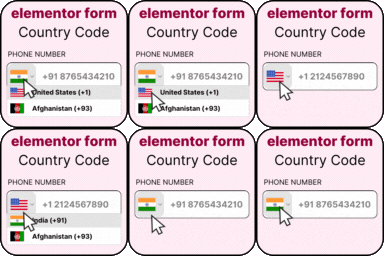
Morkiz Phone Field with Country Code for Elementor upgrades the Tel field inside Elementor Pro’s Form widget with a searchable country dropdown, flags, and E.164 formatting — then fixes the common breakages that have plagued similar plugins.
Features
- Country dropdown on any Tel field — no new widget, just extra controls inside the existing form field settings.
- Auto-localised error messages — validation strings are translatable via WPML String Translation, Polylang, Loco Translate, or a
.po/.mofile. - Cache-plugin safe flags — the selected flag is painted via an inline style pointing to an individual SVG, so WP-Rocket’s “Remove Unused CSS” and LiteSpeed’s CSS minifier can’t turn every country’s flag into the same one.
- No duplicate submissions — unlike the common reference implementation, this plugin never calls
handleSubmitorsetTimeout. It keeps the input’s E.164 value fresh and lets Elementor’s native submit handler run untouched. - Safe pre-fill — if the field is pre-populated with an E.164 value (cookie, autofill, URL param), the country dial code is not duplicated.
- Auto-detect visitor country — uses the browser’s language, no external API call.
- Preferred / Only / Exclude country lists — customize which countries appear in the dropdown.
- Multi-step form compatible — does not interfere with Elementor’s step navigation.
- Strict validation (optional) — blocks submission if the number fails
intl-tel-inputvalidation. - Server-side sanity check — digits + length bounds enforced in
elementor_pro/forms/validation/tel.
Requirements
- WordPress 6.0+
- PHP 7.4+
- Elementor + Elementor Pro (the Form widget is an Elementor Pro feature)
What makes this different
This plugin was built by studying the support threads of every existing country-code plugin in the WordPress.org directory. The concrete fixes over the status-quo:
Known issue in existing plugins
Our behaviour
Forms submit twice when country code is active
We never touch the submit pipeline
Multi-step form “Next” / “Previous” stops working
Same — native navigation preserved
Pre-filled phone number duplicates the dial code (55… 5555…)
We detect E.164 on init and use setNumber()
Flags all look the same after installing WP-Rocket / LiteSpeed
Inline SVG per country — nothing to strip
Validation error texts not translatable with WPML
Error strings registered with WPML String Translation + Polylang
Country list language can’t match site language
Locale resolved from WPML/Polylang/WP locale on the server
Preferred countries / auto-detect paywalled
Both included
Credits / Third-Party Libraries
This plugin bundles the following third-party assets:
- intl-tel-input v27.1.2 by Jack O’Connor — https://github.com/jackocnr/intl-tel-input — licensed under the MIT License. See
assets/intl-tel-input-LICENSE.txt. - Country flag SVGs — flags are not copyrightable in most jurisdictions and are distributed under the same GPLv2 licence as this plugin.
“Elementor” and “Elementor Pro” are trademarks of Elementor Ltd. This plugin is not affiliated with, endorsed by, or sponsored by Elementor Ltd.
Screenshots
No screenshots provided