Simosa Image Optimization Studio Wordpress Plugin - Rating, Reviews, Demo & Download
Plugin Description
Simosa Image Optimization Studio is a local-first WordPress plugin. Core image optimization does not require an external API; OpenRouter is optional and used only when AI ALT generation is enabled.
Core features:
- Simple Mode by default with Overview Optimize Media Health Reports.
- One-click “Fix Everything Safely” workflow with automatic before/after reporting.
- Recommended, Maximum Performance, and Maximum Quality optimization profiles.
-
Expert Mode keeps all technical media, delivery, AI, cleanup, diagnostic, and CDN controls available without cluttering the default experience.
-
Automatic WebP generation for new JPEG and PNG uploads.
- Converts the original attachment, WordPress thumbnails, and custom registered image sizes.
- Bulk optimization studio with pause and resume controls.
- Re-optimization using current quality settings.
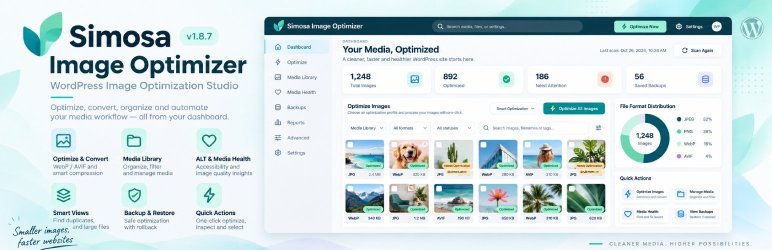
- Unified teal product dashboard with estimated transfer reduction, coverage, activity, diagnostics, and Lazy Loading Manager access.
- Dedicated Lazy Loading Manager with Native Browser, Smart Hybrid, and Intersection Observer engines.
- Interactive placeholders, trigger distance/threshold controls, reveal effects, LCP safeguards, exclusions, and WordPress/WooCommerce rules.
- Media Library optimization status and per-image actions.
- Dedicated ALT Text Manager with selectable Smart Local or OpenRouter AI Vision generation, bulk apply/edit/decorative workflows, and automatic processing for new uploads.
- Missing ALT integration in Advanced Media with status badges, a dedicated filter tab, and one-click ALT repair.
- Frontend WebP/AVIF delivery through native WordPress URL, image source, srcset, rendered HTML filters, root-relative upload URLs, and page-builder/CDN-host path recovery.
- CDN & Remote Optimization manager with Custom/Pull CDN, Cloudflare, Bunny CDN, and CloudFront purge support, connection tests, safe origin fallback, and rewrite controls.
- Optional original JPEG/PNG compression.
- Optional protected backups before destructive source compression.
- Restore generated WebP/AVIF variants and source backups.
- Native AJAX batching with nonces and capability checks.
- WP-CLI commands for large libraries.
- Optional CDN delivery and remote optimization with provider-aware cache purge controls; no third-party PHP SDK is bundled.
Recommended First-Run Settings
- WebP quality: 82
- Automatic optimization: Enabled
- Frontend WebP delivery: Enabled
- Rendered HTML rewrite: Enabled
- Original source compression: Disabled initially
- Protected backups: Enabled
- Batch size: 3 to 5 on shared hosting, 10 to 20 on dedicated hosting
WP-CLI
Optimize attachments not previously processed:
wp vyntic optimize
Re-optimize every eligible attachment:
wp vyntic optimize --all
Limit the run:
wp vyntic optimize --all --limit=100
Restore one attachment:
wp vyntic restore 123
Show statistics:
wp vyntic stats<h3>File Model</h3>
The plugin creates WebP files by replacing the source extension:
photo.jpgbecomesphoto.webpphoto-300x200.jpgbecomesphoto-300x200.webpgraphic.pngbecomesgraphic.webp
Original files are retained unless source compression is explicitly enabled.
Compatibility Notes
Vyntic rewrites standard WordPress attachment URLs, responsive srcset candidates, rendered image tags, post content, widget text content, and featured image HTML.
Vyntic rewrites standard and page-builder-rendered upload URLs, including alternate hosts when the URL path still maps to the WordPress uploads directory. Images embedded inside third-party external CSS files or opaque JavaScript payloads may still require that builder/cache layer to regenerate after optimization; Simosa clears common compatible caches automatically when a bulk run completes.
Security
- All administrative AJAX actions require a WordPress nonce.
- User capabilities are checked before optimization or restore actions.
- Settings use an admin capability and nonce.
- Backups are protected with Apache and IIS deny rules when the hosting stack honors those files.
- No images or site data are transmitted to external services.
Uninstall
By default, deleting the plugin keeps optimization data and generated files.
Enable “Remove plugin data and generated variants on uninstall” in Settings before deleting the plugin to remove:
- Generated WebP/AVIF files
- Optimization metadata
- Log table
- Plugin settings
- Backup directory
Troubleshooting
If bulk optimization stops, Simosa now reports the server response and a request ID in the dashboard. Check Simosa Image Optimization Studio > Diagnostics first. When WordPress debug logging is enabled, matching technical details are written to wp-content/debug.log.
The most common server requirements are:
- GD or Imagick compiled with WebP write support.
- A writable WordPress uploads directory.
- Enough PHP memory for the dimensions of the image being processed.