
Tracefern Image Check For C2PA Wordpress Plugin - Rating, Reviews, Demo & Download
Plugin Description
Content Credentials (C2PA) are a signed record inside an image file: who
made or edited it, with which tool, and whether generative AI was used.
Tracefern Image Check for C2PA verifies that record for every JPEG, PNG and WebP you
upload and shows the verdict where you already work with media.
- Checked right after upload, on the original file, not on the
resized copies WordPress or your browser makes. The check runs in the
background, so a file that trips it up can never break an upload. - A verdict per image in a Media Library column and in the attachment
details: who signed it, when, and against which trust list. - “AI-generated (signed)” when a manifest that verifies says the image
was made by generative AI. Never on a file that does not verify. - Sort and filter the Media Library list by verdict, including all
AI-generated images. - Check existing images again with WP-CLI:
wp tracefern check –all.
The verdicts:
- Verified: trusted signer — the credentials verify and the signer’s
certificate chains to a trusted certificate authority. - Intact: signer not trusted — the credentials verify, but the signer
is not on the trust list. The file is unchanged since signing; who
signed it is not vouched for. - Does not verify — something failed, for example the image was
changed after signing. The details list the C2PA status codes. - No Content Credentials — the file carries none. Most images today.
- Could not be checked — the file could not be read or the check did
not finish. The upload always proceeds.
What it does not do:
- It never signs anything and holds no keys.
- It never blocks an upload.
- It makes no network calls. A manifest that is only referenced by URL is
not fetched, and trust lists are never downloaded.
Verification is done by
provemark/c2pa-verifier, a
C2PA verifier written in PHP, bundled with the plugin.
Development
The source code, the tests and the build are public at
https://github.com/provemark/tracefern-image-check. composer build makes the
plugin’s zip from it: it installs the bundled verifier and prefixes its
namespace with Strauss, so it cannot collide with another copy. The
verifier itself is developed at https://github.com/provemark/c2pa-verifier.
Trust lists
By default the plugin trusts the certificate authorities on the C2PA
conformance programme’s trust lists, bundled with the plugin (see
trust/README.md for the date and source), and, optionally, the DigiCert
Trusted Root G4 for timestamps. Settings Tracefern shows the date of the
bundled copy and lets an administrator replace the lists with their own
trust settings. The plugin never downloads a list; a new copy comes with a
plugin update.
The C2PA trust lists are © the Coalition for Content Provenance and
Authenticity (C2PA), from https://github.com/c2pa-org/conformance-public,
licensed under CC BY 4.0 (https://creativecommons.org/licenses/by/4.0/).
Screenshots
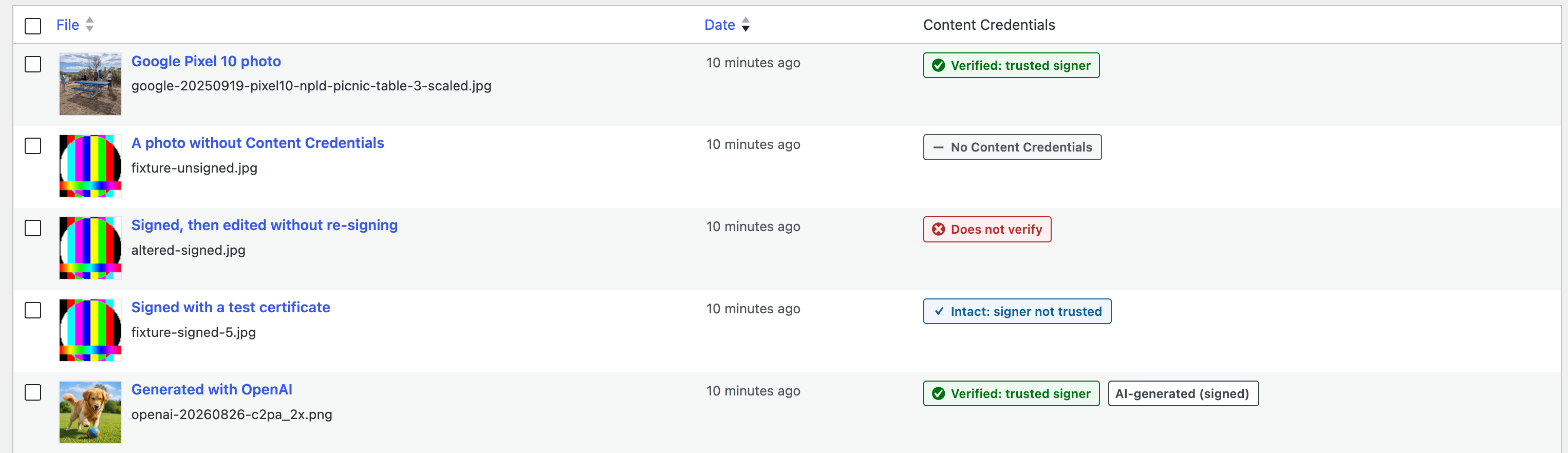
The Content Credentials column in the Media Library list.

The attachment details of a verified, AI-generated image.

Settings → Tracefern: the bundled trust list, DigiCert timestamps and custom trust settings.

The Media Library list filtered to AI-generated images, with the verdict filter above the list.


