Nanflows Sliding Cart – Side Cart & Mini Cart Wordpress Plugin - Rating, Reviews, Demo & Download

Plugin Description
Nanflows Sliding Cart (NanCart for short) is a free side cart for WooCommerce. When a shopper adds a product, a mini cart slides in from the side of the page, without a reload and without sending them to the cart page. They can change quantities, switch size or color, remove items, apply a coupon and go straight to checkout from the cart drawer.
A sliding cart keeps shoppers on the page they were browsing, so they keep shopping instead of getting lost on the cart page. NanCart gives your store that slide-out cart in a minute, with a setup wizard and a live preview built from your own products.
It is light: one small stylesheet and one small script, loaded only where the cart is shown. No jQuery UI, no icon fonts, no page builder needed, and no calls to outside services.
Side cart and mini cart
- AJAX add to cart: the cart drawer opens as soon as a product is added, on shop, category and product pages, for simple and variable products
- Change quantities, remove items and switch product variations (size, color…) inside the side cart
- Sale prices struck through, with a “Save 20%” badge
- Coupon field in the cart, open or collapsed behind a link
- Subtotal, shipping, tax and order total rows, so the amount always matches checkout
- Checkout button with the order total, plus optional “View cart” and “Continue shopping” links
- Express payment buttons (such as PayPal) in the mini cart, when your payment gateway offers them
- Empty cart message with its own title, text and button
Floating cart icon and menu cart
- Floating cart icon (cart bubble) in any corner, with the item count, your own size, shape and colors
- Seven cart icons in five styles: outline, thin, bold, solid and rounded
- Menu cart with item count and subtotal: add it from Appearance Menus, put it in the header of a block theme, or use the
[nfsc_cart_menu]shortcode - “NanCart cart button” block for block themes and the Site Editor header
- Replaces the WooCommerce Mini-Cart block and the header cart icon of popular themes, so they open the side cart instead of the cart page
- Any link to the cart page opens the sliding cart, so the cart link already in your menu or footer just works
- Open the cart from any button or link: link it to
#nfsc-cartor give it the CSS classnfsc-open(works in Elementor, Divi and other page builders) - Hide the floating cart icon and open the cart only from your own links
Design your cart drawer
- Slide in from the left or the right, with separate desktop and mobile widths
- Animation speed, corner radius, colors for every part of the cart, a font of your choice and a custom CSS box
- Live preview next to the settings, on sample products from your store, before you save
- Setup wizard: turn it on, pick a color and side, choose the cart button, done
- Mobile friendly: the side cart fills the screen width you set on phones
Works with
- WooCommerce cart and checkout blocks, and the classic cart and checkout shortcodes
- Block themes such as Twenty Twenty-Five, and classic themes such as Storefront, Astra, Kadence, OceanWP, Divi, Flatsome, Woodmart, Porto and Savoy
- HPOS (High-Performance Order Storage)
- WPML, Polylang and the common currency switchers
- Page caching plugins: NanCart clears their cache when you save its settings or update the plugin
Access
Choose which user roles, besides administrators, may manage the cart settings.
NanCart Pro
NanCart Pro is a separate premium plugin that adds cart upsells and cross-sells, a free shipping progress bar and cart rewards (discounts and free gifts), a special add-on offer, bulk discounts, a sticky add-to-cart bar, coupon creation, Google Fonts and cart analytics. NanCart works fully on its own without it.
Credits
The “Rounded” icon style is based on Feather icons by Cole Bemis, MIT License.
Screenshots

The side cart slides in as soon as a product is added, with quantities, sale prices, shipping and the checkout total.
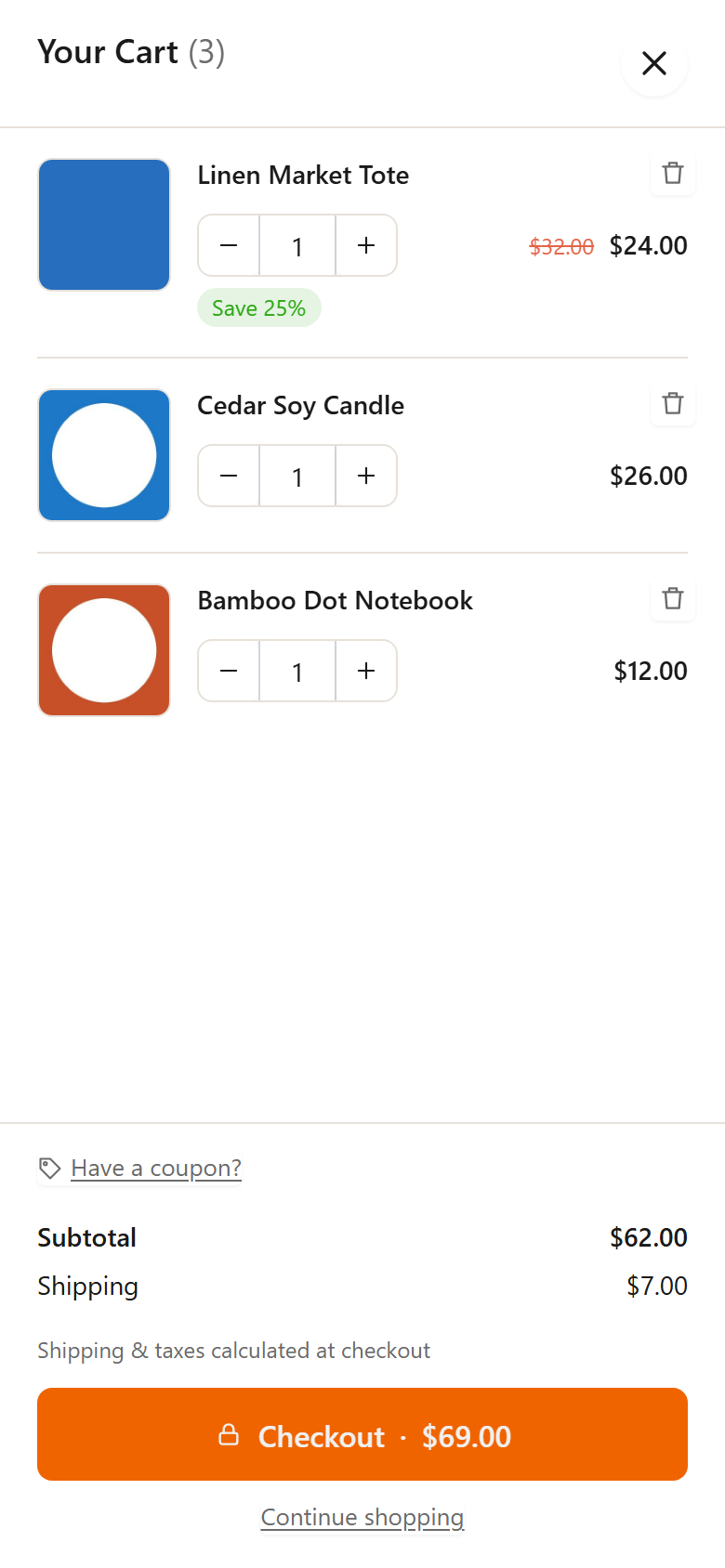
The same mini cart on a phone.

General settings, with a live preview of the cart built from your own products.

Cart content settings: heading, sale prices, savings badge, product options, coupon field and buttons.

Design settings: side, widths, animation speed, corner radius and colors.

Cart icon and menu settings: the floating cart icon and the menu cart.