Kadeworks EU Invoices With Peppol For WooCommerce Wordpress Plugin - Rating, Reviews, Demo & Download

Plugin Description
PeppolKit turns every paid WooCommerce order into a correct invoice, and sends it over Peppol when your customer is a Belgian business. Free for up to 10 invoices a month, no credit card. Sending over Peppol is free too, through your own free Peppyrus account.
Since 1 January 2026 Belgian businesses must send and receive B2B invoices as structured e-invoices over the Peppol network. A PDF is no longer enough for a Belgian business customer. PeppolKit does this for you, for shops established in the Netherlands or Belgium: you install the plugin, connect your shop and fill in your company details once. From then on every paid order gets its invoice automatically.
What you get
- PDF plus Peppol BIS Billing 3.0 UBL, validated against EN 16931 and the Peppol rules
- Optional VAT number field at checkout (classic and block checkout), checked live with the EU VIES service, reverse charge where required
- Credit notes automatically when you refund an order
- Invoices to business customers sent over the Peppol network when they have a Peppol ID (mandatory for Belgian B2B since 2026)
- Invoices in Dutch, French or English, in six designs, with your logo and brand colour; gapless numbering
- VAT done right for EU sales: reverse charge for EU businesses, OSS or the €10,000 threshold for EU consumers, export rules outside the EU
- Invoice download in the order screen, on the thank-you page, in the order e-mails and in the customer’s account
- Overview screen: setup checklist, usage this month, the latest invoices with Peppol and e-mail status
- Resend the invoice e-mail or (re)send over Peppol straight from the order
- One click to the PeppolKit dashboard: all invoices, monthly export for your accountant, sample invoice, logo and brand colour
- Orders that wait for an invoice (plan limit, missing company details) are kept and created later with one click
- Create invoices for paid orders of the last 60 days
What you need
PeppolKit is a service: the plugin sends paid orders to PeppolKit, which creates, checks, stores and delivers the invoices. Connecting your shop creates a free PeppolKit account from within WordPress, no separate sign-up.
- Free plan: 10 invoices a month, with VAT rules, credit notes, PDF and UBL file. Peppol sending runs through your own free Peppyrus account (a Belgian Peppol access point), which you connect in the PeppolKit dashboard. Peppyrus decides its own terms, so check them before you rely on them.
- Paid plans start at €9 a month and include Peppol sends through PeppolKit itself. They are billed by PeppolKit, not through WordPress.
PeppolKit only sends Peppol invoices. It does not receive them; for incoming invoices keep using your bookkeeping package or access point.
About the name
Kadeworks EU Invoices is made by Kadeworks, a Dutch software company (KvK 42214201). It connects your shop to PeppolKit, the invoicing service of Kadeworks, which also serves Shopify and PrestaShop shops. Peppol is the name of the open European e-invoicing network and standard, governed by OpenPeppol AISBL. The plugin sends invoices over that network through certified access points; it is not affiliated with, endorsed by or certified by OpenPeppol.
External service
This plugin sends order data (customer name, address, e-mail, VAT number, order lines and amounts) to the PeppolKit service at https://app.peppolkit.com to create, store and deliver invoices. Privacy policy: https://peppolkit.com/privacy · Terms: https://peppolkit.com/voorwaarden
Screenshots

Overview: setup checklist, usage this month and the latest invoices and credit notes with their Peppol and e-mail status.

The PeppolKit box in the order screen: invoice, credit note, e-mail and Peppol status, with links to the PDF and the UBL file.

The optional VAT number field at checkout (block checkout shown). Valid EU VAT numbers are checked live with VIES.

Invoices in your own style: six designs, your logo and brand colour, in Dutch, French or English (three of the designs shown).

Customers download their invoice on the thank-you page, in their order e-mails and in their account.

Settings: company details, VAT setup and sending options.

Peppol on the free plan: connect your own free Peppyrus account from the PeppolKit settings.
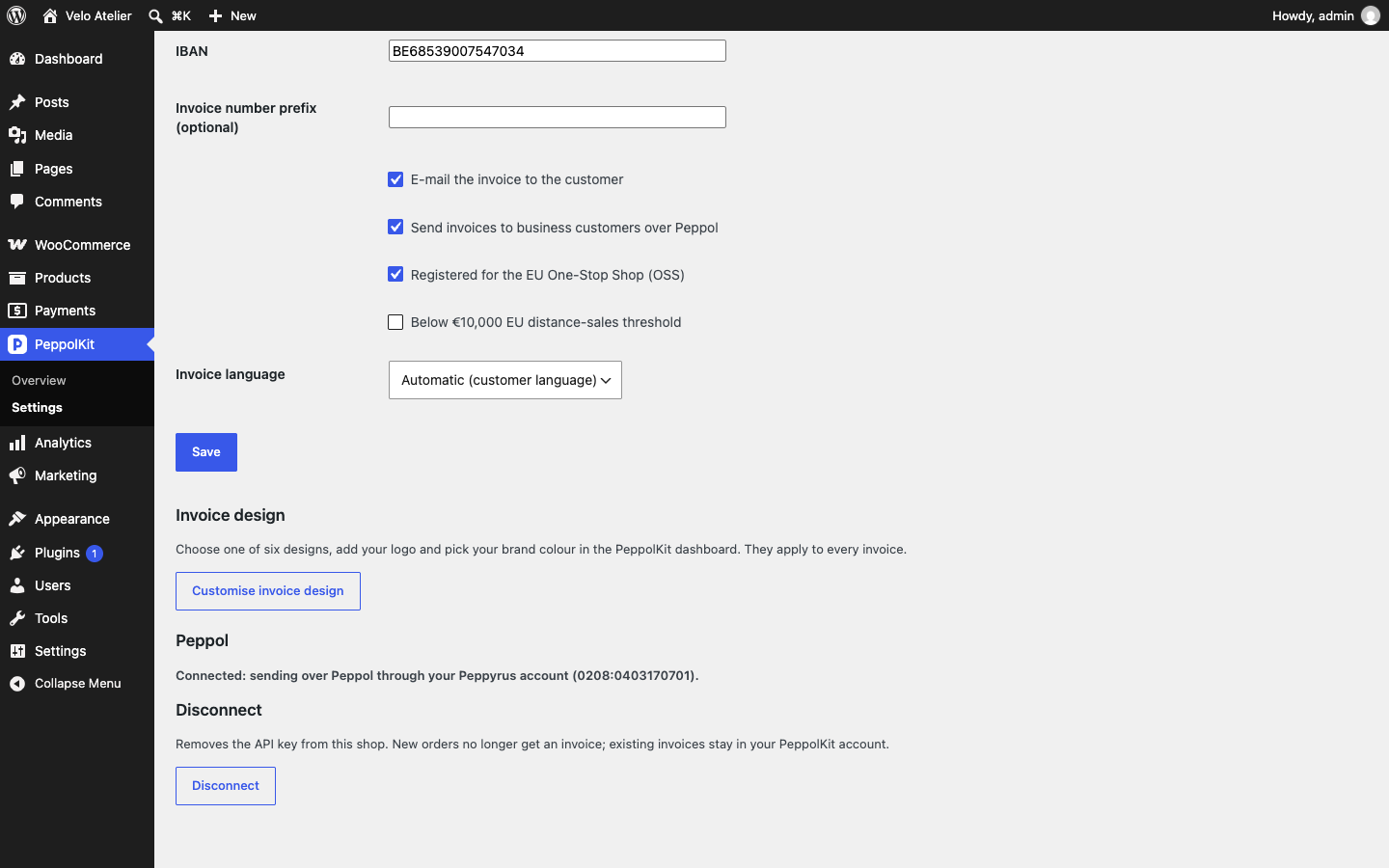
Connected: invoices to business customers go over Peppol through your own Peppyrus account.