
PixelDial Image Optimizer Wordpress Plugin - Rating, Reviews, Demo & Download

Plugin Description
PixelDial helps you make images on your WordPress website smaller. You see a real preview before you approve a change, so you can compare the result and choose the settings that suit each image.
No subscription, API key or external image-processing service is required. Images are processed locally on your WordPress server.
Three ways to work
- One image: select a picture, compare Original and Proposal, adjust the quality or format, and approve only when you are satisfied.
- Multiple images: prepare and review proposals for several selected images.
- Optimize all: choose a profile, try a four-image sample, and start a managed batch when you are ready. Progress can be paused and resumed.
What PixelDial does
- Shows actual encoded previews and measured before/after file sizes.
- Offers JPEG, PNG, WebP and AVIF processing when your server supports the format.
- Lets you change quality, set a maximum width and include existing WordPress image sizes and crops.
- Provides conservative, optional quality recommendations and keeps images when a proposal is not suitable.
- Keeps the original image files and WordPress attachment metadata. You can restore an image or temporarily display originals across the site.
- Preserves protected EXIF, ICC and XMP data when supported. If it cannot verify preservation, it keeps the original file instead of approving a lossy-metadata conversion.
- Recognizes verified Polylang media translations that share one physical image, while protecting ambiguous duplicates.
- Maintains saved profiles, batch progress and approximate savings statistics.
PixelDial does not promise a fixed percentage of savings or identical visual quality. Check each preview before approving it. The savings estimate compares current approved files with original file sizes. It is not a measurement of server disk space or page traffic.
Scope and compatibility
PixelDial works with supported local still images in the WordPress Media Library. Existing WordPress image sizes are reviewed individually. GIF animations, SVG, HEIC, external images and media managed entirely by third-party scripts are not optimized. Support for WebP and AVIF depends on your hosting server.
Approved files are served in supported WordPress page markup. Images in external CSS, remote services, or custom JavaScript integrations may need additional integration. Private-media plugins require their own integration to avoid exposing protected images. Full-template HTML enhancement requires WordPress 6.9 or newer.
For a step-by-step guide, see the included docs/GUIDE-EN.md or visit https://pixeldial.mbim.ca/. The plugin does not contact the project website automatically.
Screenshots
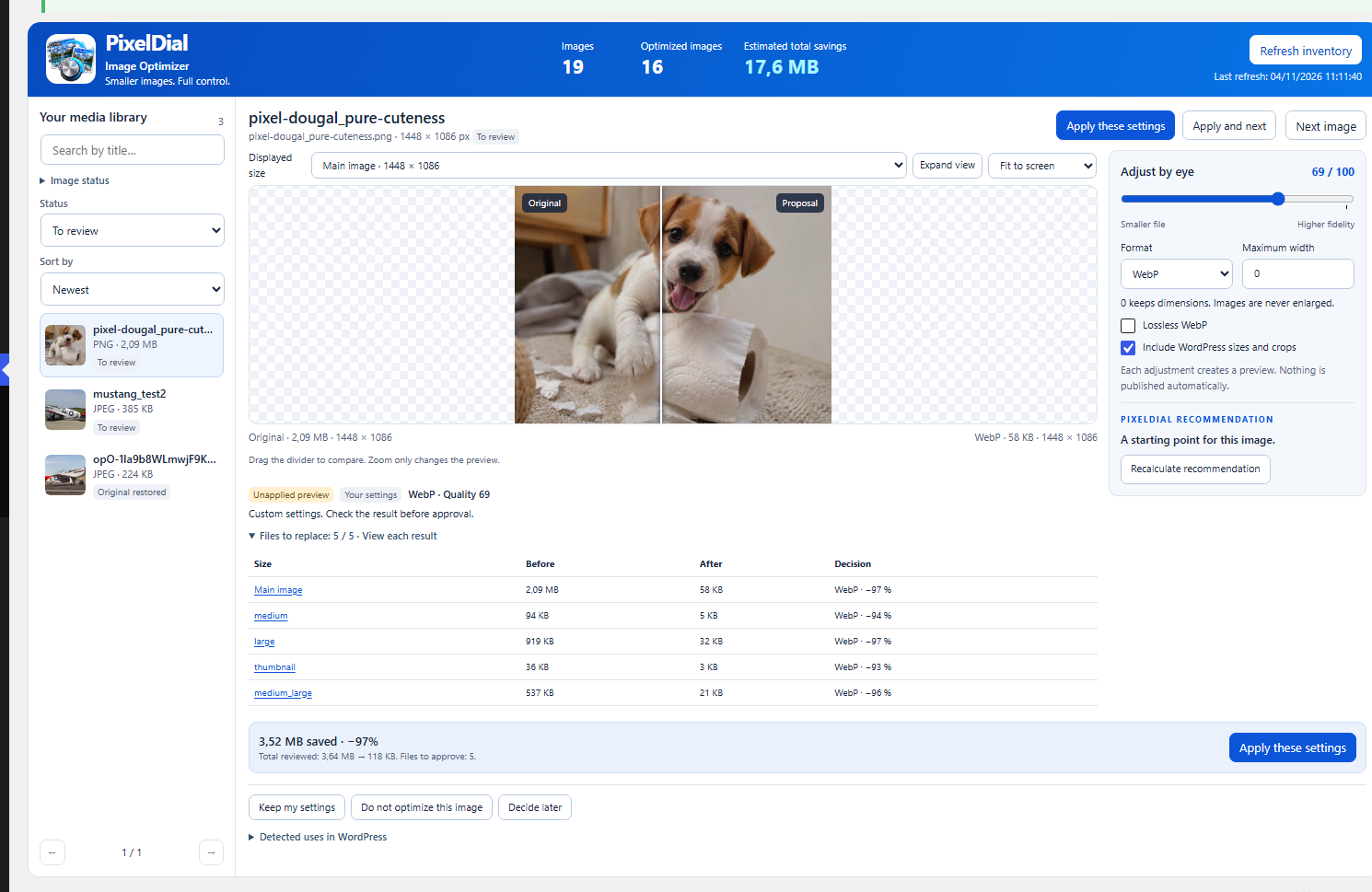
One image: compare the original with a real WebP preview, fine-tune the quality and check estimated file-size savings before applying changes.

Multiple images: compare several pictures and adjust formats and quality settings for each image.

Optimize all: choose a profile, review the completed batch and see the available undo option.


