
CB Performance Optimizer Wordpress Plugin - Rating, Reviews, Demo & Download
Plugin Description
CB Performance Optimizer makes WordPress and WooCommerce sites faster by removing what they load but never use, and by cutting the background work that keeps your server busy. It does this without page caching, minification or rewriting your HTML, so it runs safely next to the cache plugin, host cache or CDN you already have.
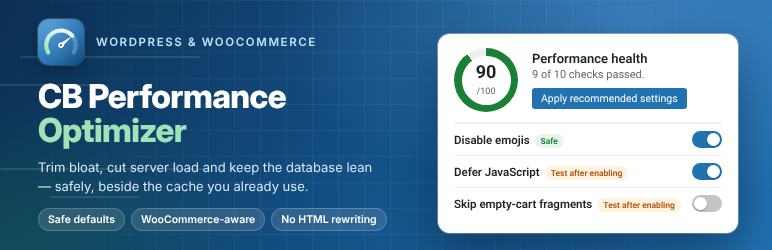
Open Settings Performance, click Apply recommended settings, and you are done. Every option after that is a simple on/off switch with a plain-English explanation. Options that could affect how a site looks or works ship turned off and carry a “Test after enabling” label.
Who it is for
- Site owners who want a faster site without learning what “render-blocking” means.
- WooCommerce stores that load shop scripts on every blog post and run an uncached cart request on every page view.
- Shared-hosting users whose host warns about CPU usage, often caused by the Heartbeat API and a bloated database.
- Developers and agencies who want a small, predictable plugin that uses WordPress core APIs and offers filters for everything.
How it differs from other speed plugins
- No output buffering or HTML rewriting. Many optimizers capture the whole page and rewrite
<script>tags with regular expressions. This plugin defers JavaScript through the WordPress core Script Loading Strategy API (6.3+). WordPress then keeps a script blocking whenever a dependency or inline code needs it, so the usual “defer broke my site” problems are far rarer. - Built to sit beside your cache, not replace it. There is no page cache, minification or file combining, so it does not conflict with LiteSpeed Cache, WP Rocket, W3 Total Cache, Cloudflare or host-level caching.
- WooCommerce-aware asset loading. WooCommerce CSS/JS is kept on shop pages and on any page that contains Woo shortcodes or blocks. It is removed everywhere else. The cart-fragments request is skipped only while the cart is empty.
- Zero cost when off. Each feature registers its hooks only when it is enabled. The plugin makes no external requests and adds no front-end files of its own.
- Finds hidden slowdowns. The autoloaded-options audit shows which options are loaded on every request and lets you switch autoload off for the large ones, with a one-click restore.
- Safety labels on every option. Each option shows whether it is safe everywhere or needs testing. Database clean-up deletes posts and comments in batches through core functions, so related meta and hooks are handled correctly.
Dashboard
- Performance health score with 10 checks: bloat, Heartbeat, revisions, scheduled clean-up, autoload size, database clutter, object cache, PHP version, OPcache and debug mode.
- Each failed check links straight to the setting that fixes it.
- One-click “Apply recommended settings” (safe options only; your other settings are kept).
Clean-up
- Disable the emoji script and styles.
- Disable wp-embed and oEmbed discovery (YouTube, Vimeo and other embeds keep working).
- Remove RSD, WLW manifest, generator, shortlink and adjacent-post tags.
- Remove the REST API discovery link and header (the REST API itself keeps working).
- Disable self-pingbacks.
- Disable XML-RPC.
- Disable RSS feeds (redirect to the home page).
Scripts & styles
- Remove jQuery Migrate (front end only).
- Remove Dashicons for logged-out visitors.
- Remove block-library CSS on pages without blocks (classic themes).
- Defer JavaScript using the core loading-strategy API, with an exclusion list.
Preloading & hints
- Instant page loads: tune core speculative loading (WordPress 6.8+) to prefetch or prerender the next page when a visitor hovers a link.
- Preload critical fonts, hero images and CSS through the core preload API.
- Preconnect and DNS-prefetch hints for third-party origins.
Server load
- Heartbeat control: slow down, disable on the front end, or run only in the post editor.
- Limit post revisions.
- Scheduled daily or weekly database clean-up via WP-Cron.
WooCommerce
- Skip the cart-fragments AJAX request while the cart is empty.
- Load WooCommerce CSS/JS only on shop, product, cart, checkout and account pages, and on pages with WooCommerce shortcodes or blocks.
Database
- Clean revisions, auto-drafts, trashed posts, spam and trashed comments, pingbacks/trackbacks, expired transients, orphaned post and comment meta, the oEmbed cache and expired WooCommerce sessions.
- Optimize tables.
- Autoloaded-options audit: total size, the 15 largest options, turn autoload off and restore it.
Privacy
CB Performance Optimizer does not collect, store or send any personal data. It makes no requests to external services, sets no cookies and adds no tracking. All settings are stored in your own database and are removed when you delete the plugin.
Screenshots

Dashboard: performance health score, key numbers and one-click recommended settings.

Dashboard checks, each with a link to the setting that fixes it.

Optimizations tab: on/off switches with “Safe” and “Test after enabling” labels.

Preloading & hints: instant page loads, preloading and connection hints.

Database tab: clean-up items with counts and one-click buttons.

Autoloaded options audit with size meter and per-option controls.


