
Flex Catalog Mode – WooCommerce B2B Catalog, Hide Prices & Quote Requests Wordpress Plugin - Rating, Reviews, Demo & Download

Plugin Description
STOP LOSING B2B, WHOLESALE AND HIGH-VALUE ORDERS TO A “BUY NOW” BUTTON
Some products should not have a fixed price on the page. Bulk orders, trade customers, made-to-order work, licensing and anything with a price you would rather discuss are all sales that WooCommerce’s Add to cart button handles badly. Visitors see a price that does not fit, leave, and never tell you why.
Flex Catalog Mode turns those visitors into quote requests you can win. Hide prices exactly where you want, replace Add to cart with Add to quote, Ask about this product, email, WhatsApp or a call button, then send a branded PDF quote that the customer accepts and pays online in one click. No spreadsheets, no back-and-forth email threads, no manual orders.
▶ TRY THE LIVE DEMO | READ THE DOCUMENTATION
WHY STORE NEEDS IT
Many WooCommerce stores cannot show a fixed price or a Buy button: wholesale and B2B shops, manufacturers, custom work, showrooms and stores with bulk pricing. They usually combine a “hide price” plugin, a separate quote plugin and a contact form, and prices still leak through the Store API, REST or Google structured data. Flex Catalog Mode replaces all three with one plugin and blocks prices on the server.
- Rules, not one big on/off switch. Hide prices for guests but not trade customers. Quote-only for one category, normal checkout for the rest. Price on request in one country, buy now everywhere else.
- A complete quote workflow, not just a form. Basket, inbox, quote editor, PDF, reminders, online acceptance, payment and the WooCommerce order are all built in.
- Prices are really hidden. Not CSS tricks. Hidden prices are removed from the page source, the Store API, REST, block data, structured data and feeds, and a built-in self-check proves it.
- You know what is working. Insights shows your win rate, response time, pipeline, top products and why quotes are lost.
- Set up in five minutes. Pick a ready-made setup in the wizard and the rules are created for you.
PERFECT FOR
One store can mix behaviours. Each rule targets products, categories, customer groups, countries and schedules, so one category can be quote-only while another sells normally.
- Wholesale and B2B stores: guests see “Log in to see the price”, approved trade customers request quotes.
- Manufacturers and custom work: printing, signage, furniture, uniforms, anything priced per job.
- Showrooms and catalogues: show every product, take enquiries, no checkout at all.
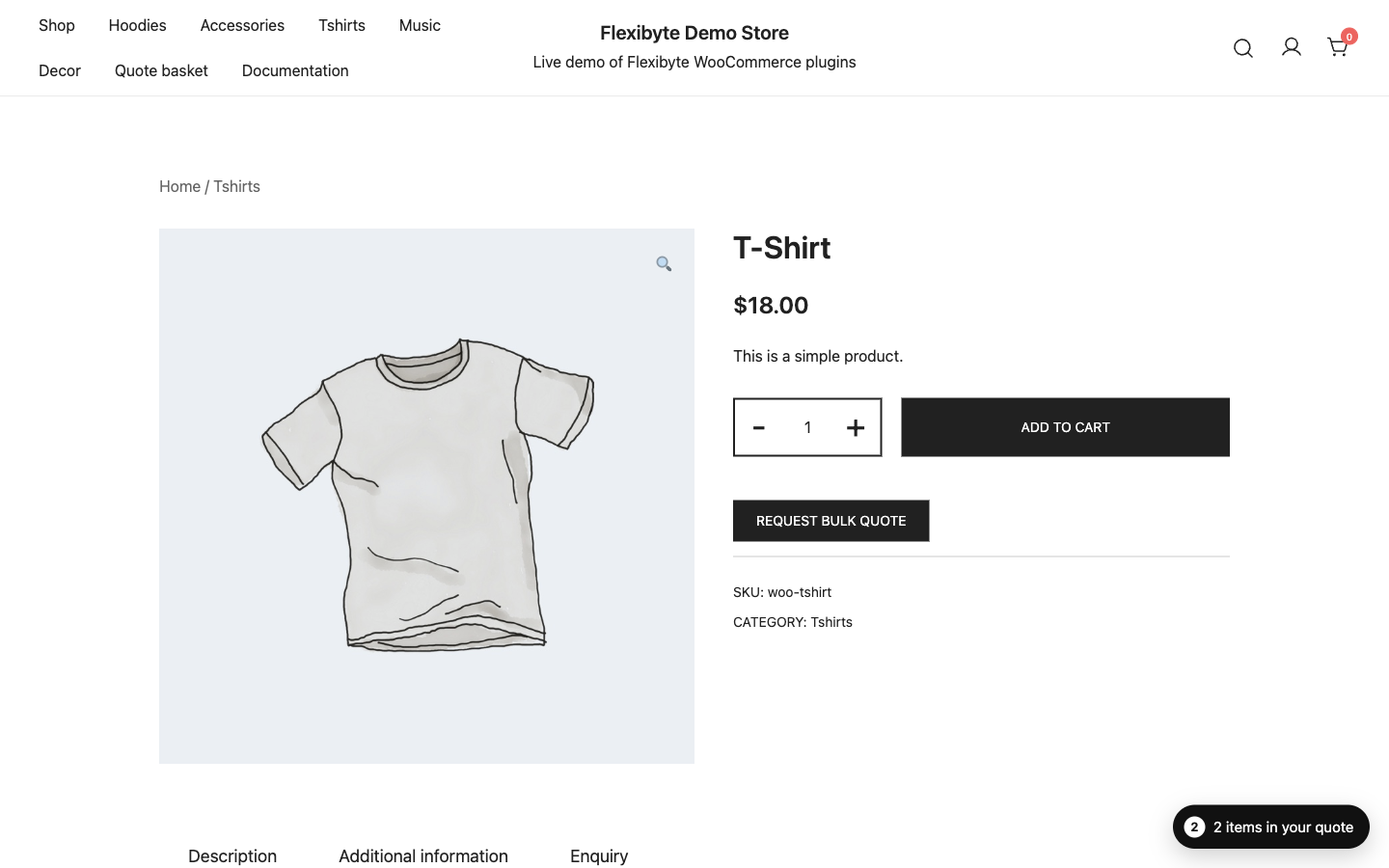
- Mixed stores: sell small items normally and quote bulk orders. Customers choose Add to cart or Request bulk quote on the same product.
- Licensing and services: send customers straight to email or WhatsApp with the product name already filled in.
- Holidays and out-of-stock items: pause orders on a schedule, or quote what you cannot ship today instead of losing the sale.
SEE IT IN ACTION
1. Different buttons for different products
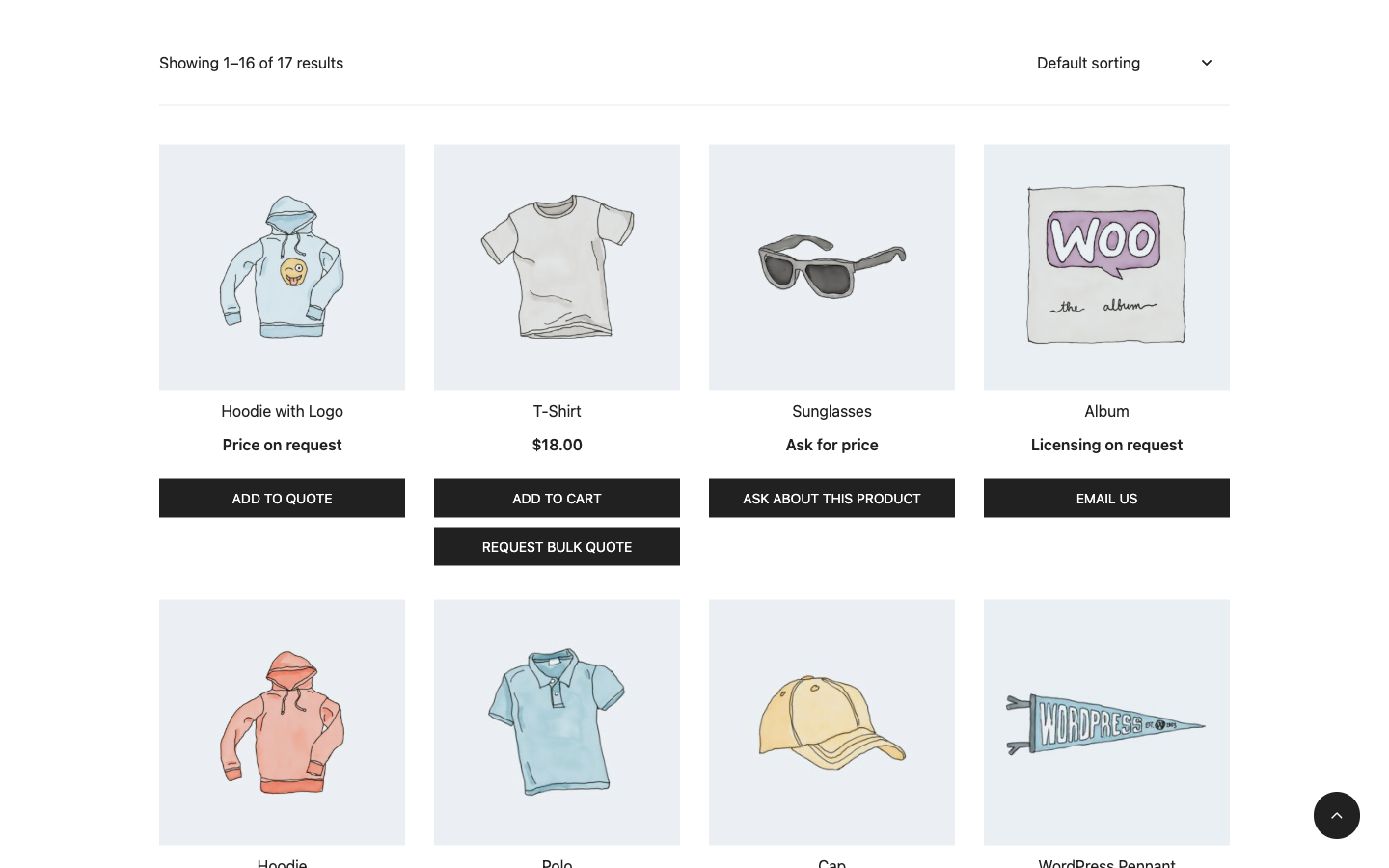
Each rule decides the price text and the button. In the demo, hoodies are quote-only, accessories open an enquiry, T-shirts can be bought or quoted in bulk, music goes to email, and decor is a normal store.
2. Variable products just work
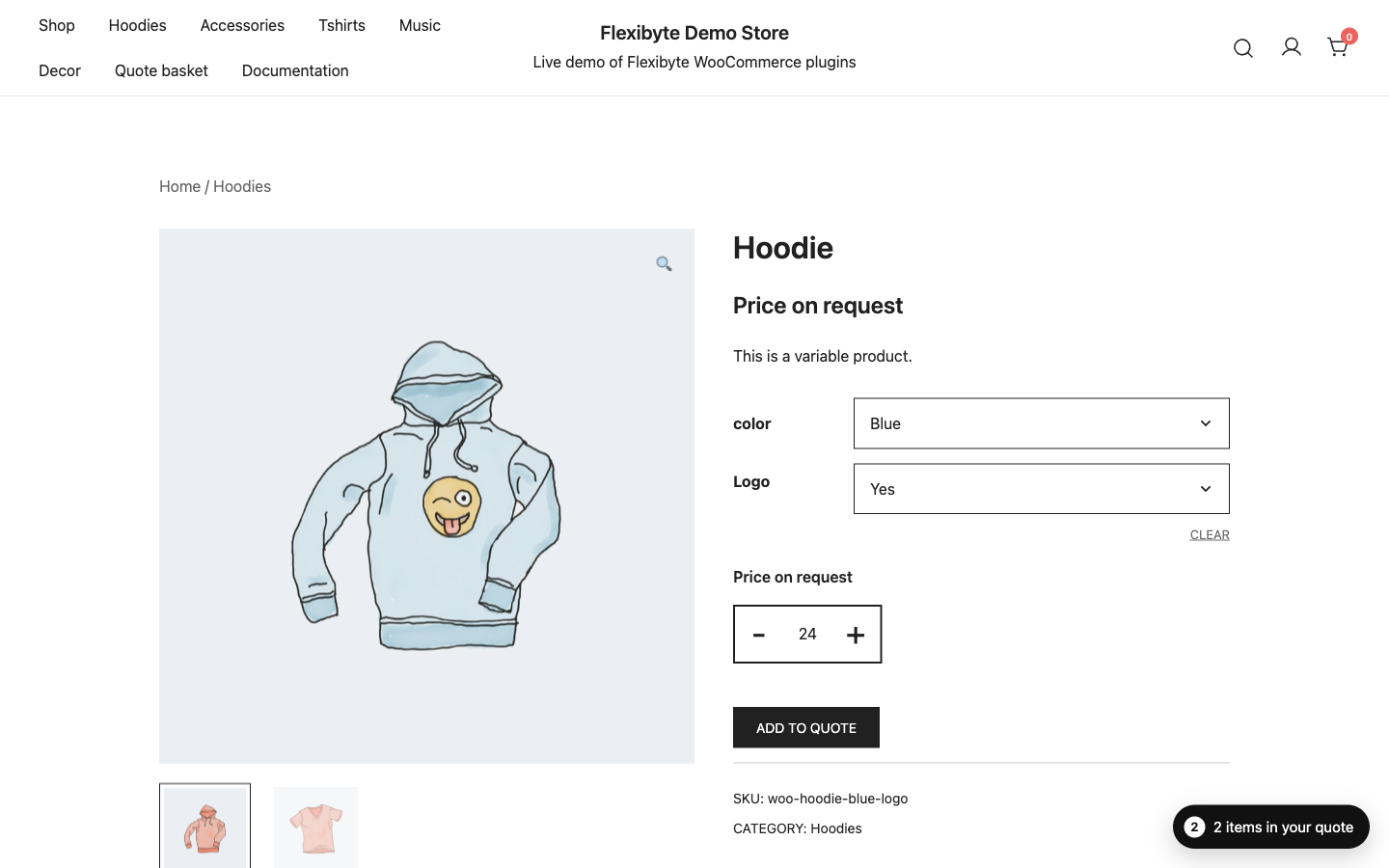
Customers choose size, colour and options, then add that exact variation to their quote. You can even make one variation quote-only and sell the others normally.
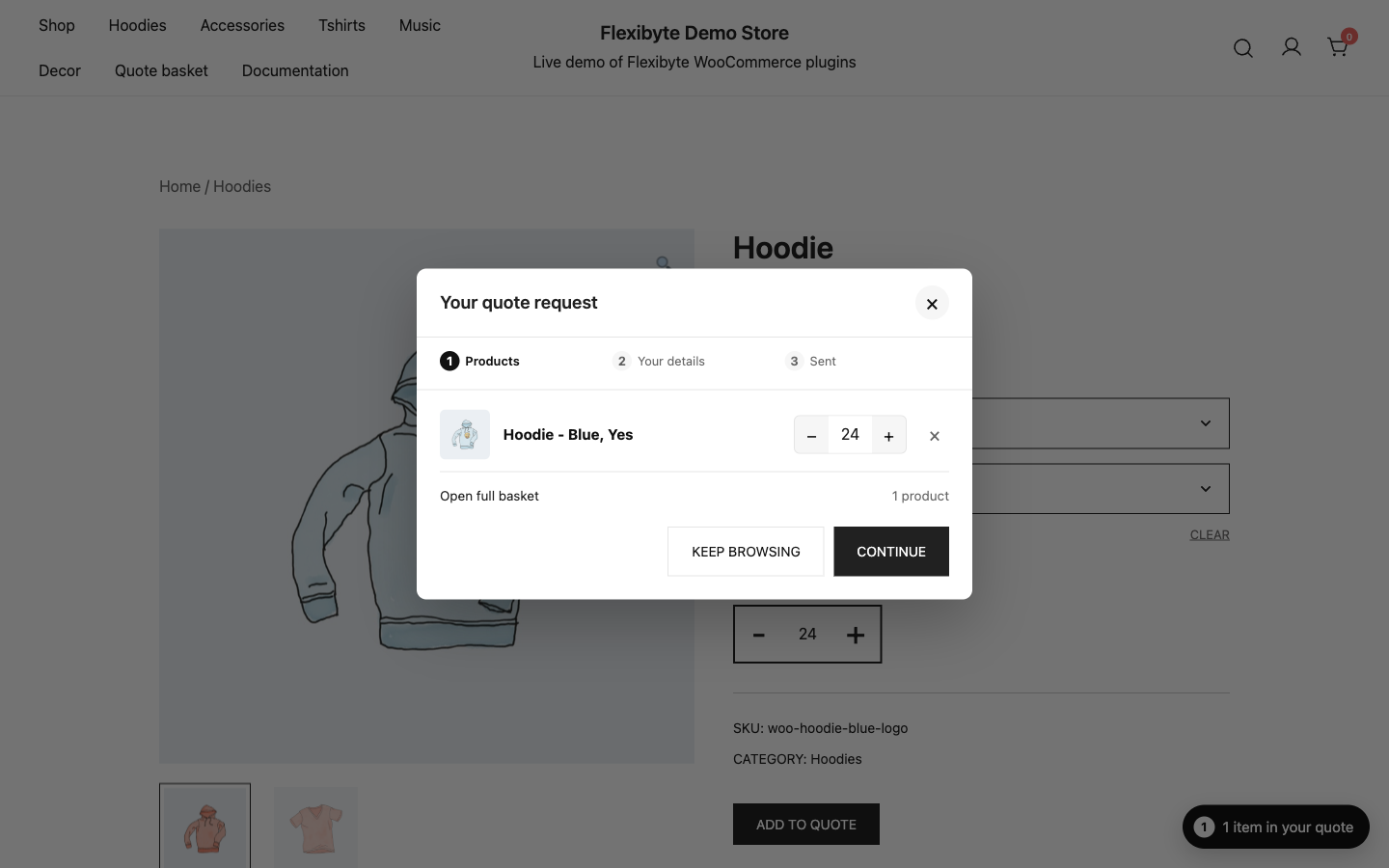
3. A quote basket customers actually finish
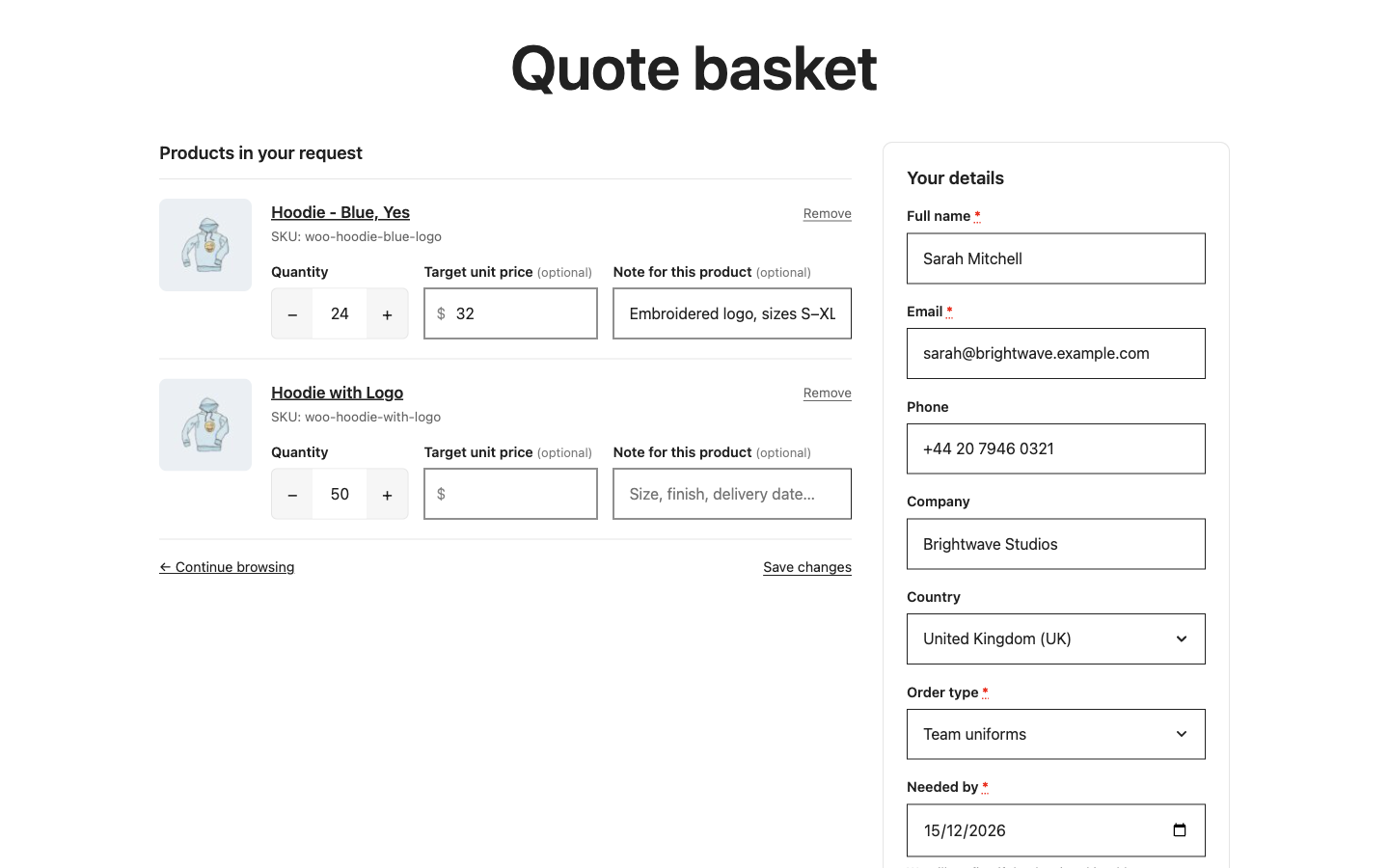
Quantities, a target price per product, notes, and your own fields such as order type, delivery date, logo placement or file uploads. Or let them send it from a popup without leaving the page.
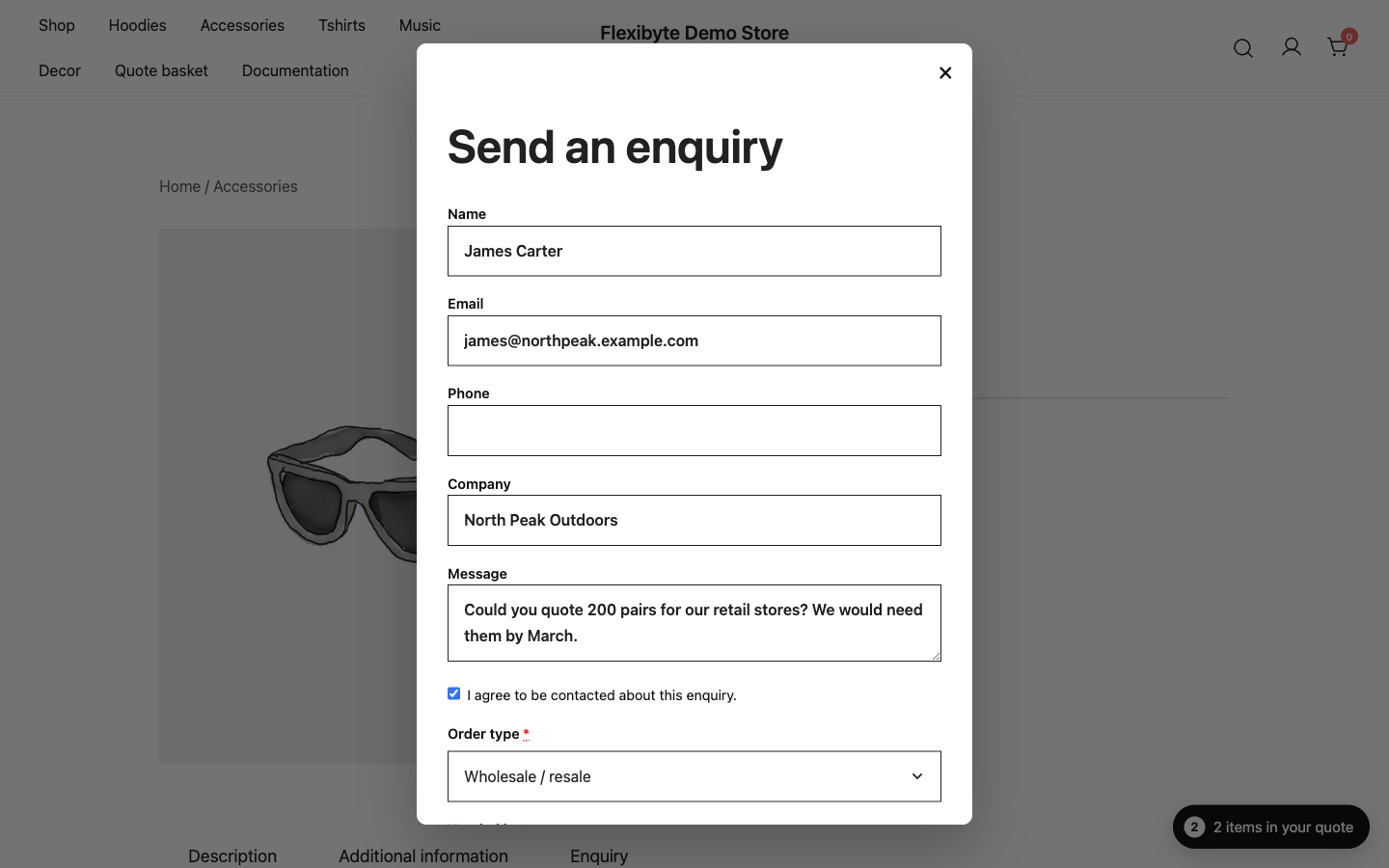
4. Quick product enquiries
A clean popup form on the product page, with your own fields. Prefer your existing form? Use Contact Form 7, Gravity Forms, WPForms, Ninja Forms or Formidable Forms, and every submission still lands in your quote inbox.
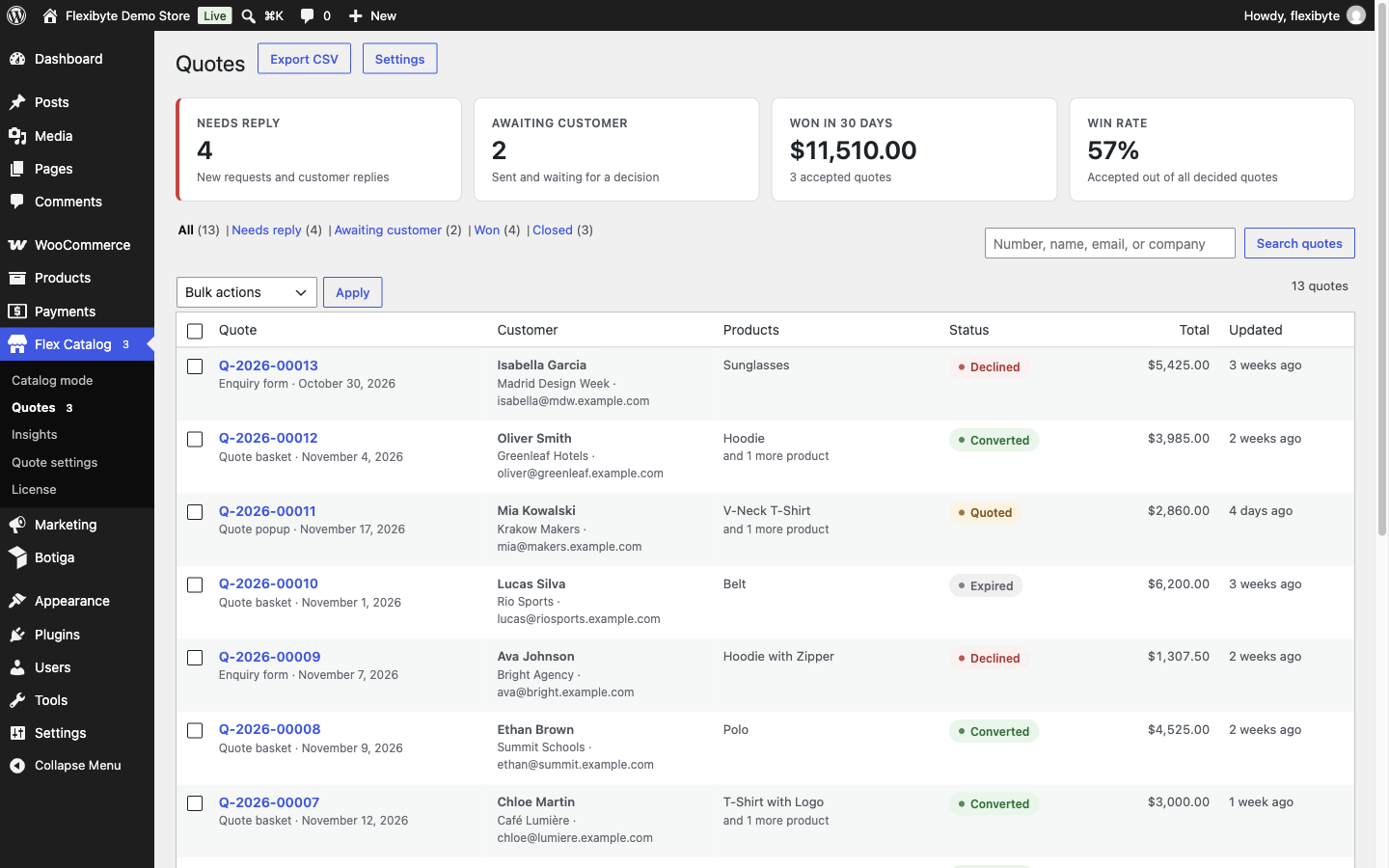
5. One inbox for every request
See what needs a reply, what is waiting on the customer, what you won this month, and your win rate, at a glance. Search, filter, bulk actions and CSV export included.
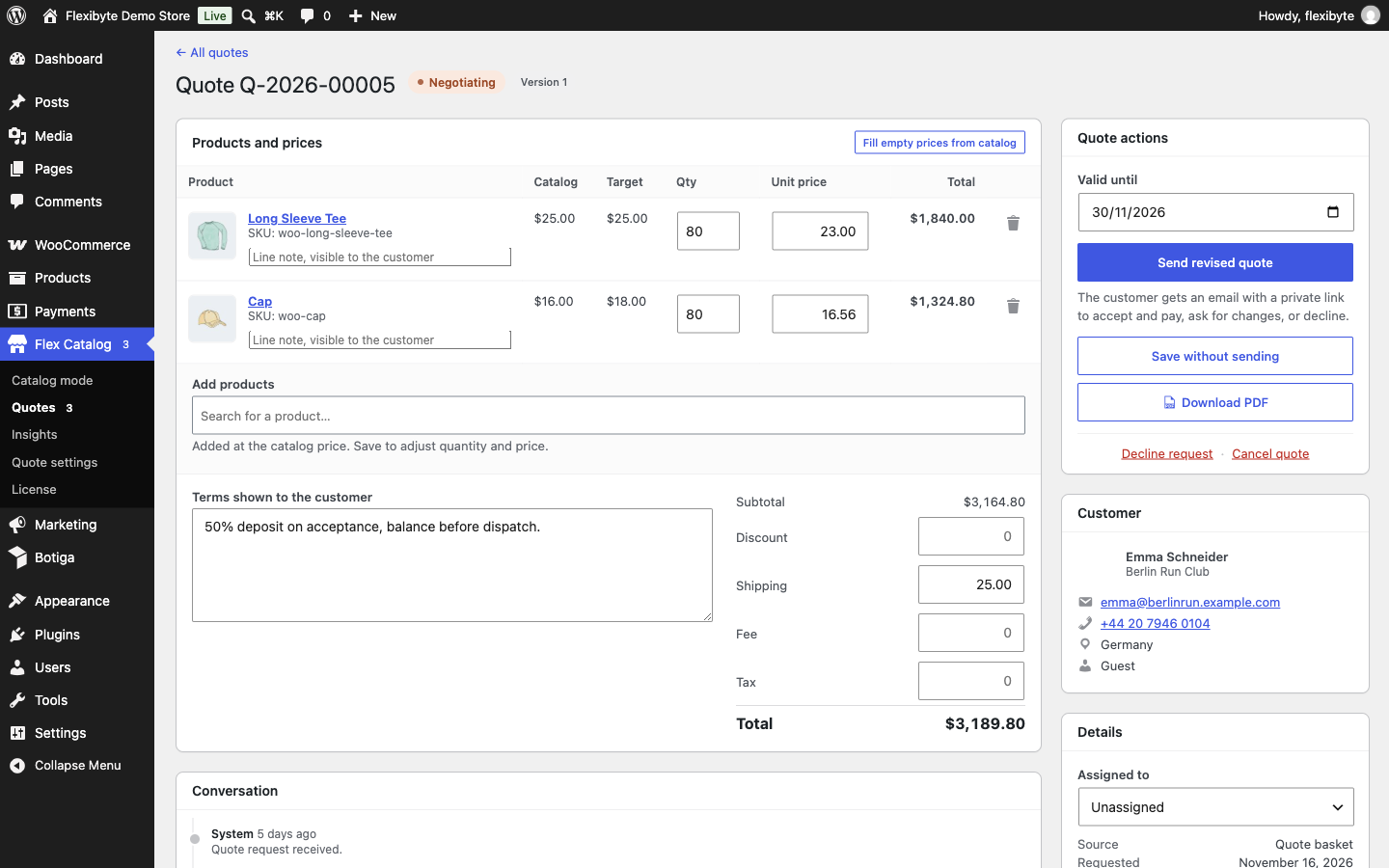
6. Price a quote in under a minute
Fill prices from your catalog, adjust quantities and unit prices, add discount, shipping, fees and tax, set the validity date and terms, then send. The customer’s target price sits beside each line, and an optional margin guard warns you before you go below your minimum.
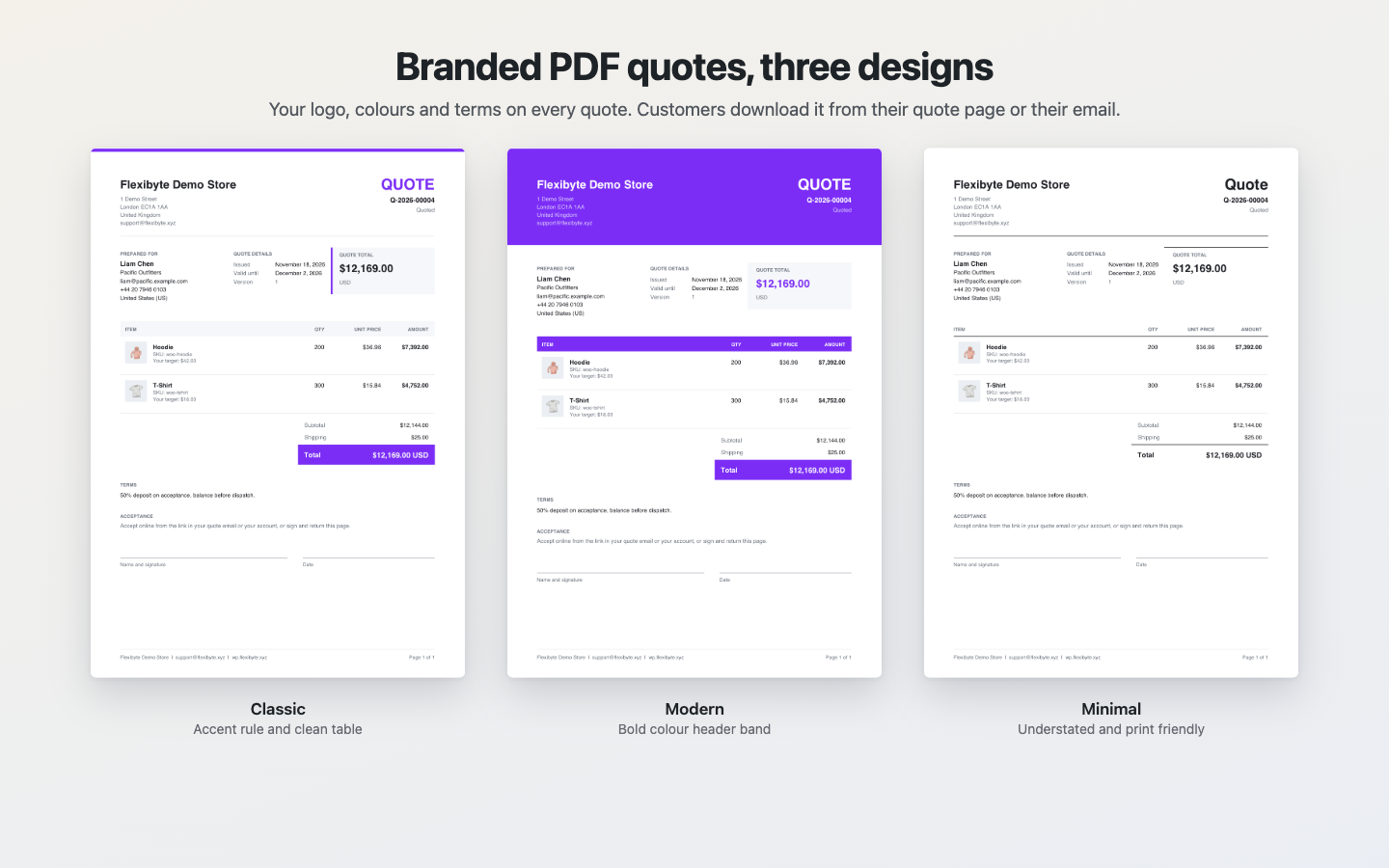
7. Branded PDF quotes
Three professional designs with your logo, colour, terms and footer. Attached to the quote email automatically and downloadable from the customer’s quote page.
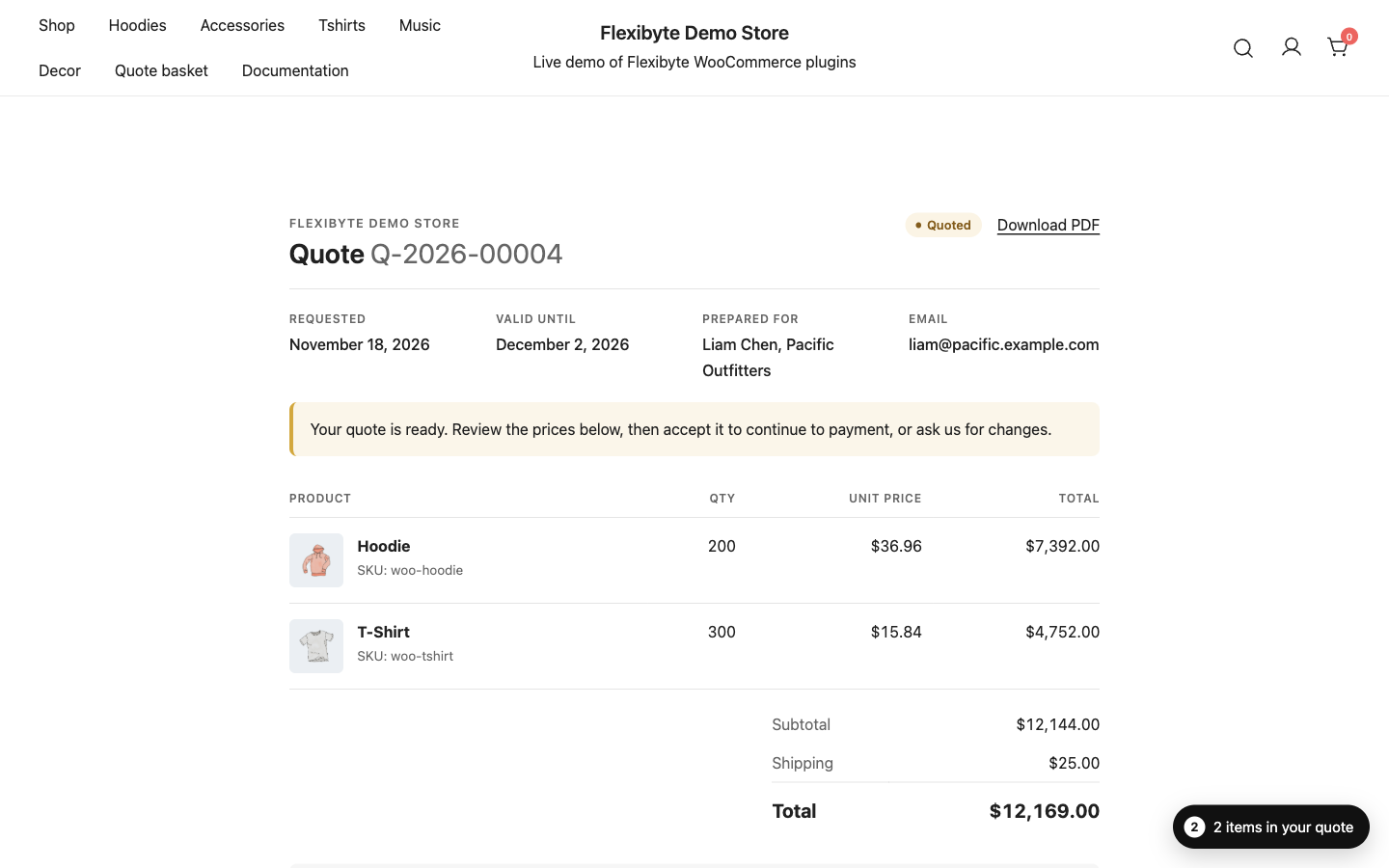
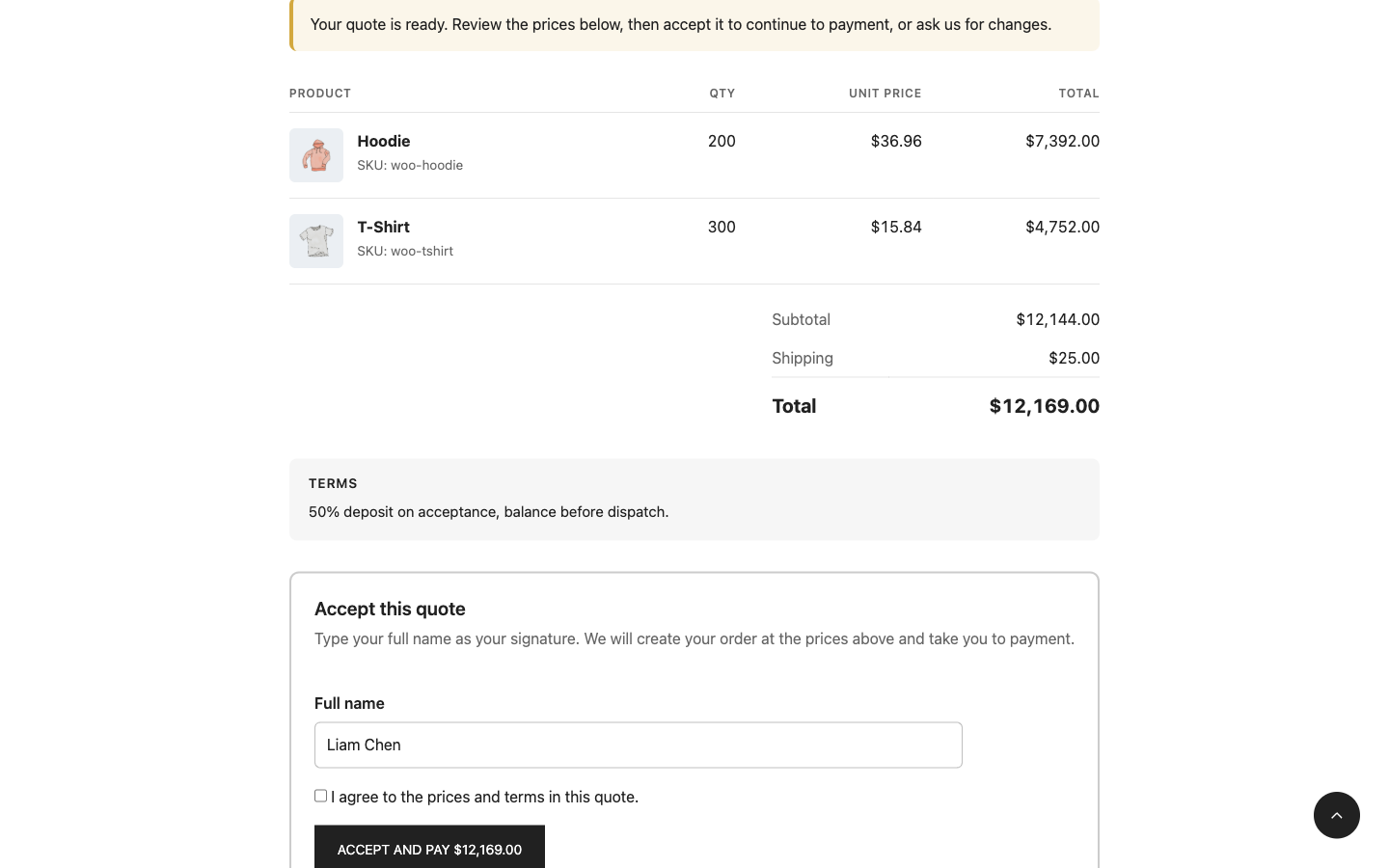
8. Customers accept and pay online
Every quote has a private page. The customer reviews it, types their name as a signature and goes straight to payment. A WooCommerce order is created at the quoted prices, with an optional deposit. They can also request changes or decline with a reason.
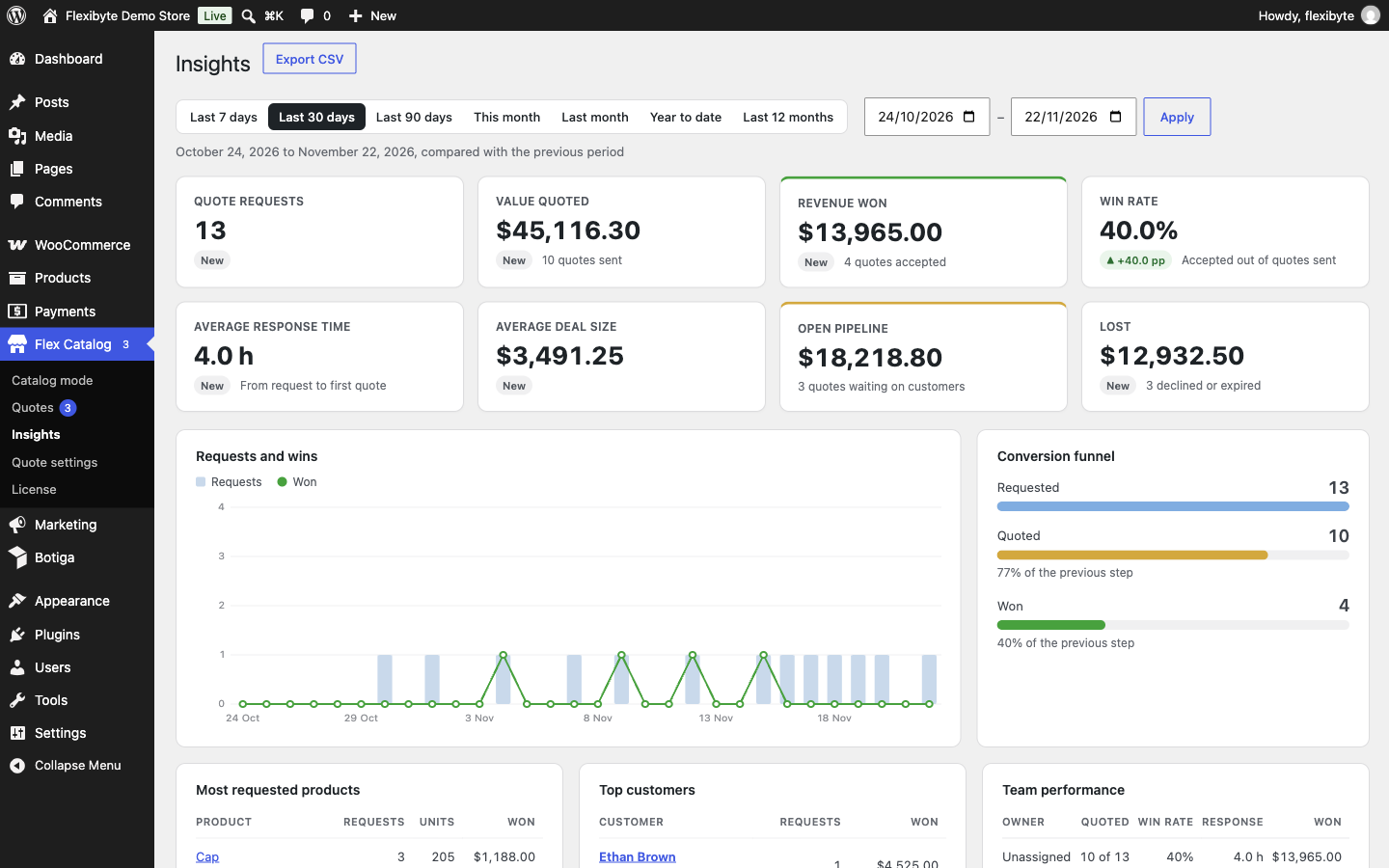
9. Insights that help you win more
Quote requests, value quoted, revenue won, win rate, average response time, deal size, open pipeline, lost reasons, top products, top customers and team performance, compared with the previous period.
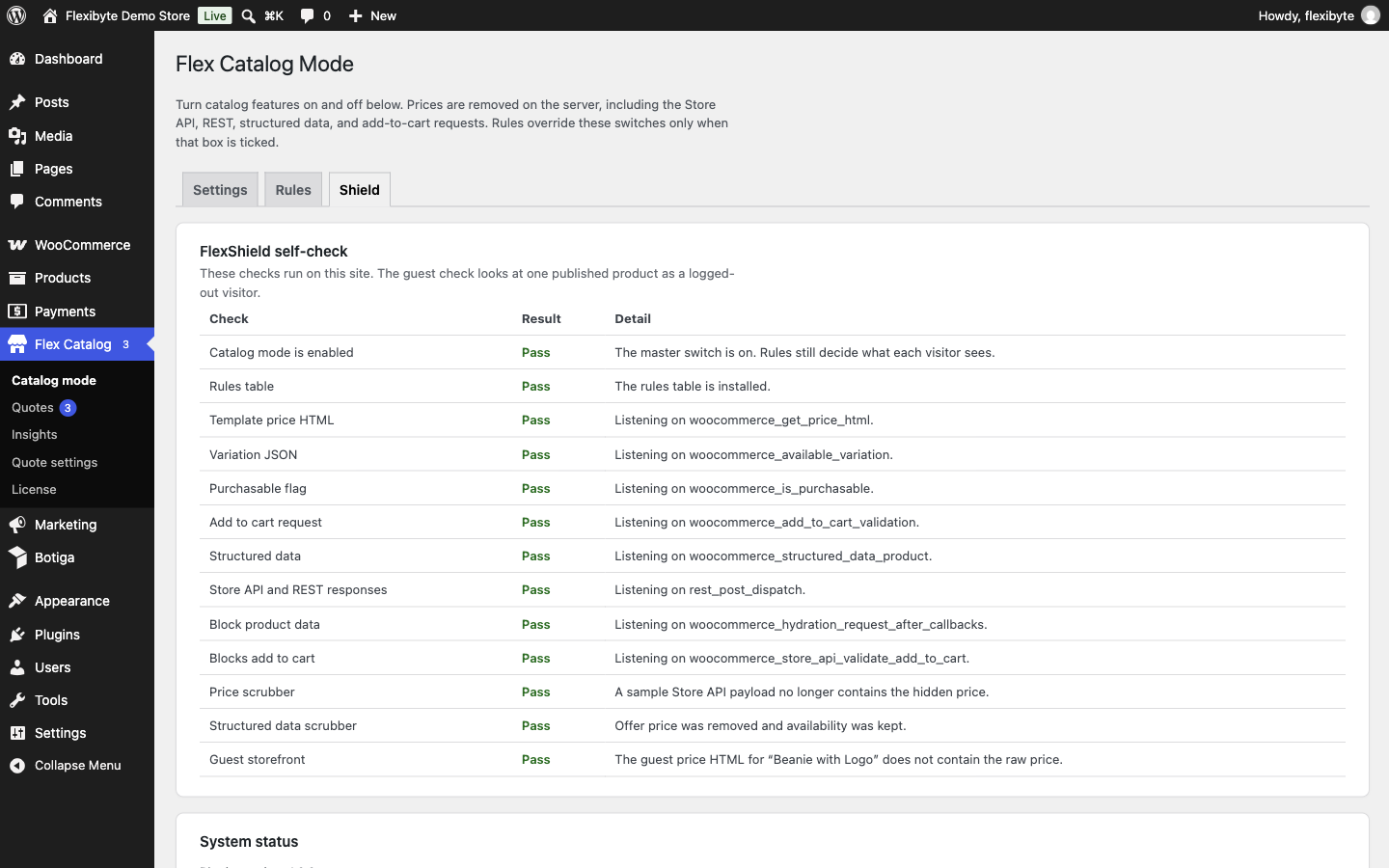
10. Proof that your prices are hidden
Many catalog plugins hide the price with CSS, so it is still in the page source and in WooCommerce’s APIs. Flex Catalog Mode removes it on the server, and the Shield self-check tests every route with one click.
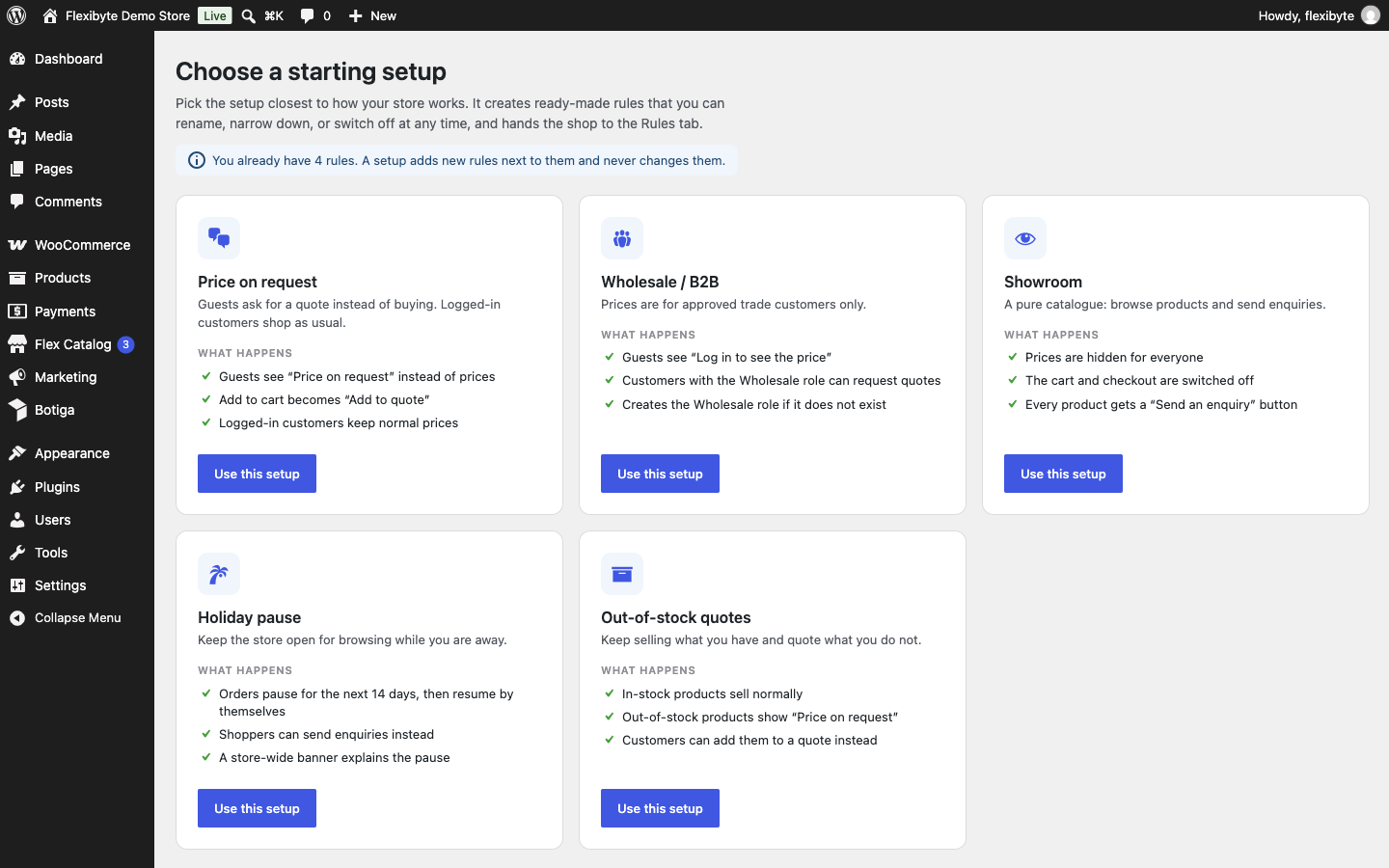
11. Ready-made setups
Price on request, Wholesale / B2B, Showroom, Holiday pause and Out-of-stock quotes. One click creates the rules, and you can edit them afterwards.
FULL FEATURE LIST
Catalog mode and rules
- Hide prices and purchasing store-wide, or with rules and priorities
- Who: everyone, guests, logged-in customers, user roles, specific customers, email domain, customer meta, has or has never bought
- What: products, variations, categories (with children), tags, brands, product type, stock status, price range, on sale, no price, attributes
- Where: country, currency, language (WPML or Polylang), and which page (shop, product, search)
- When: date ranges (repeating yearly), daily time windows, weekdays
- Replace the price with nothing, your own text or the button label
- Buttons: add to quote, enquiry popup, custom URL, login or register, WhatsApp, phone or email, replacing Add to cart or placed beside it
- Custom button label, colours, radius, size and icon, or inherit your theme’s style
- Hide the cart and checkout, remove “Sort by price”, show a store notice banner
- Per-product and per-variation override: use rules, force catalog mode, or force normal shop
- Rule tester, plus a “View store as…” preview for any role, country and date
- Price protection across templates, variation data, Store API, REST, block data, structured data and add-to-cart requests, with a Shield self-check
Quotes
- Quote basket page, floating mini basket and an optional step-by-step quote popup
- Product enquiry popup and Enquiry tab
- Target price and note per product
- Custom fields: text, dropdown, date, radio, checkboxes, file uploads, conditional logic, basket-only fields
- Quotes inbox with statuses, search, bulk actions and CSV export
- Quote editor with discount, shipping, fees, tax, validity, terms, versions, team assignment and private notes
- Conversation with the customer, emailed both ways
- Minimum margin guard for target prices
- Branded PDF quotes in three designs, A4 or US Letter
- Private customer quote page: accept and pay, request changes, or decline with a reason
- Deposits, allowed payment gateways, locked billing address
- Automatic expiry and reminder emails
- Nine emails using your WooCommerce email template, sent in the customer’s language
- My Account → Quotes for logged-in customers
- Insights dashboard with CSV export
Integrations
- Shortcodes, Gutenberg blocks and an Elementor widget
- Contact Form 7, Gravity Forms, WPForms, Ninja Forms and Formidable Forms
- WPML and Polylang, translation-ready, RTL support
- Webhooks (Zapier, Make, n8n) with signed requests
- HubSpot, Mailchimp and Klaviyo connectors
- Spam protection: honeypot, timing and rate limits, plus Cloudflare Turnstile or Google reCAPTCHA
- Page cache aware (WP Rocket, W3 Total Cache, WP Super Cache, LiteSpeed Cache and host caches)
For developers
- Clean, namespaced PHP 8.1+ code following WordPress coding standards
- Hooks and filters, template overrides in your theme
- REST API and WP-CLI commands
- Custom database tables, so quotes never clutter your other tables
TRY THE LIVE DEMO
Test it as a customer and as the store owner. No sign-up needed.
As a customer
Open wp.flexibyte.xyz and shop as normal. No login needed. Try these:
- Hoodies: the price is hidden. Add a few to the quote basket and send the request.
- T-shirts: buy now, or request a bulk quote from the same page.
- Accessories: ask a quick question in the enquiry popup.
- Music: the button opens an email with the product name already filled in.
- Decor: a normal store, to show that catalog mode only applies where you want it.
As the store owner
Click Try the admin in the menu, or log in at wp.flexibyte.xyz/wp-login.php:
Username: demo | Password: demo
- Open the quote you just sent from the store, change prices, add a discount and download the PDF.
- Edit a rule, for example add Hoodies for one country only, then check the store again.
- Switch PDF designs, add your own quote fields and explore Insights.
- Run Shield to check that no price leaks through the Store API, REST or structured data.
COMPATIBILITY
- WordPress 6.5+ (tested up to 7.1)
- WooCommerce 8.5+ (tested up to 11.3)
- PHP 8.1+ (tested up to 8.3)
- WooCommerce High-Performance Order Storage (HPOS)
- Cart and Checkout blocks
- Classic and block themes, tested with Twenty Twenty-Five and Botiga
- Elementor
CHANGELOG
Version 1.0.0 (November 2026)
Initial release.


