Phone Country Flag For FormCraft Wordpress Plugin - Rating, Reviews, Demo & Download
Plugin Description
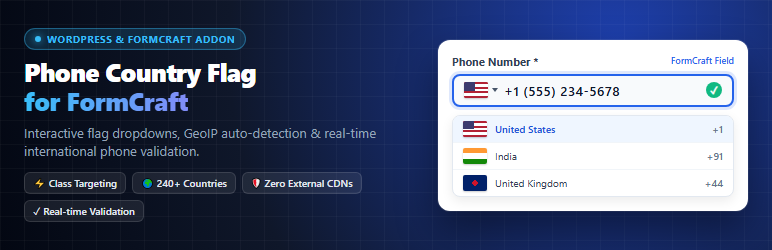
Phone Country Flag for FormCraft enhances FormCraft form fields by adding an interactive international country flag dropdown, dial code selector, and visitor country code auto-detection.
It turns standard text or number fields in FormCraft into smart, user-friendly international phone inputs powered by the industry-standard intl-tel-input library.
Key Features
- Direct Custom Field Class Support: Simply assign your chosen CSS class (
phone-country-flagorfcpf-phone-flag) to any field inside FormCraft’s field settings to instantly enable the country flag dropdown on that specific field. - Automatic Visitor Country Detection: Detects the visitor’s country using browser-based GeoIP lookup (cached in the browser to reduce network requests).
- Smart Keyword Matching: Automatically discovers phone fields across your forms based on common keywords (e.g.,
mobile,phone,whatsapp,contact,tel). - Real-Time Phone Validation: Validates international phone formats on blur and input change, displaying friendly custom error messages when an invalid number is entered.
- Preferred & Restrictive Countries: Pin key countries to the top of the dropdown list or restrict the selector to only accept specific countries.
- FormCraft Popup & AJAX Support: Seamlessly works with AJAX-submitted forms, multi-step forms, and popup modals using DOM mutation observers.
- 100% Bundled & GDPR Friendly: All core CSS, JavaScript, and flag sprite assets are bundled locally in the plugin — no external CDN dependencies.
- Zero Bloat & High Performance: Lightweight, asynchronous script execution with browser localStorage caching.
How to use with FormCraft
-
Option A (Recommended) – Custom Field Class:
- Edit your form in FormCraft.
- Click on the phone/mobile field to open its Field Options.
- Under Extra Classes (or Custom CSS Class), enter
phone-country-flag(or your custom class defined in plugin settings). - Save the form. The field will now automatically display the country flag dropdown!
-
Option B – Automatic Detection:
- Simply label your field with “Phone”, “Mobile”, “WhatsApp”, or “Contact Number”.
- The plugin automatically identifies the field and attaches the flag dropdown.
-
Option C – CSS Selector:
- For advanced forms, enter a specific CSS selector in Settings > FormCraft Phone Flag.
Privacy Policy / Third-Party Services
This plugin provides an optional feature to automatically detect a visitor’s country code based on their IP address:
-
ipwhois.io / ipwho.is (Primary GeoIP provider)
- Service URL: https://ipwhois.io/
- Terms of Service: https://ipwhois.io/terms
- Privacy Policy: https://ipwhois.io/privacy
- Data transmitted: The visitor’s IP address is sent directly from the visitor’s browser to resolve their 2-letter country code.
-
ipapi.co (Fallback GeoIP provider)
- Service URL: https://ipapi.co/
- Terms of Service: https://ipapi.co/terms/
- Privacy Policy: https://ipapi.co/privacy/
- Data transmitted: The visitor’s IP address is sent directly from the visitor’s browser if the primary provider fails.
Opt-out: Site administrators can completely disable GeoIP auto-detection at any time by unchecking “Detect visitor’s country from IP address” in Settings > FormCraft Phone Flag. When disabled, no external requests are made and the default fallback country is used instead.
Screenshots

Plugin Settings Page: Configure custom field classes, keyword detection, fallback country, preferred country list, and phone validation.

FormCraft Frontend Form Preview: Interactive country flag dropdown, dial code selector, and live phone validation in action.