
360Pay – Pagamentos Por Carteiras Móveis Para MasterStudy Wordpress Plugin - Rating, Reviews, Demo & Download

Plugin Description
360Pay adds a modular integration for mobile wallet payments directly inside the native MasterStudy LMS checkout.
This is an independent, third-party plugin. It is not affiliated with, endorsed by, or sponsored by MasterStudy LMS / StylemixThemes or by Vodacom / M-Pesa. “MasterStudy” and “M-Pesa” are trademarks of their respective owners and are used here only to describe the services this plugin integrates with.
The plugin is designed to:
* Keep orders in pending status until the API confirms the payment.
* Ensure all payment confirmations are verified server-side.
* Validate transaction reference, amount, currency, student, course, and payment status before granting access.
* Receive callbacks/webhooks through a secure REST API.
* Fallback to automated polling via WP-Cron.
* Support multiple mobile wallets, including M-Pesa, e-Mola, mKesh, or custom wallets configured manually.
* Never ask for PINs, OTPs, or private wallet data on the site.
* Keep detailed transaction logs without exposing credentials or sensitive info.
Technical details:
* Order post type: stm-orders.
* Native order items table: {$wpdb->prefix}stm_lms_order_items.
* Native enrollment function: stm_lms_add_user_course().
* Cart helper: stm_lms_get_cart_items().
* Action hook: stm_lms_purchase_action_done.
General Settings
In General Settings, you can configure:
* Enable Gateway: Globally enable or disable the mobile wallet gateway.
* Environment: Sandbox (testing) or Production.
* Default Currency: e.g., MZN.
* Expiry Minutes: Maximum time allowed for payment confirmation before expiration.
* Debug Logging: Enable additional developer logs.
Wallet Configuration
Each wallet config allows you to customize:
* Name and slug.
* Logo via the Media Library.
* Description and instructions for the student.
* Phone number prefixes and length constraints.
* Sandbox and Production API base URLs.
* Initiate Payment endpoint.
* Check Status endpoint.
* API key, secrets, bearer token, Merchant ID, and Webhook secret.
* Auth Method: none, basic_auth, bearer_token, api_key_header, oauth2, or custom.
* Timeout, max retries, and check interval.
* JSON headers.
* Request JSON template.
* Response field mapping.
* Status value mapping for success, pending, failed, and cancelled.
Available tokens in endpoints/templates:
* {reference}
* {external_reference}
* {amount}
* {currency}
* {phone}
* {merchant_id}
* {callback_url}
REST Endpoints
Wallet Callback URL:
/wp-json/ms-wallet-payments/v1/callback/{wallet_slug}
Public Status Check URL:
/wp-json/ms-wallet-payments/v1/status/{transaction_reference}
Reprocess Callback (Admin only):
/wp-json/ms-wallet-payments/v1/reprocess/{transaction_reference}
Start Payment (Frontend AJAX):
/wp-json/ms-wallet-payments/v1/start
List Active Wallets:
/wp-json/ms-wallet-payments/v1/wallets
Developer Hooks
You can customize checkout context, order creation, order completion, enrollment, and status checks using filters:
add_filter( 'mswp_masterstudy_checkout_context', function ( $context, WP_REST_Request $request ) { ... } );
add_filter( 'mswp_masterstudy_create_pending_order', function ( $order_id, $transaction ) { ... } );
add_filter( 'mswp_masterstudy_complete_order', function ( $completed, $transaction ) { ... } );
add_filter( 'mswp_masterstudy_enroll_user', function ( $enrolled, $transaction ) { ... } );
add_filter( 'mswp_masterstudy_mark_order_not_paid', function ( $updated, $transaction, $status ) { ... } );<h3>Fallback Shortcodes</h3>
If you need to manually integrate a checkout button for testing:
[mswp_wallet_checkout course_id=”123″ amount=”1500″ currency=”MZN”]
To display payment status:
[mswp_payment_status]
Security
- Access to courses is only granted after successful payment confirmation from the API.
- Duplicated callback/webhook requests are ignored.
- Webhook requests are validated with HMAC SHA-256 signatures if a webhook secret is defined.
- Sensitive keys and credentials are masked in the admin dashboard and logs.
- Direct SQL queries are sanitized using
$wpdb->prepareand identifier escaping. - Admin forms are secured with nonces and capability checks.
External services
This plugin connects to third-party mobile wallet payment APIs to initiate and verify payments. Card/PIN/OTP data is never handled by the site. The following external services may be contacted:
- Vodacom M-Pesa Mozambique API (default provider)
- What it is and what it is used for: the official Vodacom M-Pesa Mozambique payment gateway. It is used to initiate a Customer-to-Business (C2B) USSD push payment request and to verify the resulting transaction status, so the plugin can release the purchased course only after the payment is confirmed server-side.
- What data is sent and when: the customer phone number (MSISDN), the transaction amount, the currency and a unique transaction reference are sent (a) when the student clicks “Pay” on the checkout page to start the payment, and (b) afterwards through automated polling / WP-Cron checks to update the payment status.
- Endpoints used: https://api.vm.co.mz:18352 (production) and https://api.sandbox.vm.co.mz:18352 (sandbox/testing).
- Terms of Service: https://www.vm.co.mz/artigo/termos-e-condicoes
- Privacy Policy: https://www.vm.co.mz/privacidade
- Developer portal: https://developer.mpesa.vm.co.mz/
- Other mobile wallet APIs configured by the site administrator (optional)
- What it is and what it is used for: the plugin can also connect to other mobile wallet providers (for example e-Mola, mKesh or a custom wallet) only if the site administrator manually enables and configures them by entering the provider’s base URLs and credentials. They are used for the same purpose: initiating a payment request and verifying its status.
- What data is sent and when: the same data (phone number, amount, currency and transaction reference) is sent to the endpoint configured by the administrator, at the same moments described above.
- Terms of Service / Privacy Policy: these depend on the provider chosen and configured by the administrator, who is responsible for reviewing and complying with that provider’s terms and privacy policy before enabling it.
Checklist
- Verify that the plugin activates without any errors.
- Check that MasterStudy LMS dependency notice is shown if it is deactivated.
- Add a new wallet under settings.
- Edit the wallet settings and verify they are saved.
- Deactivate a wallet and check that it is no longer shown.
- Verify validation on checkout phone number field.
- Conduct a sandbox payment transaction.
- Receive a payment confirmation webhook.
- Confirm the order status changes to completed.
- Confirm course enrollment for the user.
Screenshots

Mobile wallet selector inside the native MasterStudy LMS checkout.
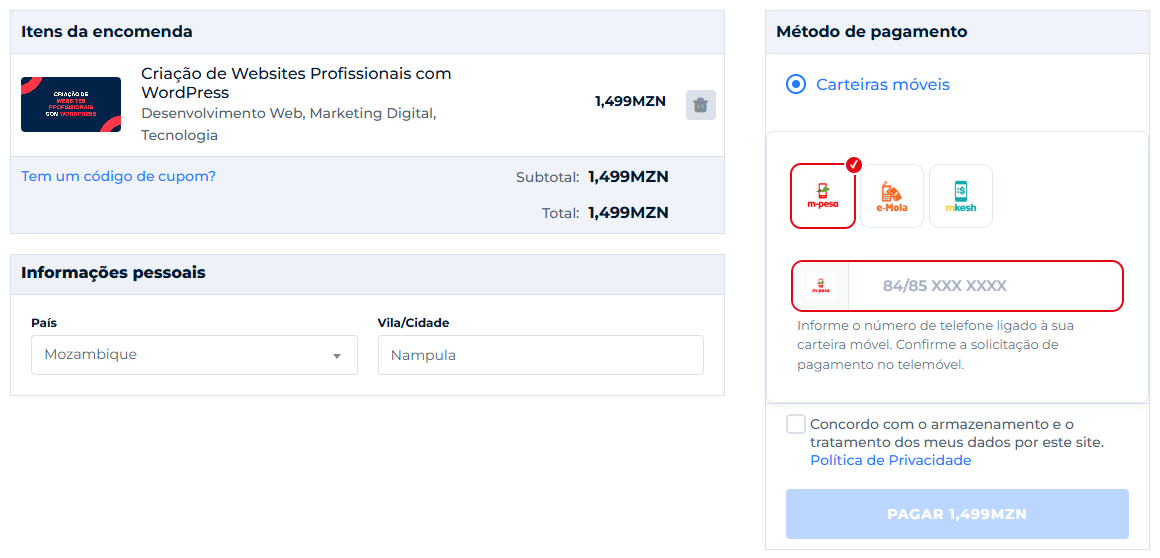
After choosing a wallet, the phone field adapts to it (logo, colour and accepted prefixes).

Payment status shown in the checkout after the student confirms the payment on the phone.
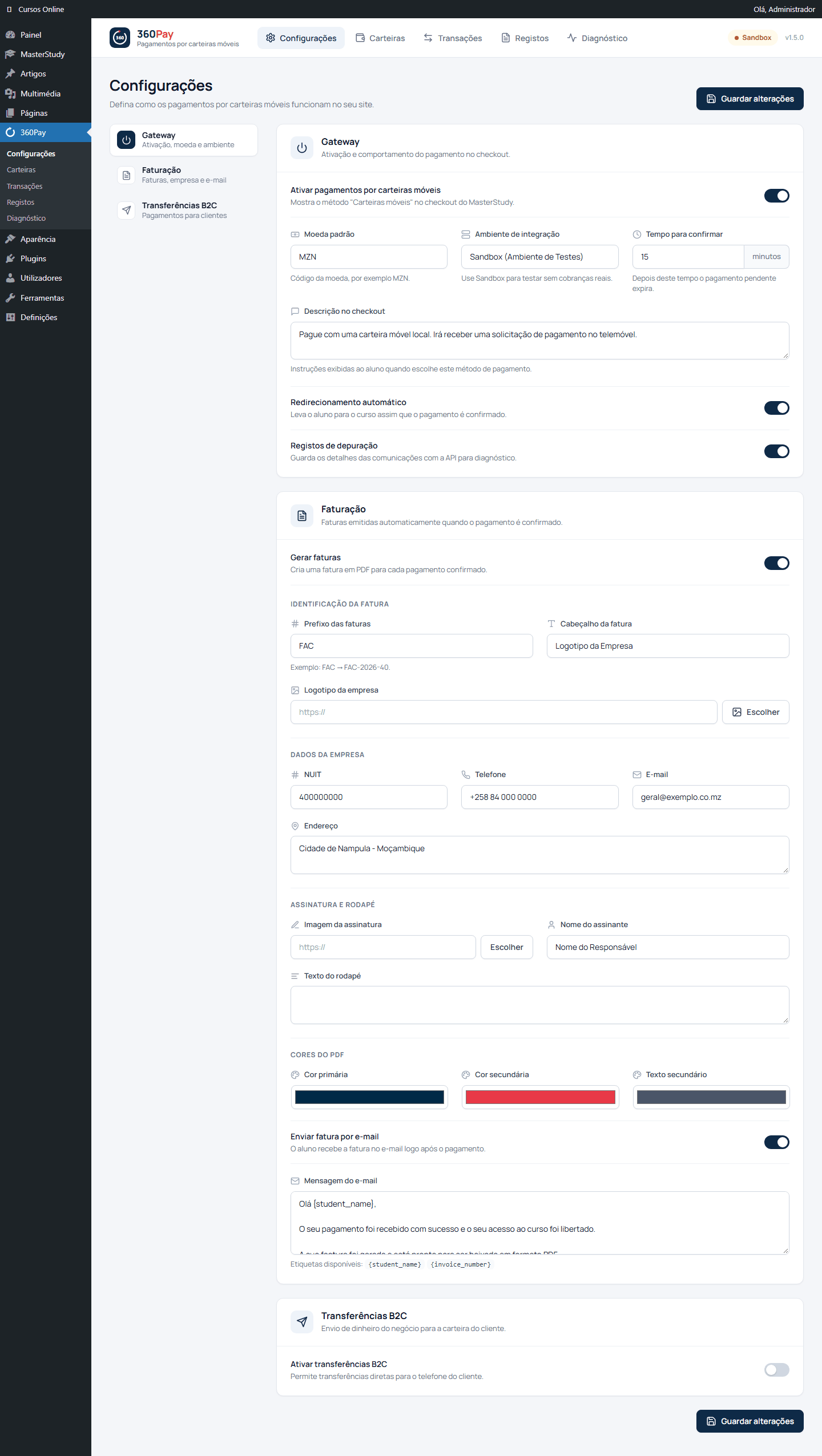
General settings: gateway, currency, environment, expiry, debug logs, invoicing and B2C options.

Mobile wallet providers: enable and configure M-Pesa, e-Mola, mKesh or custom wallets.

Transactions list with status, masked phone numbers, filters and CSV export.

Transaction details: student, purchase summary and provider tracking information.


