3task Post Order For Categories, Pages & Terms Wordpress Plugin - Rating, Reviews, Demo & Download
Plugin Description
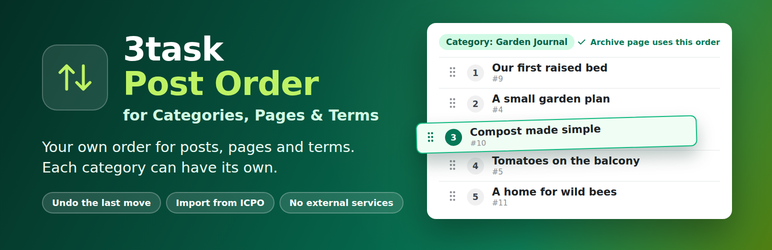
Arrange published posts, pages, custom post types and taxonomy terms. One post can have a different position in each category.
- Start in admin-only mode. Connect an archive or a selected Query Loop when ready.
- Drag with a mouse or touch, or use Arrow Up and Arrow Down on the move handle.
- Find a target across pages and move an item before or after it.
- Keep WordPress Quick Edit available in the native lists.
- Save with a confirmed server response. Revision conflicts prevent overwriting another editor’s newer order.
- Undo the most recent move or reset. Reset affects only the selected context.
- Import local Intuitive Custom Post Order data with a preview, resumable preparation and a return path.
- No account, analytics, external service or bundled font required.
Three everyday steps
- Open Tools > Post Order and create an order for a content type, optional category, or a group of sibling terms.
- Move items using the handle or Move to. Changes save automatically. You can also select the order in the native Posts or Pages list; taxonomy lists offer their available orders above the table.
- Choose Admin only, Connected blocks, or Archive and connected blocks. Only Archive and connected blocks sorts the category or archive page itself; a line below the choice says whether that page uses the order and links to it. For a block, insert Ordered posts and select the connected order in its sidebar. The existing Query Loop provides the layout.
The default post order is publication date descending, with descending ID as a tie-breaker. Terms start alphabetically. Newly published or newly assigned items join the end of an already arranged list. Pages and terms stay under the same parent. Only published posts are included in version 1.0.
Where an order applies
An archive connection affects the matching main post-type or taxonomy archive when it has no explicit sort field. It does not globally replace search results, date sorting, random widgets or arbitrary theme queries. Each connected block uses its selected context. If an order is switched back to Admin only, its connected blocks keep showing the same items, sorted by date. If an order is deleted, its blocks show the newest posts of their content type. A connection never leaves a block empty. Term order affects the selected native term list and explicitly connected get_terms() calls; it does not globally reorder navigation menus or every category widget.
Developer examples:
new WP_Query( array( 'post_type' => 'post', 'threepo_context' => 12 ) );

get_terms( array( 'taxonomy' => 'category', 'threepo_context' => 15 ) );
The context must allow public connections. Normal WordPress visibility rules still apply. The action threepo_order_changed( $context_id, $revision, $object_id ) runs after a confirmed commit. Page-cache integrations should purge the relevant public pages there; this plugin does not flush the entire site cache on every move.
Importing from ICPO
Keep the old plugin installed. Preview the configured local post types and taxonomies, prepare the import in batches, and compare the proposed order. Equal legacy ranks are resolved by ascending object ID. Only published content is imported. All sibling groups are kept separate.
Switching rechecks the source, deactivates Intuitive Custom Post Order and enables the prepared contexts. Database and plugin-activation steps are separate, with durable states so an interrupted operation can resume. If the source changed, return to the legacy order, discard unused preparation and preview again. Imported orders with newer manual changes are kept; returning to the legacy order requires a separate confirmation.
Returning disables the imported public connections and reactivates the old plugin if it was active at the switch. Source menu_order and term_order values are never overwritten. Do not uninstall ICPO as the first migration step: its uninstaller can remove shared database columns.
Requirements and limits
WordPress 6.9 or newer. PHP 7.4 syntax compatibility; use a currently patched PHP version for production. InnoDB tables and window functions are required: MySQL 8.0+ or MariaDB 10.6+. SQLite is not supported for ordering writes. Unsupported storage or an existing outer transaction causes writes to stop with an error.
Activate separately on each multisite site. Network-wide activation and network site ordering are not supported. Deinstallation honors the current site’s explicit data-deletion setting; data on other sites remains. WPML, Polylang, commerce-specific ordering and individual page builders are not supported integrations in this version. Detected multilingual plugins block ordering writes.
At most 100 items per API response, normally 50 in the interface; search text up to 200 characters; mutation bodies up to 64 KiB. Import previews support up to 500 sibling groups. Undo is available only while its revision is current. Repeating an operation with its original UUID and payload does not apply it twice while its history record is retained.
Security
Please report security issues privately to kontakt@3task.de with the subject “Security”. Include the plugin and WordPress versions and reproducible steps. Do not post credentials or exploit details in the public support forum. Supported: the latest 1.x version. We confirm reports within two working days. Tests and automated scans cannot guarantee that software has no undiscovered vulnerabilities.
Credits
Icons: Tabler Icons (https://tabler.io/icons), MIT license, embedded as inline SVG.
Screenshots

Tools > Post Order: the order for one category with numbered positions, move buttons and Move to.

Choose where the order applies. The line below confirms when the category page uses it.

Move to: find a target across pages and place the item before or after it.

The native Posts list in order mode. Quick Edit stays available.

Sibling categories in their own order in the category list.

The Ordered posts block variation with the connected order in the block sidebar.

Import from Intuitive Custom Post Order: a preview of every group before anything changes.

The workspace on a phone, with large buttons for touch.