
Saddle Analytics Wordpress Plugin - Rating, Reviews, Demo & Download

Plugin Description
Saddle Analytics shows who visits your site and what they do there. It counts visits without cookies. All the data stays in your own database.
It also counts something most stats tools miss: people sent to you by AI chat apps like ChatGPT, Claude and Perplexity.
Everything on one page
Open Saddle Analytics. All your stats are on a single screen, with no menus to dig through.
- Totals: visitors, visits, page views, time on site and bounce rate (visits that saw only one page).
- Change: how each total moved since the period before.
- Chart: visitors and page views for each day.
- Online now: who visited in the last 30 minutes. A small box on your WordPress Dashboard shows this too.
- Filters: click a source, country or browser, and every number on the page shows only those visitors.
- Details: open any card as a full list, with search.
Where visitors come from
- Channels: AI, search, social, paid, email, other sites and direct.
- Referrers: the sites that link to you.
- Campaigns: the UTM tags you add to your own links.
- Pages: your top pages, the first page of each visit and the last one.
- Exit links: links to other sites that visitors click.
- Audience: country, browser, operating system and device.
AI traffic
More people now find websites through AI chat apps. Saddle Analytics puts those visits in their own channel, called AI, at the top of the list. It knows ChatGPT, Claude, Perplexity, Gemini, Copilot, DeepSeek, Grok and more.
AI bots also read your pages, and the AI crawlers card shows which ones. It sorts them by why they came:
- Training: collecting pages to train AI models.
- Indexing: building an AI search engine.
- Answers: fetching a page because someone just asked a question about it.
One visitor at a time
Each visitor gets a made-up name and a little face. Click one to see their path: where they came from, and every page they opened, in order. You never see a real name, email or IP address.
Light tracker
The tracking script is under 1 KB. It loads after the rest of the page. It sends small messages to your own site only.
Settings
- Remember returning visitors: off by default. Turn it on to use a cookie and count returning visitors across days.
- Credit a returning visitor to: the source of their first visit, or of their latest one.
- Keep page views for: 90 days by default, anywhere from 7 days to 3 years.
- Count logged-in admins: off by default, so your own visits do not count.
- Delete all data on uninstall: off by default.
Ask your AI assistant
Saddle Analytics works inside Saddle, a free plugin that connects AI assistants to your site. Connect one, such as Claude, ChatGPT or Cursor. Then ask it: “How many visitors came from ChatGPT this week?” It answers from the same numbers you see on the page. Saddle Analytics gives it nine tools that can only read. They cannot change anything.
For developers
- WP-CLI:
wp saddle-analyticsprints every report, checks your setup and runs the move from Loggle. - Hooks: add your own AI apps with
saddle_analytics_ai_referrersand your own bots withsaddle_analytics_bots.
Privacy
- Saved in your own database: visitor counts, page paths, referring sites, UTM campaign names, links to other sites that visitors click, country, browser, operating system and device type.
- IP addresses are never saved. Without cookies, a visitor is known only by a code that changes every day (see “How does it count visitors without cookies?”).
- Country comes from Cloudflare’s
CF-IPCountryheader, and only when the request really came through Cloudflare. - With “Remember returning visitors” on, it sets two first-party, HTTP-only cookies:
_saddle_analytics_v(a random id, 1 year) and_saddle_analytics_s(a random session id, 30 minutes). - Visitors who send Do Not Track or Global Privacy Control are not counted.
- Page views are deleted after the number of days you choose. A short summary of each visitor (first and last source, landing page, country, browser, operating system, device and totals) stays until you delete the plugin’s data.
External services
None. Saddle Analytics sends no data off your site. It loads no scripts, fonts or images from other servers.
Source code
The admin screens are built from the source files in the plugin’s src/ folder. package.json and package-lock.json are included. To rebuild them, run npm ci && npm run build (it uses @wordpress/scripts). The interface parts come from Saddle at runtime and are not bundled. The tracker, assets/tracker.js, is plain JavaScript and is not compiled.
Credits
- Charts: Chart.js, MIT License.
- Country flags: country-flag-icons, MIT License (see
assets/flags/LICENSE). - Channel icons: Simple Icons, CC0.
- Full licence texts:
THIRD-PARTY-LICENSES.txt.
Screenshots
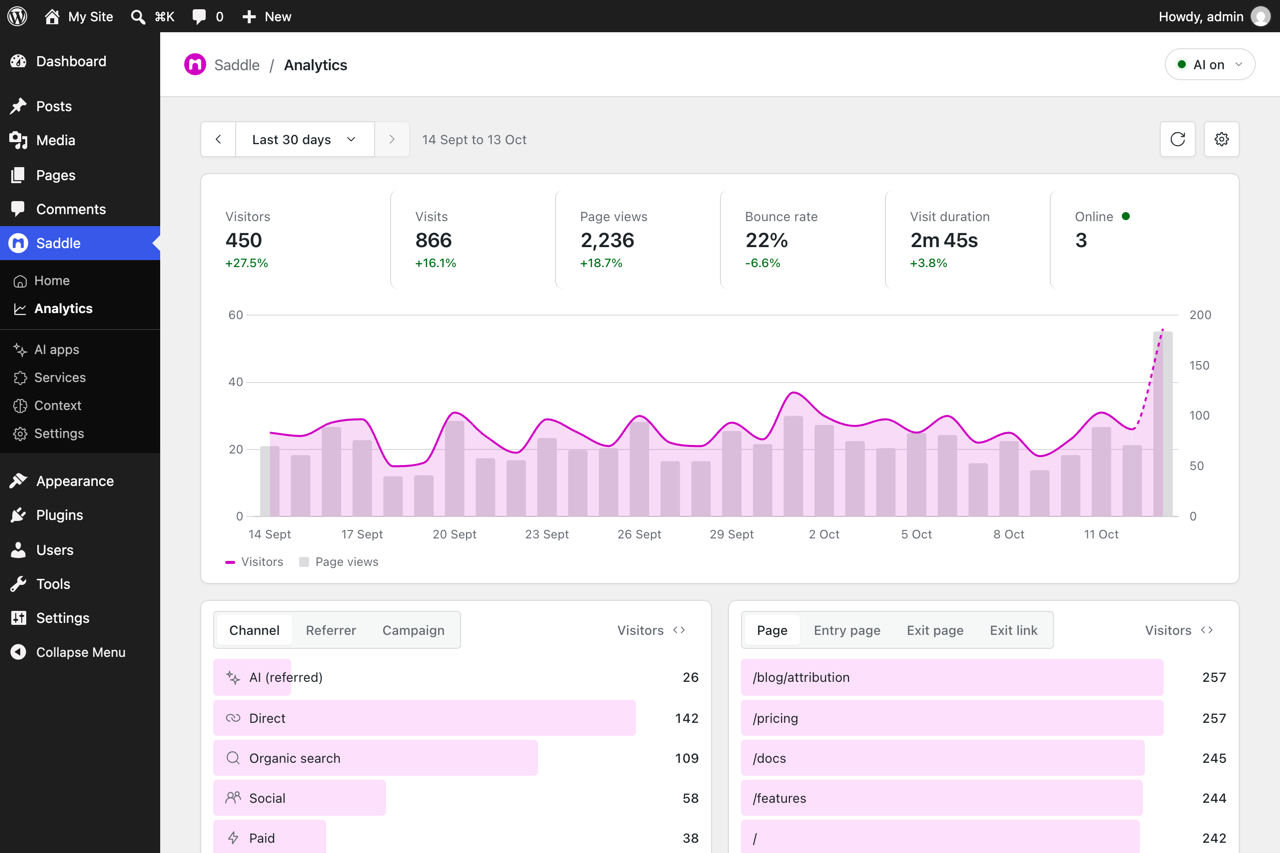
Your totals on one page, over a chart of visitors and page views.
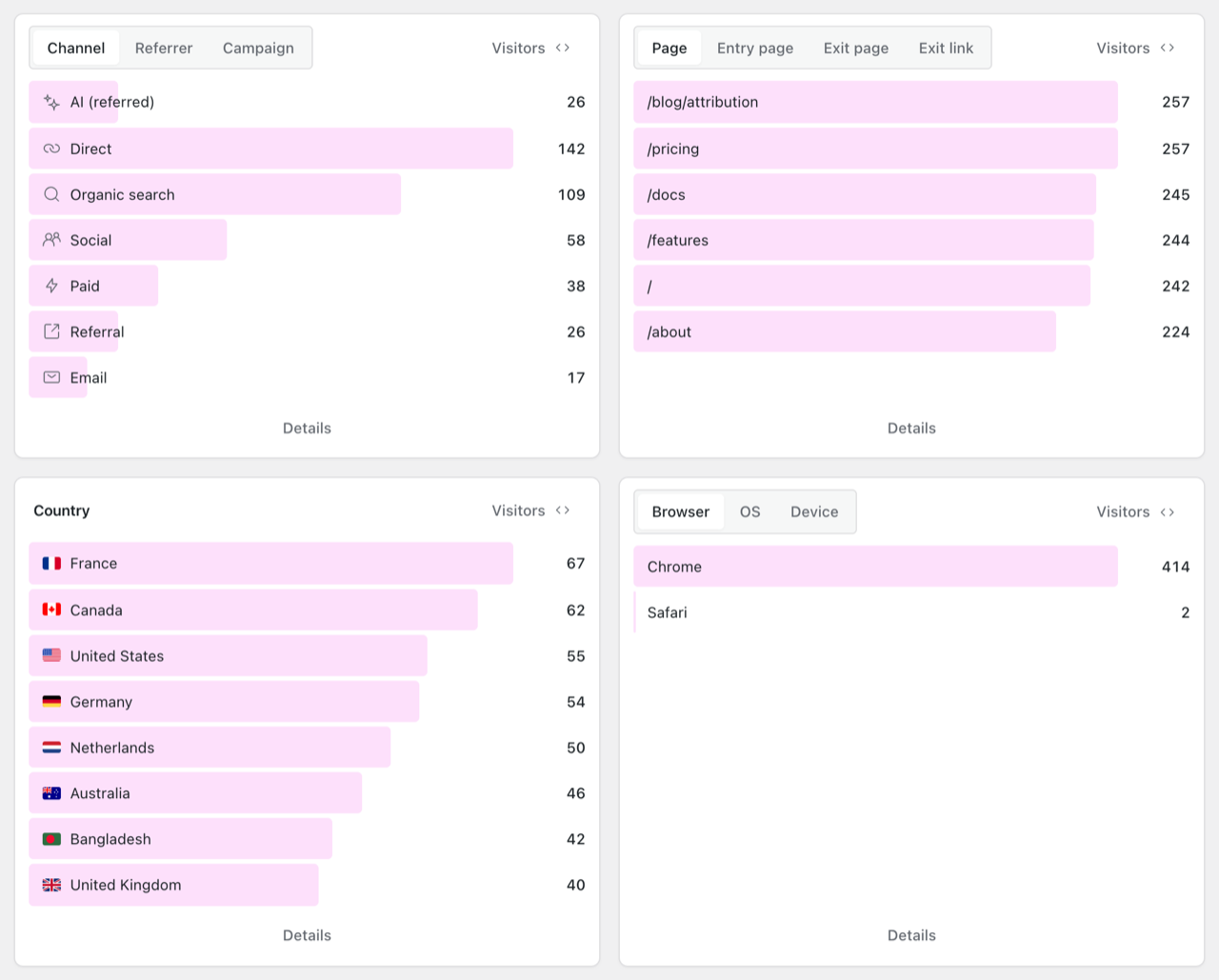
Sources, pages, countries and devices. Click a row to filter the whole page.
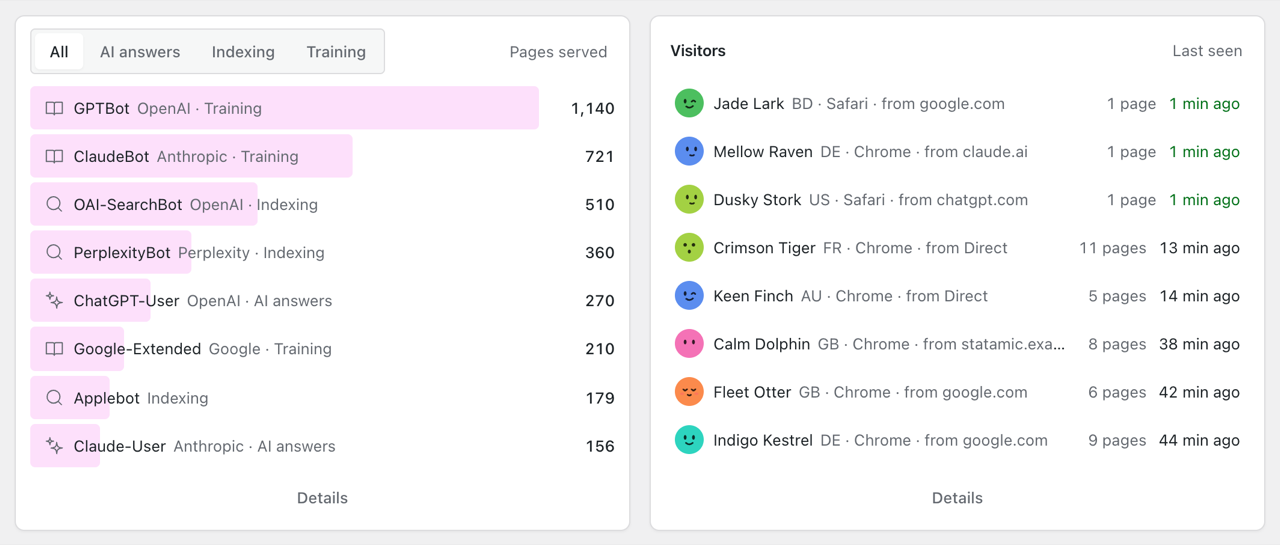
The AI bots that read your site, and your latest visitors with made-up names and faces.
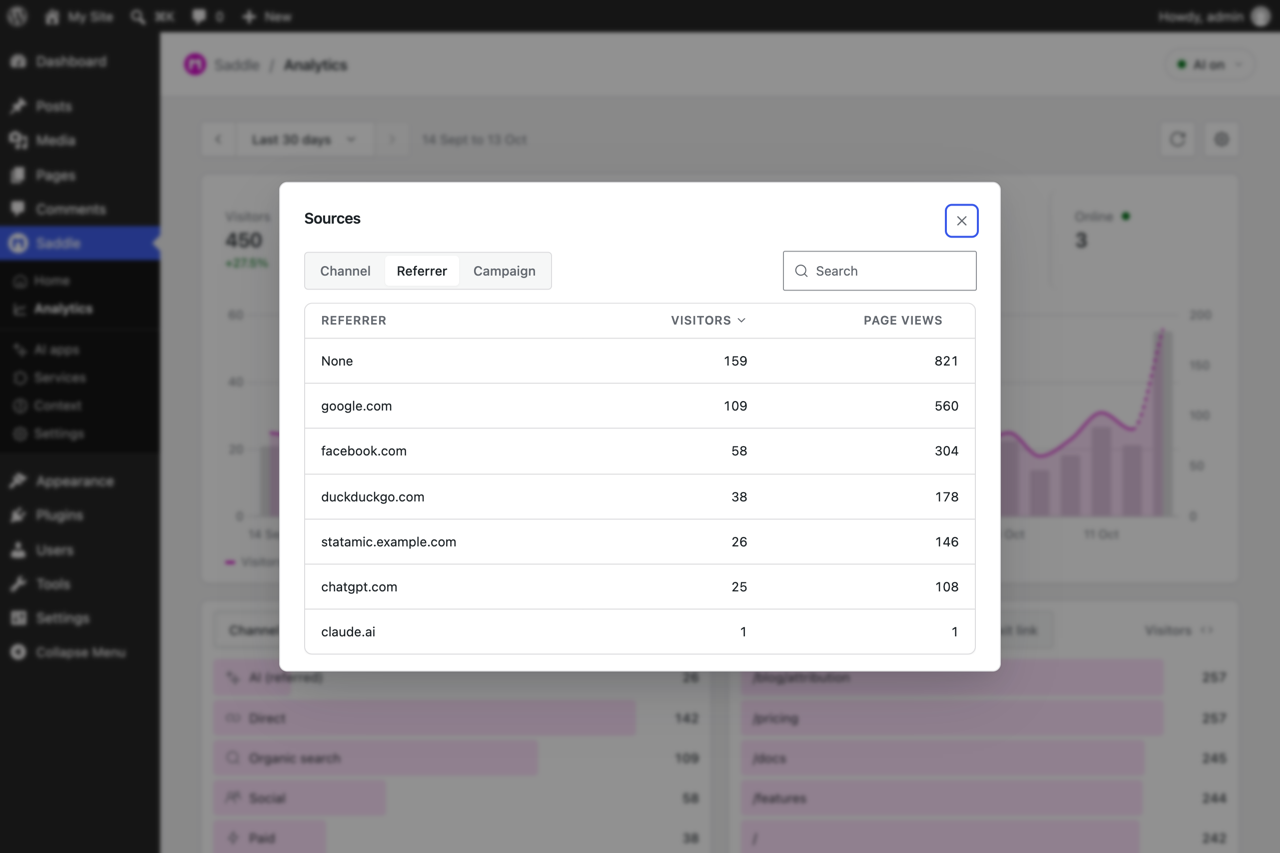
Details: the full list behind a card, with search.
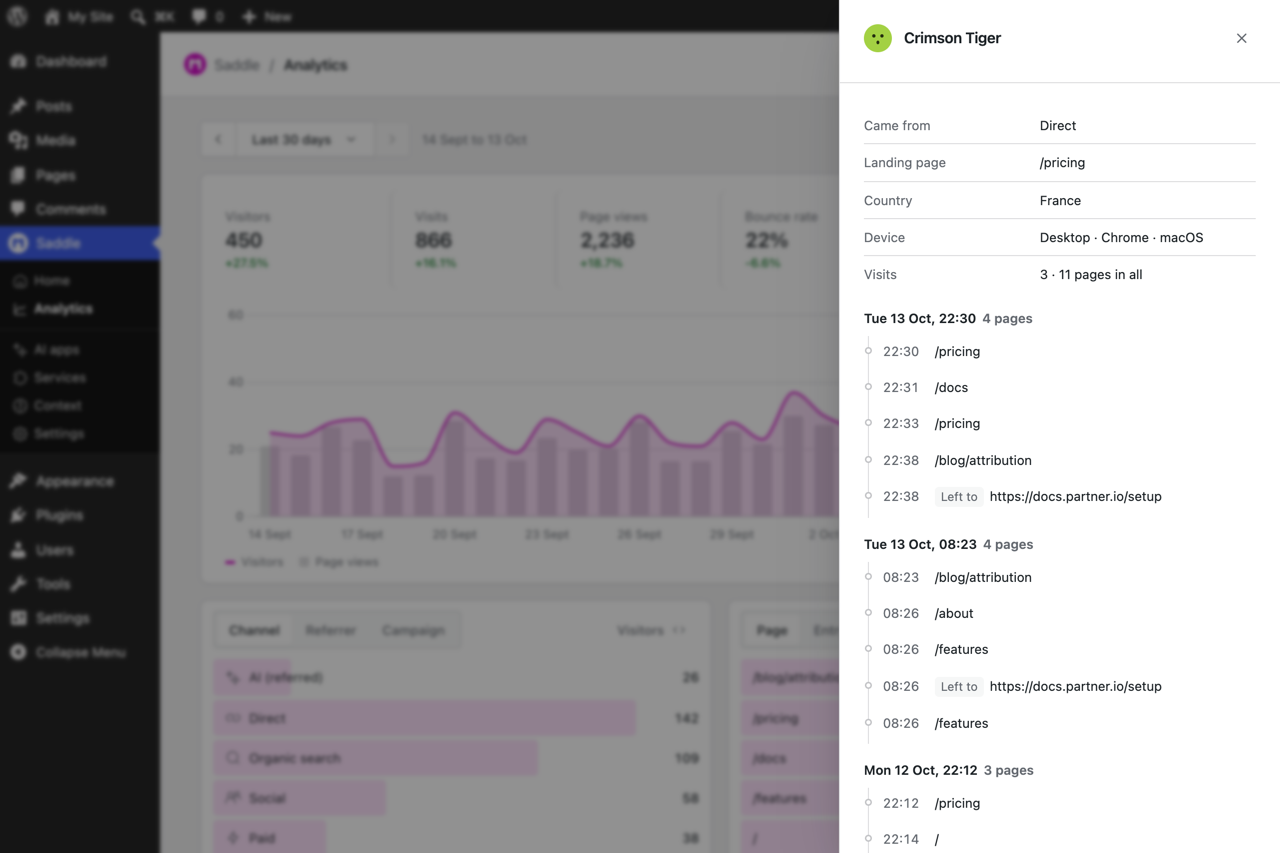
One visitor’s path: where they came from and every page they opened.
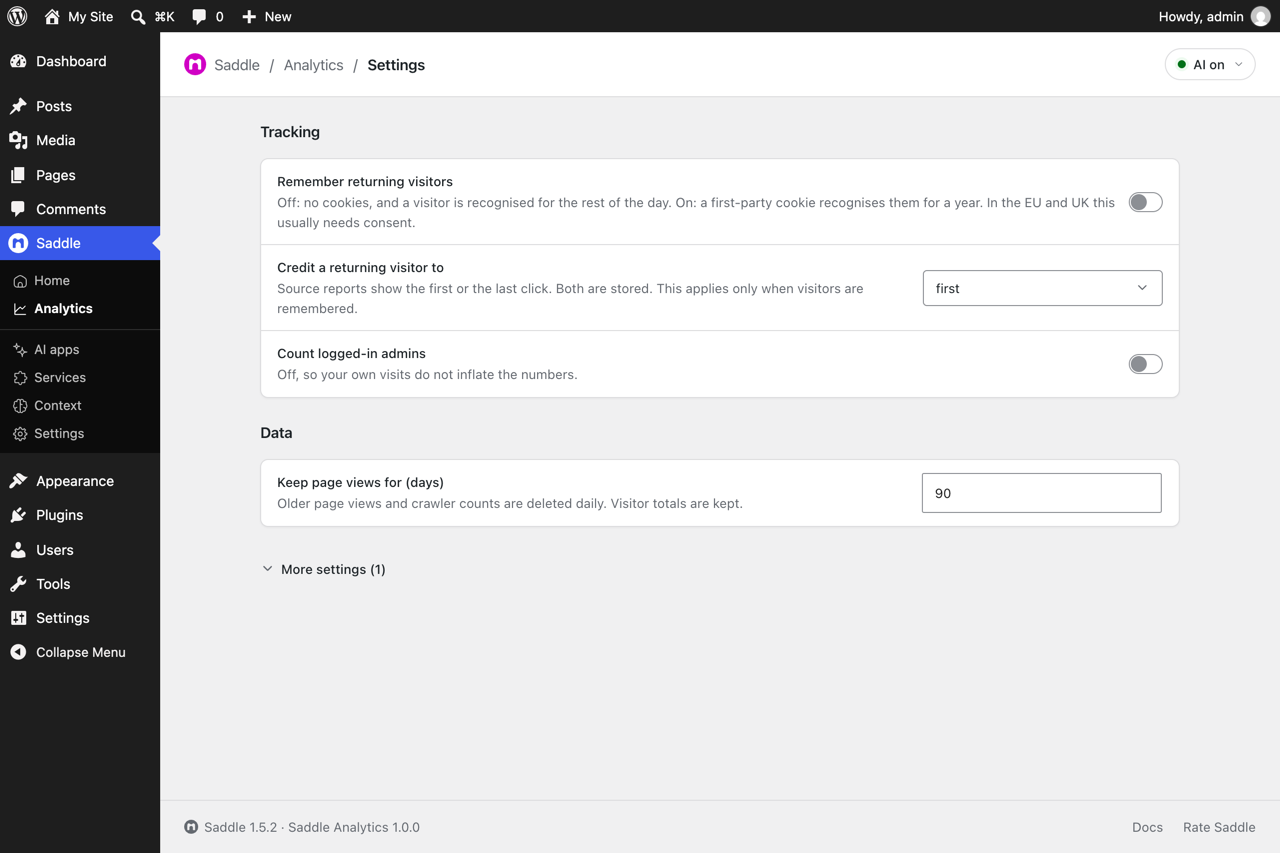
Settings: cookies, which visit gets the credit, and how long page views are kept.

