Saral SMTP Wordpress Plugin - Rating, Reviews, Demo & Download
Plugin Description
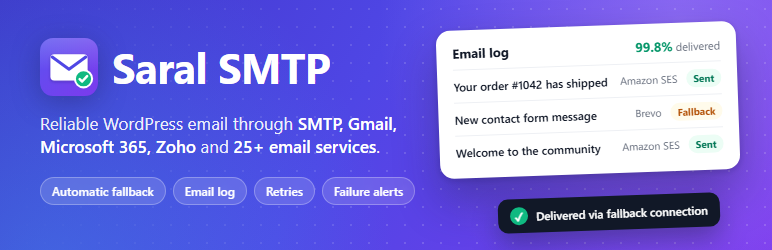
By default WordPress sends email with PHP mail(), which has no authentication, so a lot of it goes to spam or is never delivered. Saral SMTP sends every wp_mail() email through a proper email service instead, using the service’s own API where it has one. Plugins and themes that send email need no changes.
Most SMTP plugins stop there: one service for every email, and a generic “check your SPF and DKIM” warning. Saral SMTP is built for sites where email matters enough to get those two things right.
Route by sender
A shop’s order emails, a contact form’s messages and WordPress’s password resets have different needs. Saral SMTP knows which plugin, theme or WordPress feature sent each email, so you can send each sender’s emails through its own connection: WooCommerce orders through Amazon SES, contact form messages through your Google Workspace mailbox, everything else through Brevo. The fallback connection still covers all of them, and the email log shows why each email went through the connection it did.
A deliverability check that knows your email service
Since 2024 Gmail, Yahoo and Microsoft reject or junk email from domains without SPF, DKIM and DMARC, and every email service needs different records. Choose a connection and Saral SMTP checks the records that service needs: the SPF include it requires (merged into your existing SPF record, ready to copy), the DKIM selectors it signs with, MailChannels’ Domain Lockdown, and DMARC. For Amazon SES it asks SES for your domain’s three DKIM keys and tells you exactly which CNAME records are missing. “Other SMTP” connections are recognized by their server, so smtp.office365.com is checked as Microsoft 365.
Supported email services
- Any SMTP server, with quick-setup presets for Gmail / Google Workspace, Microsoft 365, Outlook.com, Zoho Mail (all regions, personal and business), Yahoo, iCloud, AOL, GMX, IONOS, Namecheap Private Email, GoDaddy, Hostinger, Fastmail, Yandex and the SMTP relays of Amazon SES, Brevo, SendGrid, Mailgun, Mailjet, Postmark, Mailtrap, SMTP2GO, MailerSend, SendPulse and Resend
- Gmail / Google Workspace (Gmail API with OAuth, no app password needed)
- Microsoft 365 / Outlook (Microsoft Graph with OAuth, works where Microsoft has switched off SMTP basic auth)
- Zoho Mail (Zoho Mail API with OAuth, all Zoho data centres, works where SMTP ports are blocked)
- Amazon SES (API v2)
- SendGrid (global and EU)
- Mailgun (US and EU)
- Brevo (formerly Sendinblue)
- Postmark (with message streams)
- Resend
- MailerSend
- Mailjet
- SparkPost (US and EU)
- ZeptoMail by Zoho (all regions)
- Mandrill (Mailchimp Transactional)
- Mailtrap (transactional and bulk streams)
- SMTP2GO
- Elastic Email
- SendLayer
- Cloudflare Email Service
- MailChannels
- SendPulse
- SMTP.com
- SocketLabs
- Netcore Email (formerly Pepipost)
- toSend
- Postal (self-hosted)
- PHP mail()
Features
- Route by sender: send each plugin’s, theme’s or WordPress’s own emails through the connection you choose (see above).
- Route by From address: emails are also sent through the connection whose From address matches, and you can add extra addresses or whole @domains to a connection.
- Automatic fallback: if the main connection fails, the email is sent through a backup connection straight away.
- Automatic retries: failed emails from the last 24 hours are retried automatically, waiting longer after each attempt (15, 30, 60 minutes…) so a service that is down is not overloaded. Test emails, Saral SMTP’s own alerts and emails whose attachments are gone are never retried.
- Sending limits: set an hourly or daily limit per connection (for example your free plan’s quota). Once it is reached, emails go through the fallback connection instead of being rejected.
- Email log: every email with its status, connection, response time, the provider’s response and the plugin or theme that sent it. Filter by status, connection, date or text, preview HTML emails safely (remote images are blocked until you choose to load them), resend to the original or new recipients, and export to CSV. Password reset and new user emails are logged without their content, so their login links never sit in the database.
- Error tips: common errors (wrong password, blocked port, unverified sender, sandbox mode…) come with a plain-language explanation of what to fix.
- Failure alerts by email, Slack, Discord, Google Chat, Telegram or your own webhook, with a limit on how often they are sent.
- Service-aware deliverability check: checks the exact SPF and DKIM records your email service needs, plus DMARC and MX, and gives you the records to add (see above). Recognizes the requirements of Google, Microsoft 365, Amazon SES, SendGrid, Mailgun, Brevo, Postmark, Resend, MailerSend, Mailjet, SparkPost, Mandrill, Mailtrap, SMTP2GO, Elastic Email, MailChannels, SendPulse, SocketLabs and Zoho.
- Dashboard: sent and failed counts, success rate, a 14-day chart and the state of each connection.
- Weekly summary email (optional).
- Encrypted credentials: API keys, passwords and OAuth tokens are encrypted before they are saved to the database.
- Automatic plain-text version for HTML emails, which helps them avoid spam filters.
- Disable sending on staging sites: emails are logged but never delivered.
- Email controls: switch off individual WordPress notification emails, such as new comment, new user, password changed and automatic update emails.
- Site Health checks: Tools Site Health warns you when no email service is connected, an account needs signing in again or emails are failing, and the Info tab includes Saral SMTP details for support.
- Import and export of settings, with or without secrets.
- Conflict detection for other SMTP plugins and replaced
wp_mail()functions. - WP-CLI:
wp saral-smtp test,connections,stats,purge-logsandretry-failed.
Developer hooks
saralsmtp_providers: register your own provider by extendingSaralSMTP_Provider.saralsmtp_default_connection: choose a connection programmatically.saralsmtp_before_send,saralsmtp_mail_sent,saralsmtp_mail_failed: actions around every send.saralsmtp_pre_send: change an email just before it is sent, or stop it (return true or false).saralsmtp_logged: runs after an email is logged, with the log id, status and the service’s message id.saralsmtp_stored_settings,saralsmtp_stored_connections: supply settings and connections, e.g. one setup for a multisite network.saralsmtp_nav_pages,saralsmtp_log_row_status,saralsmtp_log_view: add pages to the Saral SMTP menu and details to the email log.saralsmtp_http_timeout,saralsmtp_smtp_timeout,saralsmtp_dkim_selectors.- Define
SARALSMTP_ENCRYPTION_KEYinwp-config.phpto use your own encryption key instead of the site’s salts.
External services
Saral SMTP delivers your site’s emails through an email service that you choose. It does not contact any service until you add a connection for it, and it never sends data to Saral Techies.
What is sent, and when. Each time your site sends an email (through wp_mail(), including the test emails, failure alerts and weekly summaries you turn on), Saral SMTP sends that email to the service of the connection that handles it: the From address and name, the recipients (To, Cc, Bcc and Reply-To), the subject, the message content, its headers and its attachments. The request also carries the API key, password or sign-in token you entered for that service, so the service knows the email is yours. If you set a fallback connection, an email that fails goes to the fallback service as well. Failed emails are sent again automatically (up to the retry limit you choose) to the same service.
Each service below is used only if you create a connection for it.
SMTP server (Other SMTP)
Sends email over SMTP to the server you enter, with the username and password you enter. The presets only fill in a well-known server address for you: smtp.gmail.com, smtp.office365.com, smtp-mail.outlook.com, smtp.zoho.com, smtppro.zoho.com, smtp.zoho.eu, smtppro.zoho.eu, smtp.zoho.in, smtppro.zoho.in, smtppro.zoho.com.au, smtp.mail.yahoo.com, smtp.mail.me.com, email-smtp.us-east-1.amazonaws.com (Amazon SES), smtpout.secureserver.net (GoDaddy), smtp.hostinger.com, smtp.fastmail.com, smtp.yandex.com, smtp.aol.com, mail.gmx.com, smtp.ionos.com, mail.privateemail.com (Namecheap), smtp-relay.brevo.com, smtp.sendgrid.net, smtp.mailgun.org, in-v3.mailjet.com, smtp.postmarkapp.com, live.smtp.mailtrap.io, mail.smtp2go.com, smtp.mailersend.net, smtp-pulse.com (SendPulse) and smtp.resend.com. The terms and privacy policy of the provider that runs the server apply; the links for most of them are listed below.
Gmail / Google Workspace (Google)
Sends email from your Google account with the Gmail API. When you click Connect, you sign in at accounts.google.com; your site then sends the authorisation code with your OAuth client ID and secret to oauth2.googleapis.com to get access tokens (and later to renew them), and reads your account’s email address from www.googleapis.com. Each email is sent to gmail.googleapis.com.
Terms of Service, Privacy Policy
Microsoft 365 / Outlook (Microsoft)
Sends email from your Microsoft account with Microsoft Graph. When you click Connect, you sign in at login.microsoftonline.com; your site then sends the authorisation code with your app’s client ID and secret to login.microsoftonline.com to get access tokens (and later to renew them), and reads your account’s email address from graph.microsoft.com. Each email is sent to graph.microsoft.com.
Services Agreement, Privacy Statement
Zoho Mail (Zoho)
Sends email from your Zoho Mail account with the Zoho Mail API. When you click Connect, you sign in at accounts.zoho. (accounts.zohocloud.ca in Canada); your site then sends the authorisation code with your client ID and secret there to get access tokens (and later to renew them), and reads your mail account ID and email address from mail.zoho. (mail.zohocloud.ca). Each email and its attachments are sent to mail.zoho. (mail.zohocloud.ca). The region is the data centre you choose: com, eu, in, com.au, jp, sa or com.cn.
Terms of Service, Privacy Policy
Amazon SES (Amazon Web Services)
Sends each email to the Amazon SES API at email..amazonaws.com, where is the AWS region you choose (for example email.us-east-1.amazonaws.com), signed with your access key. When you run the deliverability check for an Amazon SES connection, Saral SMTP also asks the same API for that domain’s verification and DKIM status (GetEmailIdentity), sending only the domain name.
AWS Service Terms, Privacy Notice
SendGrid (Twilio)
Sends each email to the SendGrid API at api.sendgrid.com, or api.eu.sendgrid.com if you choose the EU region.
Terms of Service, Privacy Notice
Mailgun (Sinch Mailgun)
Sends each email to the Mailgun API at api.mailgun.net, or api.eu.mailgun.net if you choose the EU region.
Terms of Service, Privacy Policy
Brevo (Brevo, formerly Sendinblue)
Sends each email to the Brevo API at api.brevo.com.
Terms of Use, Privacy Policy
Postmark (ActiveCampaign)
Sends each email to the Postmark API at api.postmarkapp.com.
Terms of Service, Privacy Policy
Resend (Resend)
Sends each email to the Resend API at api.resend.com.
Terms of Service, Privacy Policy
MailerSend (MailerSend)
Sends each email to the MailerSend API at api.mailersend.com.
Terms of Use, Privacy Policy
Mailjet (Sinch Mailjet)
Sends each email to the Mailjet API at api.mailjet.com.
Terms of Use, Privacy Policy
SparkPost (Bird)
Sends each email to the SparkPost API at api.sparkpost.com, or api.eu.sparkpost.com if you choose the EU region.
Terms of Service, Privacy Policy
ZeptoMail (Zoho)
Sends each email to the ZeptoMail API at api.zeptomail., where is the one you choose: com, eu, in, com.au, jp, ca, sa or com.cn.
Terms of Service, Privacy Policy
Mandrill (Mailchimp Transactional, by Intuit)
Sends each email to the Mandrill API at mandrillapp.com.
Terms of Use, Privacy Statement
Mailtrap (Mailtrap)
Sends each email to the Mailtrap Email Sending API at send.api.mailtrap.io, or bulk.api.mailtrap.io if you choose the bulk stream.
Terms of Service, Privacy Policy
SMTP2GO (SMTP2GO)
Sends each email to the SMTP2GO API at api.smtp2go.com.
Terms of Service, Privacy Policy
Elastic Email (Elastic Email)
Sends each email to the Elastic Email API at api.elasticemail.com.
Terms of Use, Privacy Policy
SendLayer (SendLayer)
Sends each email to the SendLayer API at console.sendlayer.com.
Terms of Service, Privacy Policy
Cloudflare Email Service (Cloudflare)
Sends each email to the Cloudflare API at api.cloudflare.com, using your account ID and API token.
Terms of Use, Privacy Policy
MailChannels (MailChannels)
Sends each email to the MailChannels Email API at api.mailchannels.net.
Terms of Service, Privacy Policy
SendPulse (SendPulse)
Sends your API ID and secret to api.sendpulse.com to get an access token (reused until it expires), then sends each email to api.sendpulse.com.
Terms of Use, Privacy Policy
SMTP.com (SMTP.com)
Sends each email to the SMTP.com API at api.smtp.com.
Terms and Conditions, Privacy Policy
SocketLabs (SocketLabs)
Sends each email to the SocketLabs Injection API at inject.socketlabs.com.
Terms of Service, Email Service Privacy Policy
Netcore Email (Netcore Cloud, formerly Pepipost)
Sends each email to the Netcore Email API at api.pepipost.com.
Terms of Use, Email API Terms, Privacy Policy
toSend (toSend)
Sends each email to the toSend API at api.tosend.com.
Terms of Service, Privacy Policy
Postal (self-hosted)
Sends each email to the Postal server address you enter. Postal is software you or your host run, so no third party is involved unless someone else runs that server for you.
PHP mail()
Hands each email to your web server’s own mail program. Saral SMTP contacts no external service.
Failure alerts (optional)
When you turn on an alert channel, Saral SMTP sends a message to it each time an email fails to send, and when you click “Send test alert”. The message contains your site address, the failed email’s subject, recipients and From address, the connection name, the error message, the time and a link to your email log. Nothing is sent to channels you leave turned off.
- Slack: sent to the incoming webhook URL you enter (hooks.slack.com). Terms of Service, Privacy Policy
- Discord: sent to the webhook URL you enter (discord.com). Terms of Service, Privacy Policy
- Google Chat: sent to the space webhook URL you enter (chat.googleapis.com). Terms of Service, Privacy Policy
- Telegram: sent with your bot token and chat ID to the Telegram Bot API at api.telegram.org. Terms of Service, Privacy Policy
- Custom webhook: the same details are sent as JSON to the URL you enter.
Alert emails and weekly summaries go through your own mail connection, like any other email.
Domain deliverability check
When you run it, the check looks up the SPF, DKIM, DMARC, MX (and for MailChannels, Domain Lockdown) DNS records of the domain you enter, using your server’s normal DNS resolver. Apart from the Amazon SES lookup described above, no other service is contacted.
Credits
Service logos are trademarks of their respective owners and are shown only to identify each service. Services without a logo below are shown with their initials.
- Simple Icons (https://simpleicons.org), CC0 1.0: Gmail, Mailgun, Brevo, Resend, SparkPost, Zoho (Zoho Mail and ZeptoMail), Mailchimp (Mandrill), Mailtrap, Cloudflare and PHP.
- svgl (https://svgl.app), MIT: Amazon Web Services (Amazon SES) and Microsoft Outlook.
- FluentSMTP (https://wordpress.org/plugins/fluent-smtp/), GPLv2 or later: SendGrid, SMTP2GO, Elastic Email and toSend.
- The generic SMTP icon was made for Saral SMTP and is GPLv2 or later, like the plugin.
Screenshots
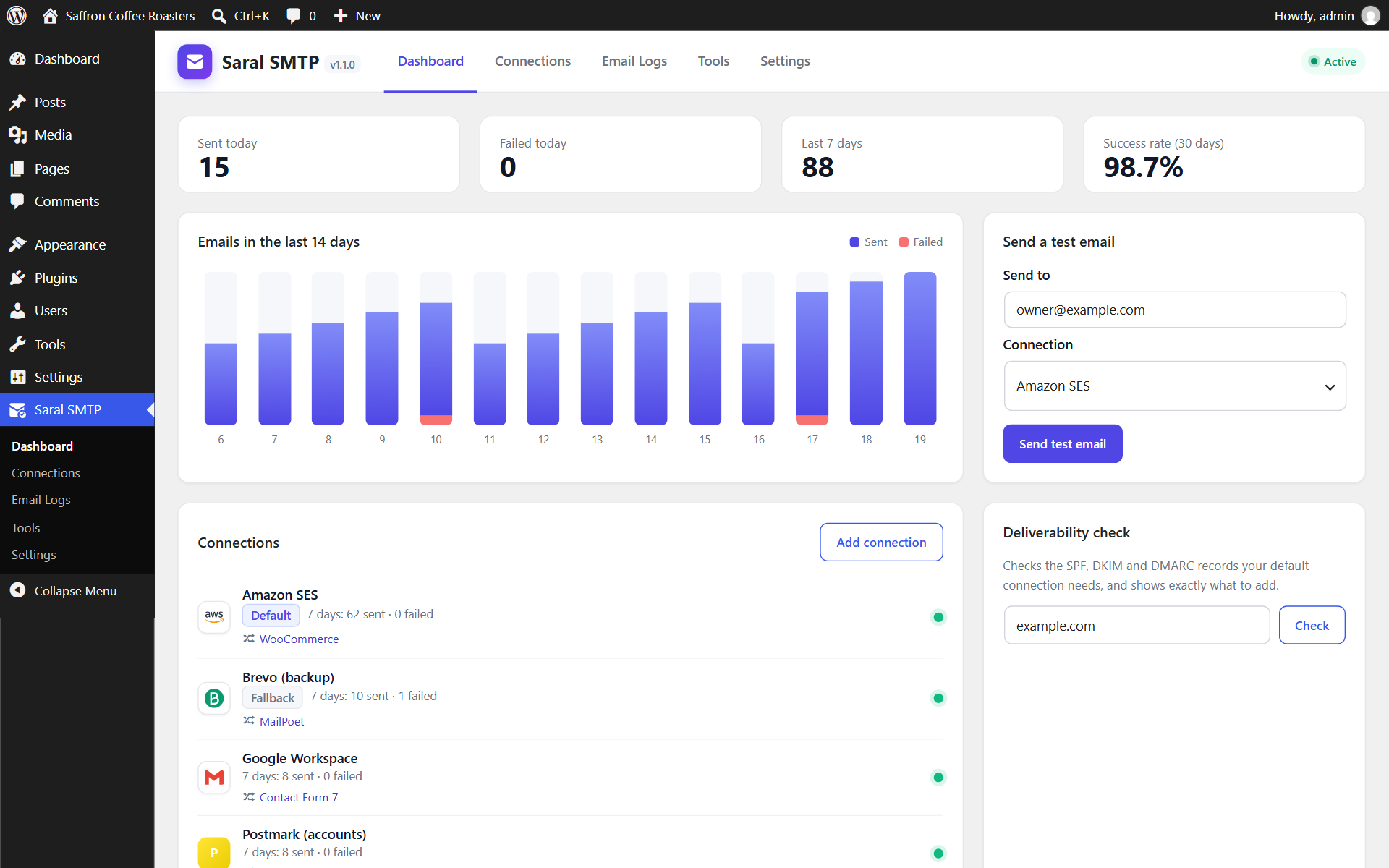
Dashboard with delivery statistics, connection health and the senders each connection handles.
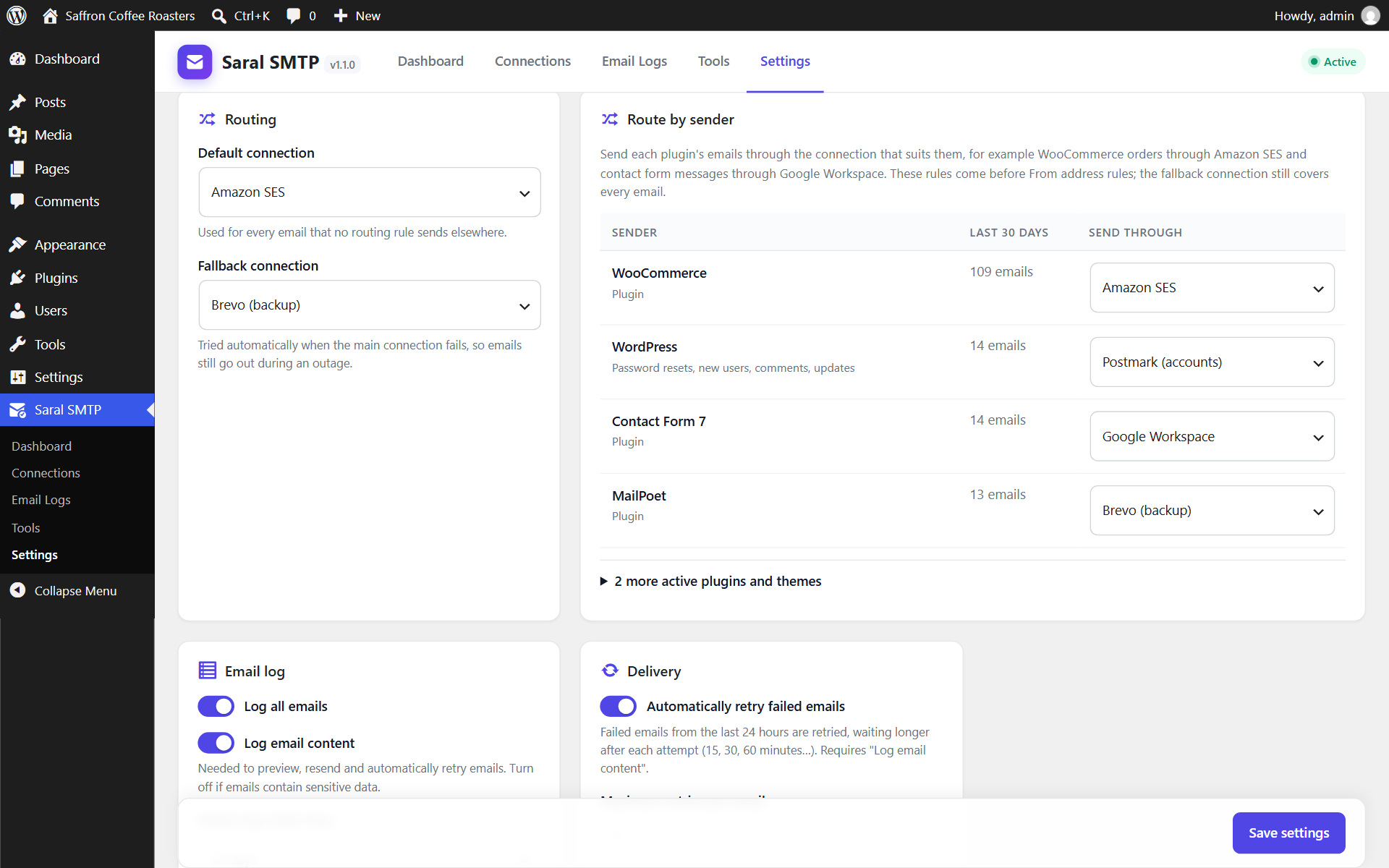
Route by sender: WooCommerce, contact form and WordPress emails each go through their own email service.
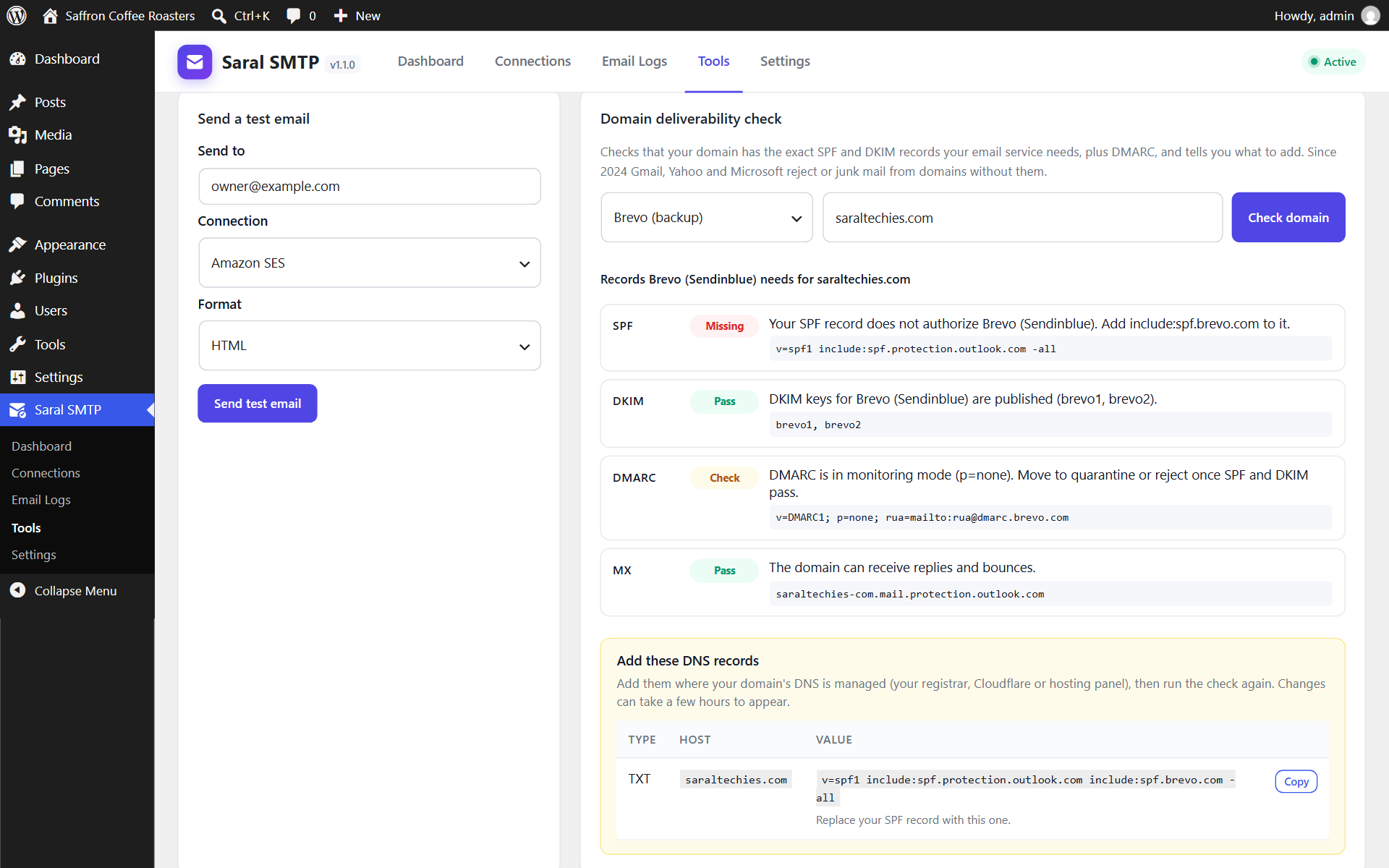
Deliverability check for a chosen email service, with the exact DNS records to add.
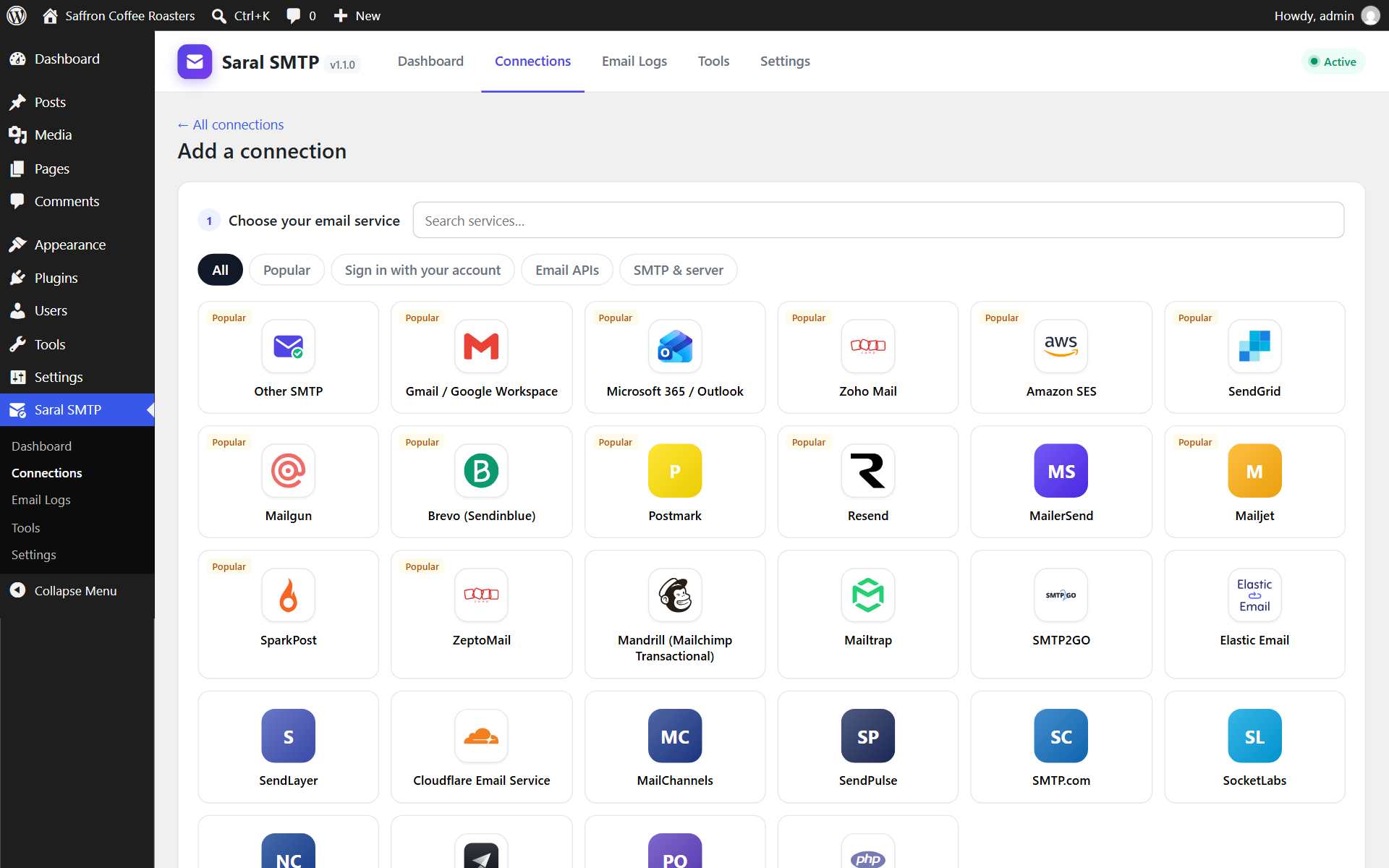
Choosing an email service.
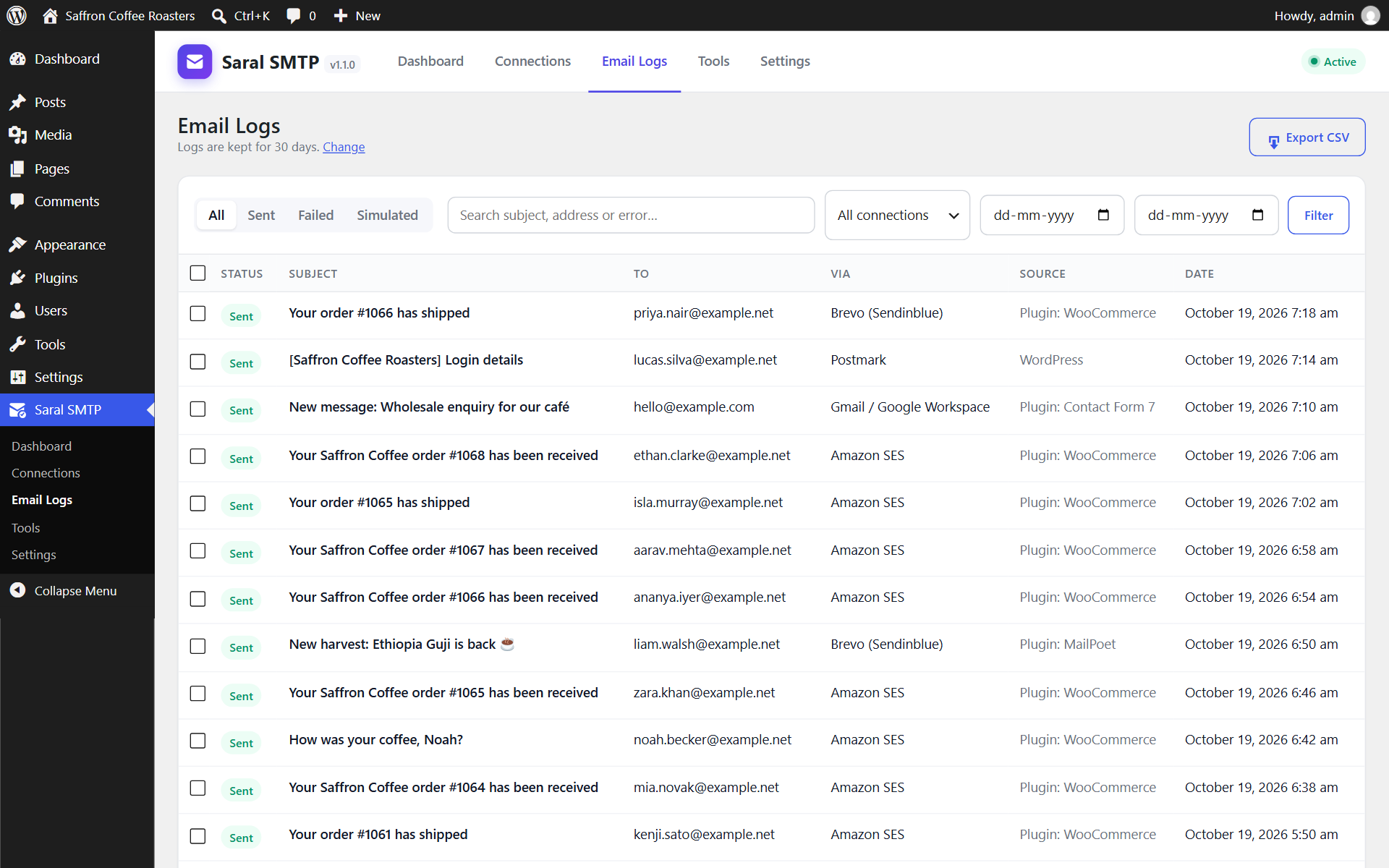
Email log with filters.
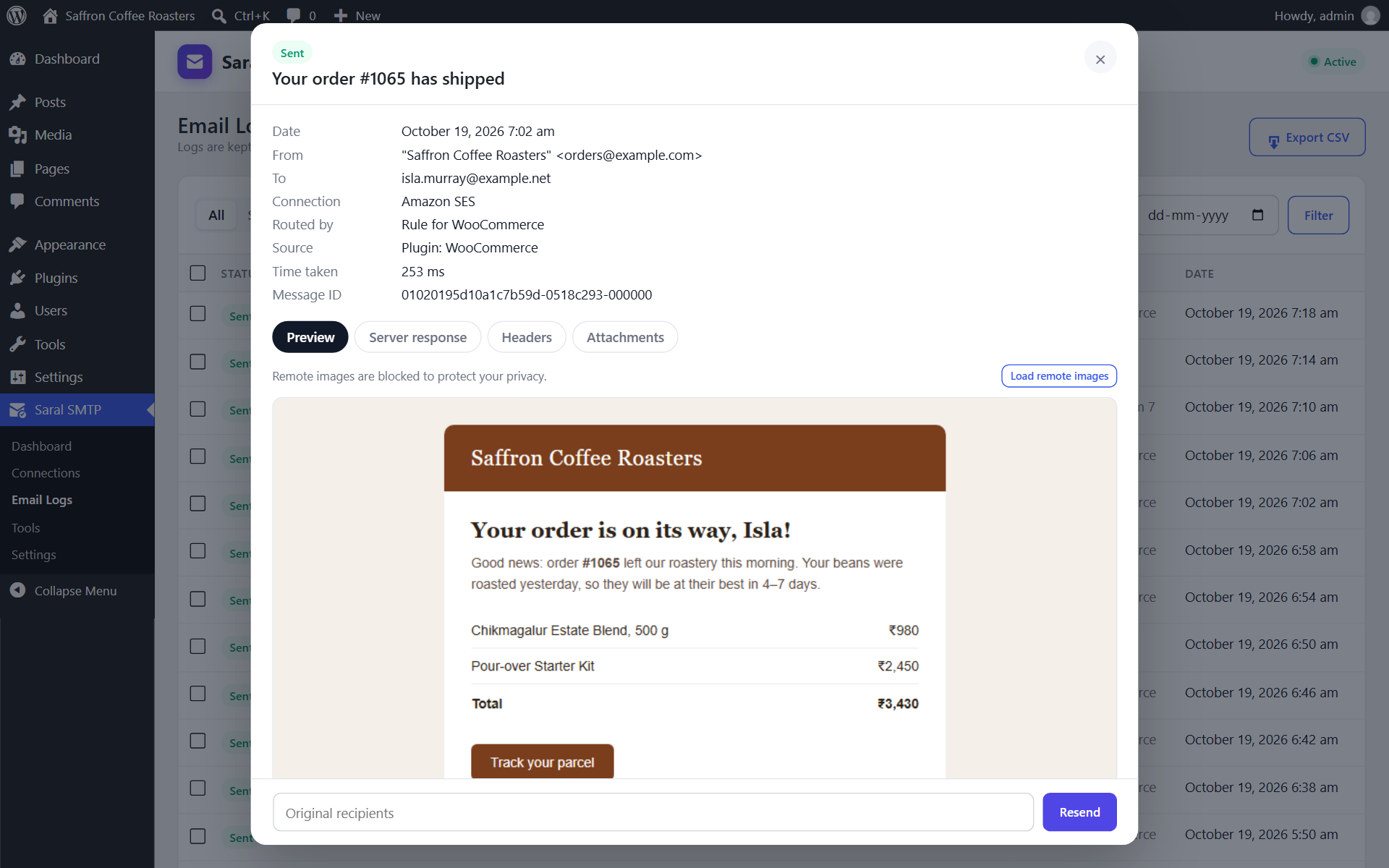
Email details with preview, why the connection was used, server response and resend.
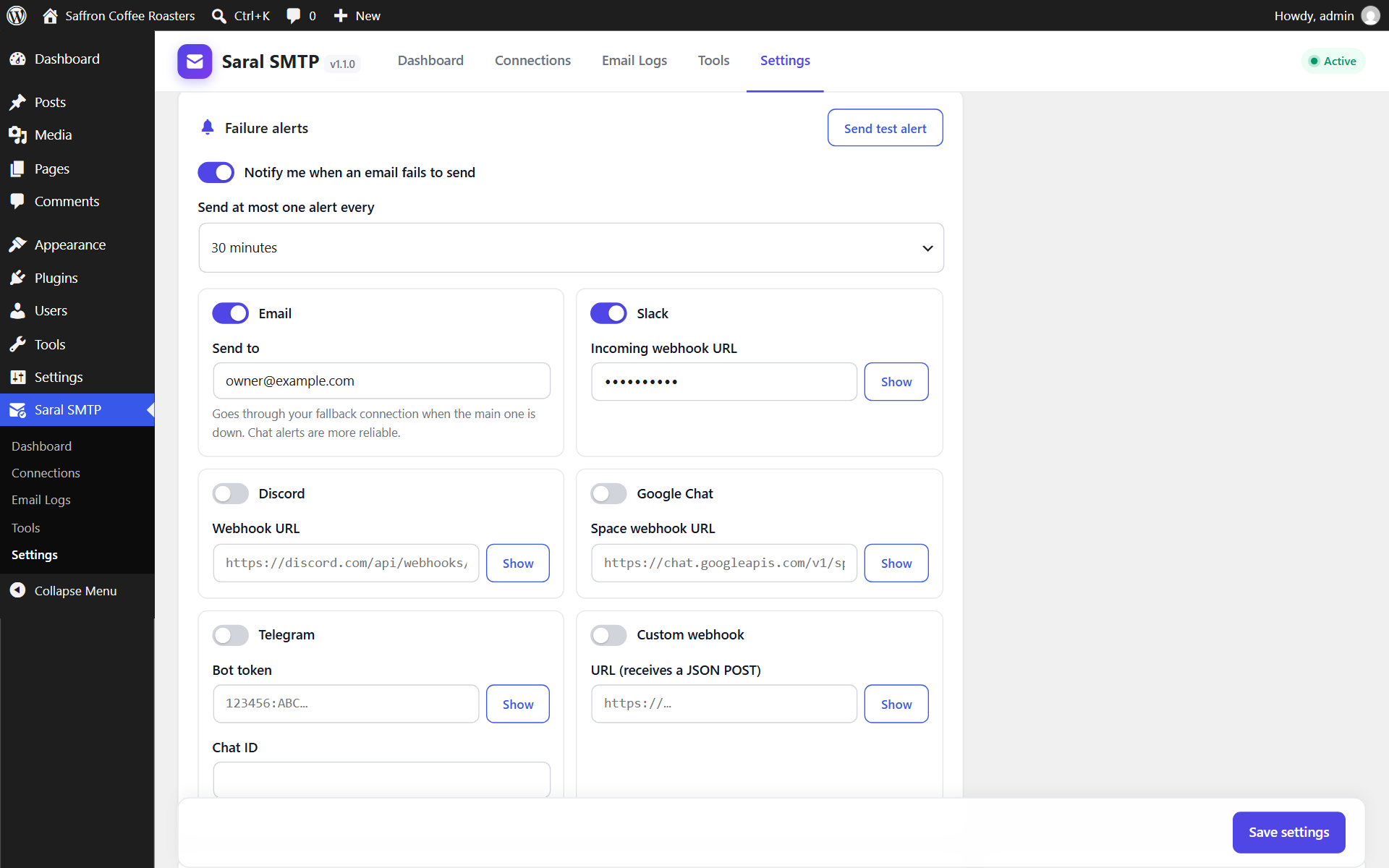
Failure alerts settings.