
Pixavif: AVIF & WebP Converter, Image Optimizer Wordpress Plugin - Rating, Reviews, Demo & Download
Plugin Description
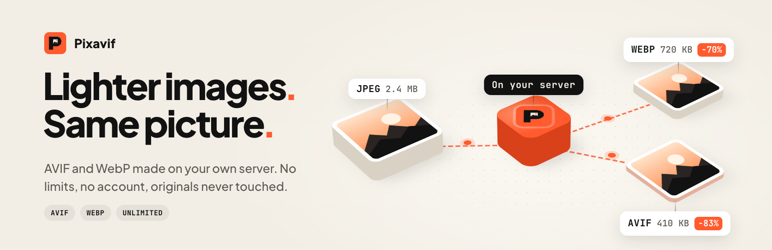
Pixavif converts your WordPress images to AVIF and WebP and serves them to every browser that supports them. The conversion runs on your own server with the image library your host already has, so there is no API key, no monthly quota and no image ever leaves your site.
AVIF and WebP files are usually 30 to 70 percent smaller than the same JPEG or PNG. Smaller images mean a faster Largest Contentful Paint (LCP), better Core Web Vitals and one less warning in PageSpeed Insights (“Serve images in next-gen formats”).
Your original files are never edited, compressed or replaced. The AVIF and WebP copies live in their own folder, and you can remove them at any time.
How it works
- Check the server. Pixavif encodes a small test image to AVIF and WebP and checks the result. If a format is missing, it tells you why and can write the email to your hosting company for you.
- Pick a quality. Smaller files, Balanced or Higher quality. A before and after slider shows the difference on one of your own photos.
- Convert. Existing images are converted in the background and new uploads are converted automatically. You can close the tab, pause, resume or cancel at any time.
Features
- Converts JPEG, PNG and GIF images to AVIF, WebP or both.
- Every image size is converted: thumbnails, medium, large, custom sizes and scaled images.
- No limits on the number of images or file size. No credits, no external service.
- Quality presets, or set your own AVIF and WebP quality.
- If a converted file would be larger than the original, it is not kept.
- Background queue with retries, a time limit per image and resume after an interruption.
- Two delivery methods: picture tags (any server, any CDN) or rewrite rules on Apache and LiteSpeed. On nginx, Pixavif gives you the config to paste.
- Whole page mode for images printed by themes and page builders. When Elementor Pro, Divi, Bricks or another theme builder is active, the Overview offers to switch it on.
- Adds missing width and height to the images it serves, so the layout does not shift while the page loads (CLS).
- Test delivery sends a real request to your site and confirms that AVIF or WebP is actually served.
- Media Library column, row actions, bulk actions and a filter by conversion status.
- Exclude images by file name pattern, by folder, or one by one.
- Site health checks: missing image library, full disk, stuck queue, files missing after a site move, low memory, another converter or a page cache. Each comes with a short fix guide.
- One click repair when converted files go missing. Visitors get the originals until then, never a broken image.
- Conversion history with search, filters and a before and after view for every image.
- Server diagnostics written in plain language, with a report you can copy for support.
- Error log of the last 200 errors with CSV export.
- WP-CLI:
wp pixavif status,convert,bulk,restoreandtest. - Multisite support. Each site has its own settings and folder.
Server requirements
Pixavif uses the same image library WordPress already uses for thumbnails. Nothing extra to install.
- WebP: PHP GD or Imagick with WebP support. Almost every host has it.
- AVIF: PHP 8.1 or newer with GD built with AVIF, or Imagick with AVIF support. Most modern hosts have it.
Not sure what your host supports? Install Pixavif and open Media Pixavif. The server check takes a few seconds and changes nothing on your site.
Your originals stay safe
Pixavif never touches your original JPEG and PNG files. Copies are stored in wp-content/uploads-pixavif. Remove the copies of one image, or all of them from Tools, and your site goes straight back to the originals.
Quiet by design
- No admin nags, upgrade banners or dashboard widgets.
- Nothing runs during the upload request. Conversion happens in the background.
- No JavaScript or CSS files on the front end. Picture tag mode adds one small inline CSS rule so the wrapper never changes your layout.
- Nothing is converted until you start it.
External services
Pixavif does not send your images or any other data to an external service. All conversions run on your own server.
“Test delivery” sends HTTP requests only to your own site, to check that converted images are served.
The plugin includes the Freemius SDK for an optional opt-in. Nothing is sent unless you choose to opt in. If you opt in, basic information about your site and WordPress setup is shared with Freemius. Freemius terms: https://freemius.com/terms/ and privacy policy: https://freemius.com/privacy/
Screenshots

Overview: savings, formats and site health after all images are converted.

Setup: the server check tests AVIF and WebP for real.

Quality presets with a before and after slider on your own photo.

Bulk conversion running in the background.

Media Library column with AVIF and WebP savings per image.

Server tab with plain language checks.


