AEO God Mode – Answer Engine Optimization, GEO, AIO & LLM SEO Wordpress Plugin - Rating, Reviews, Demo & Download

Plugin Description
AEO God Mode is the most complete Answer Engine Optimization (AEO) plugin for WordPress, built for the new generation of AI search engines: ChatGPT, Perplexity, Claude, Google AI Overviews, Gemini, Microsoft Copilot, Meta AI, DeepSeek, Apple Intelligence, and xAI Grok.
Also known as Generative Engine Optimization (GEO), Artificial Intelligence Optimization (AIO), AI SEO, LLM SEO, Generative AI Optimization (GAIO), AEOSEO, ASEO, AI Search Optimization, and ChatGPT SEO. They all describe the same shift: from optimising for search result links to optimising for AI-generated answers.
The Problem Every WordPress Site Now Has
When someone asks ChatGPT, Perplexity, Gemini, or Google’s AI Overview a question your business should be answering, your site has to be structured, accessible, and trusted by those systems.
Most WordPress sites are completely invisible to them. No llms.txt. No AI bot allowlist. No answer-shaped content. No E-E-A-T signals.
Every other SEO plugin (Yoast, Rank Math, All in One SEO, SEOPress) was built for Google search results circa 2015. AEO God Mode is built for the AI answer engine era. It runs alongside your existing SEO plugin, imports its settings on install, and adds the entire AI visibility layer they don’t cover.
Free vs Pro at a Glance
FREE FOREVER — no account required, no credit card, no SaaS lock-in:
- Decide which AI engines can use your content — allow the ones you want citing you (ChatGPT, Claude, Perplexity, etc.), block the ones you don’t. 18 AI bots supported. See screenshot 2.
- Tell AI engines what your site is about with auto-generated llms.txt — without one, AI engines often skip your site or summarise it wrong. See screenshot 9.
- Get tagged correctly by AI with auto-detected schema markup (FAQ, HowTo, Article, Product, business listing, breadcrumbs, and more) — and never duplicate what your existing SEO plugin already outputs. See screenshot 4.
- Find pages AI engines will ignore before they ignore them. Content Gap Scanner shows which pages need FAQs, schema, or answer-shaped content, with one-click fixes. See screenshot 5.
- Edit AEO inside the post editor — Gutenberg sidebar lets you fix metadata and preview AI snippets without leaving your post.
- AI-write your titles and meta descriptions in 5 different styles (free monthly credits included).
- See every AI bot that visits your site — proof that ChatGPT, Claude, and Perplexity are crawling you (or proof they’re not, so you can fix it).
- Catch broken structured data before Google or AI engines do. Schema Validator shows you red / yellow / green per page.
- Don’t duplicate what Yoast or Rank Math already does — Conflict Detector defers to your existing SEO plugin so you never get duplicate schema or fighting metadata.
- One score for AI readiness — Health Dashboard tells you at a glance whether your site is ready to be cited. Also a widget on your main WP admin home. See screenshot 1.
- Five clicks to fully set up — Setup Wizard auto-detects Yoast, Rank Math, or SEOPress and imports settings. Under 5 minutes. See screenshot 8.
PRO — unlock the metrics that prove AEO is working. Get your license at https://aeogodmode.io:
- Proof AI engines are citing you (not your competitors). Citation Tracker asks ChatGPT and Perplexity real questions about your topics every week and reports which pages got cited. Real proof, not log analysis.
- A score (0–100) telling you how citation-worthy each page is — based on what AI engines actually look for: clear answers, original data, quotable sentences, source links, author credentials, content depth, FAQs, schema. Per-page action list to raise the score.
- See revenue from AI traffic — visitors arriving from chatgpt.com, perplexity.ai, gemini.google.com, claude.ai tracked as a separate traffic source so you know your AEO is moving the business.
- Author trust signals AI engines reward — Google AI Overviews and ChatGPT cite sources with credentials, expertise, and authority. E-E-A-T Schema adds those signals to your author profiles automatically. See screenshot 6.
- Connect Google Search Console to pull AI query patterns, indexing status, impressions, and clicks straight into your AEO dashboard. Includes AI query classification and fan-out detection. See screenshot 7.
- AI tells you where to add internal links to strengthen the topic clusters AI engines use to identify expertise. Better topical authority means more citations.
- See which paragraphs of your content are citation-ready — AI engines cite specific sections, not whole pages. Section Index shows you which sections will get cited and which won’t, paragraph by paragraph.
- Fix AEO on 100s of posts in minutes — bulk-regenerate metadata, bulk-add FAQ schema, bulk-update llms.txt entries from your normal WordPress Posts and Pages screens. No clicking into each post.
- Unlimited AI metadata generation — no monthly credit cap.
- Find which pages AI bots are ignoring — Blind Spots report shows you the gaps, plus 30-day activity charts and your top-crawled pages.
Why AEO God Mode Beats Other AEO Plugins
Most AEO plugins tell you they’re optimising for AI. None of them prove it. AEO God Mode does.
-
Real citation verification (Pro). Our Citation Tracker actually queries Perplexity and ChatGPT with your site’s topics and reports whether your domain appeared. Real proof, not crawler logs.
-
Files live on YOUR site, not ours (Free). Your llms.txt, schema, and metadata are served from your domain. They are not piped through a third-party cloud or locked behind a SaaS portal.
-
Free forever. No account required (Free). The entire core AEO stack works without signing up for anything. Other AEO plugins require a SaaS account just to generate a basic llms.txt.
-
Citability Score (Pro). A per-page predictive score (0–100) for how likely AI engines will cite that page. Based on 10 signals other plugins don’t even measure.
-
Built-in E-E-A-T author schema (Pro). Proper Experience, Expertise, Authoritativeness, and Trust markup that Google AI Overviews and ChatGPT use to assess citation-worthy sources.
-
Yoast & Rank Math compatibility (Free). Auto-imports your existing SEO plugin settings on install. Never overwrites your titles, meta, or canonicals.
AI Engines Supported
AEO God Mode optimises your WordPress site to be discovered, indexed, and cited by every major AI answer engine:
- ChatGPT and ChatGPT Search (OpenAI) — GPTBot, OAI-SearchBot, ChatGPT-User
- Perplexity AI — PerplexityBot, Perplexity-User
- Claude (Anthropic) — ClaudeBot, Claude-SearchBot, Claude-User
- Google AI Overviews and Gemini — Google-Extended
- Microsoft Copilot and Bing AI — Bingbot
- Meta AI (LLaMA) — Meta-ExternalAgent
- DeepSeek — DeepSeekBot
- Apple Intelligence — Applebot-Extended
- xAI Grok and every emerging answer engine
18 AI crawler patterns recognised out of the box, kept up to date as new engines launch.
Free Features (Included Forever, No Account Required)
Setup Wizard (Free) — see screenshot 8.
Five screens, under five minutes, fully configured. Auto-detects Yoast, Rank Math, and SEOPress on install and imports your existing business info so nothing breaks. You don’t have to fill in fields you’ve already filled in elsewhere.
AI Crawler Allowlist (Free) — see screenshot 2.
Decide which AI engines can use your content. Want ChatGPT to cite you but not Meta AI? Or block everyone except Perplexity and Claude? Toggle each AI bot on or off. Supports 18 AI crawlers including OAI-SearchBot, GPTBot, ChatGPT-User, PerplexityBot, Perplexity-User, ClaudeBot, Claude-SearchBot, Claude-User, Google-Extended, Meta-ExternalAgent, Applebot-Extended, DeepSeekBot, Bytespider, CCBot, FacebookBot, cohere-ai, Anthropic-AI, and more.
Robots.txt Manager (Free).
Without proper Allow / Disallow rules in robots.txt, some AI engines skip your site by default — meaning you’re invisible to ChatGPT and Perplexity even if your content is brilliant. AEO God Mode generates the rules these engines actually look for, so they find you.
AI HTTP Headers (Free).
Some AI engines respect HTTP headers but ignore robots.txt. This catches them. Adds the right X-Robots-Tag and AI preference signals at the server level so AI bots get a consistent answer no matter how they ask.
llms.txt Generator (Free) — see screenshot 9.
llms.txt is the file AI engines read first to understand what your site is about and which pages matter most. Without it, AI engines often skip your site or summarise it wrong. AEO God Mode auto-generates yours, keeps it in sync every time you publish, and gives you an editable context box to add the things only you know about your business.
Schema Engine (Free) — see screenshot 4.
Schema markup is how AI engines and Google identify what type of content each page is — an article, a product, a FAQ, a recipe, a business listing. Without it, your content reads to AI as generic text. With it, AI knows exactly what to do with each page. AEO God Mode auto-detects the right schema type per page and adds it for you: FAQPage, HowTo, Article, BreadcrumbList, WebSite, Product, Organization, LocalBusiness, and opt-in Speakable (for voice search and AI assistants). WooCommerce and Easy Digital Downloads (EDD) products supported.
Schema Conflict Detector (Free).
Already running Yoast, Rank Math, SEOPress, or All in One SEO? They probably output some schema too. Duplicate or fighting schema confuses AI engines and can get pages ignored. The Conflict Detector scans what’s already there and only adds what’s missing — never duplicates.
Schema Validator (Free).
Catches errors in your structured data before AI engines and Google do. Bad schema gets your pages ignored or penalised. AEO God Mode shows you green / yellow / red per page so you know what’s working, what’s risky, and what’s broken. No more switching to external validator tools.
Content Gap Scanner (Free) — see screenshot 5.
Finds the pages on your site that aren’t ready for AI engines yet — missing FAQ sections, no answer-shaped content, no schema, weak metadata. Gives you a prioritised to-do list with one-click fixes for the easy stuff (FAQ preview and undo included). Stop guessing which pages need work.
Editor Panel (Free).
Edit AEO settings for each post without leaving the Gutenberg editor. Add FAQ blocks, fix metadata, preview how AI engines will see the page — all in a sidebar where you write. No more bouncing between the editor and a separate SEO settings screen.
AI Metadata Generator (Free, limited credits).
Writes AI-optimised page titles and meta descriptions for you in 5 different styles: descriptive, benefit-led, question-led, conversational, and technical. Pick the one that fits each page. Free tier includes a monthly credit allowance. Pro removes the cap.
AI Crawler Log (Free).
See every time an AI bot visits your site — what page it crawled, when, how often. Proves ChatGPT, Claude, and Perplexity are actually finding your content (or shows you they’re not, so you can fix it). Pro adds 30-day activity charts, Top Crawled Pages, and Blind Spots reports.
AEO Health Dashboard (Free) — see screenshot 1.
One score that tells you whether your site is ready for AI engines. Updates every time you publish or change a setting. Also lives as a widget on your main WordPress dashboard so you see it the moment you log in, without clicking into the AEO menu.
Yoast / Rank Math / SEOPress Compatibility (Free).
Already using Yoast or Rank Math? Keep them. AEO God Mode runs alongside without conflict. It only adds what they don’t already do — never overwrites your titles, meta descriptions, canonicals, or sitemaps. You don’t have to choose.
Pro Features
Get Pro at https://aeogodmode.io to unlock the metrics, automation, and authority signals that prove your AEO is actually working.
Citation Tracker (Pro) — see screenshot 3.
Did ChatGPT or Perplexity cite your site this week? Or your competitor’s? Citation Tracker asks them real questions about your topics every week and reports back: which pages got cited, by which engine, how often, and which competitors are showing up instead of you. This is the only metric that actually matters for AEO, and the only AEO plugin on WordPress that measures it directly.
Citability Score (Pro).
A score from 0 to 100 for every page on your site predicting how likely AI engines are to cite it. Based on the 10 signals AI engines actually look for: clear direct answers, definitive claims, original data, heading clarity, quotable sentences, source links, author credentials, content depth, FAQ presence, and schema coverage. Each page gets an action list telling you exactly what to fix to raise the score. Stop guessing what AI engines want.
AI Referral Traffic Analytics (Pro).
See the real business impact of being cited by AI. Tracks visitors arriving from chatgpt.com, perplexity.ai, gemini.google.com, claude.ai, and other AI tools as a separate traffic source — separate from Google Organic. Now you can tell your boss (or yourself) how much revenue is coming from AI citations, not just guess.
E-E-A-T Schema Enrichment (Pro) — see screenshot 6.
Google AI Overviews and ChatGPT decide who to trust and cite based on Experience, Expertise, Authoritativeness, and Trustworthiness signals. They look at author credentials, job titles, education, and proven expertise. E-E-A-T Schema adds proper author markup with all of those fields, with per-field display toggles and live preview. Without this, AI engines treat your authors as anonymous voices. With it, they treat them as cite-worthy experts.
Google Search Console Integration (Pro) — see screenshot 7.
Connect GSC and pull AI query patterns, indexing status, impressions, and clicks per page straight into your AEO dashboard. Includes AI query classification (which of your queries are getting AI Overviews) and fan-out detection (which queries are being broken into sub-queries by Google’s AI). See which pages Google has indexed and which AI bots are crawling them — side by side, in one place.
Internal Link Builder (Pro).
AI engines decide whether to cite you partly based on how clearly your site demonstrates expertise on a topic — which they measure by looking at your internal link structure. Internal Link Builder reads your post, scans the rest of your site, and tells you exactly where to add internal links to strengthen your topic clusters. The result: stronger topical authority, more AI citations.
Section Index (Pro).
When ChatGPT or Perplexity cites a source, they almost always quote one specific paragraph or section, not the whole page. Section Index analyses your content section by section (every H2 and H3 heading) so you can see which sections are citation-ready, which sections AI engines are likely to skip entirely, and which ones need rewriting to become quote-worthy. Fix the gaps before AI engines see them.
Bulk Actions (Pro).
Fix AEO across hundreds of posts in minutes. Right inside your standard WordPress Posts and Pages screens, select multiple posts and apply AEO improvements in one click — regenerate metadata, add FAQ schema, refresh llms.txt entries, run schema validation. No more editing posts one at a time. Especially useful for sites with 50+ pages catching up on AEO.
Unlimited AI Metadata Generation (Pro).
No monthly credit cap on AI title and description generation. Regenerate as many pages as you need, as often as you need. Useful when launching new sections, after major content updates, or when A / B testing meta descriptions …
Screenshots
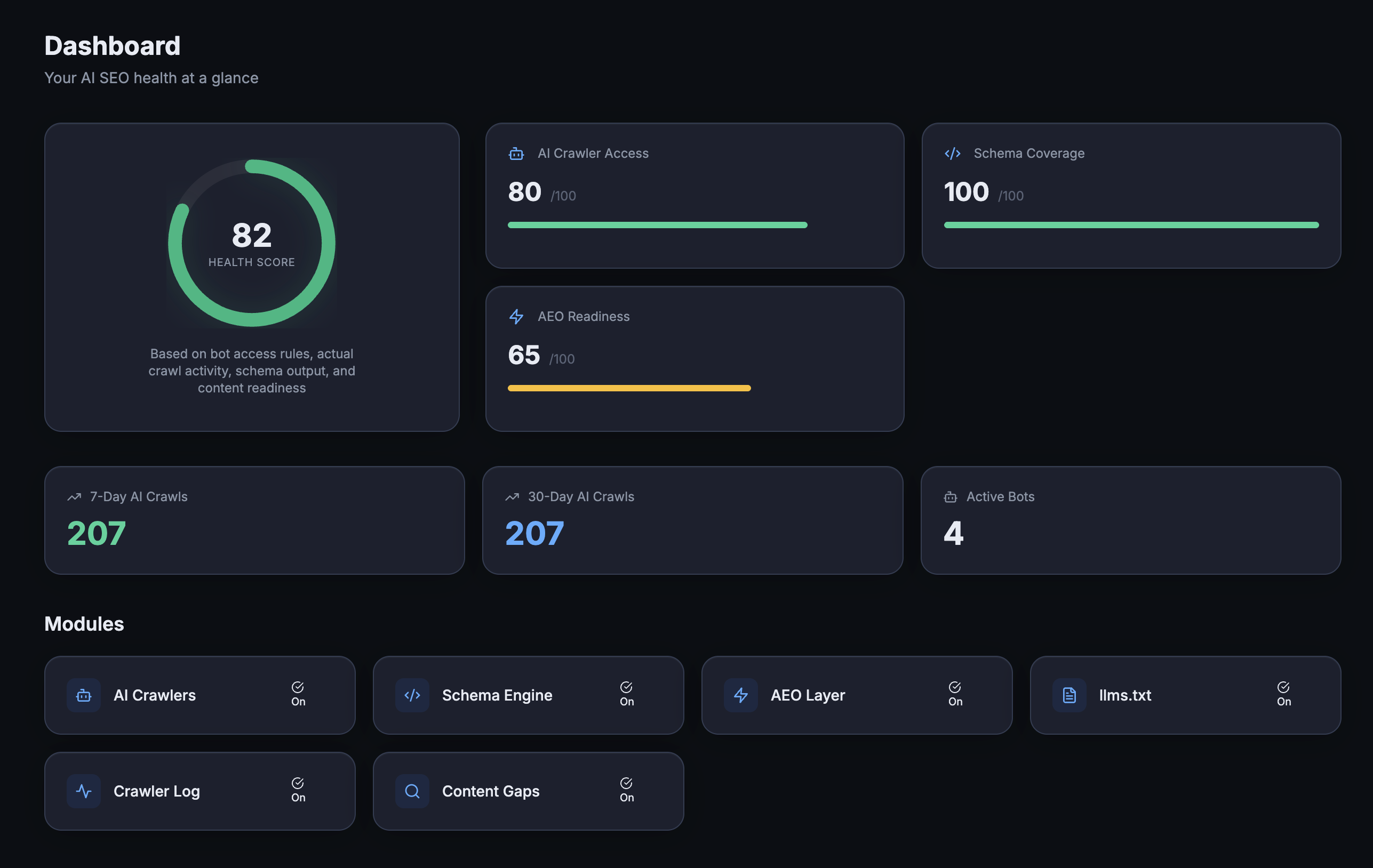
Dashboard — AEO health score, AI crawler access, schema coverage, and module status at a glance
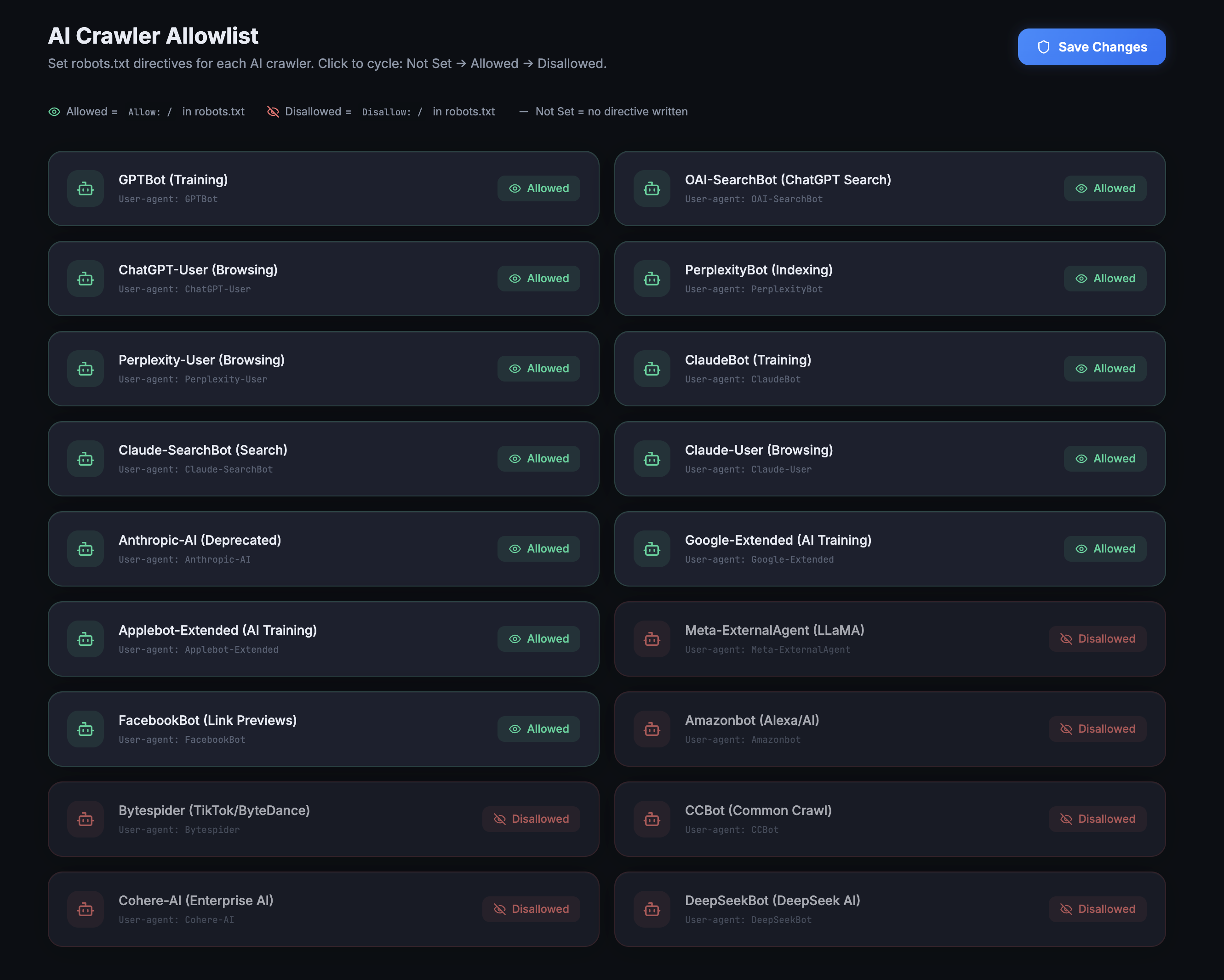
AI Crawler Allowlist — control which 18 AI bots (ChatGPT, Claude, Perplexity, Gemini, Meta AI, and more) can use your content for training and citations
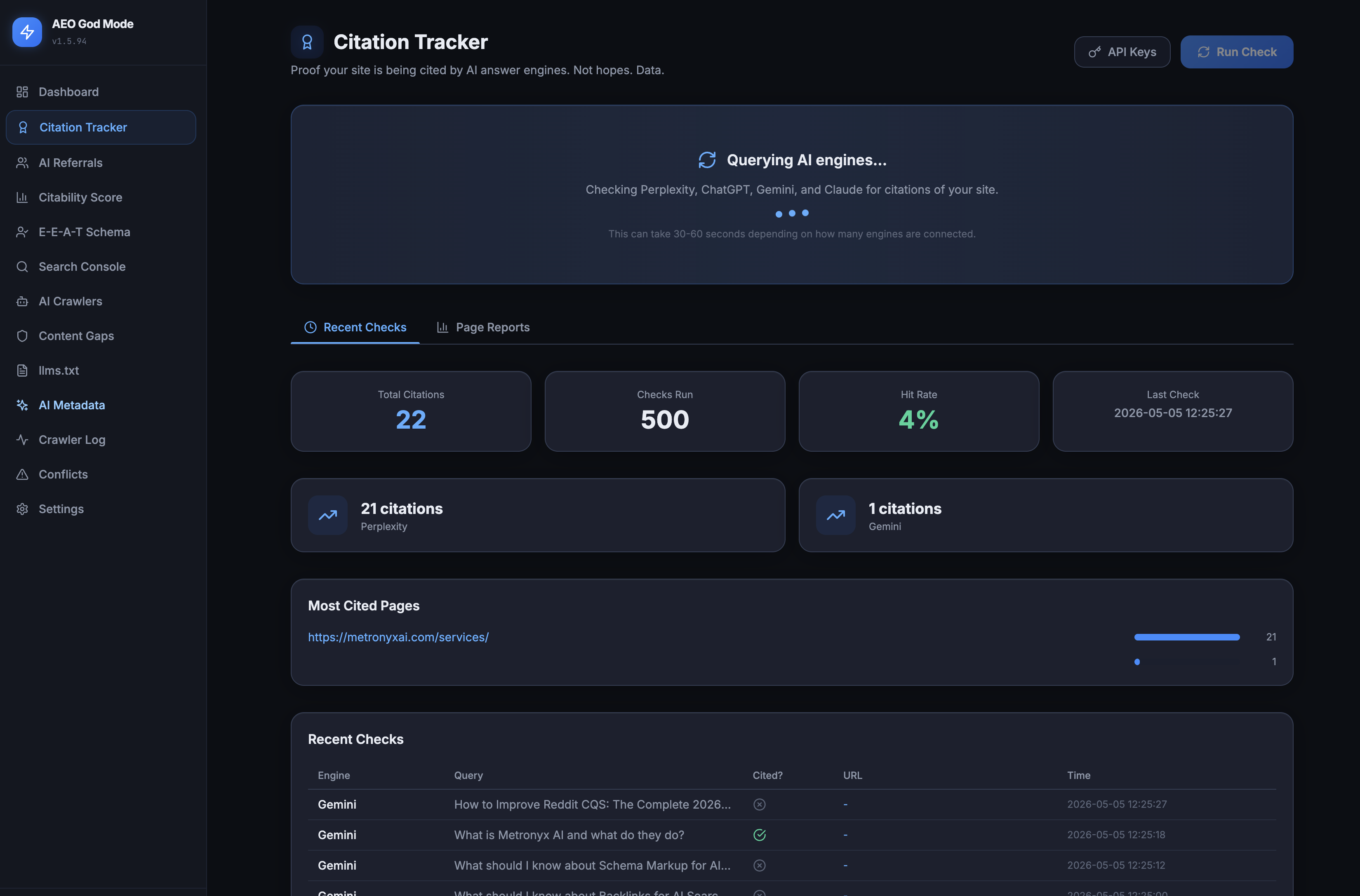
Citation Tracker (Pro) — proof your site is being cited by AI engines. Real citation counts from Perplexity, ChatGPT, Gemini, and Claude — plus your most-cited pages and recent check log
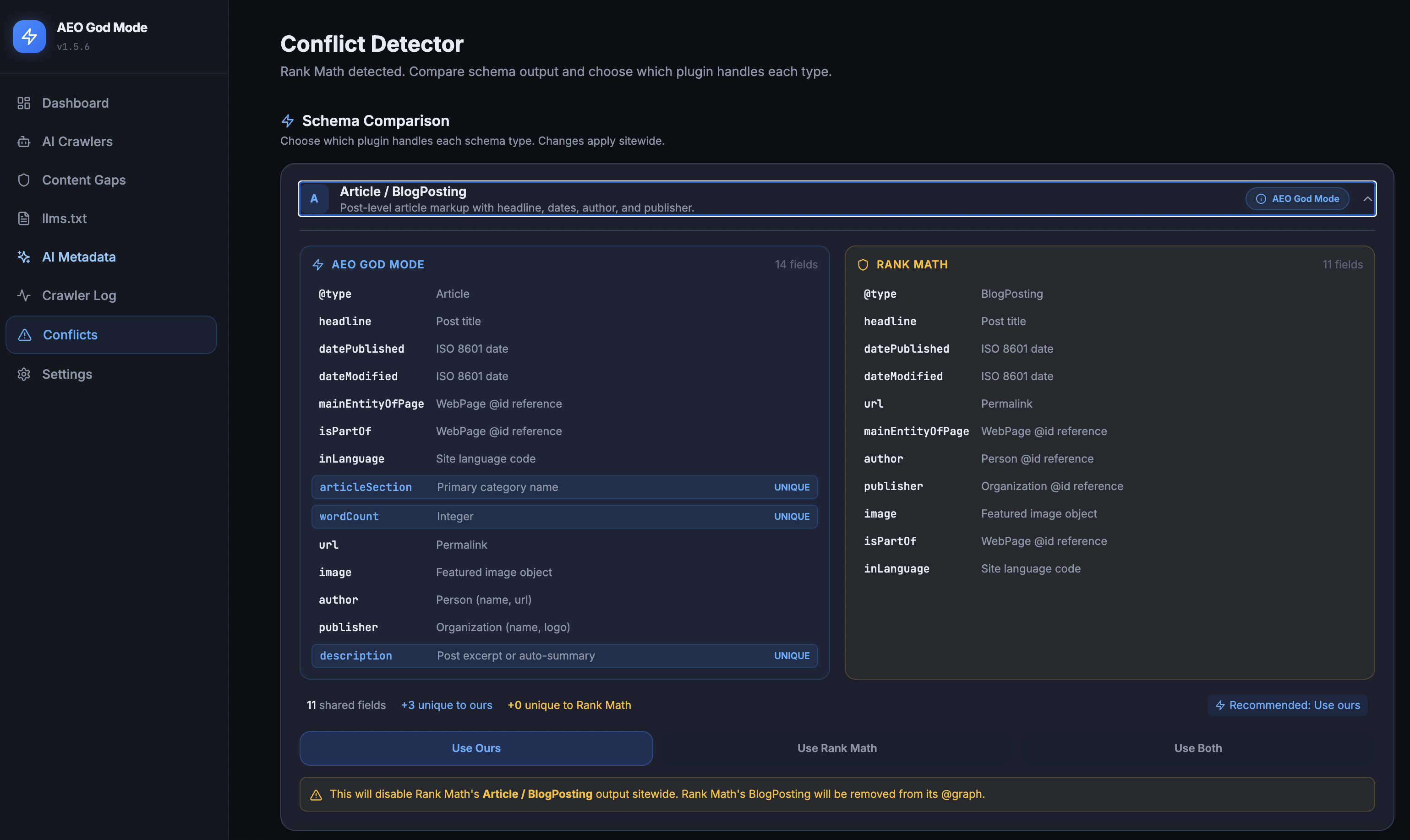
Schema Conflict Manager — never duplicate schema with Yoast, Rank Math, or SEOPress. Compare what each plugin outputs and choose which one wins, field by field
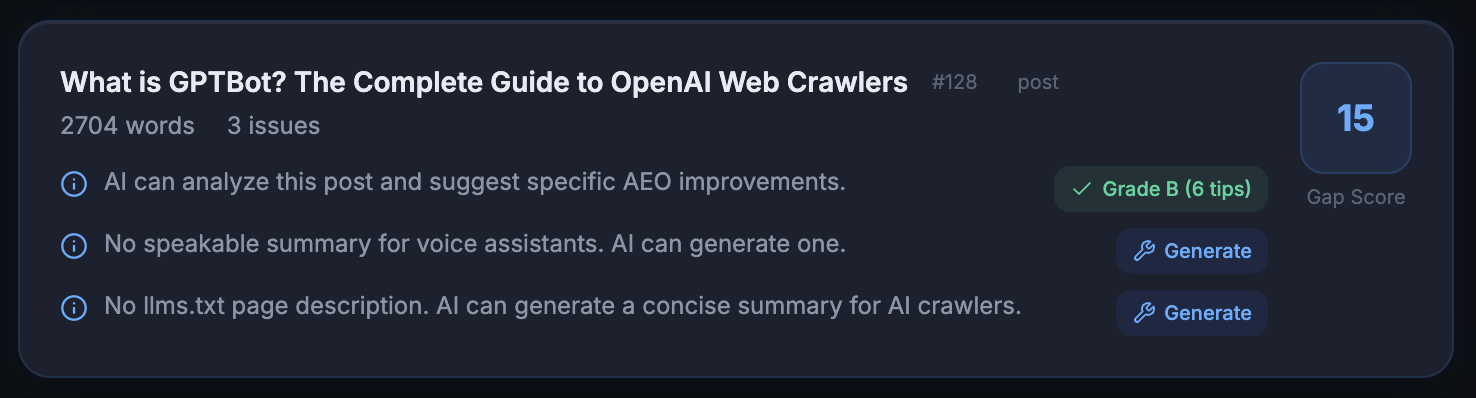
Content Gap Scanner — per-post AEO grade with one-click “Generate” buttons for missing speakable summaries, llms.txt entries, and schema markup
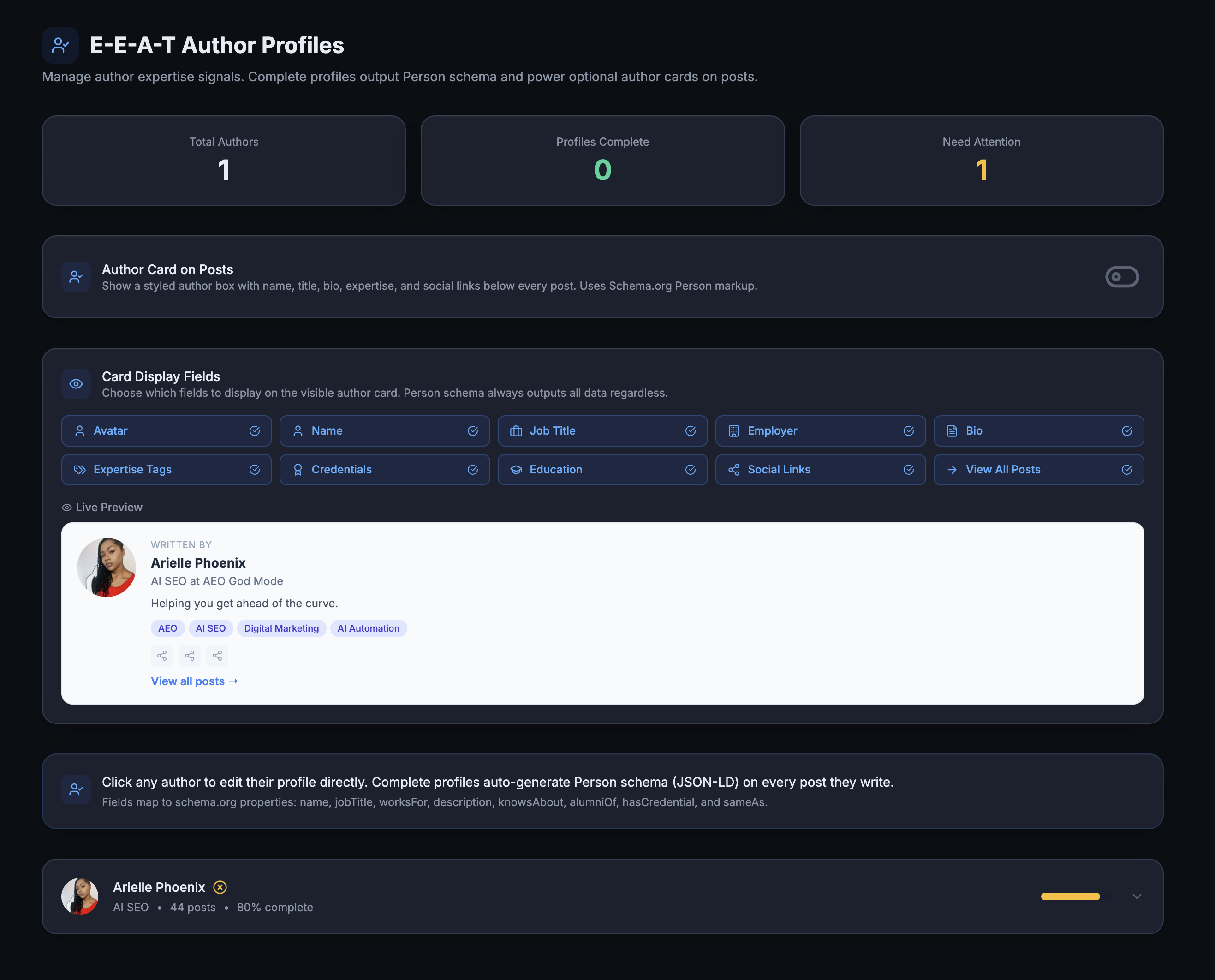
E-E-A-T Author Schema (Pro) — credentials, expertise tags, education, and live preview of the author card AI engines see
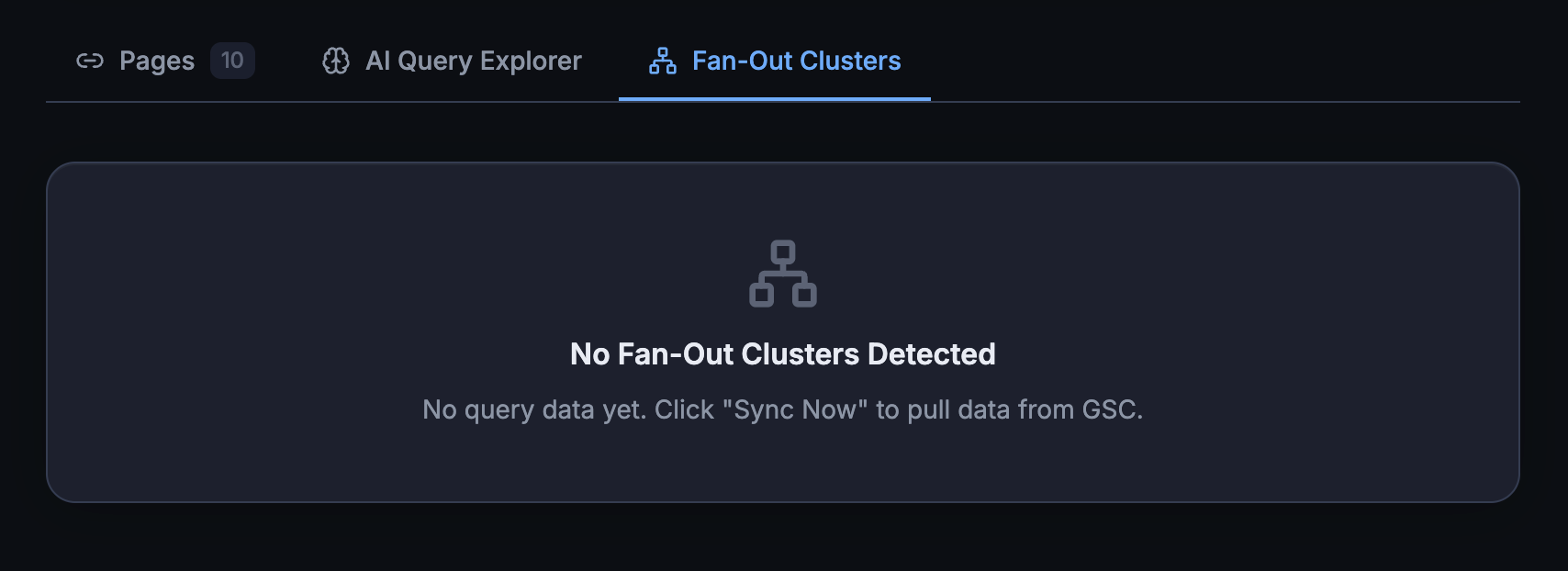
Google Search Console (Pro) — indexing status, AI Query Explorer, and Fan-Out Cluster detection inside your AEO dashboard
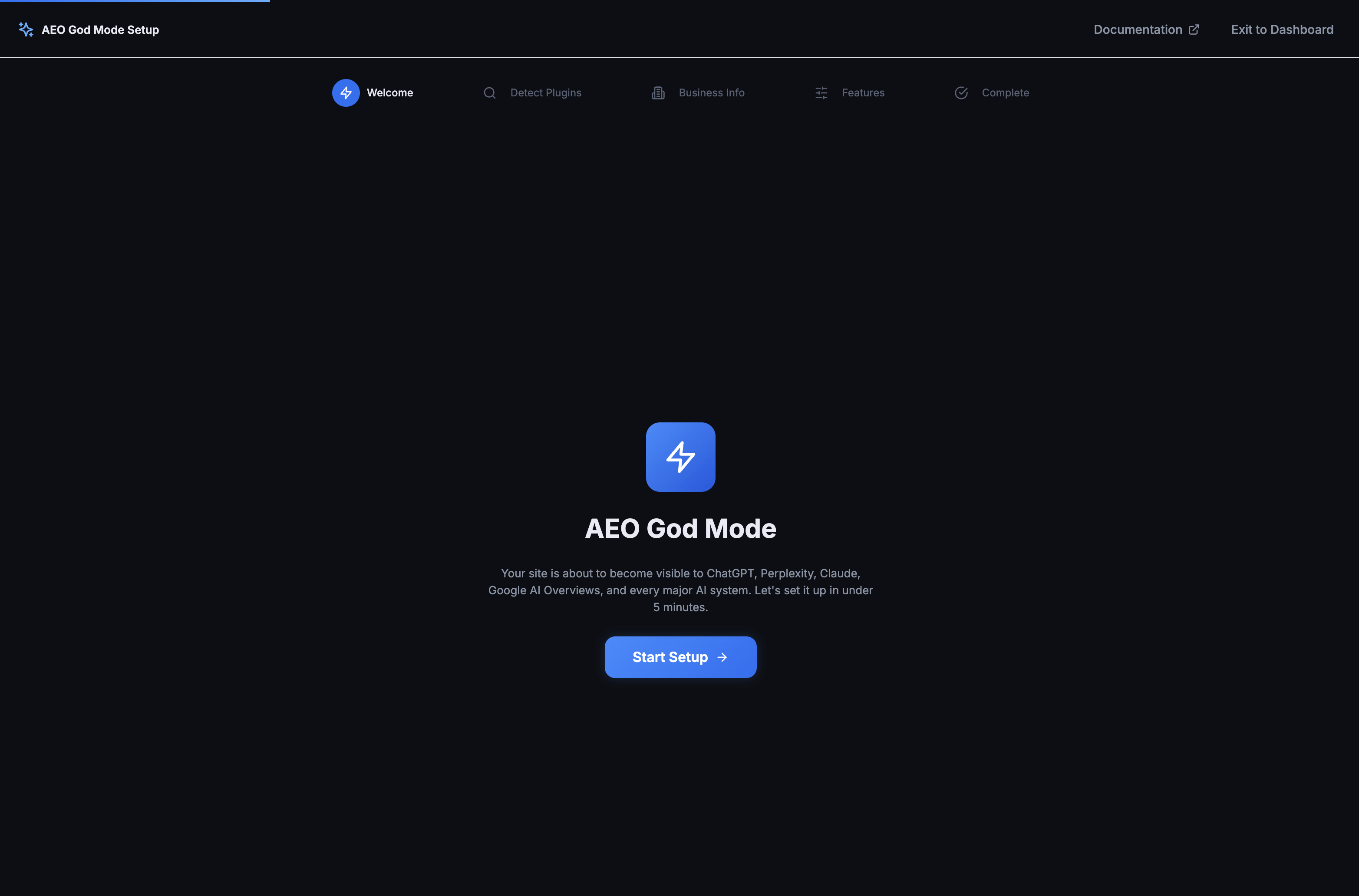
Setup Wizard — under 5 minutes from install to fully configured, with auto-import from Yoast and Rank Math
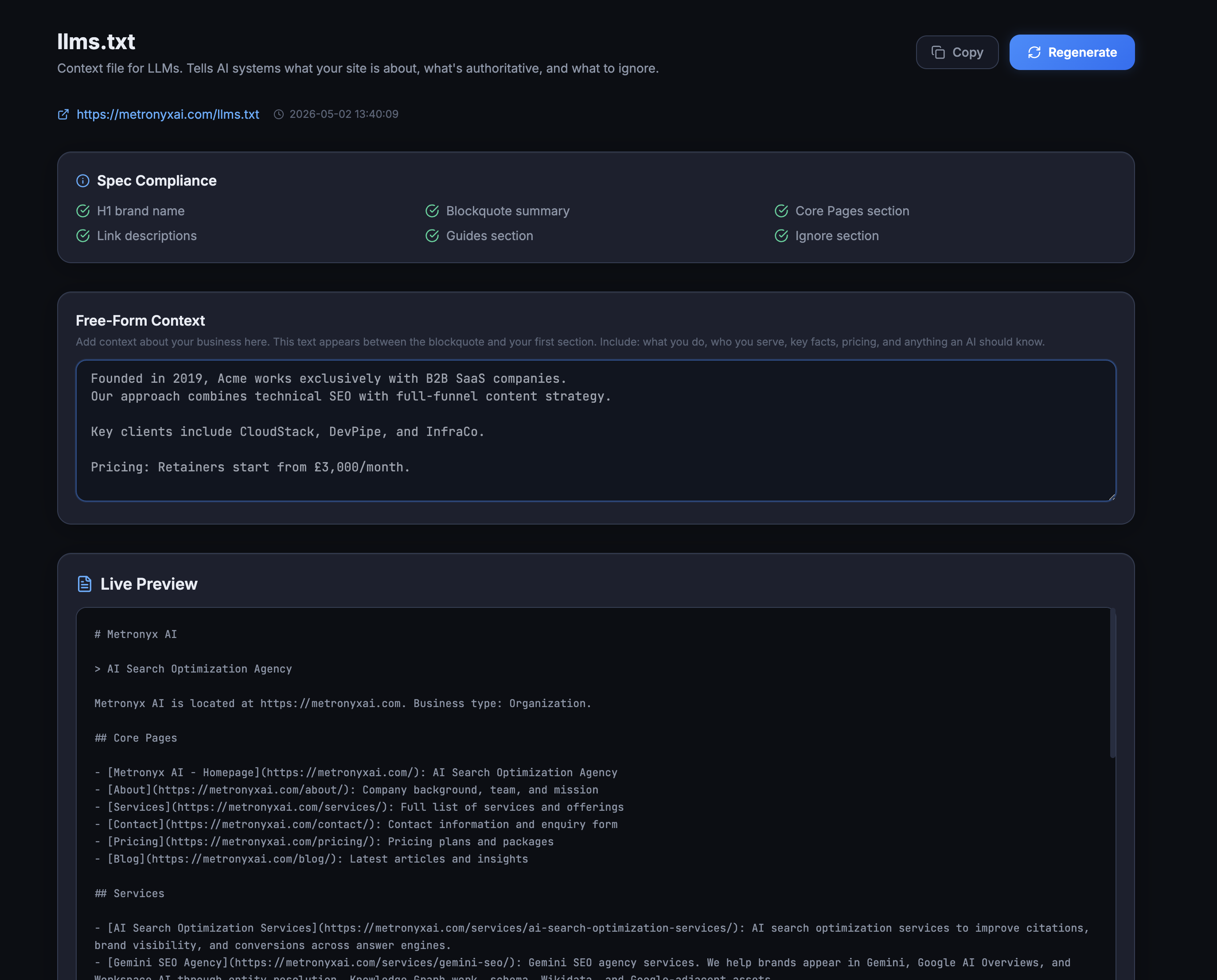
llms.txt Generator — auto-generated machine-readable summary AI engines read first to understand your site, with editable site context