Agent Toolbelt – Safe Site Operations For AI Agents Wordpress Plugin - Rating, Reviews, Demo & Download

Plugin Description
AI agents can now operate WordPress sites — through the WordPress Abilities API, MCP, and WP-CLI. That’s powerful, and it’s also exactly how a confused or manipulated agent breaks a site.
Agent Toolbelt gives your agent a small set of maintenance operations it can use safely: every operation can be previewed without changing anything, the dangerous one requires an explicit look-then-act confirmation, everything is recorded in an audit log you can read later, and the riskiest ability is off until you personally turn it on.
The abilities
- Site status (read-only) — WordPress/PHP/database versions, environment, active theme, plugin counts, pending updates, the latest Site Health summary, and which toolbelt abilities are enabled. The agent’s natural first call.
- Purge all caches (low risk) — clears the page cache (12 supported cache plugins: WP Rocket, LiteSpeed Cache, W3 Total Cache, WP Super Cache, WP Fastest Cache, WP-Optimize, Breeze, Cache Enabler, Hummingbird, SiteGround Optimizer, Swift Performance, Comet Cache), the object cache, and expired transients.
- Flush rewrite rules (low risk) — fixes pretty permalinks returning 404 after plugins or post types change.
- Maintenance mode (medium risk) — turns the visitor-facing maintenance page on or off. It always auto-expires (5 minutes by default, 60 max): even if the agent forgets to turn it off, your site can never stay locked. Logged-in administrators keep seeing the normal site, and the REST API and wp-admin stay reachable the whole time.
- Read audit log (read-only) — what ran, when, by which caller, and the result. Lets the agent (or you) review and explain past actions.
- Update plugin (high risk, disabled by default) — updates one plugin with a safety net; see below.
Safe plugin updates with automatic rollback
The flagship ability. When you enable it, an agent can update a plugin like this — and only like this:
- Dry-run first (forced). The ability defaults to preview mode: it reports the installed and available versions and returns a one-time confirm token. Nothing changes.
- Confirm to execute. The real update requires that token back. It is bound to the exact plugin, the exact user, and expires in 15 minutes. A single injected prompt cannot one-shot an update — the agent must look, then act.
- Backup, update, health check. The update runs on WordPress core’s own upgrader, which keeps a temporary backup of the current version. Afterwards the plugin checks that your site still responds: it fetches the home page and the REST API as an anonymous visitor and scans for fatal errors.
- Automatic rollback. If the site broke, the previous version is restored automatically — and the audit log records
rolled_backso everyone knows what happened.
The ability refuses to update Agent Toolbelt itself, refuses single-file plugins (WordPress core cannot back them up, so the rollback promise can’t be kept), refuses when no update is available, and refuses on multisite.
Built for the prompt-injection era
The canonical agent-security failure is indirect prompt injection: malicious content on a page tricks your own agent into calling destructive tools (see OWASP LLM Top 10, LLM01). No plugin can make a gullible agent smart — what it can do is shrink the blast radius:
- Non-destructive by default. Read-only and low-risk operations only, until you opt in to more.
- Dry-run everywhere. Every mutating ability accepts a preview mode; the high-risk one defaults to it.
- Look-then-act confirmation for the destructive ability — one-time, input-bound, expiring tokens.
- Least privilege. Every call requires a logged-in user with
manage_options; plugin updates additionally requireupdate_plugins. Anonymous callers can’t even see the abilities. - Disabled means invisible. An ability you turn off is not registered at all — agents don’t see a “forbidden” tool, they see no tool.
- Everything audited. Each execution writes who called (REST, WP-CLI, admin), as what user, with what input digest, and the result — kept 90 days, capped at 2,000 rows.
- Kill switch. Add
define( 'AGENT_TOOLBELT_DISABLED', true );towp-config.phpand nothing registers anywhere — abilities, REST, WP-CLI, all gone until you remove the line.
Connect your AI agent
The abilities are standard WordPress Abilities, so anything that speaks the Abilities API can use them. The fastest path, with no extra plugins, is the WordPress REST API:
- Create an application password for an administrator (Users Profile Application Passwords).
-
List the available abilities:
curl -u “admin:APP_PASSWORD” https://example.com/wp-json/wp-abilities/v1/abilities
-
Run one. Read-only abilities use GET:
curl -u “admin:APP_PASSWORD” “https://example.com/wp-json/wp-abilities/v1/abilities/agent-toolbelt/site-status/run”
Mutating abilities use POST with an input object:
curl -u "admin:APP_PASSWORD" -X POST -H "Content-Type: application/json" -d '{"input":{"dry_run":true}}' https://example.com/wp-json/wp-abilities/v1/abilities/agent-toolbelt/purge-all-caches/run
Give those three lines to your agent (Claude, ChatGPT, or any tool-calling model) as its instructions for operating the site — the ability descriptions and JSON schemas tell it the rest.
Using MCP? Any MCP bridge that exposes WordPress Abilities will automatically expose exactly the abilities you enabled here — nothing else. (The official WordPress ai plugin lists MCP support as upcoming; several community MCP plugins already bridge the Abilities API.)
WP-CLI
The same operations, same guardrails, for deploy scripts and humans:
wp agent-toolbelt list— abilities with risk level and enabled state.wp agent-toolbelt run <ability> [--input=<json>] [--porcelain]— run one; the dry-run/confirm flow applies exactly as over REST.wp agent-toolbelt log [--limit=20] [--ability=<slug>]— read the audit log.
Good to know
- On sites with a static page cache, visitors may keep seeing cached pages while maintenance mode is on — purge the page cache first (the agent can call purge-all-caches) if the maintenance page must be visible immediately.
- The only HTTP requests the plugin ever makes are the post-update health checks — to your own site. Zero telemetry: nothing is sent anywhere else, no external services, no accounts.
- Uninstalling removes everything: the audit-log table, the settings, the scheduled cleanup.
Screenshots

The ability checklist with risk badges — enable exactly what your agent may do.

The audit log — every operation with caller, user, input digest and result.
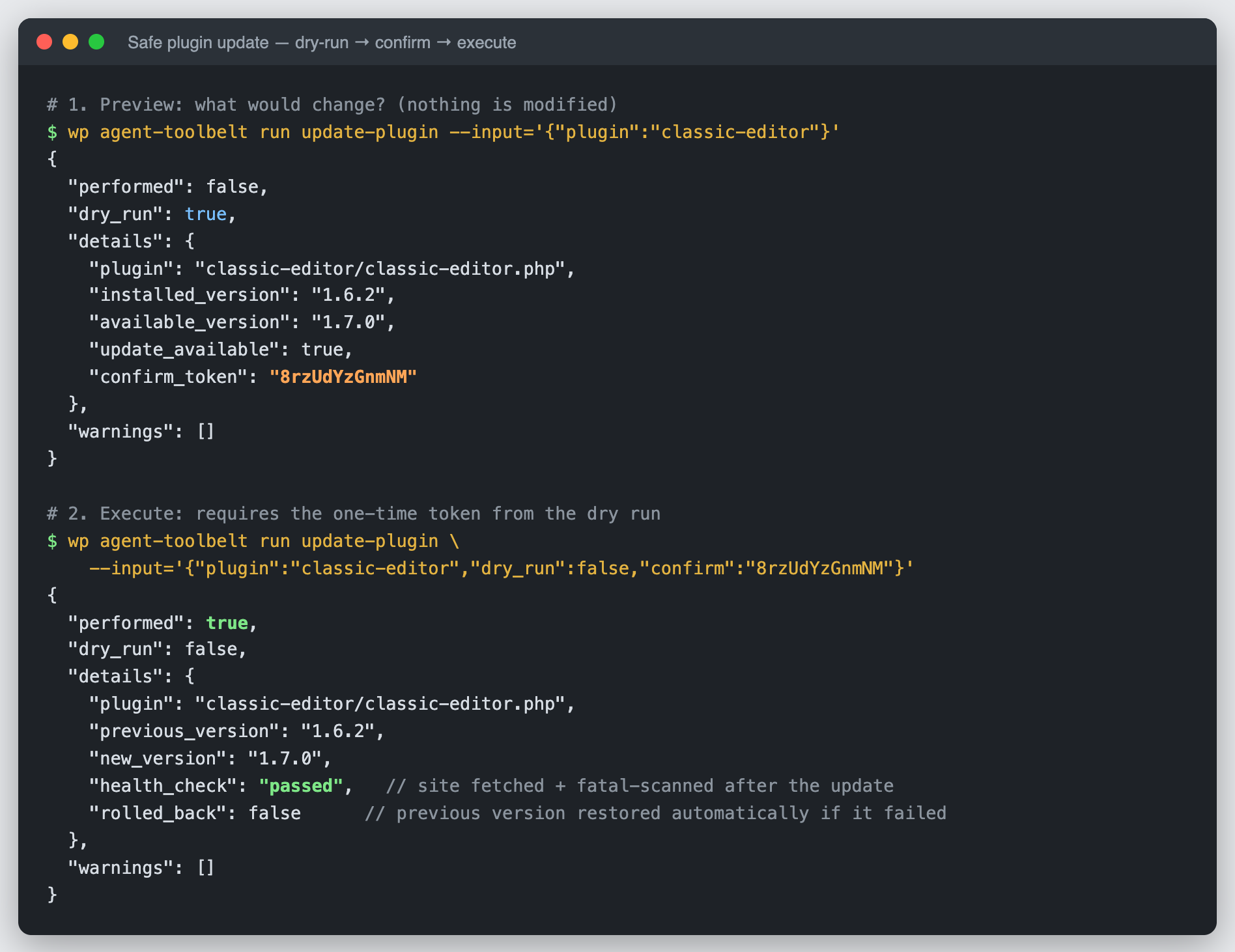
A dry-run → confirm-token → execute round-trip for a safe plugin update.