
AriAccess – Accessibility Checker, Fixes & Display Panel Wordpress Plugin - Rating, Reviews, Demo & Download

Plugin Description
AriAccess helps you make your WordPress site work for everyone: people who use a screen reader, a keyboard, a magnifier, or who have dyslexia, low vision or a sensitivity to motion.
It does this the honest way. No plugin can make a site “compliant” on its own, and AriAccess never claims to. Automated checks find roughly a third of accessibility problems. AriAccess finds what can be found automatically and shows you exactly where each problem is and how to fix it at the source. It fixes what can be fixed safely in code and helps you write an accessibility statement.
Content checker
- Checks every post and page when you save it, or the whole site in one click.
- 26 checks, including missing or poor alt text, empty and vague links (“click here”, “les mer”, “läs mer”, “lue lisää”), skipped and empty headings, tables without headers, frames without titles, autoplaying media, missing captions, unlabelled form fields, nameless buttons, duplicate ids and positive tabindex.
- Colour contrast inside your content, including block colours from your theme’s palette.
- Each issue is mapped to its WCAG success criterion and marked as required or good practice for the standard you choose:
- Norway, private sector (35 WCAG 2.0 criteria)
- Norway, public sector (47 WCAG 2.1 criteria)
- WCAG 2.1 AA / EN 301 549 (EU)
- WCAG 2.2 AA
- Results in the editor sidebar, a column in your post lists and a site-wide report. Dismiss issues you have checked by hand.
Page checker
- “Check accessibility” in the admin bar runs axe-core, the open-source engine used by accessibility professionals, on the live page in your own browser.
- Sees what a content check cannot: menus, headers, footers, theme colours, landmarks.
- Highlights each problem on the page and saves a summary to your report.
- Nothing is sent to any outside service.
Fixes
Code-level repairs for common theme and plugin gaps, each one switchable:
- Skip-to-content link (only if your theme has none)
- Clear keyboard focus outline
- Pinch zoom allowed on phones
- “Opens in a new tab” warnings, or same-tab links
- Post titles added to “Read more” links for screen readers
- Accessible names for unlabelled search and form fields
- Media Library alt text used where older posts have none
- Positive tabindex removed
- Page language and direction added if missing
- Empty searches explained
- Redundant title attributes removed
- Optional: underlined links, respect for “reduce motion”
Display panel for visitors
A panel visitors can use to adjust the site for themselves: text size, line and letter spacing, a readable font (Atkinson Hyperlegible), a dyslexia-friendly font (OpenDyslexic), left-aligned text, dark and light high contrast, greyscale, soft colours, highlighted links and headings, stopped animations (including GIFs and videos), hidden images, big cursor, reading guide, reading mask, strong focus outline and read-aloud on click. Five quick profiles combine these.
- Built to be used with a keyboard and screen readers: real buttons,
aria-pressedstates, Escape to close, focus returned, announcements for changes. - Tested with axe-core: the panel itself has no violations, in light and dark mode.
- Choices are stored only in the visitor’s browser. No cookies, no tracking, no requests to other servers. Fonts are bundled.
- Norwegian (bokmål and nynorsk), Swedish, Danish and Finnish translations of all visitor-facing text are being added through translate.wordpress.org.
- Place your own button anywhere with
[ariaccess_button].
Accessibility statement
Answer a few questions and AriAccess writes your accessibility statement in Norwegian or English as a normal page you can edit. The statement includes known problems, a contact address, reply time and how to complain to Uutilsynet. Public bodies can link their uustatus.no statement. The display panel links the statement and a “Report a problem” email.
Alt text manager
See every Media Library image without alt text and fill them in on one screen. A “Missing alt text” filter is added to the Media Library.
Privacy
AriAccess sets no cookies, collects no visitor data and makes no external requests. Check results are stored in your own database.
Third-party code
- axe-core 4.14.0 by Deque Systems, MPL-2.0, used for the page check (loaded only for logged-in editors). Source: https://github.com/dequelabs/axe-core
- Atkinson Hyperlegible by the Braille Institute, SIL Open Font License 1.1. Source: https://github.com/googlefonts/atkinson-hyperlegible
- OpenDyslexic by Abbie Gonzalez, SIL Open Font License 1.1. Source: https://github.com/antijingoist/opendyslexic
All are bundled with the plugin. AriAccess makes no requests to external services.
Screenshots

Overview: content problems, page checks, images without alt text and the statement status in one place.

Content issues, each mapped to WCAG and marked as required by the standard you chose, with where it is and how to fix it.
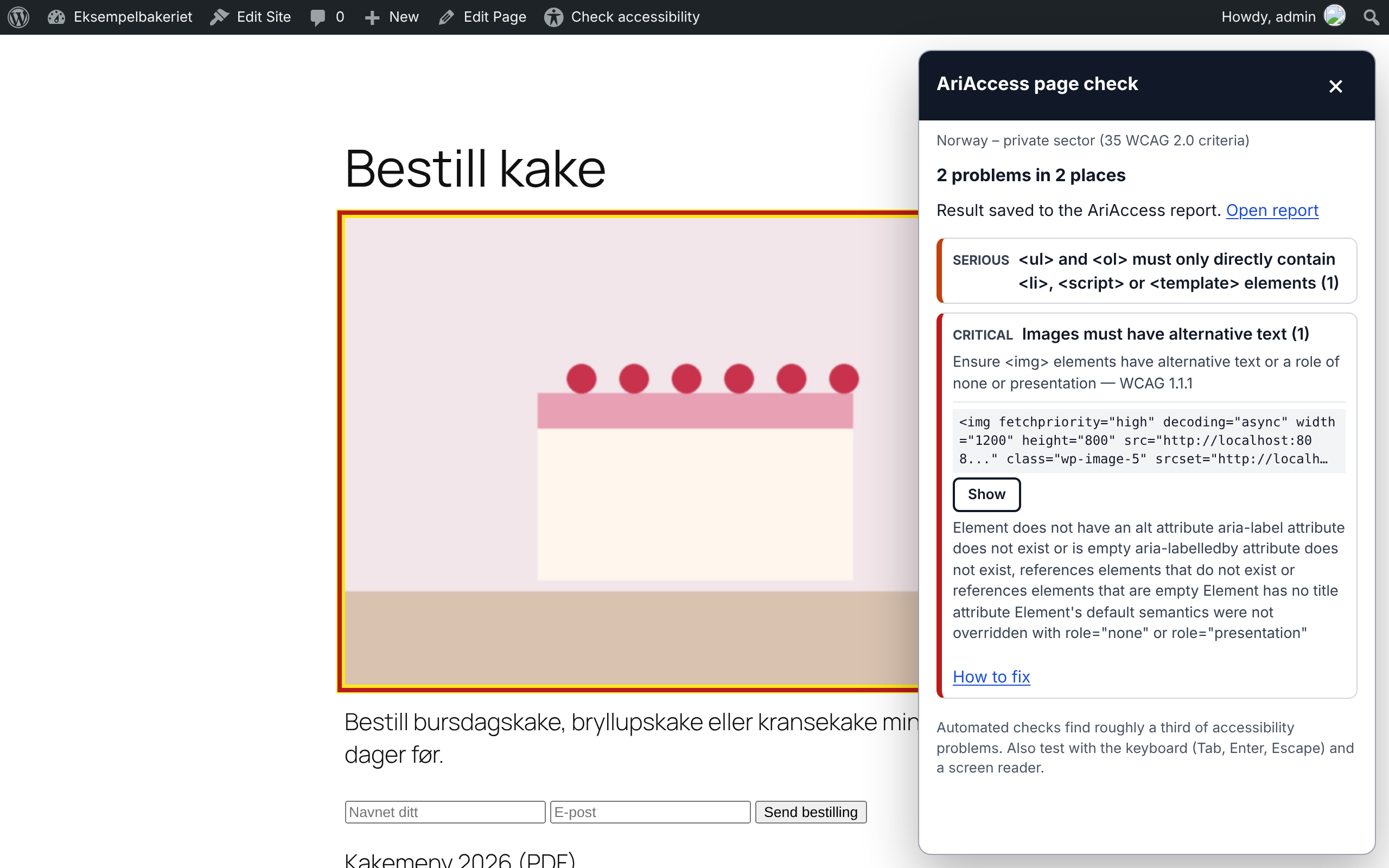
The page check on a live page, with the problem highlighted on the page.

The visitor display panel with the Low vision profile turned on.

The display panel on a phone.

The accessibility statement form (Norwegian or English).


