
AVAR ProductPulse Wordpress Plugin - Rating, Reviews, Demo & Download
Plugin Description
Stop guessing which products are working.
AVAR ProductPulse gives WooCommerce store owners a clear view of what shoppers do with individual products — which products they view, add to cart, buy, and how much revenue those purchases generate.
More importantly, ProductPulse helps turn those numbers into useful signals.
Instead of opening WooCommerce reports and trying to connect the dots yourself, you can quickly spot products that attract attention but do not sell, products that convert well despite low traffic, and products that simply need more data before you make a decision.
No Google Analytics account is required. Product analytics are stored locally in your WordPress database.
What can ProductPulse tell you?
ProductPulse helps answer questions such as:
- Which products receive the most attention?
- Which products are added to cart most often?
- Which products actually generate purchases and revenue?
- Which products get plenty of views but no sales?
- Which products sell well despite relatively low traffic?
- Which products may have a price, content, image or offer problem?
- Which products do not yet have enough data to judge?
- How is product activity changing over time?
The goal is simple: help you decide where to focus your attention in your WooCommerce store.
Product analytics dashboard
Get a quick overview of your store with:
- Product views
- Add-to-cart actions
- Purchases from paid orders
- Product revenue
- View purchase rate
- Daily product activity trend
- Top-performing products
Choose between:
- Today
- Yesterday
- Last 7 days
- Last 30 days
- This month
- Last month
- Custom date ranges up to 366 days
CSV export is available directly from the dashboard.
Product-by-product performance
The Products report puts important metrics next to each product so you can compare performance without opening products one by one.
See:
- Views
- Add-to-cart actions
- Purchases
- Revenue
- View cart rate
- View purchase rate
The Products report can be shown for today, the last 7 days, the last 30 days or the last 90 days.
ProductPulse also adds simple status signals such as:
No data
No views or purchases were recorded for the product in the selected period.
Needs review
The product received meaningful traffic but no purchases.
Opportunity
The product converts well despite relatively low traffic and may deserve more visibility.
Low sales for the traffic
The product receives traffic but purchases remain unusually low.
Sales without views
The product was purchased without a recorded product-page view, for example after being added directly from a shop, category or search page.
Low data
There is not yet enough activity to make a useful judgement.
No clear issue
No obvious problem was detected for the selected period.
These are deliberately simple signals — ProductPulse Free does not pretend that a few numbers can explain every product problem.
Basic product opportunities
The Opportunities screen automatically looks for two useful patterns over the last 30 days:
High interest, low sales
Products with at least 20 recorded views but no purchases.
These products may deserve a review of:
- price,
- product images,
- description,
- value proposition,
- shipping or other purchase friction.
Low traffic, high conversion
Products with 5–19 views, at least 2 purchases and a view-to-purchase rate of at least 20%.
These products may already sell well when shoppers discover them and could benefit from more visibility.
ProductPulse explains why each opportunity was detected instead of showing an unexplained score.
WooCommerce revenue tracking
ProductPulse tracks purchases from paid WooCommerce orders and keeps product revenue connected to the products that generated it.
The analytics layer also accounts for WooCommerce order lifecycle changes such as refunds and relevant order updates, so reports are not based only on the first state in which an order was recorded.
ProductPulse supports both:
- WooCommerce HPOS
- Classic WordPress order storage
Multi-currency friendly
ProductPulse does not silently add different currencies together.
If your store contains analytics in multiple currencies:
- each currency remains separate,
- Dashboard and Products reports show one selected currency at a time,
- the active currency is clearly labelled,
- every detected currency can be selected.
ProductPulse does not perform currency conversion.
Local analytics and privacy controls
Your ProductPulse analytics are stored in your own WordPress database.
The analytics tables do not store customer names, e-mail addresses or IP addresses.
For visitor-level analytics ProductPulse uses first-party visitor/session identifiers. Tracking can be controlled from ProductPulse settings.
You can:
- Enable or disable analytics tracking
- Ignore store managers and administrators
- Optionally ignore all logged-in users
- Control raw-event retention
- Export daily aggregate data to CSV
- Use the WordPress personal-data exporter and eraser
- Choose whether ProductPulse data should be deleted when the plugin is uninstalled
The default raw-event retention period is 30 days. Longer-lived daily aggregates are used for reporting.
A filter is also available for consent-management integrations:
avar_productpulse/should_track_current_request
Returning false prevents ProductPulse from creating visitor/session identifiers and recording visitor-behaviour events for that request.
Designed to stay useful as data grows
ProductPulse does not build every report by repeatedly scanning the complete event history.
Raw activity is processed into daily aggregates in the background using WordPress scheduling, reducing the amount of work required to display reports as analytics data grows.
Data retention is configurable so stores can choose a balance appropriate for their traffic and hosting environment.
CSV exports
ProductPulse includes CSV exports for further analysis.
Depending on the screen, exported data can include:
- Date
- Product ID
- Variation ID
- Views
- Unique views
- Add-to-cart actions
- Purchases
- Quantity sold
- Revenue
- Revenue currency
Financial values retain their recorded currency.
Built-in diagnostics
Not seeing the numbers you expect?
The Settings screen includes read-only diagnostics that help confirm whether:
- Tracking is enabled
- Analytics database tables are available
- Events are being recorded
- Aggregation is working
- The current administrator is excluded from tracking
Diagnostic information can be copied when you need support.
What is included in ProductPulse Free?
ProductPulse Free is a standalone WooCommerce product analytics plugin.
It includes:
- Product activity tracking
- Dashboard KPIs
- Daily activity trends
- Product-level analytics
- Basic product status signals
- Basic product opportunity detection
- Date-range filtering
- Multi-currency reporting
- CSV exports
- Data retention controls
- Privacy tools
- Diagnostics
- HPOS compatibility
- Multisite support
No paid license is required to use the Free analytics features.
Want deeper WooCommerce insights?
A separate AVAR ProductPulse Pro edition adds advanced tools such as:
- Prioritized recommendations
- Product-aware Advice Engine
- Abandoned-cart recovery
- On-site search analytics
- Search autocomplete and synonyms
- Back-in-stock alerts
- Price-drop alerts
- Offers and promotion tools
- Customer segments
- Advanced reports
The paid edition is distributed separately through Freemius. ProductPulse Free does not contain the paid implementation code.
External services
Freemius
AVAR ProductPulse uses the Freemius SDK for optional usage tracking and for product licensing, account management, purchases, and premium updates. Usage tracking in the free version is optional and requires administrator opt-in.
Freemius may process site and administrator information required to provide these services. AVAR ProductPulse analytics data, WooCommerce orders, WooCommerce customer records, and customer behavior tracked by ProductPulse are not sent to Freemius.
Freemius: https://freemius.com/
Terms of Service: https://freemius.com/terms/
Privacy Policy: https://freemius.com/privacy/
SDK source: https://github.com/Freemius/wordpress-sdk
Screenshots
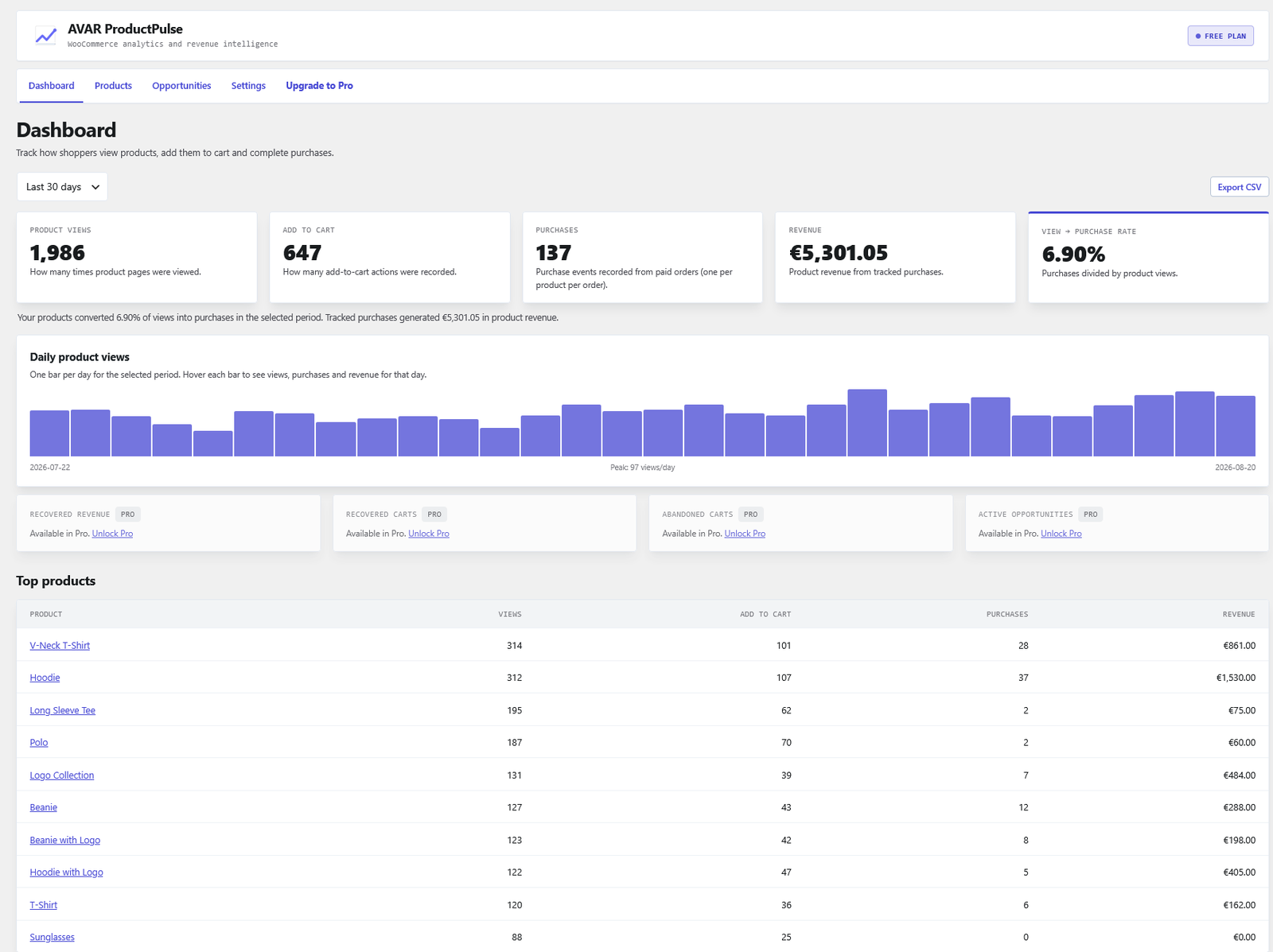
Dashboard — see product views, add-to-cart actions, purchases, revenue, view-to-purchase rate, daily activity and top products at a glance.
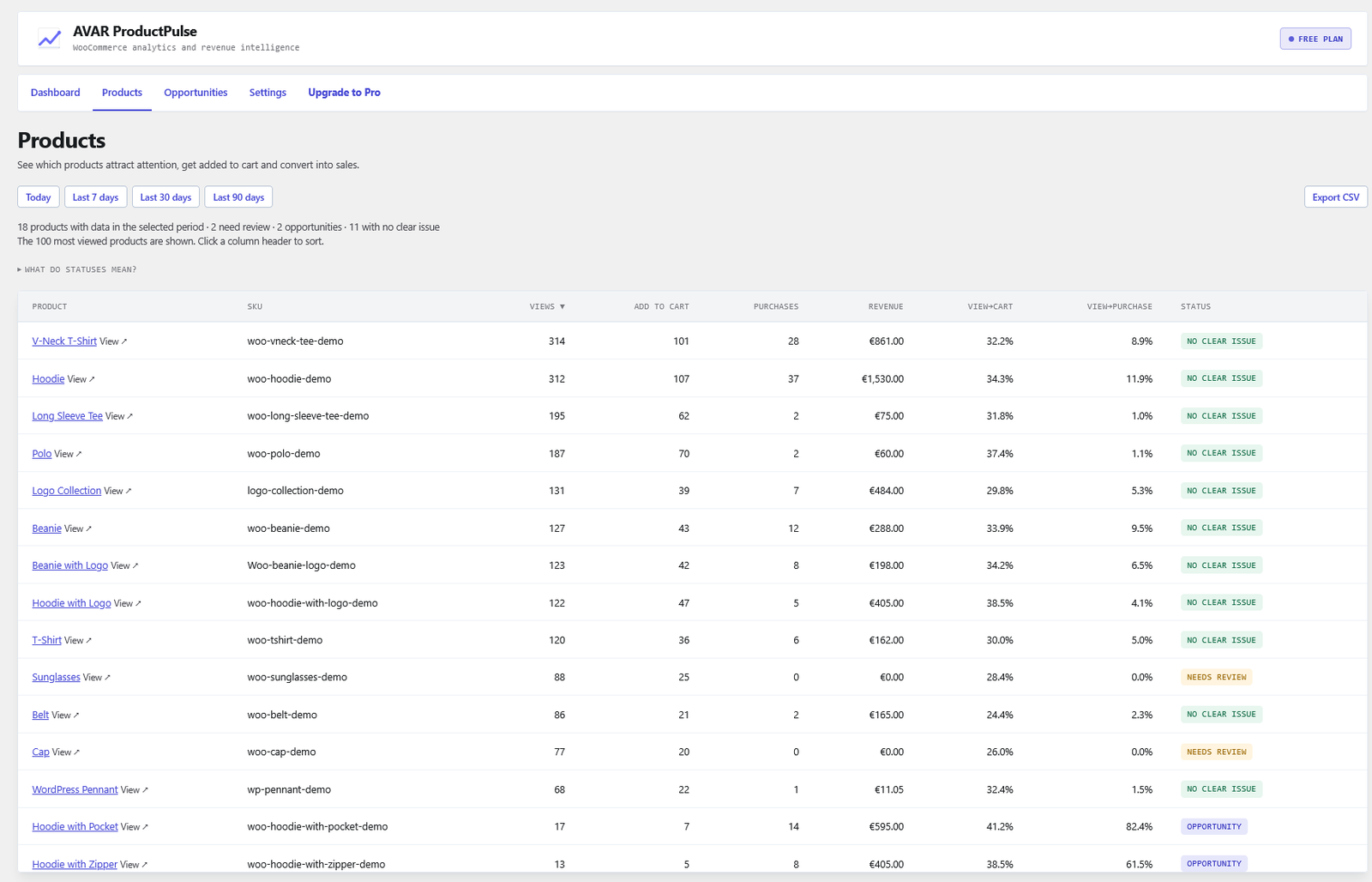
Products — the most viewed products side by side with views, cart activity, purchases, revenue and both conversion rates, plus a status signal such as Needs review, Opportunity or No clear issue.
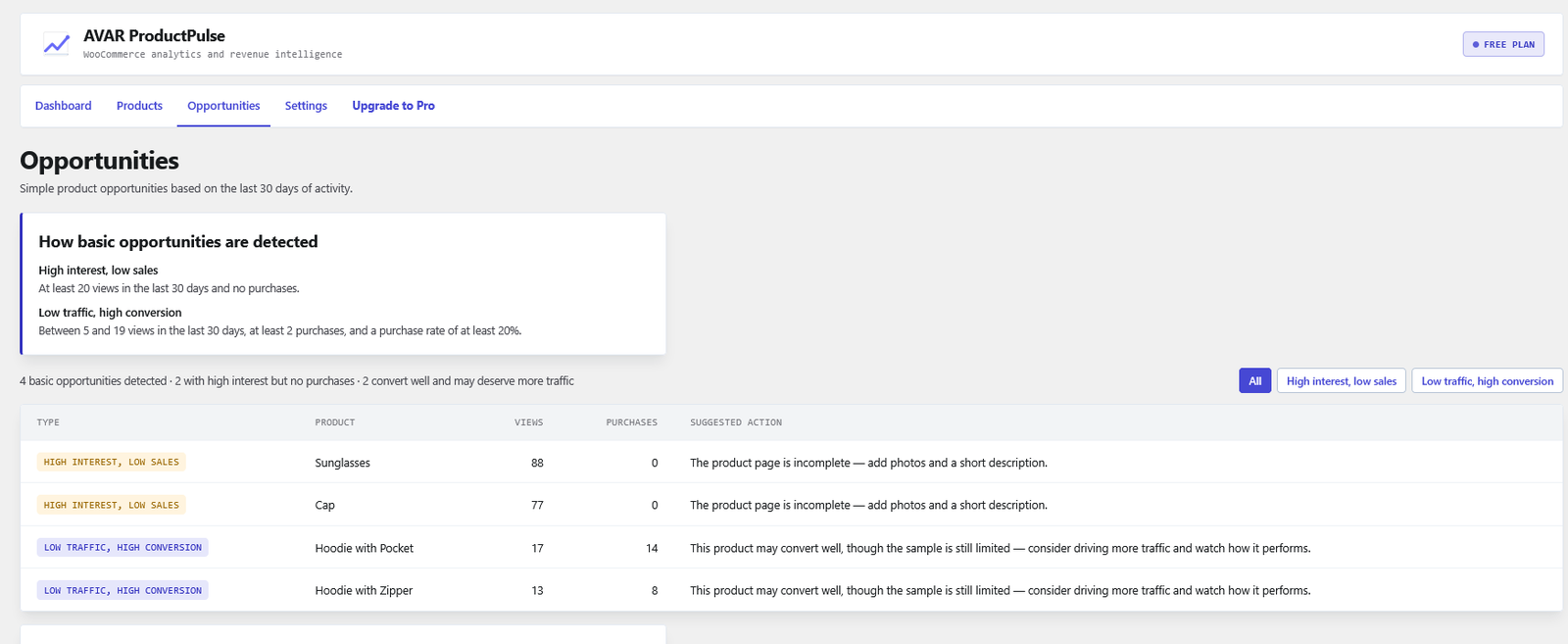
Opportunities — products with high interest but no purchases, and products converting well on low traffic, each shown with the rule that detected it and a suggested next step.
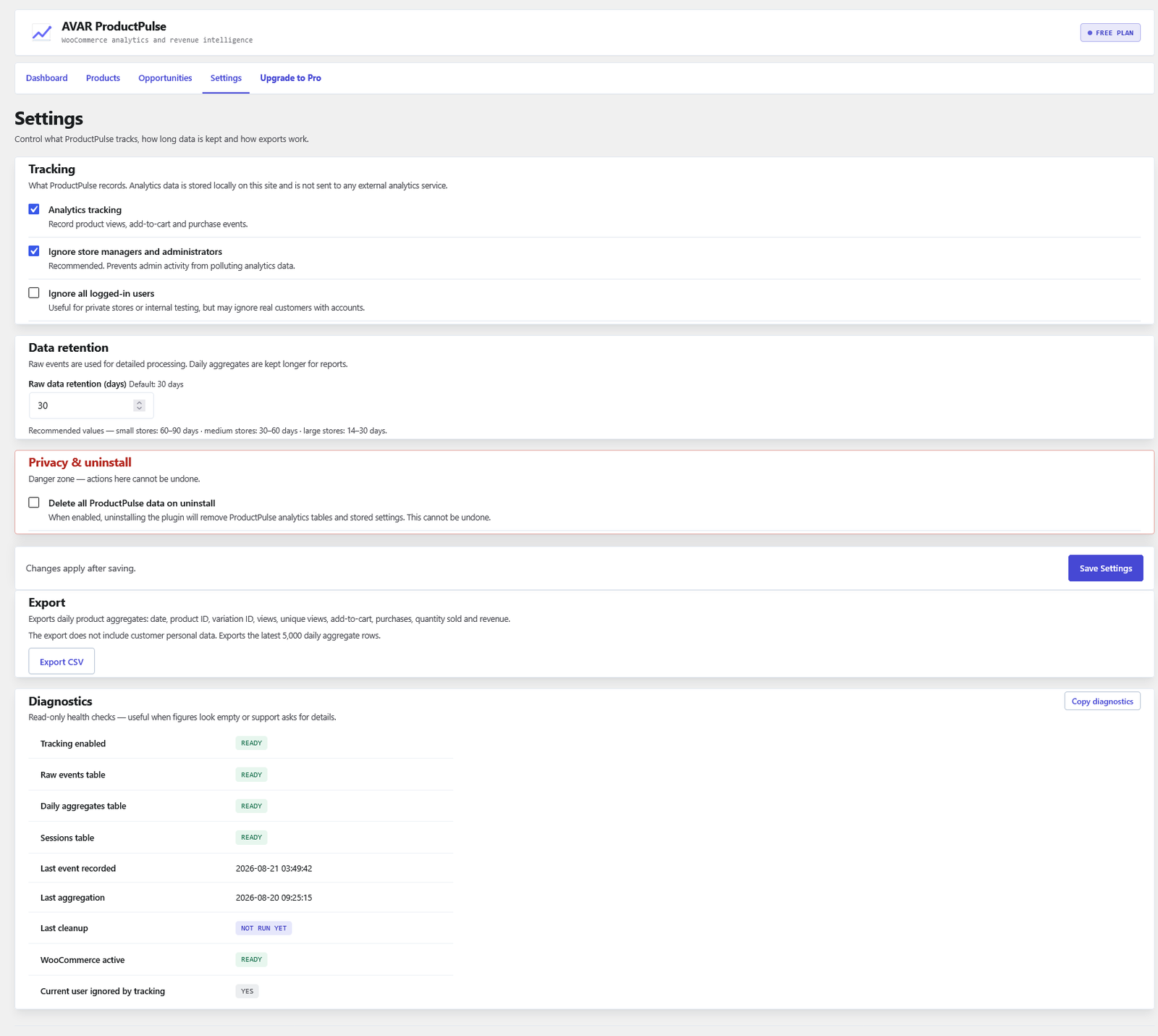
Settings & diagnostics — control tracking, retention, privacy and uninstall behaviour, export analytics data and check the health of your ProductPulse installation.


