
AXeMit Import Products, Media & SEO Suite For WooCommerce Wordpress Plugin - Rating, Reviews, Demo & Download
Plugin Description
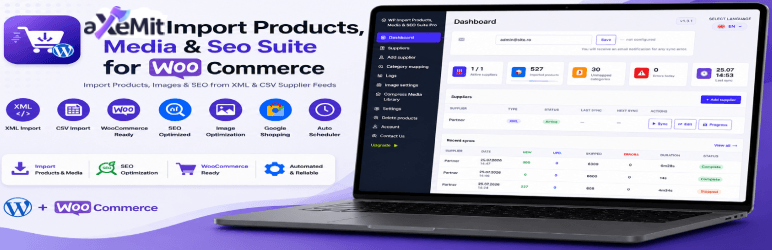
aXeMit Import Products, Media & SEO Suite for WooCommerce is a complete WooCommerce product import and synchronization plugin built for store owners who source products from external suppliers.
Connect unlimited XML or CSV supplier feeds and let the plugin take care of everything automatically: creating new products, updating stock and prices, mapping categories and brands, downloading images, and handling products that disappear from the feed. Synchronization can run daily or weekly at a configured hour — no manual work required.
This plugin requires WooCommerce to be installed and active.
Why store owners choose this plugin
Most WooCommerce store owners who work with supplier feeds spend hours manually updating products, prices and stock. This plugin eliminates that entirely. Once a supplier feed is configured, every sync runs automatically in the background and your store stays up to date — without you touching a thing.
What’s included
Product import & sync
* Import from unlimited XML and CSV supplier feeds (direct URL or local file upload)
* Manual field mapping: SKU, name, price, stock, description, categories, brand, EAN/MPN, images 1–5, attributes, variations, dimensions, weight
* Auto-detect feed columns and auto-map to Google Shopping format (g:id, g:title, g:price, g:image_link, g:additional_image_link, etc.)
* Full support for variable products and product variations
* Automatic stock, price and description updates on every sync
* Draft mode — import products as drafts and publish them manually when ready
* Mass-publish all draft products from a supplier with one click
* Configurable action for products removed from the feed: set out of stock, disable, move to draft, delete, or do nothing
* Feed simulation (feed check) — preview what will be imported without modifying anything in your store
Scheduling
* Sync schedule per supplier: daily or weekly, at a configured hour
Category & brand mapping
* Map supplier categories to your WooCommerce categories — one-to-one or many-to-one
* Option to ignore specific supplier categories entirely so those products are skipped
* Brand mapping supports WooCommerce taxonomy, product attribute, or both
Price rules
* Apply a fixed or percentage markup per supplier
* Tiered markup by price range (e.g. products under 50 +10%, products over 50 +20%)
* Final price rounding: .99, whole number, or round up
* Maximum feed price cap — products above the limit are skipped entirely
Image handling
* Automatic image download for up to 5 images per product (main image + gallery images 2–5)
* Asynchronous background queue — large image batches process without causing timeouts
Sync logs
* Full history of every sync: new, updated, skipped, errors, duration and status
* Filter logs by supplier
* View per-product error details for any sync run
* Configurable auto-cleanup (delete logs older than X days)
Admin
* Multi-language admin interface (EN, RO, DE, FR, ES, IT, NL, PL and more)
* Clean, modern admin UI integrated directly into the WordPress dashboard
* Dashboard with statistics: total products imported, active suppliers, unmapped categories, errors and last sync time
Support
For support and plugin ownership questions, contact contact@axemit.eu.
Requirements
- WordPress 6.0 or higher
- WooCommerce 7.0 or higher
- PHP 8.0 or higher
External Services
This plugin downloads product images from URLs provided in your supplier feeds. The URLs are entered by you when setting up each supplier — no data is sent to any external service by the plugin itself. The plugin connects only to the feed URLs you explicitly configure.
Third-Party Libraries
This plugin includes the following third-party library:
- Select2 (https://select2.org/)
- Version: 4.1.0
- License: MIT License (https://opensource.org/licenses/MIT)
- Copyright: Copyright (c) 2012-2022 Kevin Brown, Igor Vaynberg, and Select2 contributors
- Source: https://github.com/select2/select2
Optional Pro Companion
This plugin is fully functional on its own. It does not require a license key, account, payment, external activation or upgrade to import products, synchronize suppliers, map categories and brands, process images, or view logs.
An optional, separate Pro companion plugin is available for stores that need additional tools beyond this plugin’s built-in feature set:
- Auto-resume watchdog for interrupted imports
- Automatic background trim — removes white or uniform backgrounds from product images
- Resize images to your configured maximum dimensions
- Compress to your target quality level
- Convert to WebP format for faster page loads
- Optionally serve WebP only to browsers that support it
- SEO integrations for Yoast SEO, Rank Math and AIOSEO
- EAN, GTIN and MPN fields automatically populated for the Google for WooCommerce plugin on every imported product
- Receive email alerts for sync errors and when products go out of stock — configure a notification address in Settings
- Bulk compress and WebP-convert all existing images in your WordPress Media Library — independently from any import
The optional companion is separate from this WordPress.org plugin and is not required for its operation. See https://axemit.eu/plugins/wp-import-productsmedia-seo-suite-pro-for-woocommerce/ for details.
Screenshots
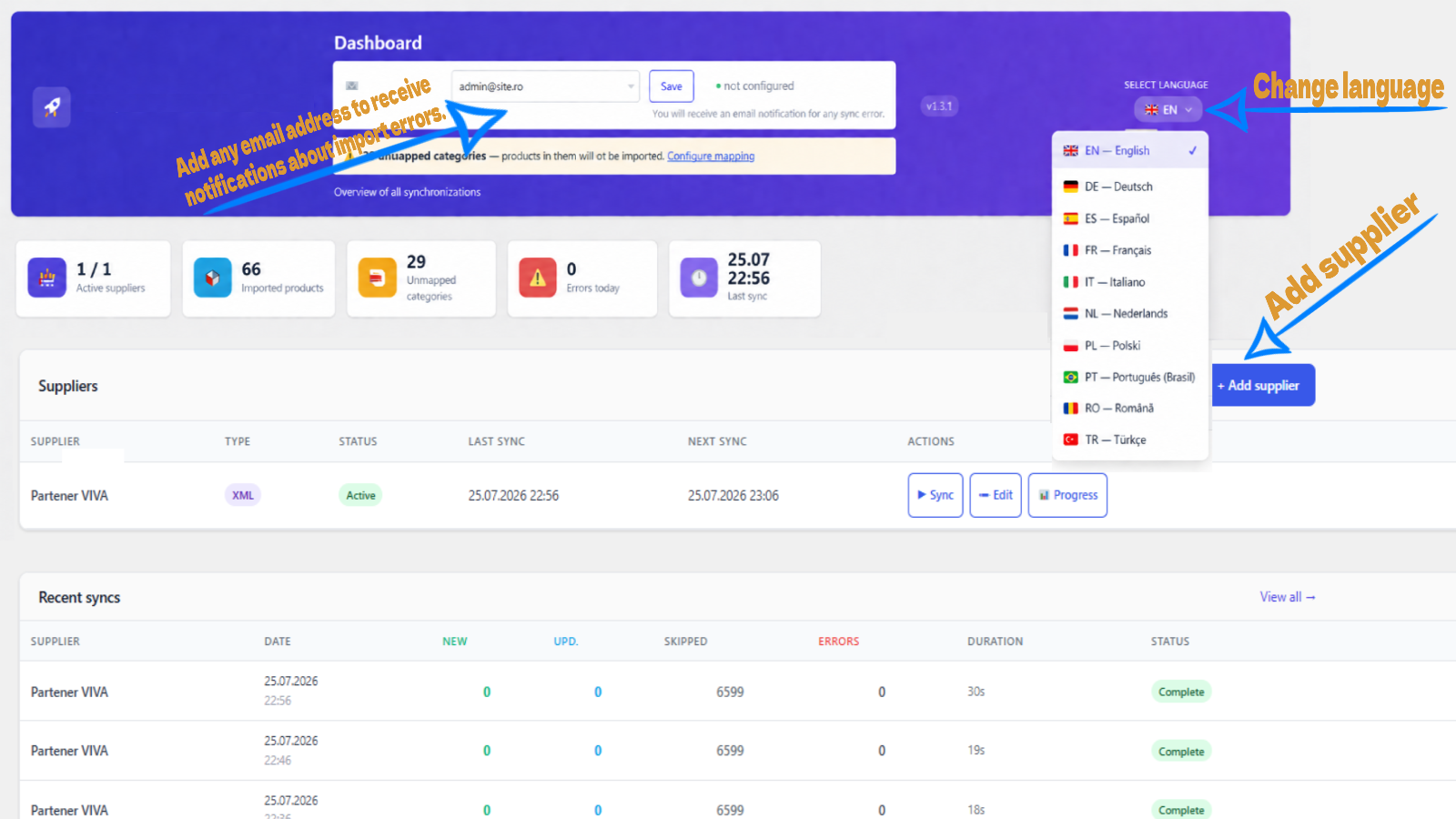
Dashboard — Real-time overview of all your suppliers, total imported products, unmapped categories, errors today and the last sync timestamp. Quick access to supplier actions from the main screen.
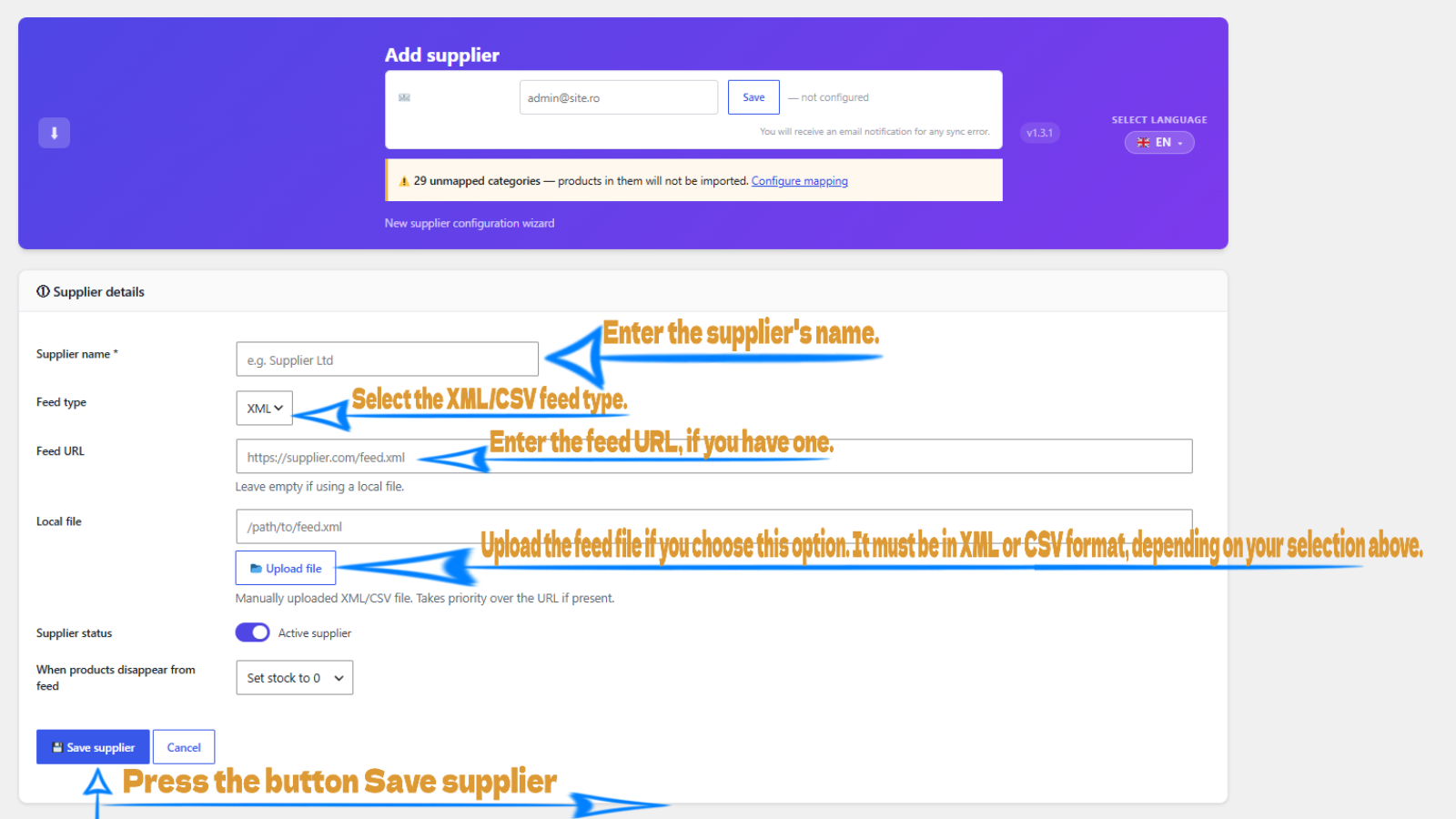
Add supplier / General settings — Configure the supplier name, feed type (XML or CSV), feed URL or local file upload, supplier status toggle, and what happens to products that disappear from the feed.
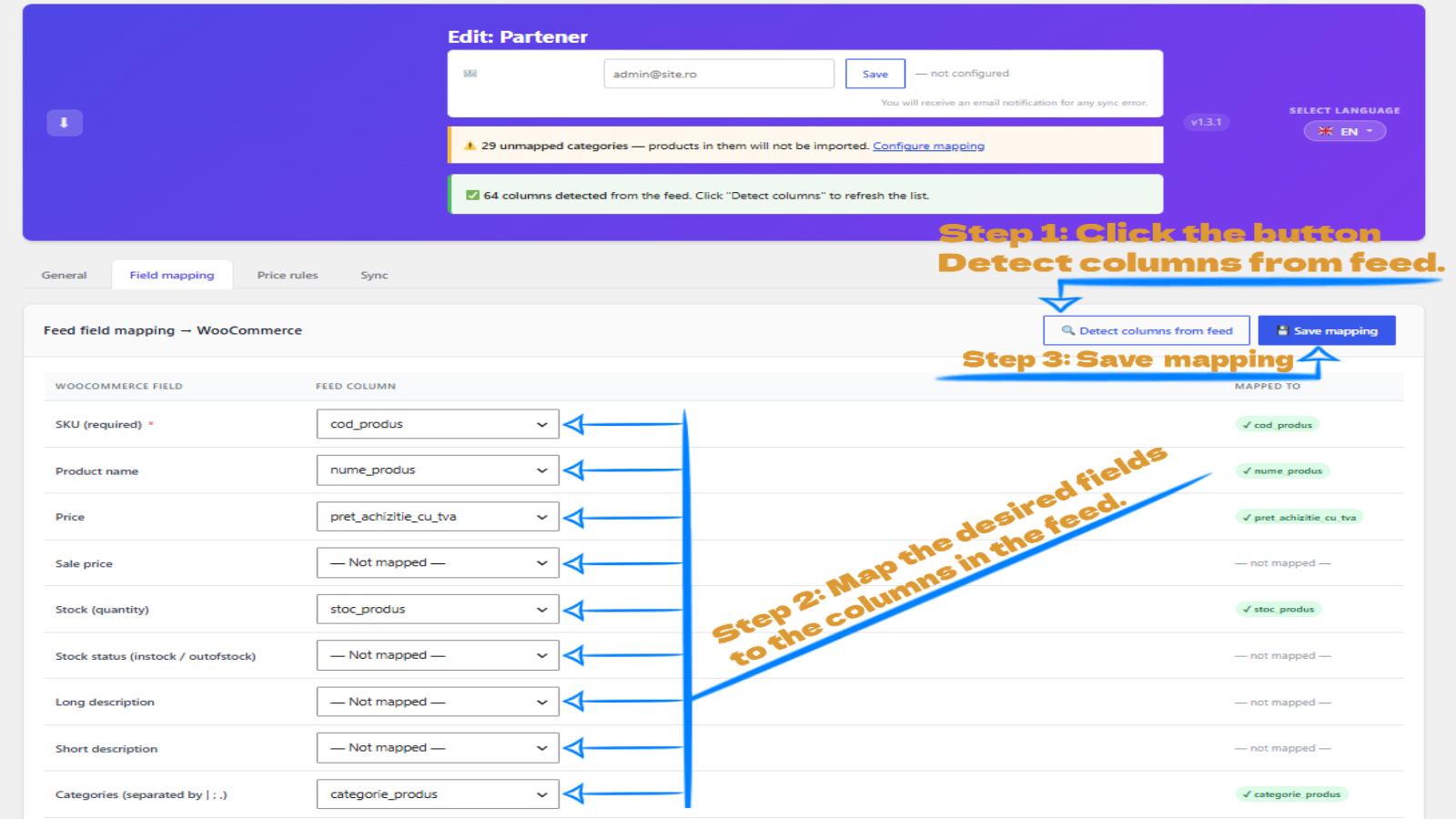
Field mapping — Map every column or XML node from the supplier feed to the correct WooCommerce product field: name, price, stock, description, SKU, images, EAN, brand and more. Supports XPath for XML feeds.
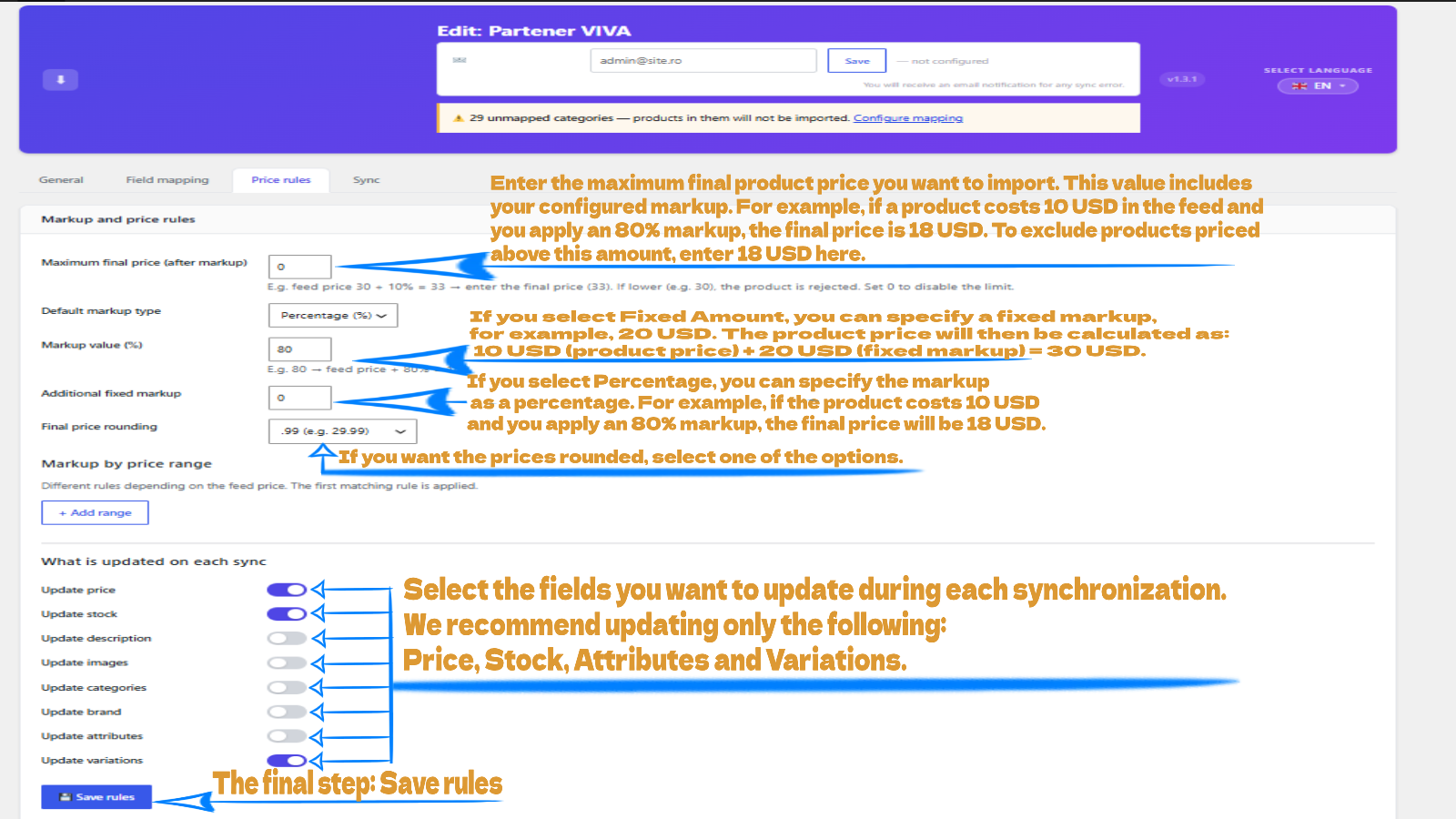
Price rules — Set a fixed markup (e.g. +10.00 EUR), a percentage adjustment (e.g. +15%), and a maximum feed price cap per supplier. Rules are applied automatically on every sync.
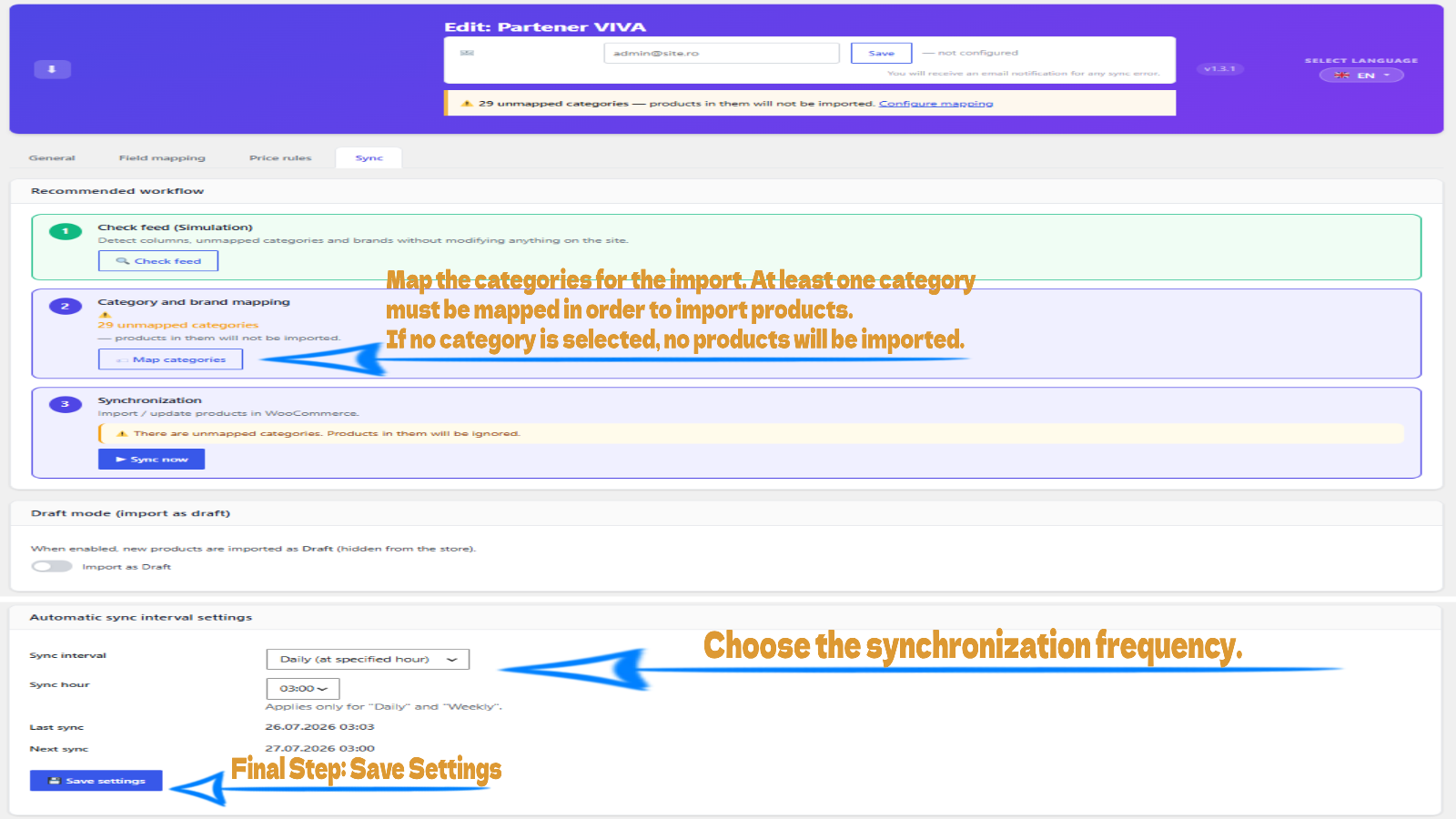
Sync settings — Choose a daily or weekly sync schedule per supplier, configure draft mode for testing, and run a manual sync or simulation directly from this tab.
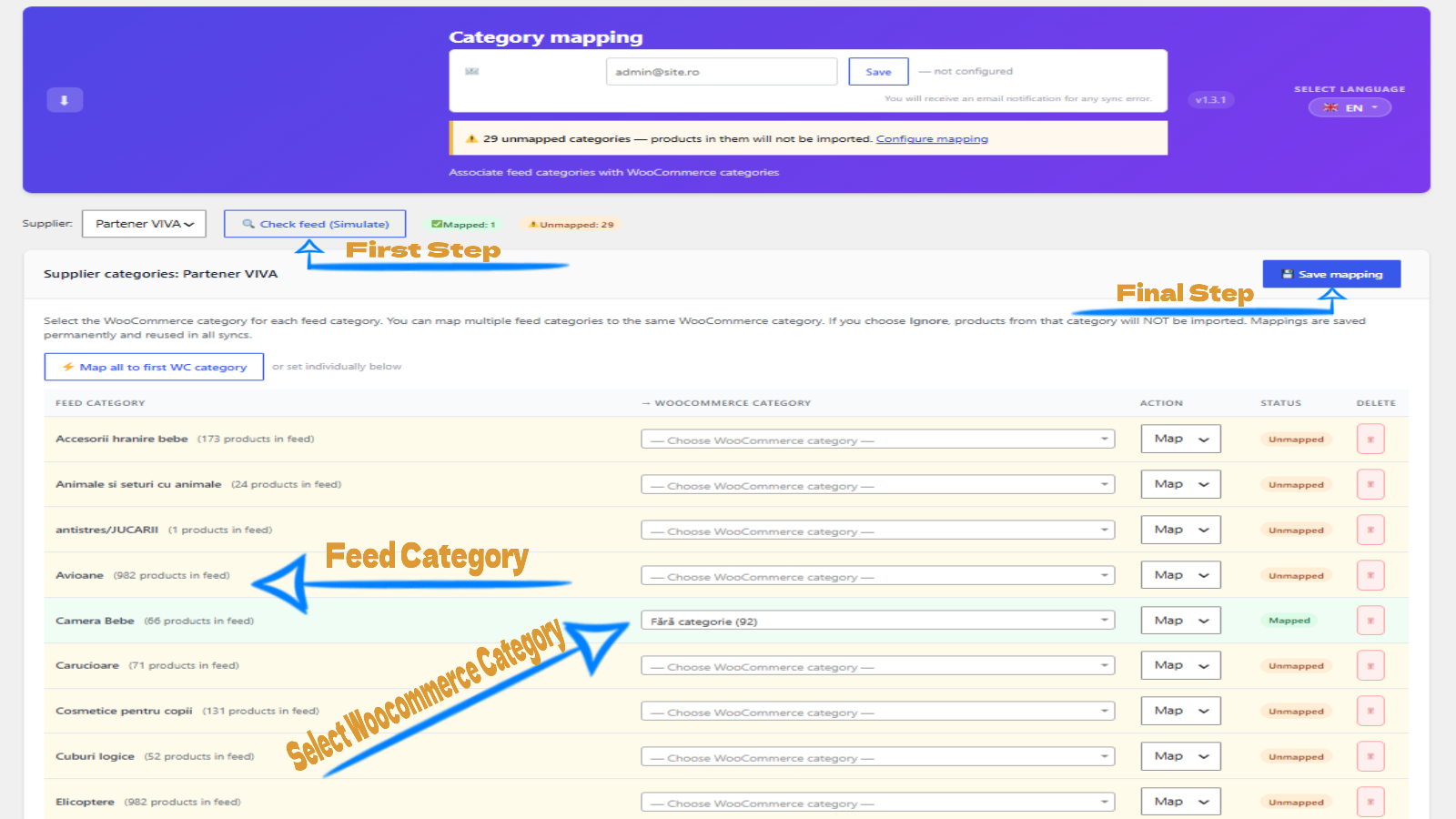
Category mapping — Map every category that appears in the supplier feed to a WooCommerce category. Mark categories as Ignored to skip their products. Changes are saved permanently and reused in all future syncs.
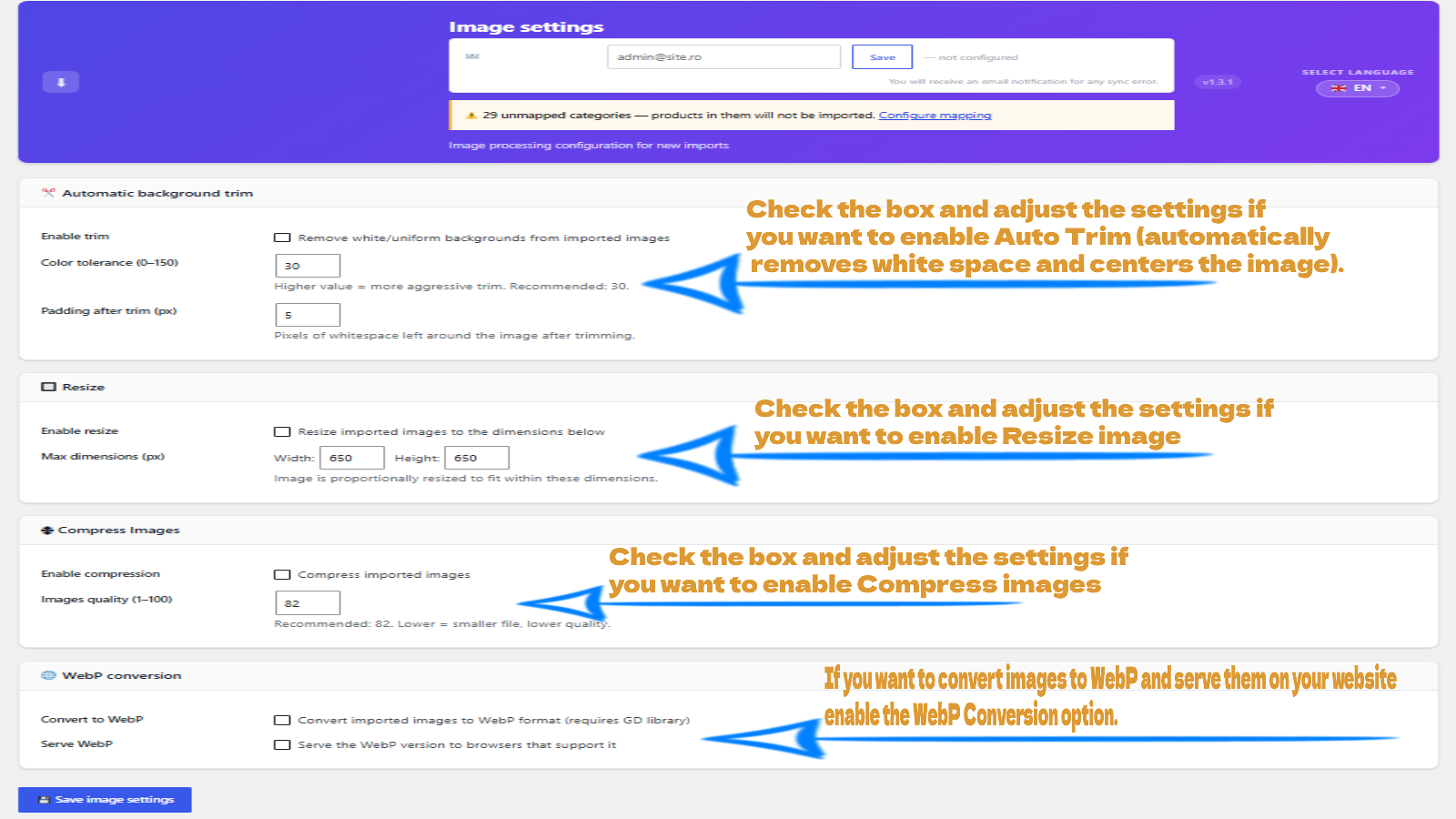
Image settings — Configure automatic background trim, maximum resize dimensions, compression quality and WebP conversion for all images downloaded during a product import.
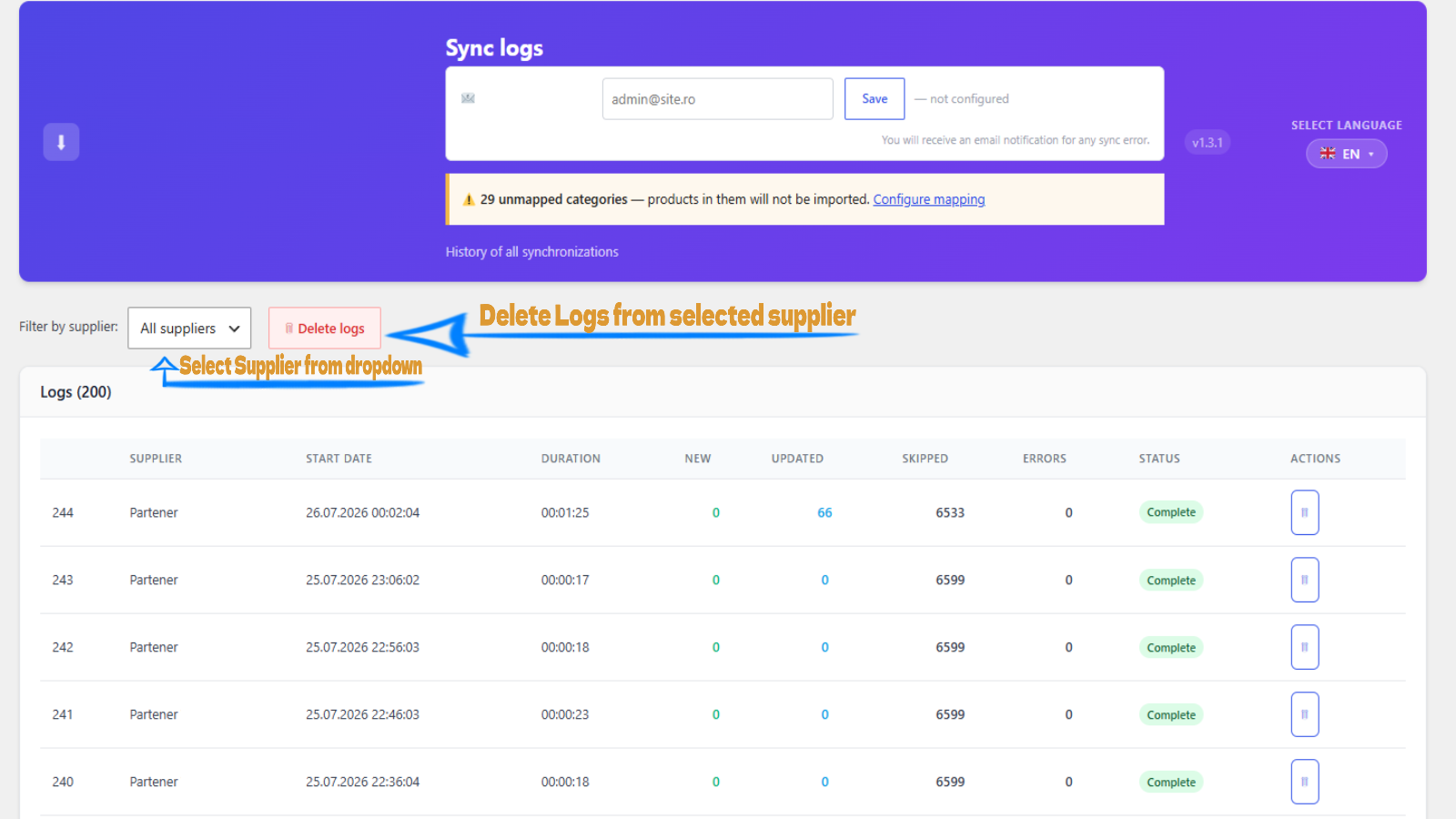
Sync logs — Complete history of every sync run, showing new products, updated products, skipped entries, errors, duration and final status (Complete / Stopped / Error). Filter by supplier and drill into per-product error details.
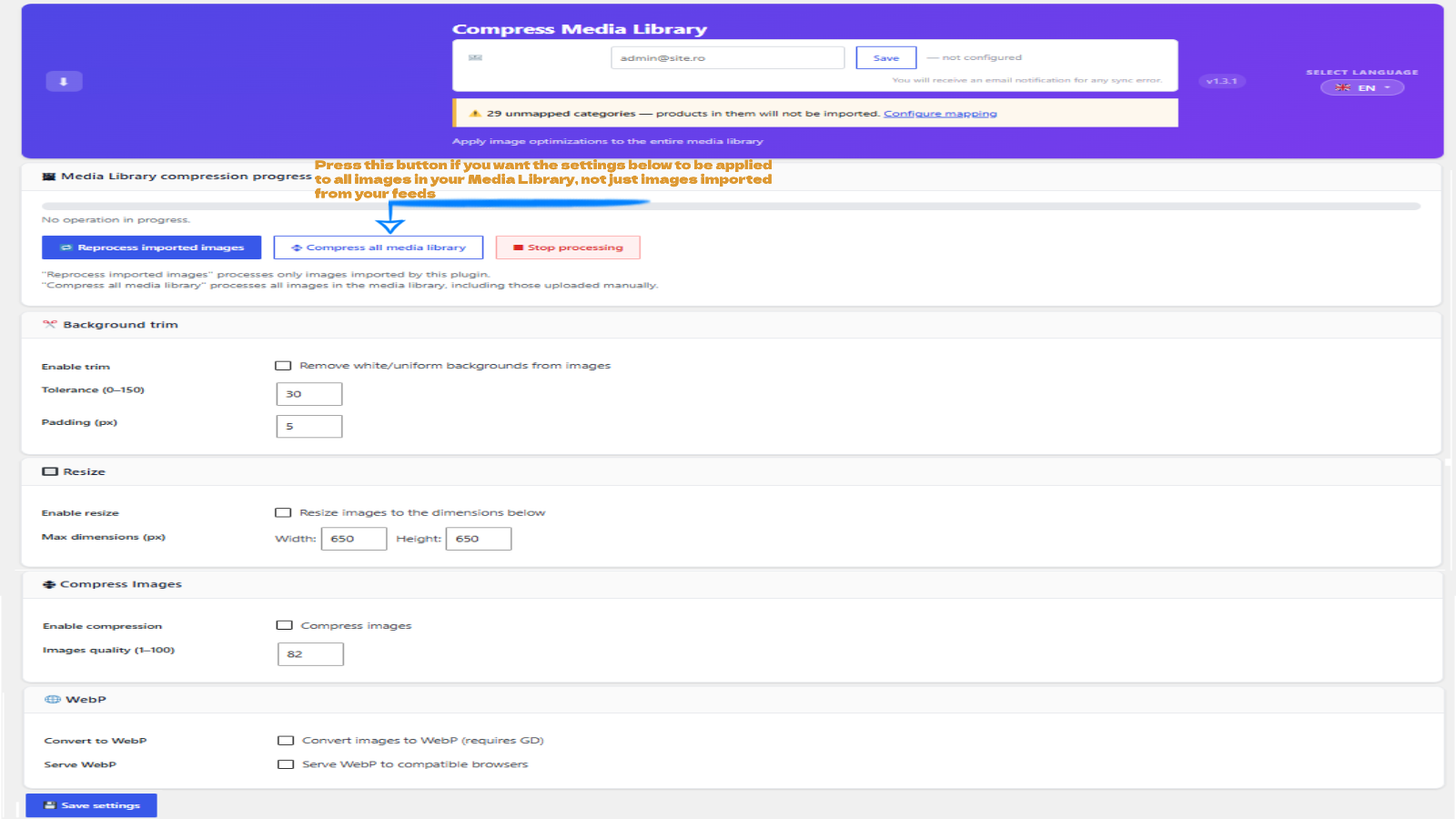
Compress Media Library — Apply resize, compression and WebP conversion to your entire existing WordPress Media Library in one batch operation — independently from any supplier import.
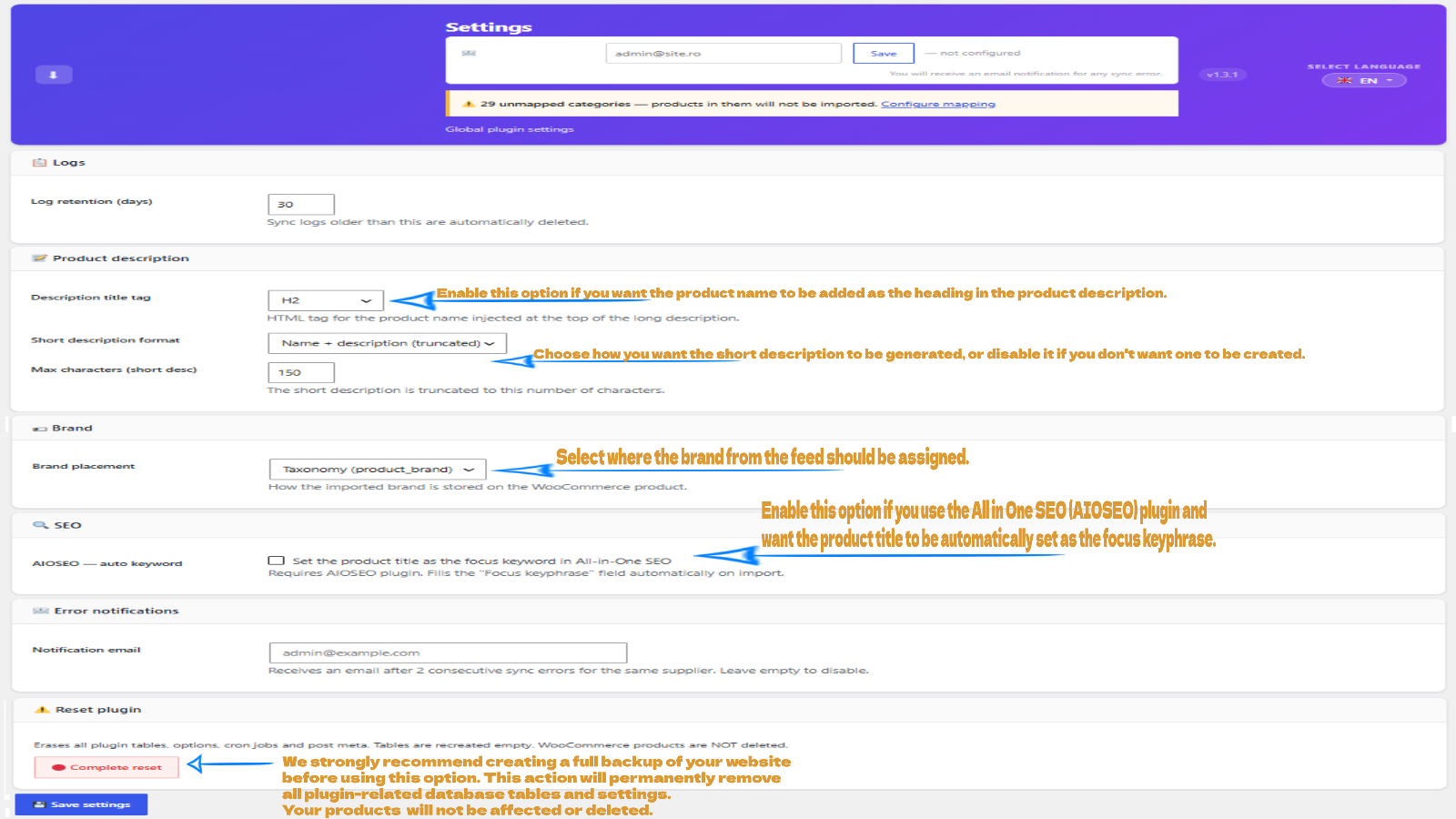
Settings — descriptions & SEO — Configure the product description format, short description length, and whether the plugin auto-sets focus keywords for Yoast SEO, RankMath or AIOSEO.
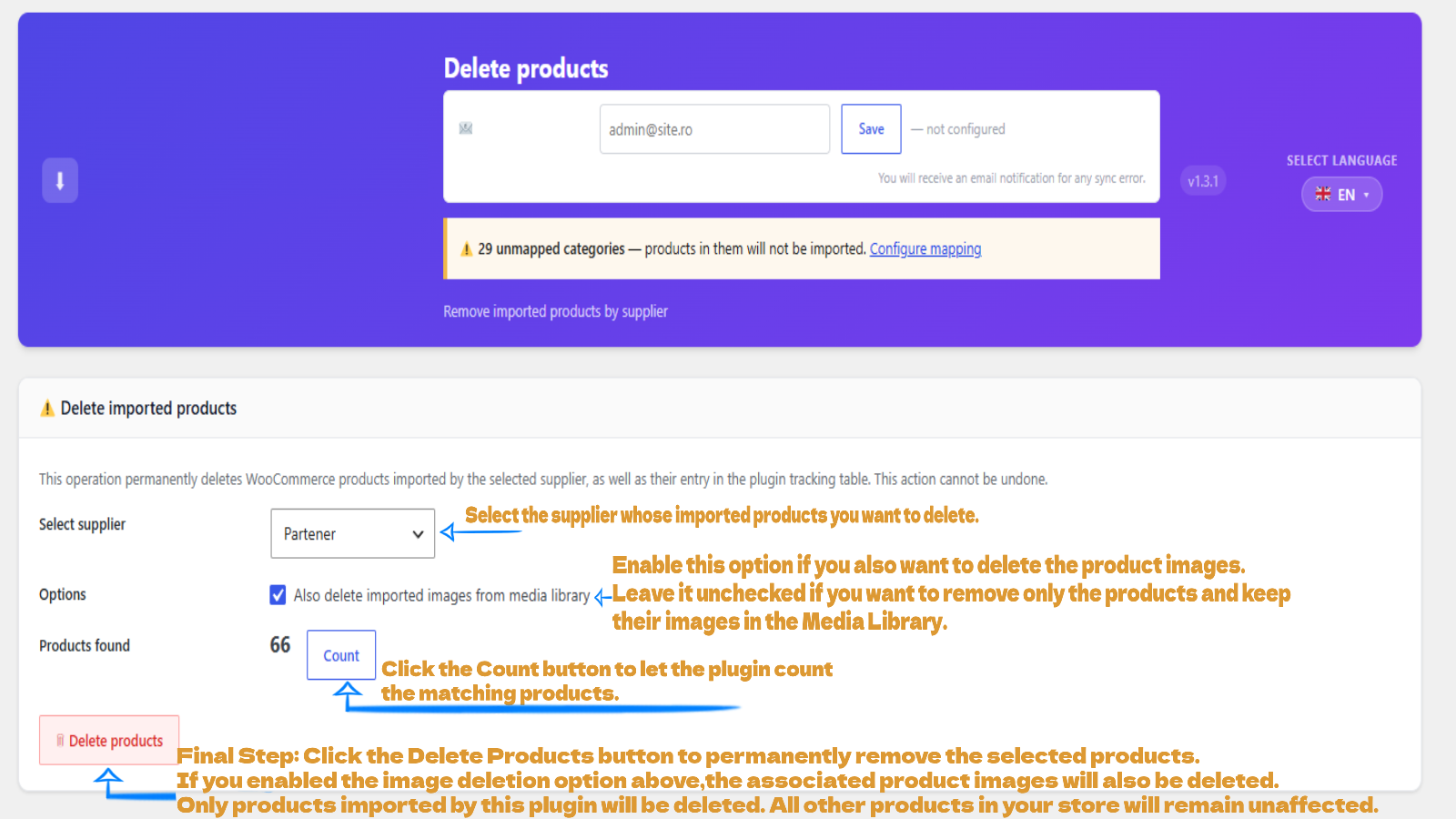
Delete products — Permanently remove all WooCommerce products imported from a specific supplier, with an optional checkbox to also delete their images from the Media Library.

