
Beziworld – Cookie Consent Wordpress Plugin - Rating, Reviews, Demo & Download
Plugin Description
Beziworld – Cookie Consent runs entirely on your own server. It scans your site, recognises services and cookies with a built-in database, holds back scripts, frames and pixels until the visitor agrees, shows a banner with the rules of the visitor’s region and keeps a proof of every decision. No account, no external scanner, no banner loaded from a third-party CDN, no page-view or page limits.
Scanner without external services
- The server crawls the site as a first-time visitor: home, posts, pages, shop, product, cart, checkout, My Account, archives, pages with forms and search. It reads scripts, inline snippets, iframes, pixels, stylesheets, resource hints and Set-Cookie headers.
- A browser scanner for administrators reports what scripts set in the browser (cookie, localStorage, sessionStorage and IndexedDB names, requested domains). No values and no personal data are sent.
- Services are recognised with a local signature database (GA4, GTM, Google Ads, AdSense, Meta Pixel, TikTok, LinkedIn, Pinterest, Microsoft UET and Clarity, Hotjar, Matomo, YouTube, Vimeo, Google Maps, reCAPTCHA, Turnstile, Stripe, PayPal, Przelewy24, WooCommerce, Jetpack, Mailchimp, HubSpot, Klaviyo, live chats and many more) and the Open Cookie Database bundled with the plugin.
- Unknown hosts and cookies are listed for review; you assign a category in one click. Scheduled scans and a notice when something new appears.
- Resources that send the IP address to third parties without cookies are reported too: Google Fonts, the WordPress emoji CDN, Gravatar, font and library CDNs, video and map embeds.
Blocking before consent
- The page HTML is rewritten on the server: scripts get type=”text/plain” with their category, keeping src, async, defer, module type and the original order; iframes become placeholders; tracking pixels, avatars and stylesheets of blocked services wait. The HTML is the same for every visitor, so page caches keep working.
- Scripts and iframes injected later by other scripts are held back too (createElement, appendChild, insertBefore and a MutationObserver).
- After consent everything is restored without reloading the page, in the original order. Withdrawing consent deletes the cookies of the category (also on parent domains) and reloads the page when needed.
- Safe mode (default) reports unknown external scripts; strict mode blocks every unknown script from another domain. Scripts of WordPress, the theme and plugins on your domain are never blocked unless they match a tracking signature.
- Necessary services (payment gateways, CAPTCHA on forms, WooCommerce, library CDNs) are never blocked.
- Placeholders for YouTube, Vimeo and maps use a generic graphic or, when you switch on thumbnail downloads, a preview image stored on your server, never an image from the video platform before consent.
- Optionally, Google Fonts found on the site are copied to your server and served locally from then on (switch it on in the settings or click “Host locally” in the Tools tab); switch off the emoji CDN and hold back Gravatar.
- Manual mode for developers: add data-bwcc-category to a script or iframe that is already in your theme markup and the plugin delays it until consent (data-bwcc-ignore excludes one). The plugin never stores script or HTML code: there are no code fields in its settings.
- Consent gate (the [bwcc_block] shortcode or the Consent gate block): text and images shown after consent, plus an optional YouTube, Vimeo or Google Maps embed that the plugin builds from the URL you enter. Gated content is filtered like post content, so scripts, iframes and custom HTML are removed.
Banner and preference centre
- “Accept all”, “Reject all” and “Settings” on the first layer with the same visual weight; categories without pre-ticked boxes; services and cookies with provider, purpose, lifetime and country on the second layer.
- A permanent settings button, a “Cookie settings” link for menus (#bwcc-settings), a shortcode and a block, and the “Your Privacy Choices” link with the official icon in US opt-out regions.
- Bar, corner box or dialog; light, dark or automatic theme; colours from theme.json or your own with a contrast check; live preview.
- Accessible (WCAG 2.2 AA goal): keyboard operation, focus trap only in the dialog, ARIA, switches with role=”switch”, reduced motion, no scroll lock by default, no layout shift, the banner comes first in the tab order and never hides the focused element.
- Small: no jQuery, no external requests; the banner script loads deferred and the stylesheet does not block rendering. Hidden from search engine crawlers without changing the page content.
- Every text is translatable; custom texts work with WPML and Polylang string translation.
Laws of every region
Legal presets map countries and US states to the rules of their law: GDPR and ePrivacy (EU/EEA, with 6-month validity for France/CNIL and 12 months elsewhere), UK PECR, Swiss nFADP, CCPA/CPRA and the other US state laws (opt-out with Global Privacy Control), Quebec Law 25, PIPEDA, LGPD, APPI, PIPA, PIPL, DPDP, Australia, New Zealand, POPIA, KVKK, Israel and notice-only regions. Unknown regions get the strictest opt-in rules.
- Region detection without external services: CDN headers (Cloudflare, CloudFront, Vercel, Fastly, Akamai or your own list) or a local MMDB database you upload (GeoLite2, GeoIP2, IP2Location), read by the plugin itself.
- Detection happens in the browser through a small, never-cached endpoint, so full page caching keeps working. The device time zone can only make the rules stricter.
- Global Privacy Control is honoured as an opt-out of sale, sharing and targeted advertising in US regions, and switches marketing off in consent regions.
- Consent is asked again after the period of the preset, after you raise the policy version and, optionally, when a new service joins a category the visitor accepted.
This plugin helps you comply; it is not legal advice.
Google, GTM and other platforms
- Google Consent Mode v2: consent default as the first script of the head (before GTM and gtag) with the stored choice of returning visitors, regional defaults, wait_for_update, ads_data_redaction and url_passthrough; consent update after every decision. Basic mode (tags wait) or advanced mode (tags load with denied consent).
- Google Tag Manager: bwcc_consent_default and bwcc_consent_update dataLayer events for the Consent Initialization trigger, optional container.
- WP Consent API, used by WooCommerce, Site Kit and others. WooCommerce order attribution (sbjs cookies) is treated as statistics.
- Microsoft UET consent mode and Clarity consent API, Meta Pixel, TikTok Pixel, Matomo and Hotjar adapters.
- Warning when another consent plugin is active.
Proof of consent
- Local consent log: random consent ID (shown to the visitor), time, versions of the policy and the banner, categories, region, method (click, GPC, placeholder), keyed hashes of the IP address and the browser instead of the values.
- Search by consent ID, CSV export, statistics per region, configurable retention, personal data export and erasure for logged-in users.
- The consent cookie is signed (HMAC), so PHP can trust it: bwcc_has_consent( ‘statistics’ ).
Documents and tools
- Cookie declaration generated from the scan (shortcode and block) and a suggested privacy policy text.
- Setup wizard, diagnostics and a before-consent check that loads your pages as a first-time visitor from the EU and lists every cookie, script, frame and third-party request with an OK or “to fix” status. It also runs after every scan.
- WP-CLI: wp bwcc scan, services, consents, export, import, diagnose and reconsent. REST API with permissions. JSON export and import. Multisite with per-site or shared settings.
External services
Out of the box the plugin does not contact any external service, does not load fonts, stylesheets, scripts or images from other servers and sends no data anywhere. The banner, its script, stylesheet and images are served from your own site. Each service below is contacted only after you, the site owner, switch on or configure the related feature.
Google Tag Manager (optional container)
- What and why: when you enter a GTM container ID in Integrations, the plugin adds the Google Tag Manager container to your pages so that your tags can run.
- When: in the default (basic) Consent Mode the container stays inert and is loaded only after the visitor accepts the statistics or the marketing category. Only if you choose the advanced Consent Mode does it load before the decision, with all consent signals set to “denied”.
- Data: the visitor’s browser requests https://www.googletagmanager.com/gtm.js with your container ID; Google receives the visitor’s IP address, browser data and the page address.
- Terms: https://marketingplatform.google.com/about/analytics/tag-manager/use-policy/ and https://policies.google.com/terms. Privacy policy: https://policies.google.com/privacy
YouTube, Vimeo and Google Maps (consent gate embeds)
- What and why: when you enter a video or map URL in the Consent gate block or the [bwcc_block] shortcode, the plugin shows that video or map.
- When: only after the visitor accepts the category of the gate (or clicks “Load and accept”). Nothing is loaded before that.
- Data: the visitor’s browser loads the player or the map from www.youtube-nocookie.com, player.vimeo.com (with the do-not-track parameter) or www.google.com/maps; the provider receives the IP address, browser data and may set cookies.
- YouTube terms: https://www.youtube.com/t/terms Google privacy policy: https://policies.google.com/privacy Vimeo terms: https://vimeo.com/terms Vimeo privacy policy: https://vimeo.com/privacy Google Maps terms: https://policies.google.com/terms
Video thumbnails (optional, off by default)
- What and why: when you switch on “Download video thumbnails during the scan”, placeholders of embedded videos show a preview image stored on your server instead of a grey graphic.
- When: only during a scan you start or schedule, for videos the scan finds on your site.
- Data: your server (not the visitor’s browser) downloads https://i.ytimg.com/vi/VIDEO_ID/hqdefault.jpg for YouTube and asks https://vimeo.com/api/oembed.json for the Vimeo preview address. Only the public video ID is sent; no visitor data.
- YouTube terms: https://www.youtube.com/t/terms Google privacy policy: https://policies.google.com/privacy Vimeo terms: https://vimeo.com/terms Vimeo API terms: https://vimeo.com/legal/service-terms/api Vimeo privacy policy: https://vimeo.com/privacy
Google Fonts (optional, off by default)
- What and why: when you switch on “Serve hosted Google Fonts locally” or click “Host locally” in Tools, the plugin copies Google Fonts that your theme or plugins already use to your server, so visitors no longer contact Google for them.
- When: once per stylesheet, after you switch the option on or click the button.
- Data: your server (not the visitor’s browser) downloads the stylesheet from fonts.googleapis.com and the font files from fonts.gstatic.com. No visitor data is sent.
- Terms: https://developers.google.com/terms Privacy: https://developers.google.com/fonts/faq/privacy and https://policies.google.com/privacy
Not external services
- Region detection reads the country header of your own CDN or proxy, or a MaxMind/IP2Location MMDB file that you upload yourself. No geolocation API is called and no database is downloaded.
- The scanner, the before-consent check and the browser scanner only request pages and endpoints of your own site.
- The admin screens contain plain links to the plugin home page (beziworld.eu) and, when AdSense is found, to the Google AdSense help centre (support.google.com). Nothing is requested from these sites.
Bundled reference data (no connection is made)
The folder data/ holds an offline reference database that ships with the plugin and changes only with plugin releases. It is never downloaded, updated or synchronised at run time, and the plugin never sends a request to any host or address it contains. Automated scans may report these files as remote calls or third-party services; they are lookup tables, not network code.
- data/services.php lists third-party services with the host names their scripts, frames, images and stylesheets use. The plugin compares these names with the markup of your own pages so that it can recognise a service your site already embeds and hold it back until the visitor consents. The privacy policy address of each service is printed as a plain link in the admin screens and in the cookie declaration, for your visitors to read.
- data/open-cookie-database.php contains more than 2,200 cookie names with their purpose, retention and data controller, plus the privacy policy addresses of those controllers (stored once each), from the Open Cookie Database by Jaap Kwakman and contributors (https://github.com/jkwakman/Open-Cookie-Database), Apache License 2.0. The plugin matches the names with cookies found on your site and prints the descriptions and privacy links in the admin screens and the cookie declaration. It is loaded only in the admin, during scans and in WP-CLI.
- data/presets.php holds the legal presets of the regions, with links to the official texts of the laws and guidelines, shown as plain links in the Regions tab.
Every host name that appears in these files is listed in the FAQ under “Which third-party host names appear in the bundled data?”.
Credits
Cookie descriptions include data from the Open Cookie Database by Jaap Kwakman and contributors (https://github.com/jkwakman/Open-Cookie-Database), licensed under the Apache License, Version 2.0 (https://www.apache.org/licenses/LICENSE-2.0). A copy of the licence is included in data/LICENSE-open-cookie-database.txt. The data was modified: it was converted from CSV to a PHP array, long descriptions were shortened and categories were mapped to the categories of this plugin. The data is used only for local lookups; the plugin never requests the database or any address listed in it.
Screenshots

Consent banner as a bar: Accept all and Reject all with the same weight.

Banner as a box in the corner.

Banner as a centred dialog.
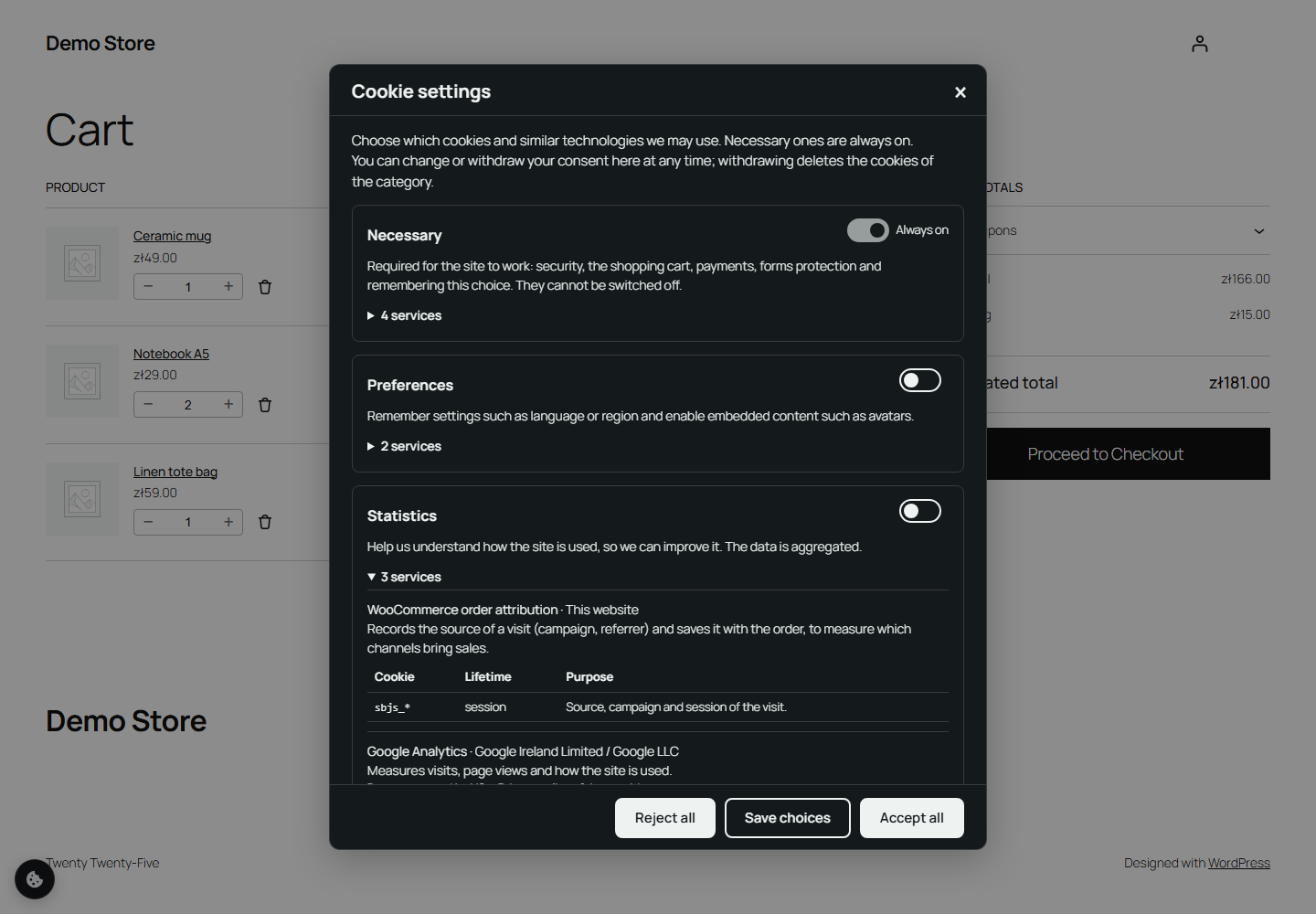
Preference centre with categories, services and cookies.

YouTube and Google Maps placeholders: nothing loads from the providers before consent.

Scanner with the before-consent check.

Services and cookies with categories to review.
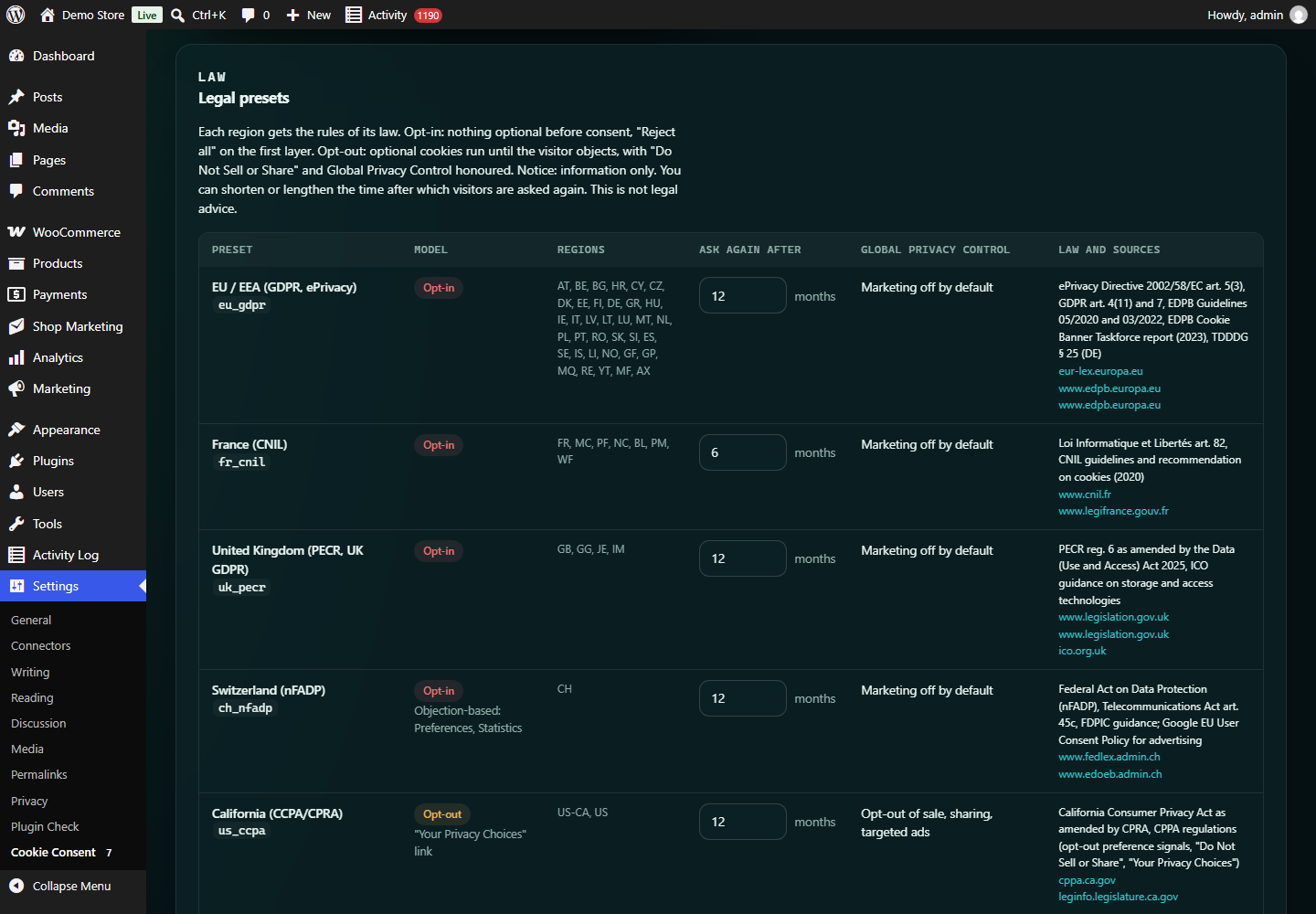
Legal presets per region.
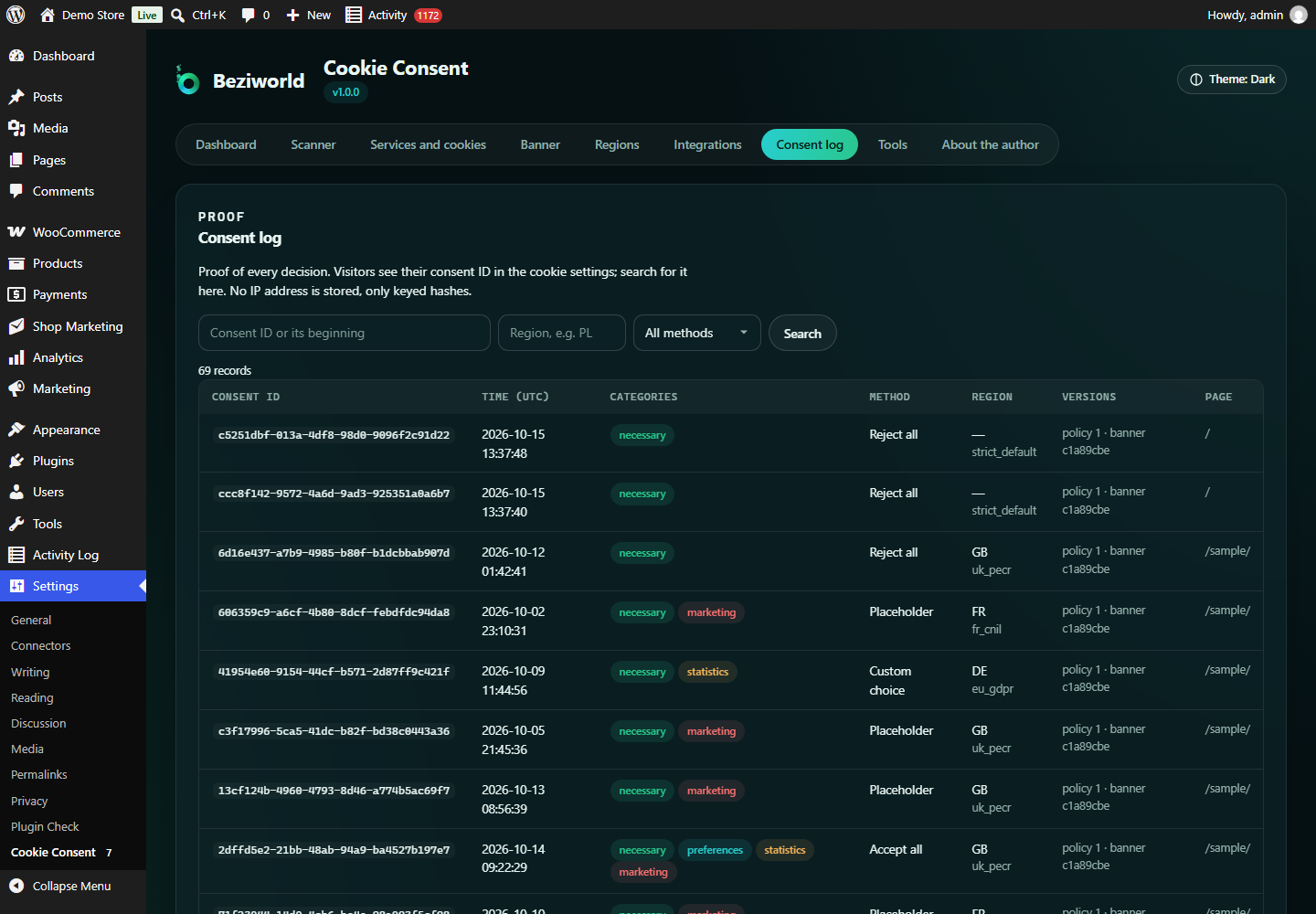
Consent log with search by consent ID.

Cookie declaration generated from the scan.
Similar Plugins:
 Cookie Consent, Consent Log, Cookie Scanner, Script Blocker (for GDPR, CCPA & EPrivacy) : WP Cookie Consent
 AdSimple Cookie Consent Manager (DSGVO/GDPR), Cookie Banner, Cookie Consent, Cookie Notice
 Consentmanager Cookie Banner For Cookie Consent (Google Consent Mode And GDPR Compliant Cookie Notice)