
BG Couriers For WooCommerce Wordpress Plugin - Rating, Reviews, Demo & Download
Plugin Description
BG Couriers adds the major Bulgarian couriers to WooCommerce as shipping methods. At checkout the customer picks a delivery type per courier – to an office, to an address, or to an APS/locker – searches for their city and office (or picks it from an interactive map), and sees a live price from the courier’s own API. The merchant generates shipping labels and tracks shipments from the WordPress admin.
Deliveries are Bulgaria-only.
Couriers
- Speedy – office / address / APS, live rates, labels, tracking.
- Econt – office / address / Econtomat, live rates, labels, tracking, and cash on delivery (наложен платеж) with an itemised packing list paid out via your postal-money-transfer agreement.
- Pigeon Express – office / address / locker, live rates, labels, tracking.
- BOX NOW – locker (APM) delivery with an embedded GPS map picker, flat rate.
- Sameday – office / address / easyBox, live rates, labels, tracking.
Highlights
- Live prices per courier and delivery type, with a daily reference baseline and a configurable fallback.
- Interactive map picker for offices/lockers (geolocation “nearest to me”).
- Tap anywhere on a courier row at checkout to choose it – a full-width target on phones.
- Per-order and bulk label generation to a combined PDF (A6 / A4), tracking links.
- Per-courier settings: only the fields each courier actually needs.
External services
This plugin relies on the online APIs of the couriers you enable to calculate shipping prices, create shipping labels and track shipments. Data is sent only for the couriers you configure, and only when an action requires it (a checkout price quote, a label generation, or a tracking lookup).
What is sent and when
- Price quote (checkout / cart): the parcel weight, the destination city/office and delivery type. Triggered when a customer views shipping options.
- Label creation (admin): the recipient’s name, phone, e-mail, and the chosen address or office/locker, the parcel weight, and – if you enable cash on delivery – the amount to collect and an item list. Triggered when you generate a label.
- Tracking: the waybill number. Triggered when you or the customer open tracking.
Services used (each only if you enable that courier):
- Speedy – api.speedy.bg. Terms: https://www.speedy.bg/en/terms-and-conditions · Privacy: https://www.speedy.bg/en/privacy-policy
- Econt – ee.econt.com. Terms: https://www.econt.com/en/terms · Privacy: https://www.econt.com/en/privacy-policy
- Pigeon Express – api.pigeonexpress.com (demo host api-demo.pigeonexpress.com in test mode). Terms: https://pigeonexpress.com/terms · Privacy: https://pigeonexpress.com/privacy
- BOX NOW – api-production.boxnow.bg (stage host api-stage.boxnow.bg in test mode), and the locker-selection map widget map.boxnow.bg, which is loaded in an iframe only when the customer opens the BOX NOW locker picker. Terms: https://boxnow.bg/terms-of-use-for-shipping-services · Privacy: https://boxnow.bg/personal-data-processing-notice
- Sameday – api.sameday.bg (demo host sameday-api-bg.demo.zitec.com in test mode). Terms: https://sameday.bg/terms-and-conditions-delivery-courier-services-bg/ · Privacy: https://sameday.bg/politika-za-poveritelnost/
Maps: the office/locker map picker loads map tiles from OpenStreetMap (tile.openstreetmap.org) – only when the customer chooses to open the map. The optional address map picker is DISABLED by default; if the merchant enables it in the settings, it additionally reverse-geocodes a point via OpenStreetMap Nominatim (nominatim.openstreetmap.org) – only the coordinates of the pin the customer drops, only when they drop it, never automatically. OSM tile policy: https://operations.osmfoundation.org/policies/tiles/ · Nominatim policy: https://operations.osmfoundation.org/policies/nominatim/ · Privacy: https://wiki.osmfoundation.org/wiki/Privacy_Policy
If the merchant sets a Google Maps API key (optional), the address picker instead uses Google Maps Geocoding (maps.googleapis.com) for that lookup – sending only the picked coordinates. Google terms: https://cloud.google.com/maps-platform/terms · Privacy: https://policies.google.com/privacy
No data is sent to any service the merchant has not configured, and the plugin sends nothing to the plugin author.
Contributing
The plugin is developed in the open. Bugs, ideas and pull requests are welcome:
https://github.com/dangoriaynov/bg-couriers/issues
Screenshots
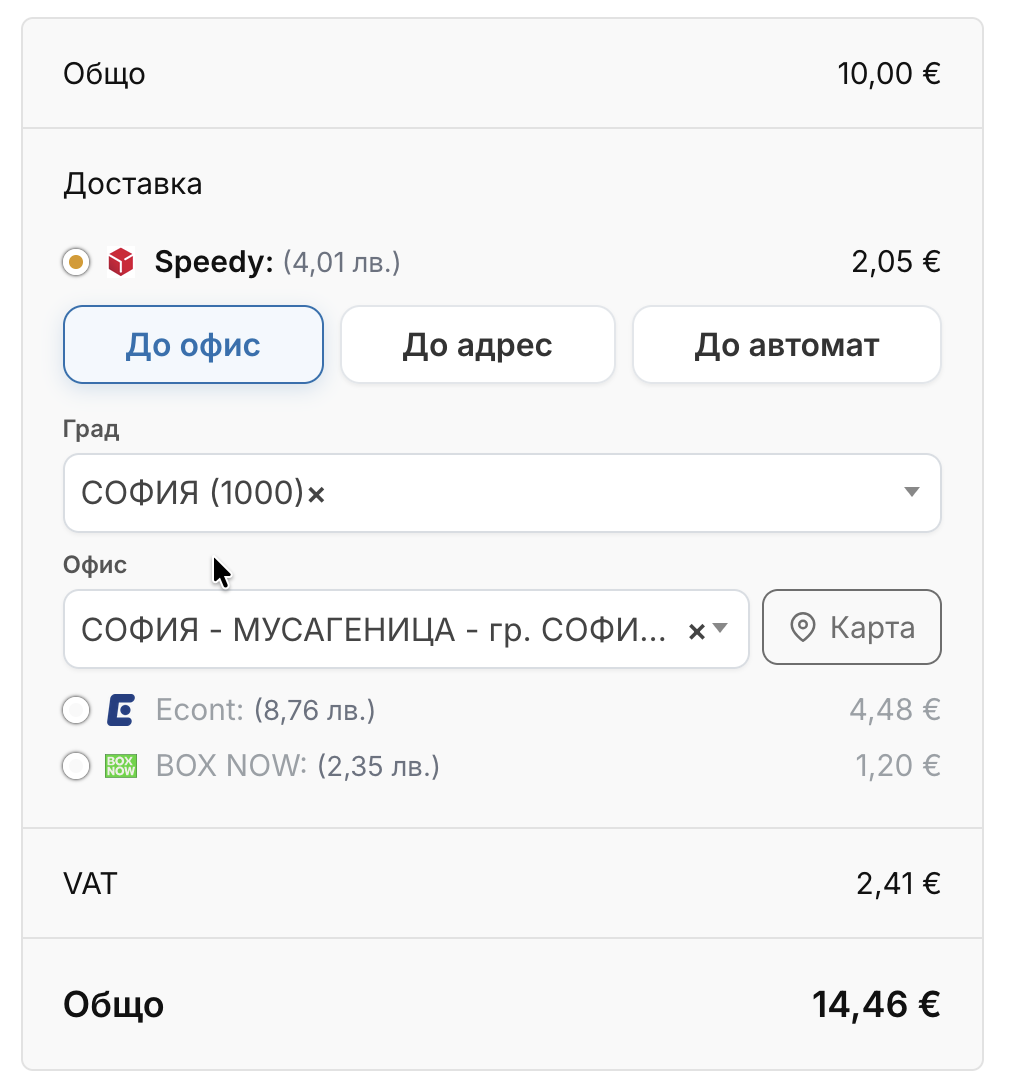
Checkout: delivery-type tabs (to office / address / APS locker), searchable city and office pickers, a live per-courier price, and a “Map” button.
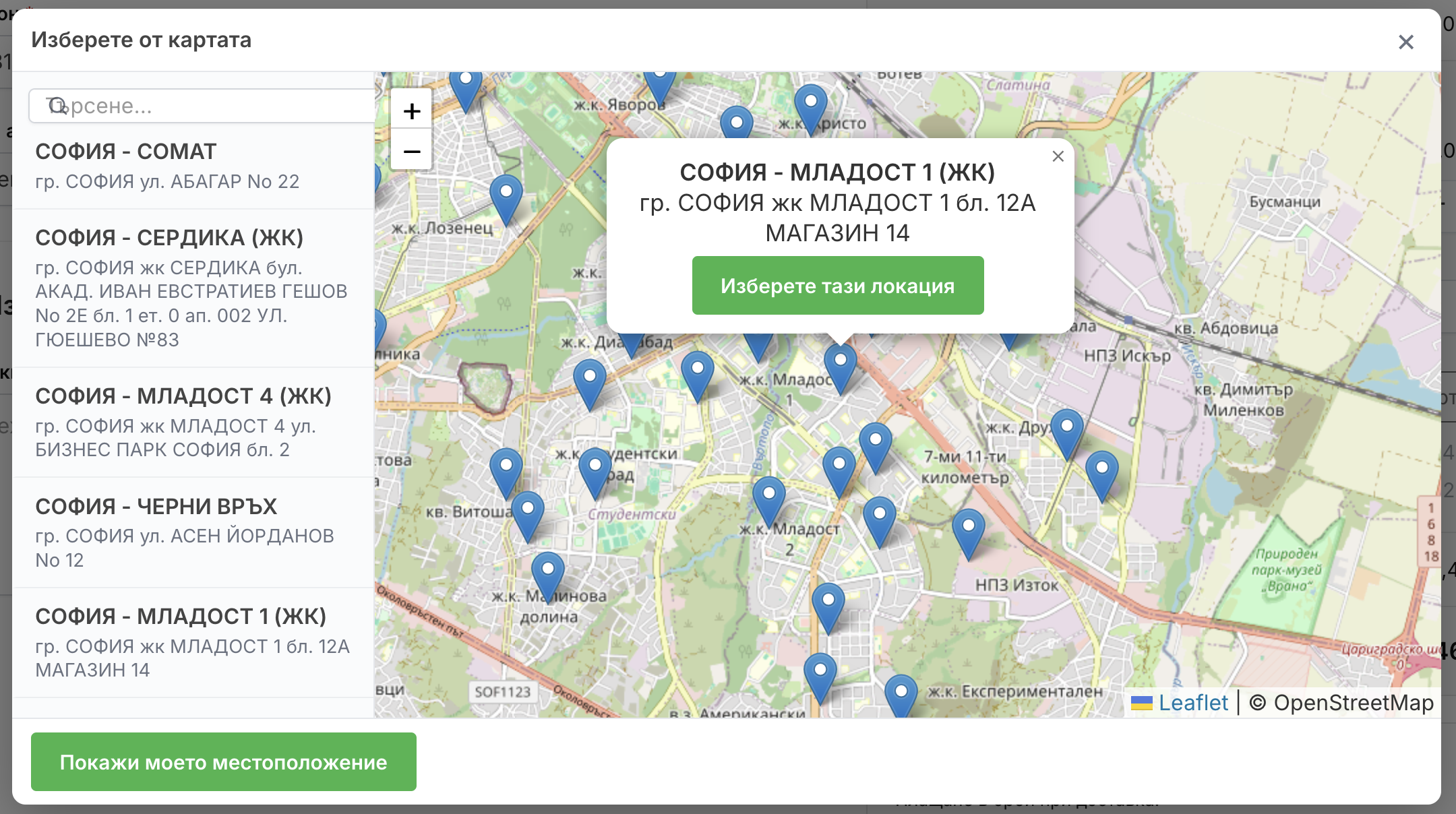
Checkout: the office/locker map picker – a searchable list beside the map, markers, and “show my location”.
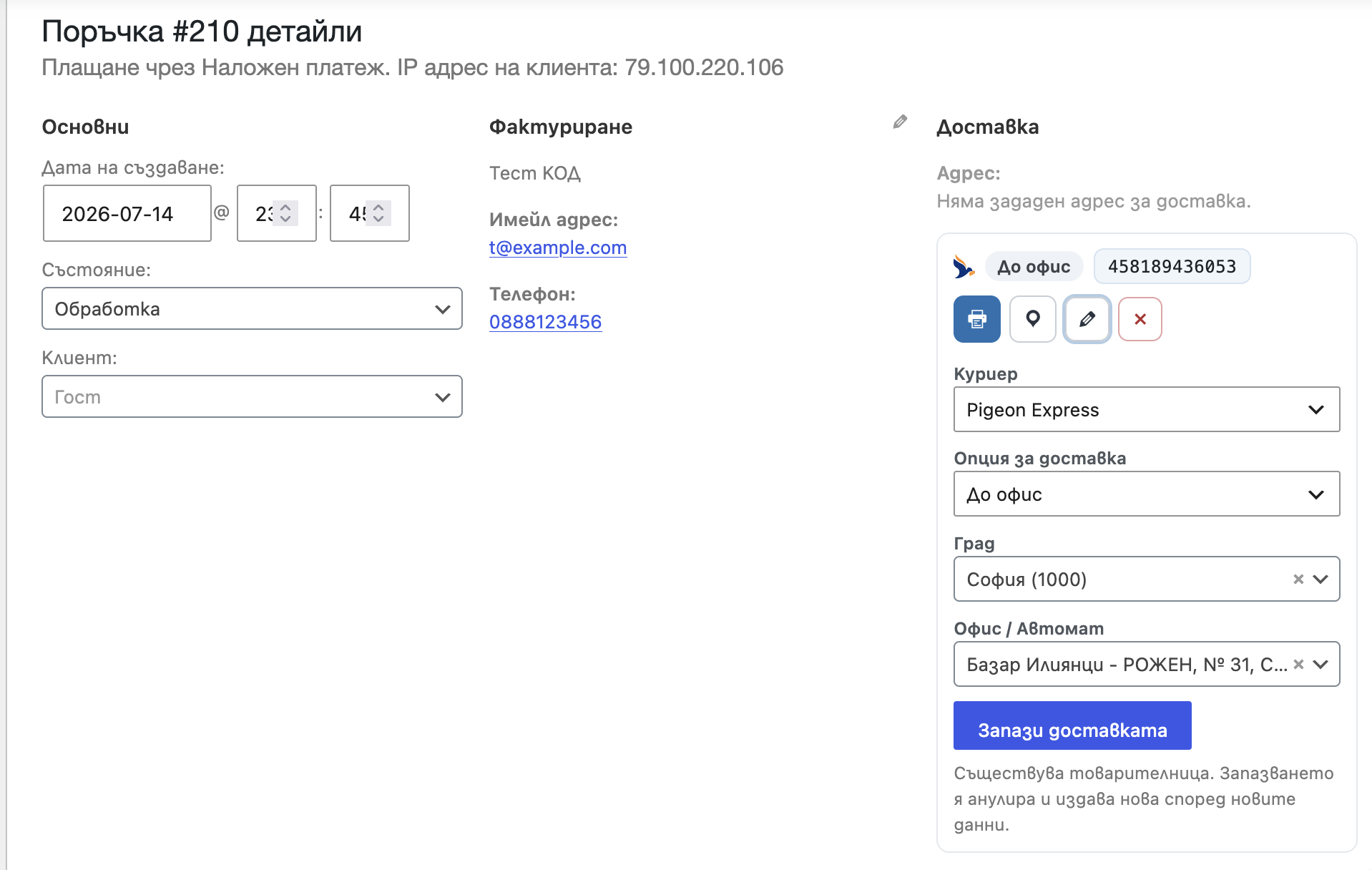
Order screen: the shipment panel (waybill number + print / track / cancel) and the inline delivery editor (courier, delivery option, city, office/APS).
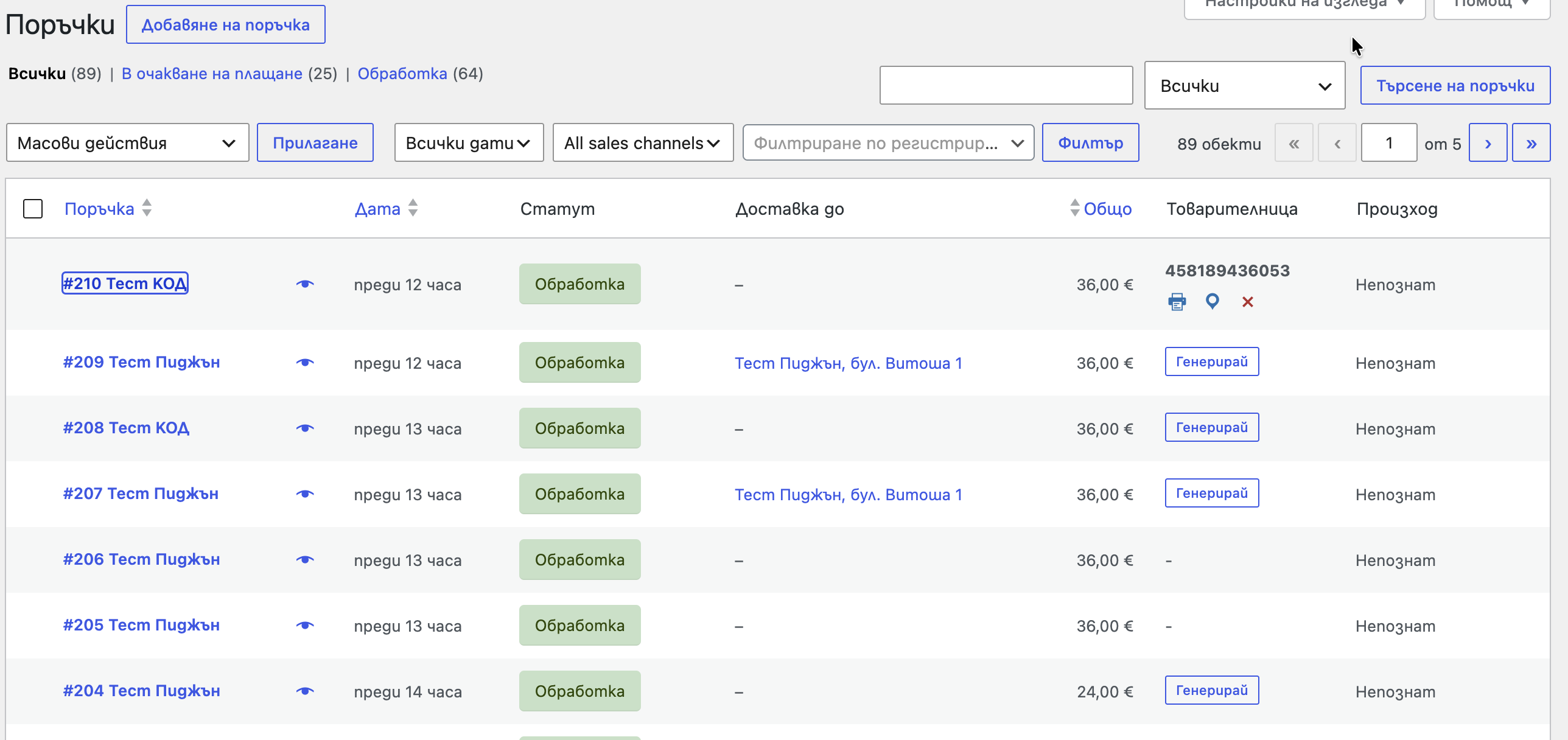
Orders list: the “Waybill” column – generate a label, or print / track / cancel an existing one, per order.
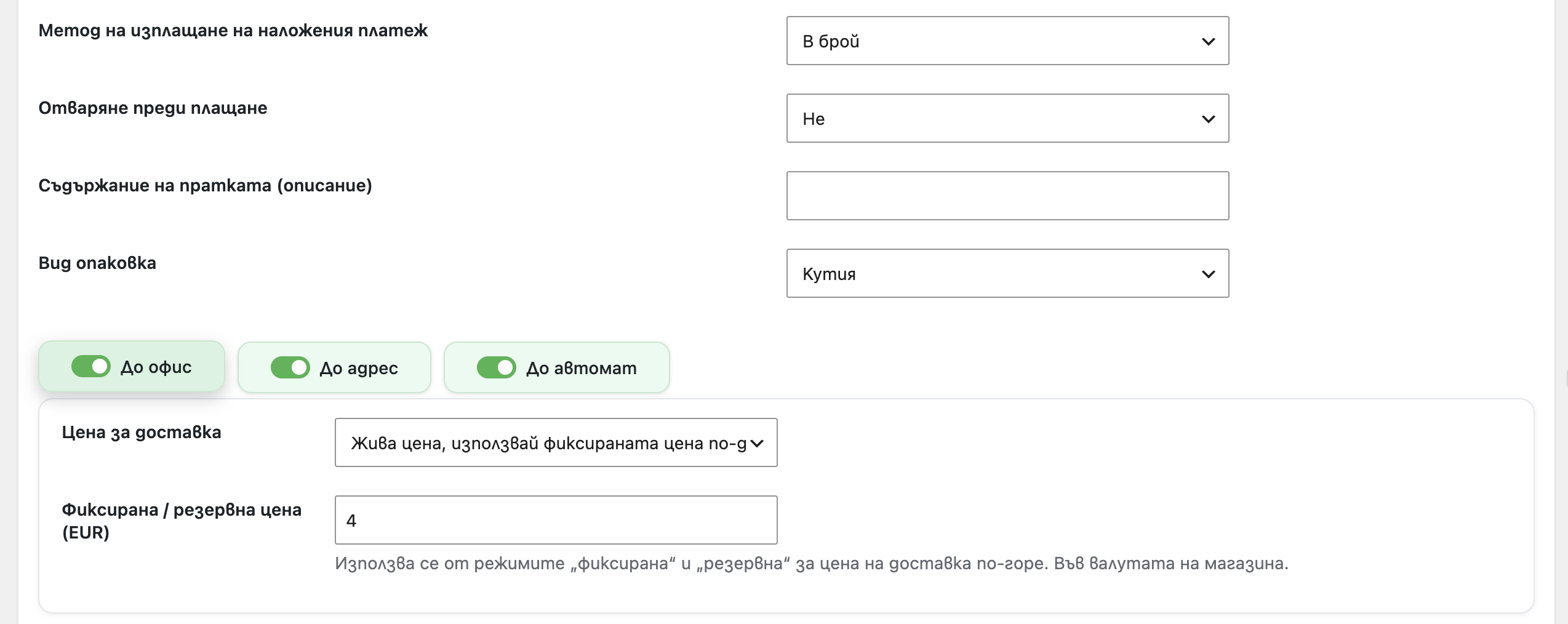
Settings: a courier tab – COD payout method, open-before-payment, contents/package, the delivery-option sub-tabs and per-method prices.
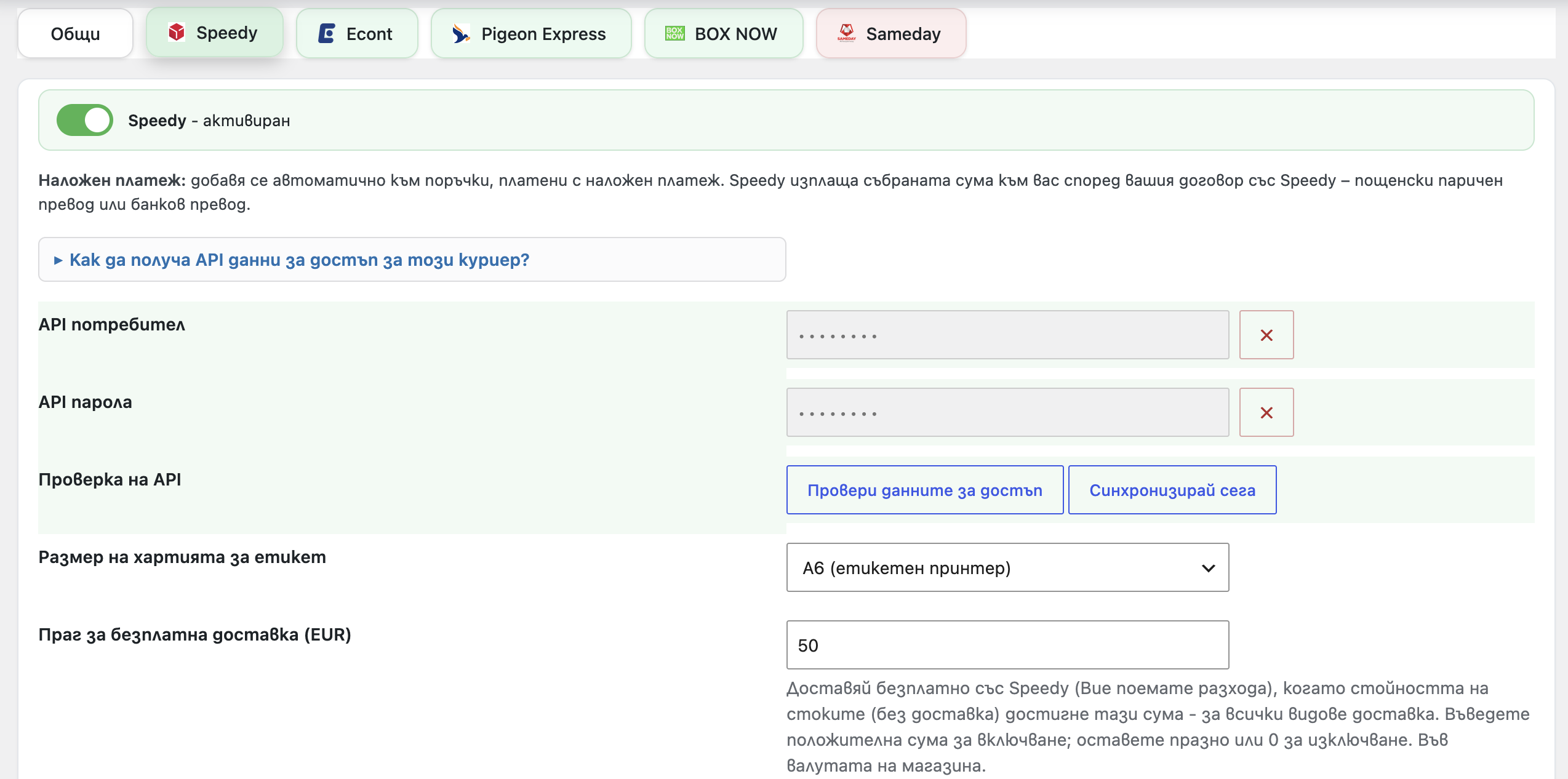
Settings: masked credentials with Validate / Sync and the built-in “How do I get API credentials?” hint.


