
Caretta AI Assistant Wordpress Plugin - Rating, Reviews, Demo & Download
Plugin Description
Someone lands on your site at eleven at night with one question standing between them and a purchase. Right now they either find the answer themselves or they leave. Caretta answers them.
It learns from what your site already says, so there is nothing to train and no script to write. You connect your Wapiso account, tick one box, and the assistant appears in the corner of your site.
What it does for you
- It answers instead of collecting an email. Shipping times, returns, sizes, opening hours, whether you deliver to a city. The questions that used to sit in your inbox until morning get an answer straight away.
- It replies in the visitor’s language. Someone writes in German, they get German back. English and Turkish too.
- It knows your products. With WooCommerce, your catalogue goes to the assistant when you connect, so it answers with real names and prices and puts the product in the chat with a link to buy.
- It tells you where it fell short. Every question it could not answer is waiting for you in the Gaps list, with a counter for how often it was asked. You write the answer once and the assistant uses it from then on.
- It looks like it belongs to you. Pick your colour, the title, which corner it sits in, and which pages it appears on. Until someone clicks, it is a small button.
What you should know before installing
- Caretta is a paid service from Wapiso. You need an account with credit on it; the plugin is the free way to put that service on your WordPress site. Details and pricing: https://wapiso.com/caretta-assistant
- Conversations are kept in your Wapiso account, not in your WordPress database. WordPress stores counts and the unanswered questions, not the chats themselves.
- Nothing is sent anywhere until you connect an account. After that, visitors’ messages go to Wapiso to be answered, and on a WooCommerce site your product catalogue goes too. The External services section lists exactly what is sent, and when.
Your visitors’ chat does not leave your site
Most chat plugins put a key in your page and let the visitor’s browser talk to the vendor directly. This one does not. The conversation goes to your own server first, and your server passes it on. Your key stays on the server, and anyone reading your page source finds nothing that looks like a credential.
That is also why the assistant keeps working on sites where a browser-to-vendor connection is blocked.
Getting an answer right
The assistant answers from your site. When that is not enough, you fill the gap yourself:
- Open Caretta → Gaps. It lists the questions visitors asked that the assistant was unsure about, most asked first.
- Press Write answer and say it in your own words.
- The answer becomes a card in your Knowledge Base and goes to the assistant. The next visitor who asks gets it.
Your answers stay in WordPress even if you disconnect the service.
Requirements
- WordPress 6.0 or newer, PHP 7.4 or newer.
- A Wapiso account with an embed token allowed for your domain. One button on the Caretta screen does this for you.
- A permalink setting other than “Plain”. The plugin checks this for you: if the addresses the assistant needs do not reach WordPress, it keeps the widget hidden and tells you on its own screen rather than showing your visitors a button that cannot answer.
- It writes no rewrite rules, changes no configuration file and does not touch your permalink settings. Sites in a subdirectory (
example.com/blog/) work too.
About the name
Caretta is Wapiso’s own product and is published here by its owner: the WordPress.org account wapisocom, the plugin slug wapiso-caretta, its text domain and the domain https://wapiso.com are one and the same company. “Caretta” is the genus of the loggerhead sea turtle, which is where both the name and the logo come from. The product page is https://wapiso.com/caretta-assistant.
This plugin is not affiliated with, endorsed by, or connected to any other product, service or company using a similar name.
WooCommerce is a trademark of Automattic Inc. This plugin integrates with WooCommerce but is not affiliated with or endorsed by Automattic.
Languages
The interface is in English and ships with a Turkish (tr_TR) translation. On a WordPress site whose language is Turkish, the plugin appears in Turkish automatically. Additional languages can be contributed through translate.wordpress.org.
External services
This plugin relies on two external services. Both are described below.
1. Wapiso (the assistant itself)
The plugin is a client for the Caretta assistant, which is a hosted service run by Wapiso. Without it the plugin has nothing to answer with.
What is sent, and when. Your site’s server, not the visitor’s browser, connects to:
https://wapiso.com/api/v1/chat-embed/*every time a visitor opens the widget or sends a message. Sent: the visitor’s message text, a random visitor identifier the plugin generates, the conversation identifier, the page URL the widget was opened on, the interface language, and your embed token. The visitor’s IP address is visible to Wapiso as the origin of the request, as with any HTTP request.https://wapiso.com/api/v1/*when you use the admin screens: connecting your account, testing the connection, reading knowledge base entries and unanswered questions, and sending the knowledge cards you write.https://wapiso.com/api/v1/*for your WooCommerce catalogue, if WooCommerce is active. Once you connect your account, the plugin sends your published products so the assistant can answer about them: titles, prices, permalinks, stock status and image addresses. Products you add or edit afterwards are sent as they change, and deleted ones are removed. This starts with the connection, not with a separate switch; disconnecting stops it.
Nothing is sent to Wapiso until you enter a token or connect your account.
Terms of service: https://wapiso.com/terms-of-service
Privacy policy: https://wapiso.com/privacy-policy
2. Cloudflare Turnstile (bot protection, optional)
Turnstile is Cloudflare’s bot-detection widget. The chat widget carries an integration with it, so we are documenting it even though it does not currently run.
When it runs. The widget loads Turnstile only if the assistant’s start response hands it a Turnstile site key (assets/embed/ source: src/bootstrap.js, which calls the loader only when the key is non-empty). The Wapiso service has not returned that key since June 2026 – bot protection is switched off service-side – so in practice the browser makes no request to Cloudflare and the script is never inserted into the page. It is documented here because it can be switched back on service-side without a plugin update.
What would be sent if it were on. The visitor’s browser would load https://challenges.cloudflare.com/turnstile/v0/api.js, and Cloudflare would receive what its widget collects in order to score the request: the visitor’s IP address, browser and device characteristics, and interaction signals on the page. The resulting token would be passed back through the plugin’s proxy for verification.
Terms of service: https://www.cloudflare.com/website-terms/
Privacy policy: https://www.cloudflare.com/privacypolicy/
Source code
Nothing in this plugin is obfuscated. The PHP is shipped as written.
The chat widget under assets/embed/ is generated, so its full unminified source ships with the plugin:
widget-src/src/– the widget’s ES modules, including the loader (src/loader/index.js, built toassets/embed/loader.js).widget-src/css/– the widget’s stylesheets. The cascade order iscss/index.json.widget-src/build.mjs– the build script.widget-src/package.jsonandwidget-src/package-lock.json– pinned build dependencies (esbuild 0.25.5, jsdom 24.1.3).widget-src/test/– the gates the build must pass.
To regenerate assets/embed/ from source:
cd widget-src
npm ci
CARETTA_EMBED_OUT=../assets/embed npm run build
The build produces the loader, the code-split bundle in dist/, and dist/manifest.json. npm run check runs the test gates on their own.
Screenshots
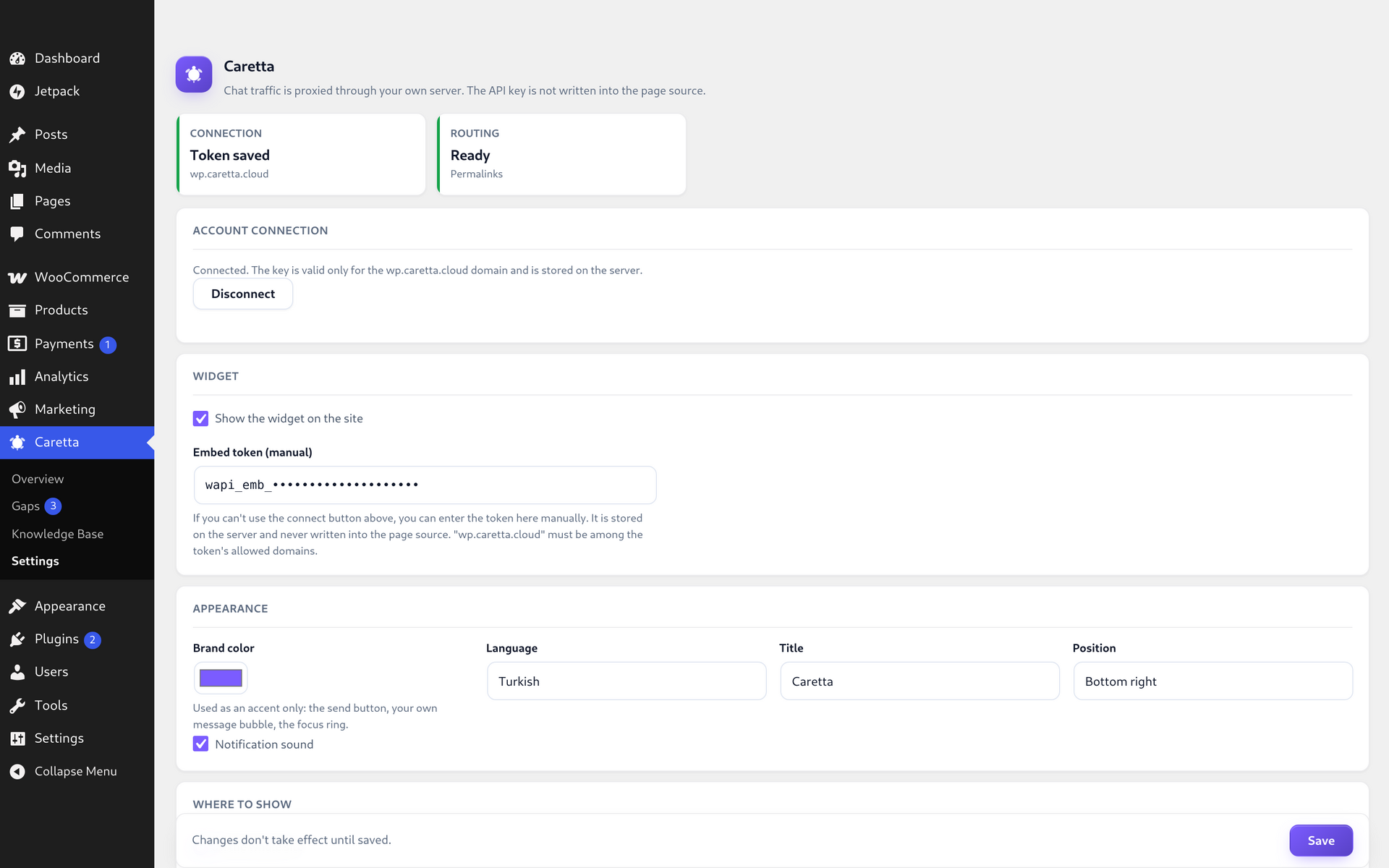
The Caretta screen: connect your Wapiso account or paste an embed token, then switch the widget on. The Routing card underneath says whether the widget’s addresses reach WordPress on your permalink setting.
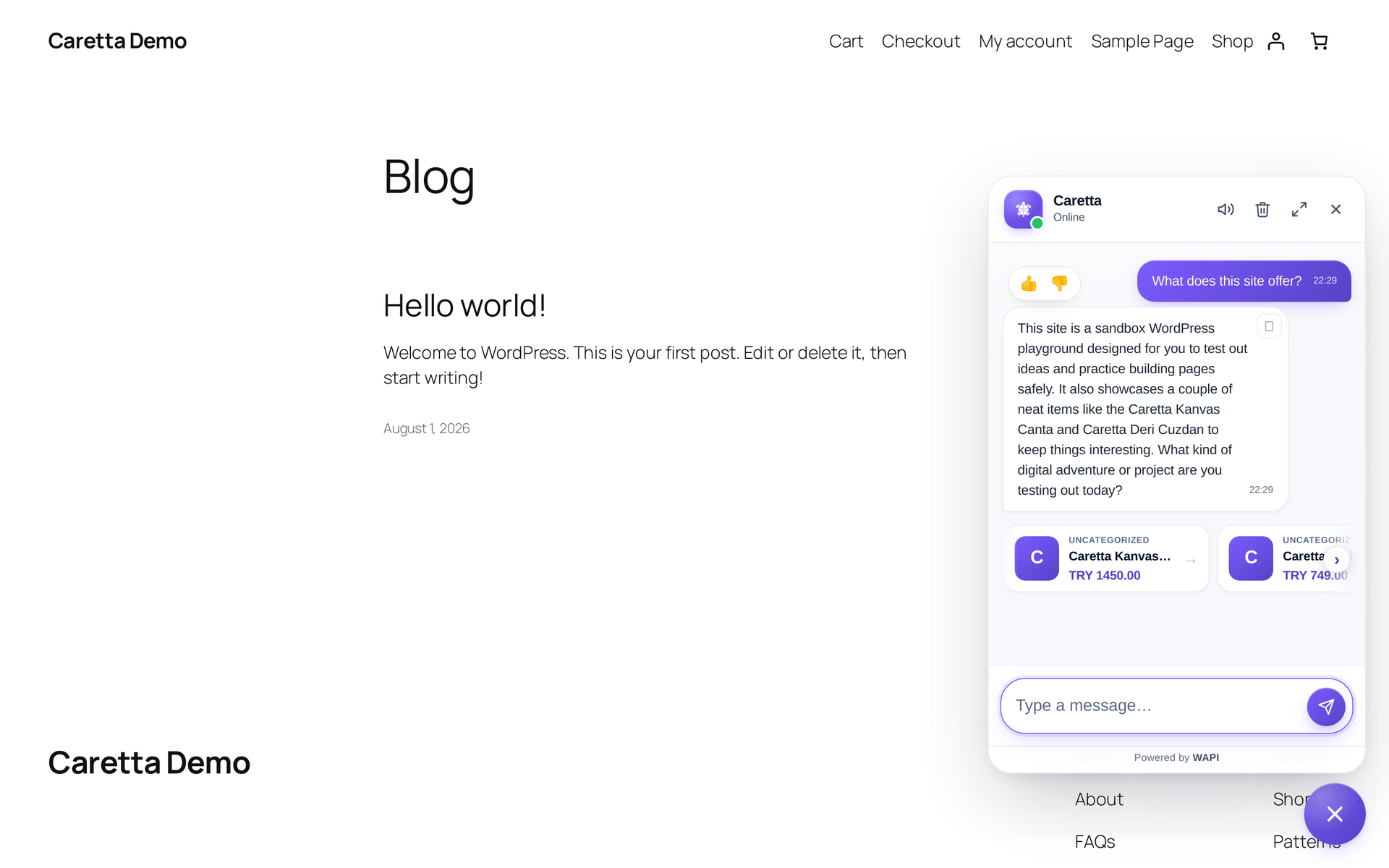
The assistant answering a visitor on the site itself, served from your own origin.
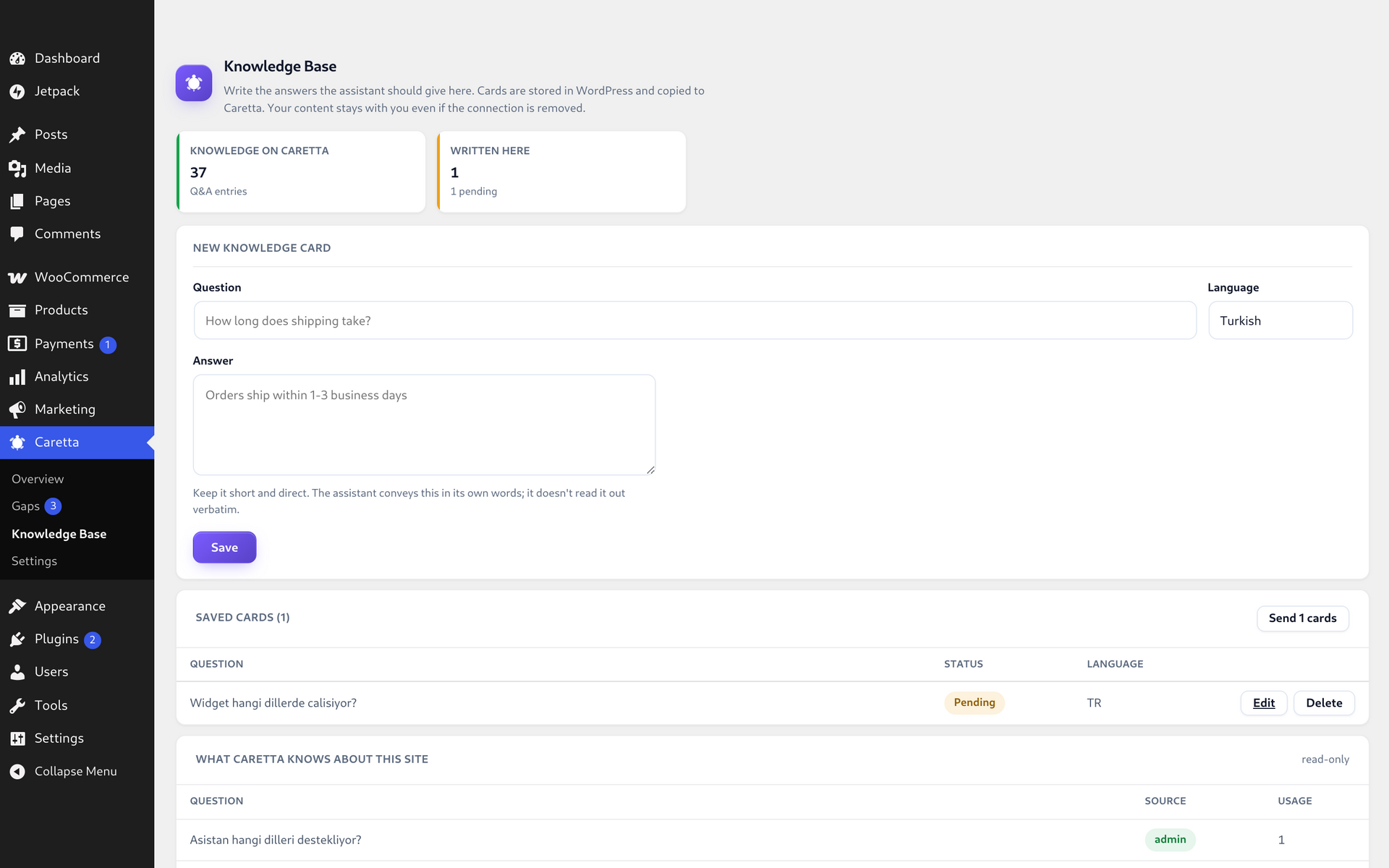
The knowledge base the assistant answers from, and the questions it could not answer, both readable without leaving the admin.


