
Checkout Clout Wordpress Plugin - Rating, Reviews, Demo & Download
Plugin Description
Turn your customers into influencer leads — automatically.
Every day, creators and influencers place orders in your store without you knowing. Checkout Clout changes that.
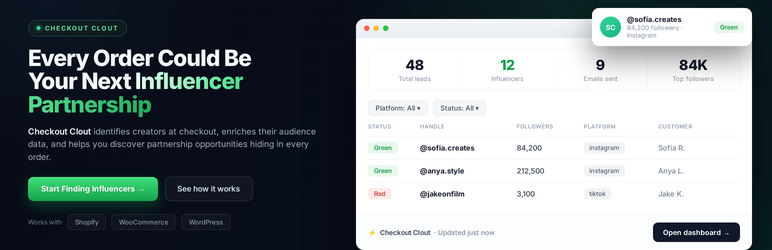
A subtle, optional field appears at checkout asking customers if they want to share their Instagram or TikTok handle. After the order is placed, Checkout Clout automatically looks up their follower count and scores them green, orange, or red — so you know exactly who’s worth reaching out to.
How it works
- Install the plugin and connect your Checkout Clout account
- An optional social handle field appears at checkout
- After each order, follower counts are retrieved and leads are scored automatically
- Send branded outreach emails with one click — or enable auto-send for top leads
Features
- Checkout widget — Subtle Instagram & TikTok field embedded directly in your WooCommerce checkout
- Automatic lead scoring — Green (10k+ followers), Orange (1k–10k), Red (<1k)
- Outreach emails — Personalized collaboration emails sent from your dashboard. Track opens.
- Leads dashboard — Filter, sort, and manage all creator leads in one place
- Collaboration tracking — Track leads through outreach, negotiation, and active partnership stages
- Customizable widget — Change colors, fonts, button text, disclaimer, and checkout position
- Blacklist & GDPR — Delete any lead on request. Return window prevents duplicate leads.
- WooCommerce + Shopify — Works across both platforms with the same account
Privacy & External Services
This plugin connects to checkoutclout.com to:
– Validate your API key and authenticate your account
– Store and retrieve lead data (customer handles, follower counts, email addresses)
– Send outreach emails via the Checkout Clout delivery system
– Retrieve publicly available social media follower counts via search engine APIs
Data is processed in accordance with the Checkout Clout Privacy Policy.
Submission of a social handle at checkout is entirely optional for end customers. No data is collected from customers who do not submit a handle.
Requirements
- WordPress 6.0+
- WooCommerce 7.0+
- PHP 8.0+
- A Checkout Clout account (free to register at checkoutclout.com)
Support
For help, visit checkoutclout.com/support or email hi@checkoutclout.com.
External Services
This plugin connects to the following third-party services:
Checkout Clout (checkoutclout.com)
Used to authenticate your account, store lead data (social handles, follower counts, customer emails), and send outreach emails. Data is sent after each order where a customer submits a social handle.
– Terms of Service
– Privacy Policy
Serper (google.serper.dev)
Used to retrieve publicly available follower counts for submitted social handles. When a customer submits a handle at checkout, the handle and platform (Instagram or TikTok) are sent to the Serper API to perform a Google search and extract the follower count from the result snippet. No customer PII (name, email, address) is sent to Serper.
– Serper Terms of Service
– Serper Privacy Policy
Stripe (stripe.com)
Used to process subscription payments for Checkout Clout plans. When a store owner upgrades their plan from the plugin’s Billing tab, they are redirected to a Stripe-hosted checkout page. Payment data is handled entirely by Stripe and is never stored by this plugin.
– Stripe Terms of Service
– Stripe Privacy Policy
Screenshots

The checkout widget — optional Instagram & TikTok field at checkout

Leads dashboard — automatically scored by follower count

Form settings — customize the widget to match your brand

Email outreach — send personalized collaboration emails

Connect screen — paste your API key to link your account


