Chiaro – AI Sales Analytics For WooCommerce Wordpress Plugin - Rating, Reviews, Demo & Download

Plugin Description
Chiaro lets store owners ask questions about their own WooCommerce data, in plain language, and get back a short answer, a table and a chart:
- “Which 5 products generated the most revenue this year?”
- “How are sales going this month compared with last year?”
- “Which products are returned the most, and why?”
- “Which size do I sell the most?”
- “Which provinces and countries do my orders come from?”
- “Which products are out of stock but sold well in the last 6 months?”
- “What is my margin this year, by category?” (with WooCommerce “Cost of Goods Sold”)
Chiaro is in beta: it is tested on stores with thousands of orders, but we are still learning from real stores. If an answer looks wrong, the SQL query is always one click away, and we would love to hear from you in the support forum.
What you get
- Dashboard with the key numbers of your store compared with the previous period, the revenue of the last 12 months and the best-selling products. It runs on your site: no question is used.
- Suggested questions based on your own data, one click away.
- Answers with a chart and a table, automatically compared with the previous period when the question names one (this month, last year, the last 30 days…), with side-by-side bars for comparisons.
- Follow-up questions: “and in June?”, “only for Milan”, “split it by month”. Chiaro remembers the last questions of the conversation (their text and query, never the data).
- Monday summary by email (optional): last week compared with the week before, the best-selling products and up to three things worth a look (a product running out, a product selling less, refunds going up, days without orders). Calculated on your site: no question is used.
- Alerts every morning in the dashboard, with a counter on the Chiaro menu: a product about to run out or out of stock while it was selling, sales dropping, no orders for 48 hours, refunds going up. Optional email as soon as one appears. Calculated on your site: no question is used.
- Pinned questions: pin an answer and it runs again for free with today’s data.
- “Ask Chiaro” buttons on products, orders and customers.
- CSV export of every answer, ready for Excel.
- Voice dictation of the question (Chrome, Edge, Safari).
Your data stays on your site. Only your question and the structure of the data (view and column names) are sent to the AI service. The AI writes a database query; Chiaro checks it and runs it on your own database. The rows of the result are never sent to the AI: the text, the table and the chart are built by the plugin.
Safe by design.
- Chiaro reads the store through 10 read-only database views (
ai_bi_*) that contain no customer names, emails, phone numbers or full addresses. - Every query generated by the AI is checked before it runs: a single
SELECT, only on those views, with a row limit. - Queries run in a read-only database transaction, with a time limit where the database server supports it.
- You can use a dedicated read-only MySQL user.
- You can always see the SQL query used for each answer.
Works out of the box. Activate Chiaro with your email and get 50 free questions, with no AI key to set up. When they run out you can buy question packs (see Pricing below), or use your own AI key.
Bring your own AI. Chiaro also works with your API key for Google Gemini, Anthropic Claude, OpenAI or any OpenAI-compatible service (for example a local Ollama server). You pay the AI provider directly and Chiaro is free.
Your language. The interface follows the language of your WordPress profile: English, Italian, French, Spanish and German (other languages use English). Answers follow the language of the question.
Pricing
With the Chiaro questions service the first 50 questions are free. Then you buy packs, with no subscription and no expiry:
- 300 questions: €9
- 1,000 questions: €25
- 3,000 questions: €59
Prices include VAT. Pinned questions and the dashboard run again for free. Optional automatic top-up buys the same pack when the questions run low, up to a monthly limit you choose. An unused pack can be refunded within 14 days from the plugin. With your own AI key Chiaro is free.
External services
Chiaro questions service (default)
When you activate Chiaro with your email, the plugin connects to the Chiaro service at https://chiaro-api.tceitalia.com, run by TCE Italia.
* At activation it sends: the site address, the email you enter and the plugin version.
* For every question it sends: the question, the structure of the Chiaro data views (names and descriptions of the columns) and, for follow-up questions, up to 3 previous questions of the same conversation with their database query. The question text may include product names or customer ids when you use “Ask Chiaro” on a product, order or customer screen. Store data rows (orders, customers, amounts) are never sent: the query runs on your site.
* To show the questions left and manage top-ups it sends the site identifier, signed with a key stored on your site.
* If you enter a partner code in Settings, it sends that code to link the site to the agency.
The service forwards the question to Google Gemini to write the query. Terms: https://chiaro-api.tceitalia.com/terms – Privacy: https://chiaro-api.tceitalia.com/privacy
Payments
Question packs are sold by Paddle.com (merchant of record). The payment page opens on the Chiaro service and loads Paddle.js. Paddle terms: https://www.paddle.com/legal/terms – Privacy: https://www.paddle.com/legal/privacy
Your own AI key (optional)
To answer a question, Chiaro sends a request to the AI service you choose in Chiaro Settings. Nothing is sent until you configure a service and ask a question (or press “Test the setup”).
What is sent, every time you ask a question: the text of the question, the names and types of the columns of the ai_bi_* views, a description of the data model, today’s date and, for follow-up questions, up to 3 previous questions of the same conversation with their database query. Your API key is sent to that service only, for authentication. No order, product or customer data is sent.
Depending on your choice, the request goes to one of these services:
- Google Gemini API (Google LLC) – used when “Google Gemini” is selected. Terms of service, Privacy policy.
- Anthropic API (Anthropic PBC) – used when “Anthropic Claude” is selected. Commercial terms, Privacy policy.
- OpenAI API (OpenAI, L.L.C.) – used when “OpenAI” is selected. Terms of use, Privacy policy.
- Another OpenAI-compatible service – used when you enter its URL yourself; its own terms and privacy policy apply.
Voice dictation (optional)
The microphone button in the chat uses the speech recognition built into your browser (the Web Speech API). The plugin does not send audio anywhere: depending on the browser, your voice is processed by Google (Chrome), Microsoft (Edge) or Apple (Safari) under their own terms, and only the recognized text is written in the question box. Nothing is sent until you press the button; you can hide it in Chiaro Settings.
Screenshots
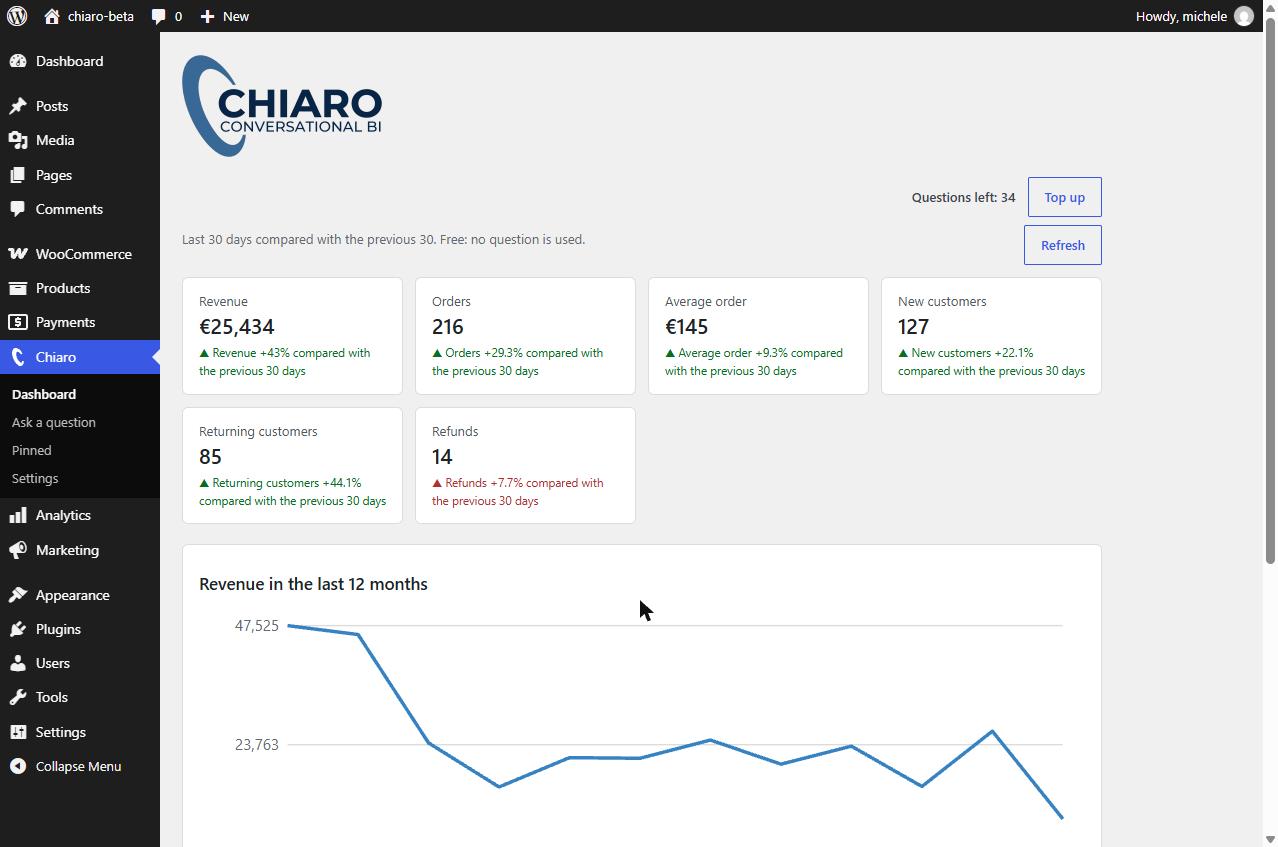
The dashboard: key numbers compared with the previous period, the revenue trend and the best-selling products.
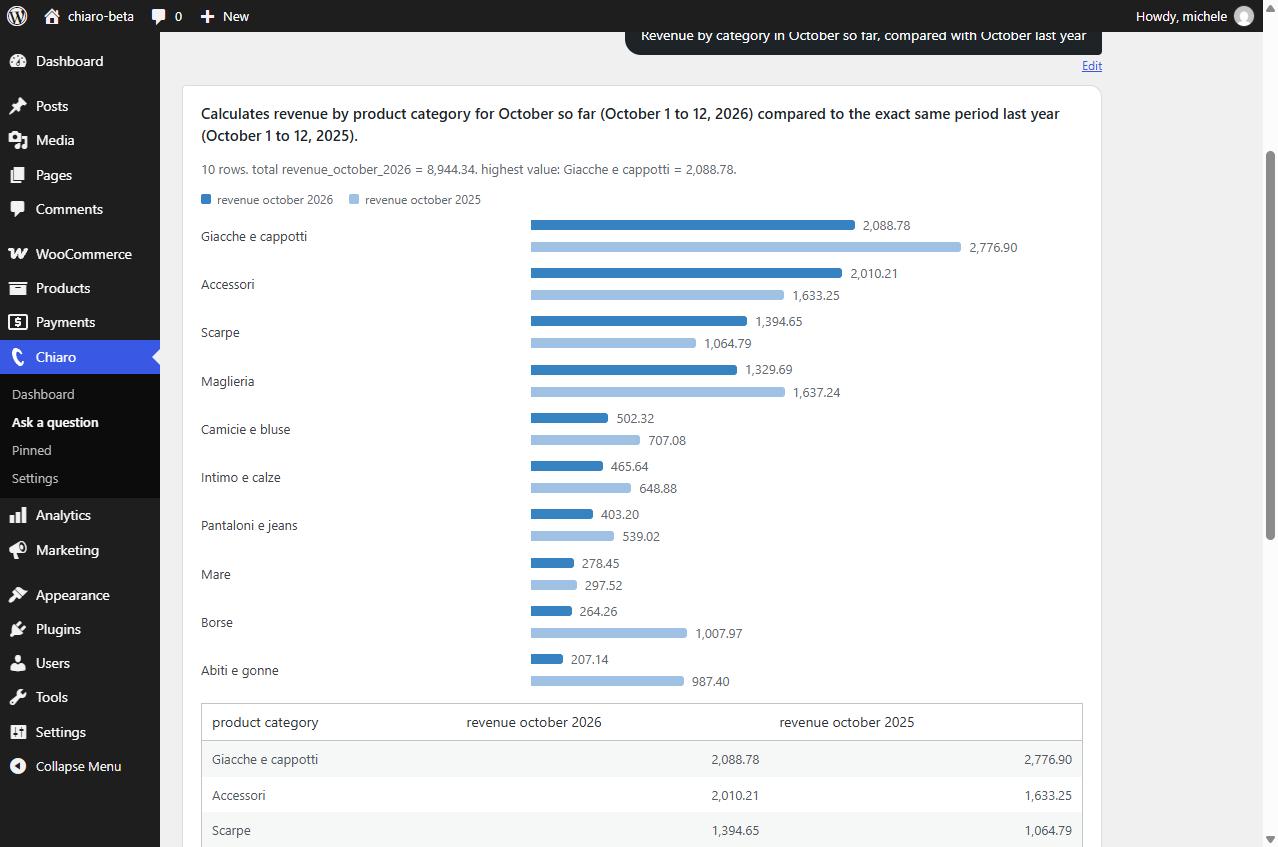
An answer with a chart: revenue by category this month, compared with the same days of last year.
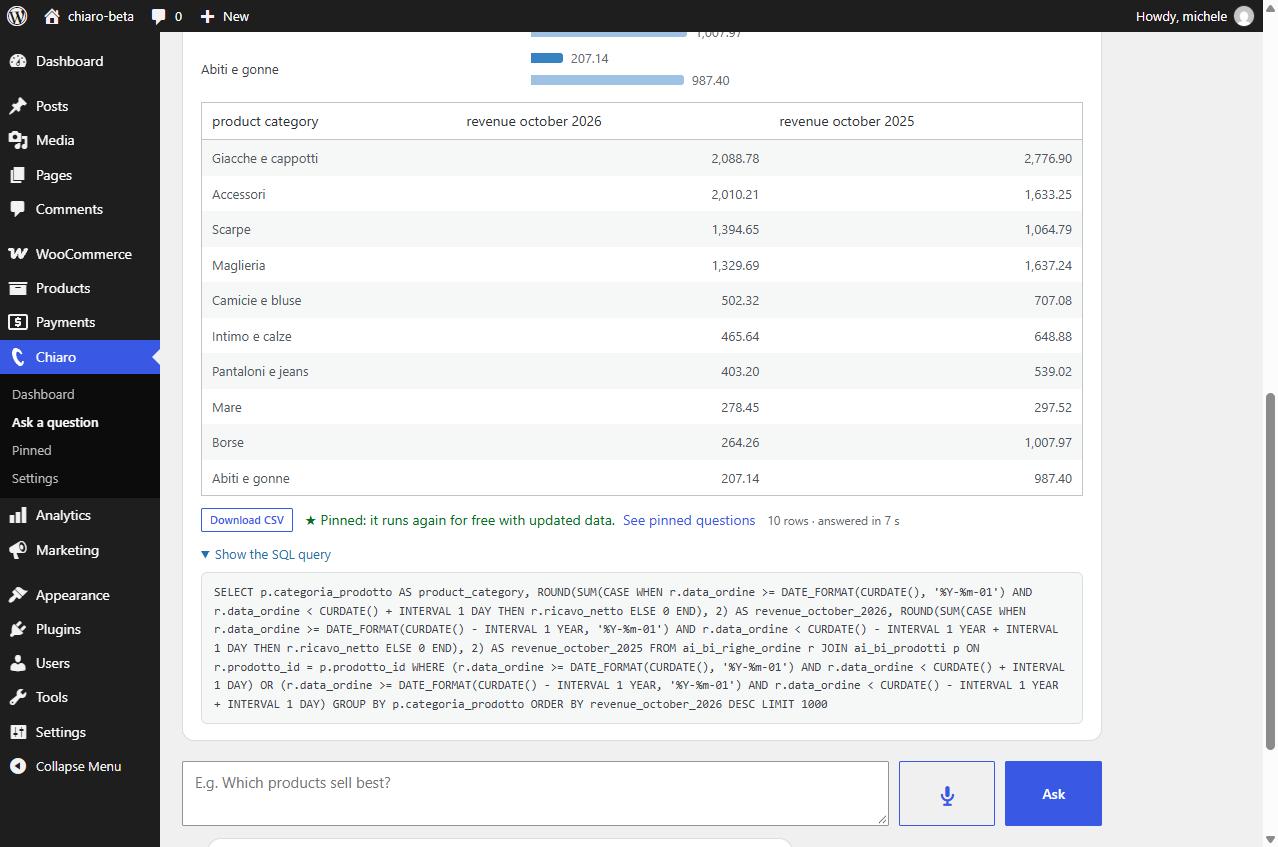
The table of the same answer, the CSV export, the pinned question and the SQL query used.
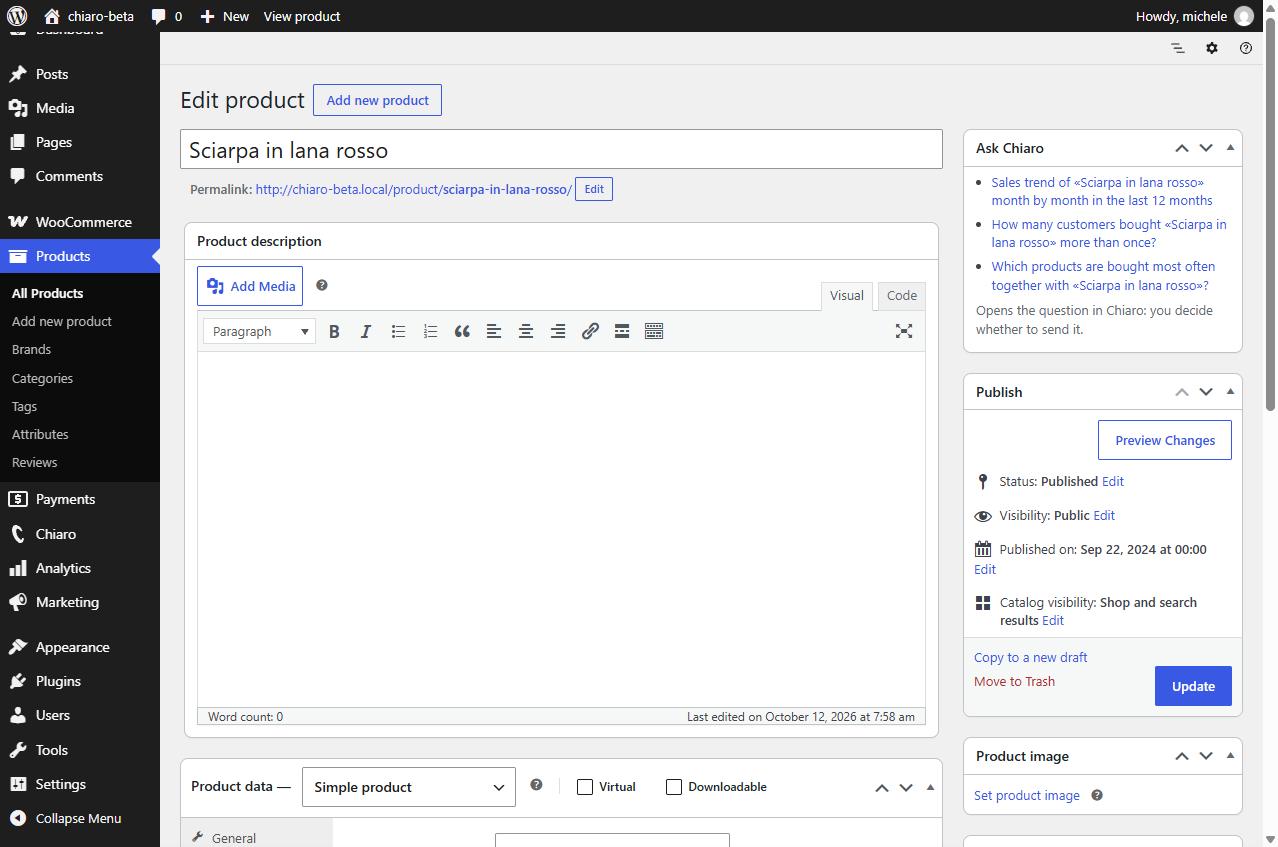
“Ask Chiaro” on a product: suggested questions about that product.
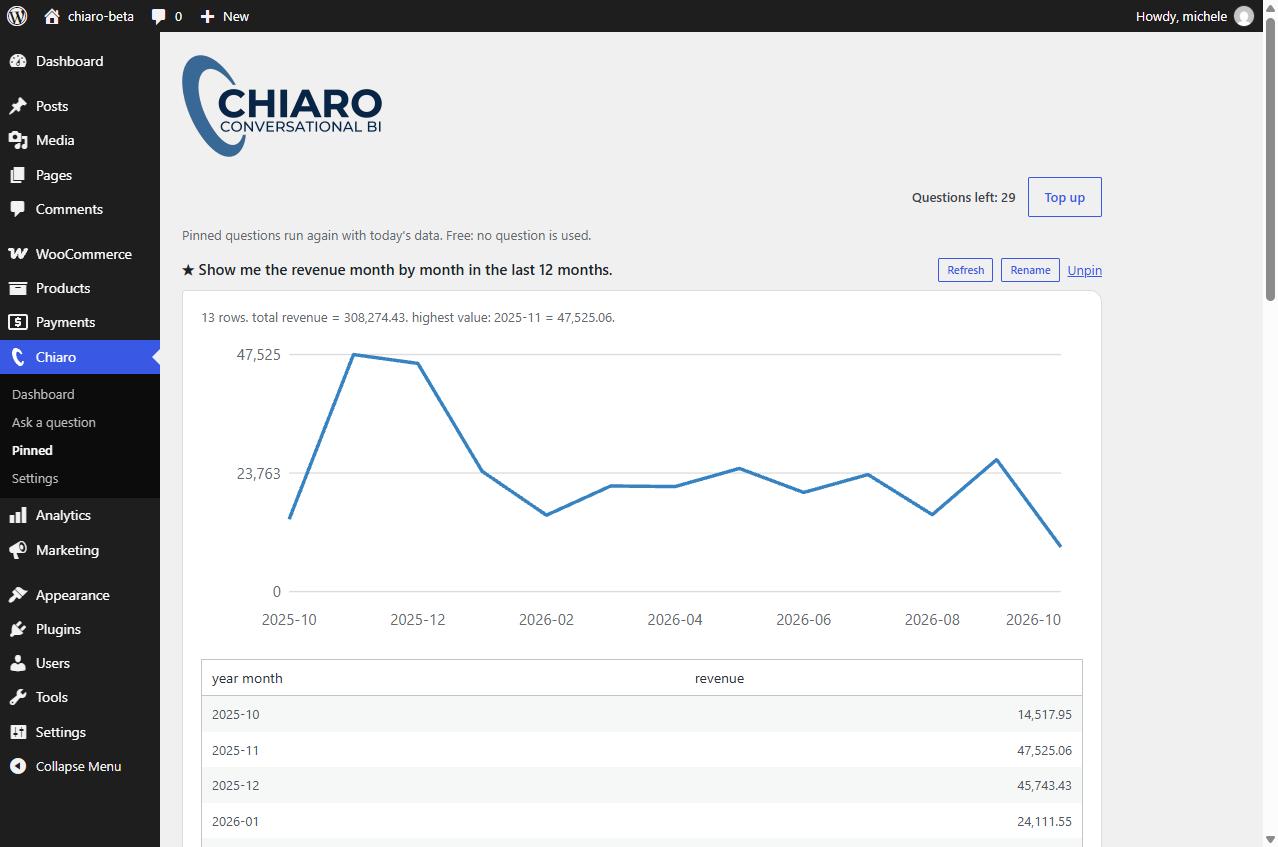
Pinned questions run again with today’s data, for free.
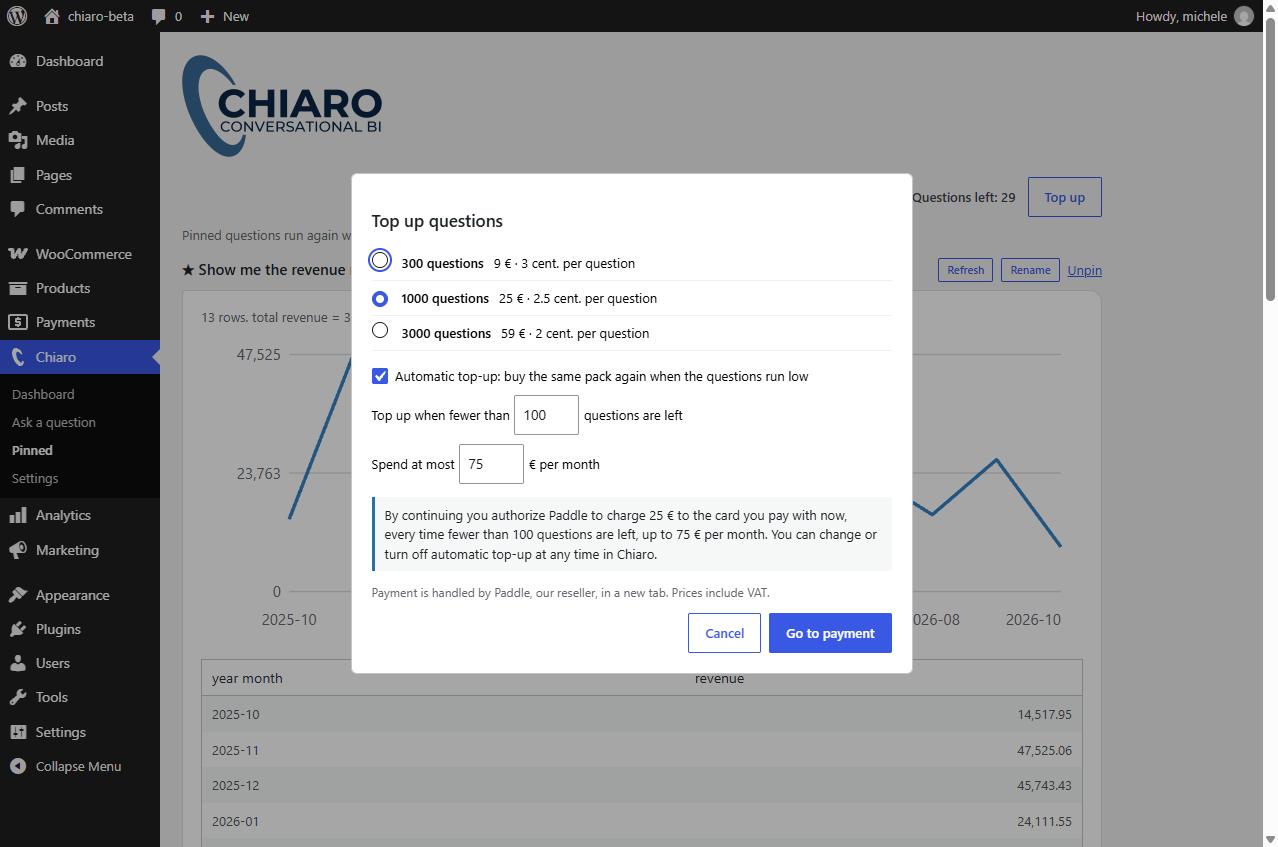
Topping up questions: with automatic top-up you see exactly what will be charged, when and up to which monthly limit.