Chimpjar Accessibility Toolbar Wordpress Plugin - Rating, Reviews, Demo & Download
Plugin Description
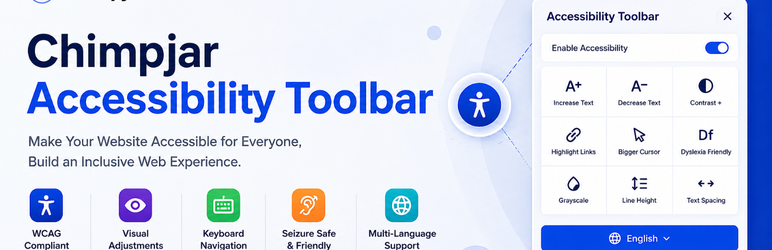
Chimpjar Accessibility Toolbar is a powerful, fully customizable interactive web accessibility toolbar designed to improve website usability for people with disabilities, elderly users, and those with temporary limitations.
🌟 Why Choose Accessibility Toolbar?
- 35+ Accessibility Features – Comprehensive toolkit for maximum accessibility
- Easy to Use – One-click activation with intuitive interface
- Fully Customizable – Match your brand colors and preferences
- No Coding Required – Simple WordPress admin panel configuration
- Lightweight & Fast – Optimized code with minimal performance impact
- WCAG 2.1 AA Compliant – Built following accessibility standards
- GDPR Ready – No cookies without consent, privacy-focused
🎯 Who Can Benefit?
- Visually Impaired Users – High contrast, magnifier, text scaling
- Color Blind Individuals – 3 types of color blindness simulations
- Dyslexic Users – Specialized font and text spacing
- Motor Impaired Users – Virtual keyboard, focus indicators
- Elderly Users – Big cursor, easy navigation
- Temporary Limitations – Reading mask, distraction-free mode
✨ Key Features
Visual Adjustments
- Increase/Decrease text size
- High contrast and dark mode
- Color blindness compensation
- Monochrome mode
- Saturation control
Reading Assistance
- Dyslexia-friendly font
- Text spacing and alignment
- Reading mask and guide
- Line height adjustment
- Dictionary lookup
Navigation Tools
- Page navigation menu
- Virtual keyboard
- Focus highlighting
- Big cursor option
- Magnifier glass
Content Control
- Hide images
- Stop animations
- Mute sounds
- Hide distractions
- Highlight links and headers
Smart Features
- Auto alt-text generation
- Custom color schemes
- Accessibility statement
- 24-hour temporary hide
- Position adjustment
🔧 Easy Installation
- Upload the plugin to
/wp-content/plugins/ - Activate the plugin through ‘Plugins’ menu
- Go to Accessibility Toolbar settings page
- Customize colors, features, and position
- Save settings – toolbar appears instantly!
📱 Fully Responsive
Works perfectly on all devices – desktop, tablet, and mobile phones. The toolbar automatically adjusts its position and size for optimal user experience.
🌍 Translation Ready
Chimpjar Accessibility Toolbar is fully translation-ready and supports standard localization, making it easy to translate all admin and frontend text strings into any language.
🎨 Customization Options
- Theme Color – Match your brand identity
- Icon Color – Choose any color for the toolbar icon
- Icon Size – Adjust from 16px to 40px
- Bold Icons – Make icons thicker for better visibility
- Widget Position – Choose from 4 corners of the screen
- Feature Toggle – Enable/disable individual accessibility tools
🚀 Performance Optimized
- Lazy loading of resources
- Non-blocking script execution
- Minimal CSS footprint
- No jQuery dependency
- Built with vanilla JavaScript
🔒 Secure & Reliable
- Regular security audits
- WordPress coding standards
- Input validation and sanitization
- Output escaping throughout
- Capability-based access control
External services
This plugin relies on the following third-party service:
- Wikipedia REST API
- Purpose: Used to fetch word definitions and article summaries when users use the built-in “Dictionary” lookup feature within the accessibility toolbar.
- Data Sent: Only the selected search word/text and language code are sent to Wikipedia’s REST API endpoint when the user actively searches or looks up a term. No personal user data or cookies are transmitted.
- Service Provider: Wikimedia Foundation, Inc.
- Terms of Use: Wikimedia Terms of Use
- Privacy Policy: Wikimedia Privacy Policy
Screenshots
No screenshots provided