
ClearFund Wordpress Plugin - Rating, Reviews, Demo & Download

Plugin Description
Someone gives your organization $50, receives a thank-you email, and then hears nothing ever again. They never find out whether it bought school books or disappeared into overheads. That silence is the single biggest reason first-time donors don’t give twice.
ClearFund closes that gap. It publishes a live page on your own site showing every category you’re raising for, how much has come in, exactly what’s been spent — and a photographed receipt for each purchase. No spreadsheets emailed on request, no annual PDF report nobody opens. Your supporters can check for themselves, whenever they like.
Your field staff submit expenses from their phone with a receipt photo attached. You approve them. They appear on the public page. That’s the whole loop.
ClearFund doesn’t take payments — it works alongside the donation plugin you already use, currently GiveWP or MissionWP, and pulls donations in automatically. You can also record cash, bank transfers and grants by hand, so the public picture includes money that never touched your website.
Key features
- Per-category donation pools — organize giving into categories (e.g. Food, Medicine, Education) each with its own goal and running balance.
- Receipt-backed expense tracking — field staff submit expenses with a receipt photo and an optional “in use” action photo.
- Approval workflow — expenses stay private until an administrator approves them, then appear on the public dashboard. Optional auto-approve for small teams.
- Manual donations — record donations received outside GiveWP (cash, bank transfer, grants) per category, with an optional donor name, source note, and backdated date.
- Public transparency dashboard — a shortcode that shows donated vs. spent vs. balance per category, plus a gallery and full expense history.
- Email digests — automatic weekly or monthly transparency reports to your admins and (optionally) your newsletter subscribers.
- White-label — configurable organization name, field-staff role label, and base currency, so it fits any non-profit. Nothing identifies ClearFund to your donors: the optional “Powered by ClearFund” mark is off unless you switch it on.
- Tamper-evident audit trail — every donation and expense event is recorded and hash-chained as it happens, and the log is readable on every install.
- Integrations — GiveWP for donations, Brevo for email digests and subscribers.
Shortcodes
[clearfund_dashboard]— the public transparency dashboard.[clearfund_subscribe]— a newsletter signup widget (ideal on your donation confirmation page).[clearfund_my_impact]— a logged-in donor’s personal money-tracing page showing exactly which expenses their donations funded. Registered only by the separate ClearFund Pro build; this plugin does not include it.
What’s included
Everything you need to run a transparent ledger is here, free and unlimited — there is no cap on categories, expenses, donations or traffic, and no trial that expires:
- Unlimited donation categories, each with its own goal and running total
- Receipt-backed expense tracking with an approval workflow
- Manual donation recording for cash, bank transfers and grants
- The public transparency dashboard (shortcode and Gutenberg block)
- GiveWP and MissionWP donation syncing, including in-form category choice
- Weekly or monthly email digests, and the Brevo newsletter integration
- Tamper-evident ledger recording — every donation and expense is hash-chained as it happens, on every site — and a readable Audit Trail of every recorded event
ClearFund Pro is a separate plugin download, not an unlock. The plugin you install from WordPress.org contains only the free features listed above; the Pro code is not present in it in any form, and nothing in it can be switched on by a license key, constant or setting. Buying Pro downloads a different, larger build of ClearFund from Freemius, which replaces this one. Cancelling reverses that: you go back to this build.
ClearFund Pro adds, for organizations that need them:
- Audit Trail — verify the hash chain on demand, catch changes made directly in the database, export the ledger as CSV/JSON for auditors, and show a public integrity badge
- Donor money-tracing — let a donor follow their own gift to the exact purchases it paid for, plus the
[clearfund_my_impact]personal page - Donor Impact Emails — automatically email donors when their gift is spent
- Deeper Insights — arbitrary custom date ranges, forecasting, PNG export
- Multi-currency — let field staff record expenses in a local currency, auto-converted
- Appearance — hero background gradients and images with a readability overlay
Details and pricing at clearfund.ing.
External Services
ClearFund works without any external service. The following are optional and only contact a third party once you have entered your own credentials or enabled the feature.
ExchangeRate-API (ClearFund Pro only — this plugin contains no currency-conversion code and never contacts it) — in Pro, used only when you enable a secondary (field) currency, to convert expense amounts into your reporting currency. Each conversion sends the two currency codes and your API key to v6.exchangerate-api.com. No donor or expense data is sent. Terms and Privacy: https://www.exchangerate-api.com/terms
Brevo — used only when you enter a Brevo API key, to send transparency digest emails and to add newsletter subscribers. Sends the subscriber’s email address, optional first name, and digest content to api.brevo.com. Terms: https://www.brevo.com/legal/termsofuse/ — Privacy: https://www.brevo.com/legal/privacypolicy/
Freemius — handles licensing, updates and checkout for the paid features. Contacts api.freemius.com to validate a license and check for updates. Diagnostic/usage data is only sent if you opt in when activating. Terms: https://freemius.com/terms/ — Privacy: https://freemius.com/privacy/
Privacy
ClearFund stores donation records in your own WordPress database and sends nothing to us. Depending on how you use it, those records can include a donor’s name and email address — captured from GiveWP or MissionWP, or typed in when you record a donation by hand. Email addresses are used to match a donor to their own giving history on the “My Impact” page and, if you enable Donor Impact Emails, to write to them; every such email carries a one-click unsubscribe link and opt-outs are honoured permanently.
You control what supporters can see. A new install does not publish donor names: logged-out visitors see “A supporter”, and you have to change Settings Donor Privacy before a name is visible to the world. Donations given anonymously always show as “Anonymous”. Donation amounts and the expenses they funded are public — that is the point of the dashboard — but no name is attached to them unless you have opted in.
Uninstalling ClearFund leaves your data in place by default, so an accidental deactivation can never destroy your ledger. If you genuinely want it erased, tick the option under Settings Advanced before you delete the plugin.
See External Services above for the three optional integrations and exactly what each one transmits.
Screenshots
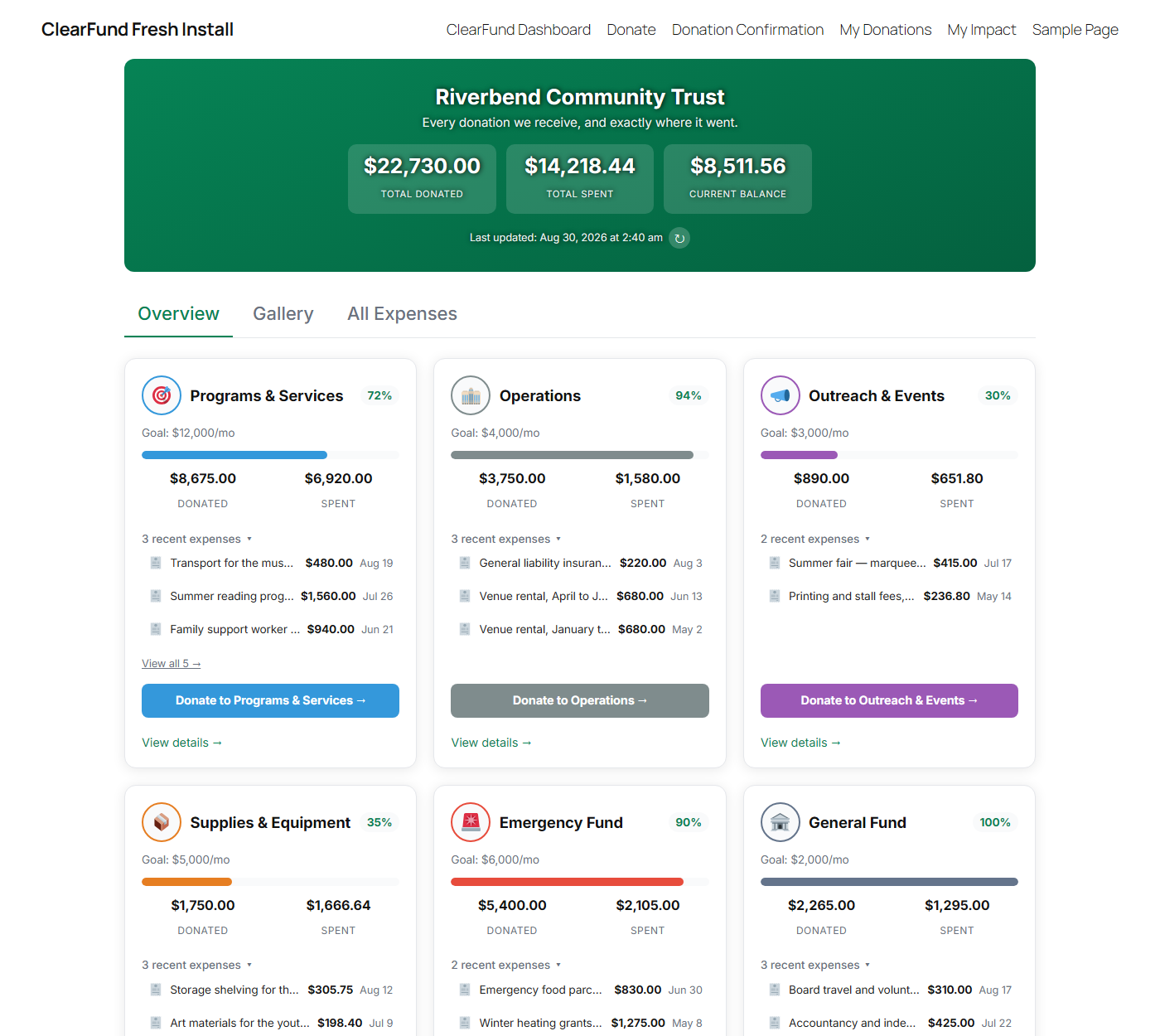
The public transparency dashboard — per-category donation pools with goal progress, headline totals, and the most recent receipt-backed expenses.
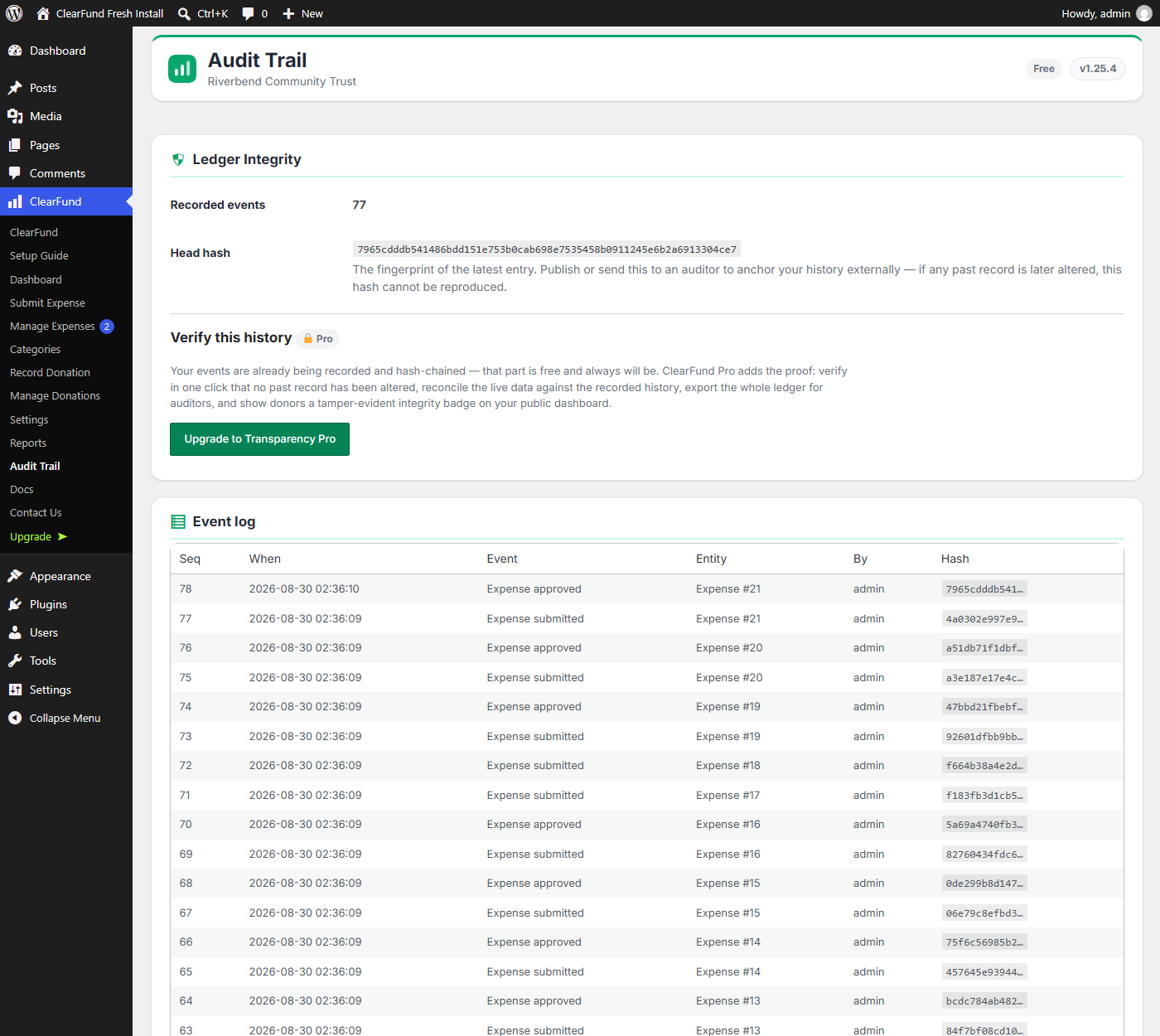
The Audit Trail — every donation and expense recorded in a tamper-evident, hash-chained ledger. Reading the log and the head hash is free; one-click verification, auditor export and the public integrity badge are ClearFund Pro.
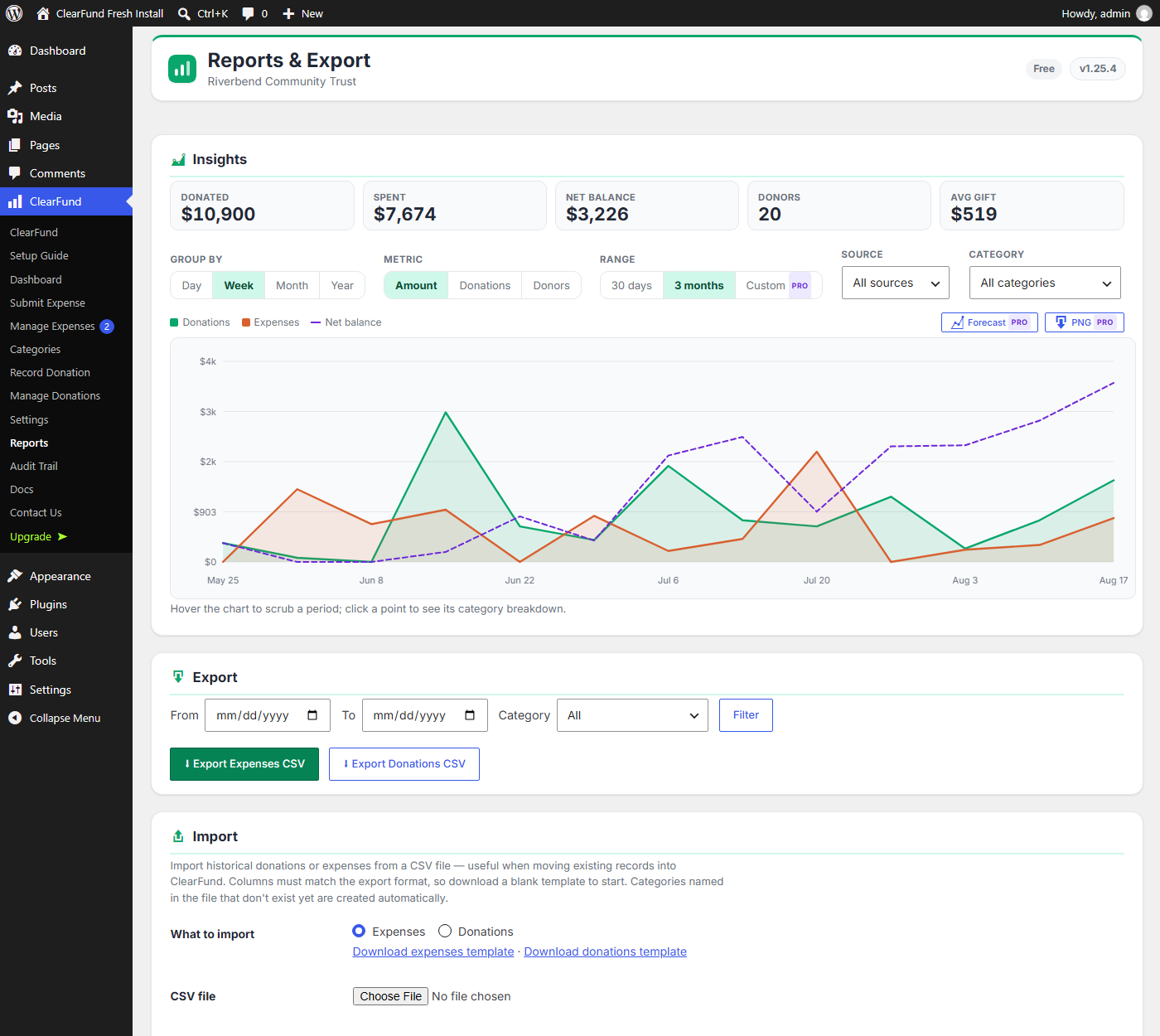
Insights on the Reports page — donations and expenses over time with a running net balance, plus CSV export and import.
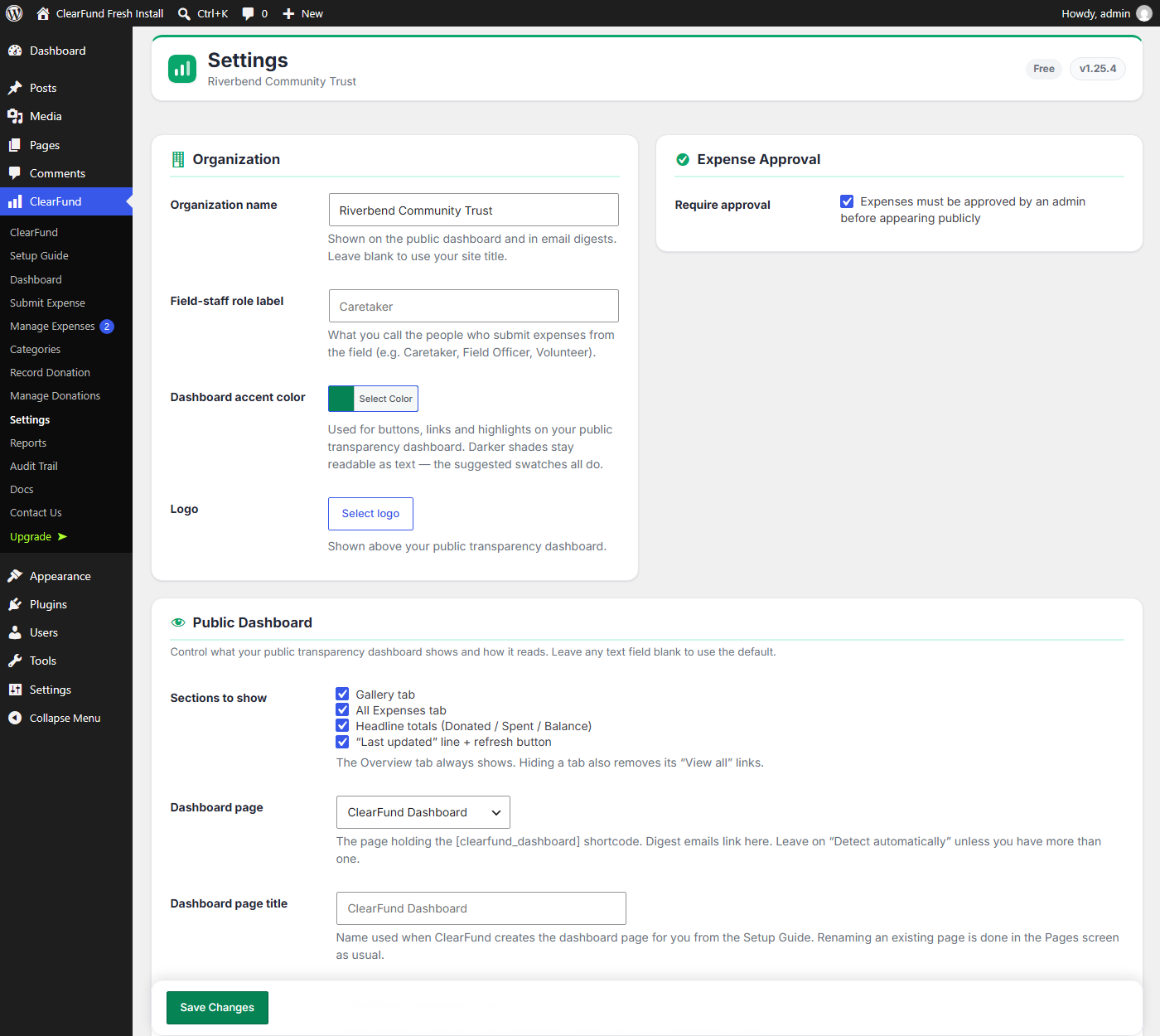
Settings — organization name, branding and accent color, and full control over what your public dashboard shows.
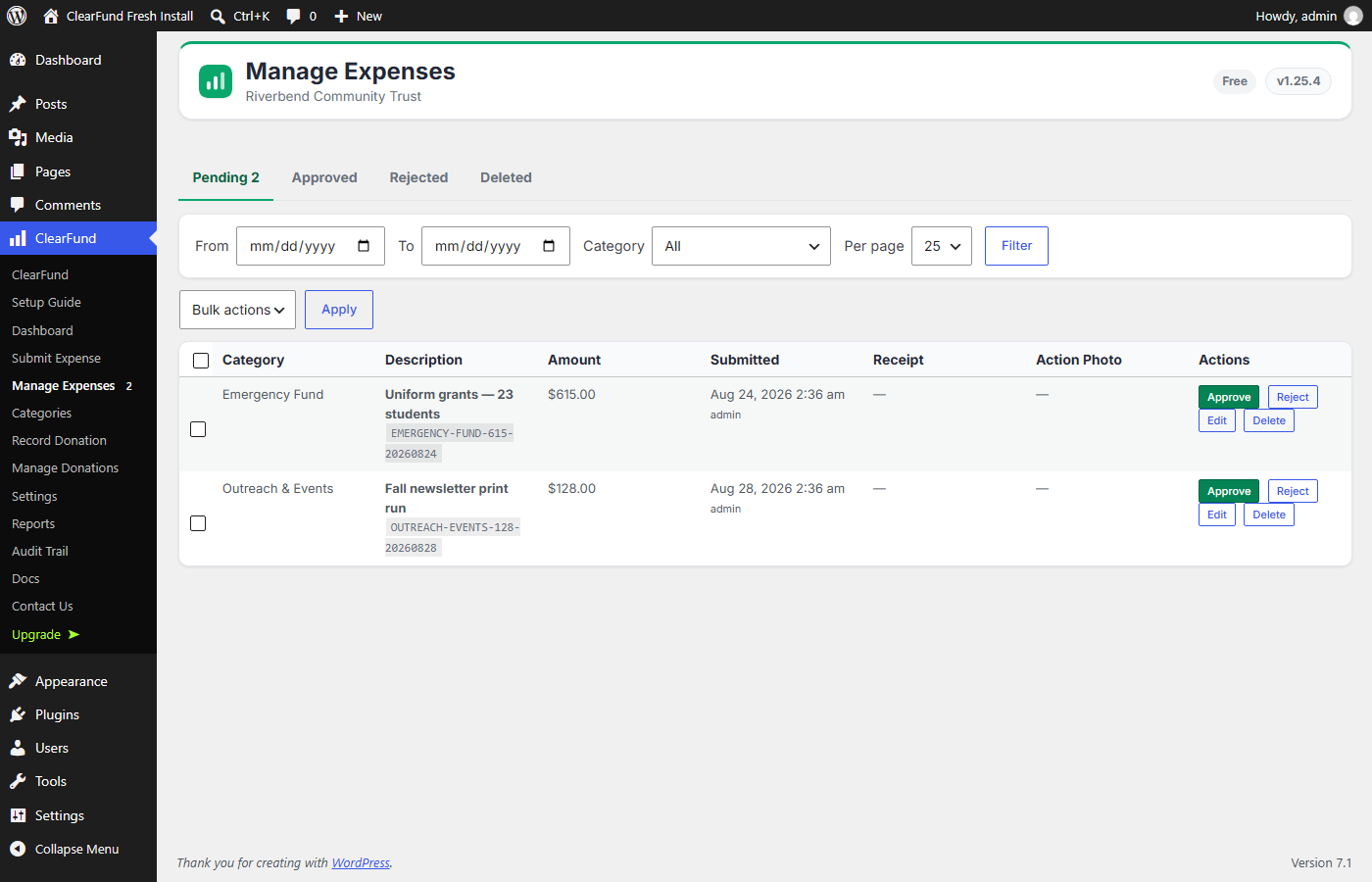
Manage Expenses — the approval queue, with the receipt attached to each submission and bulk approve, reject and restore.
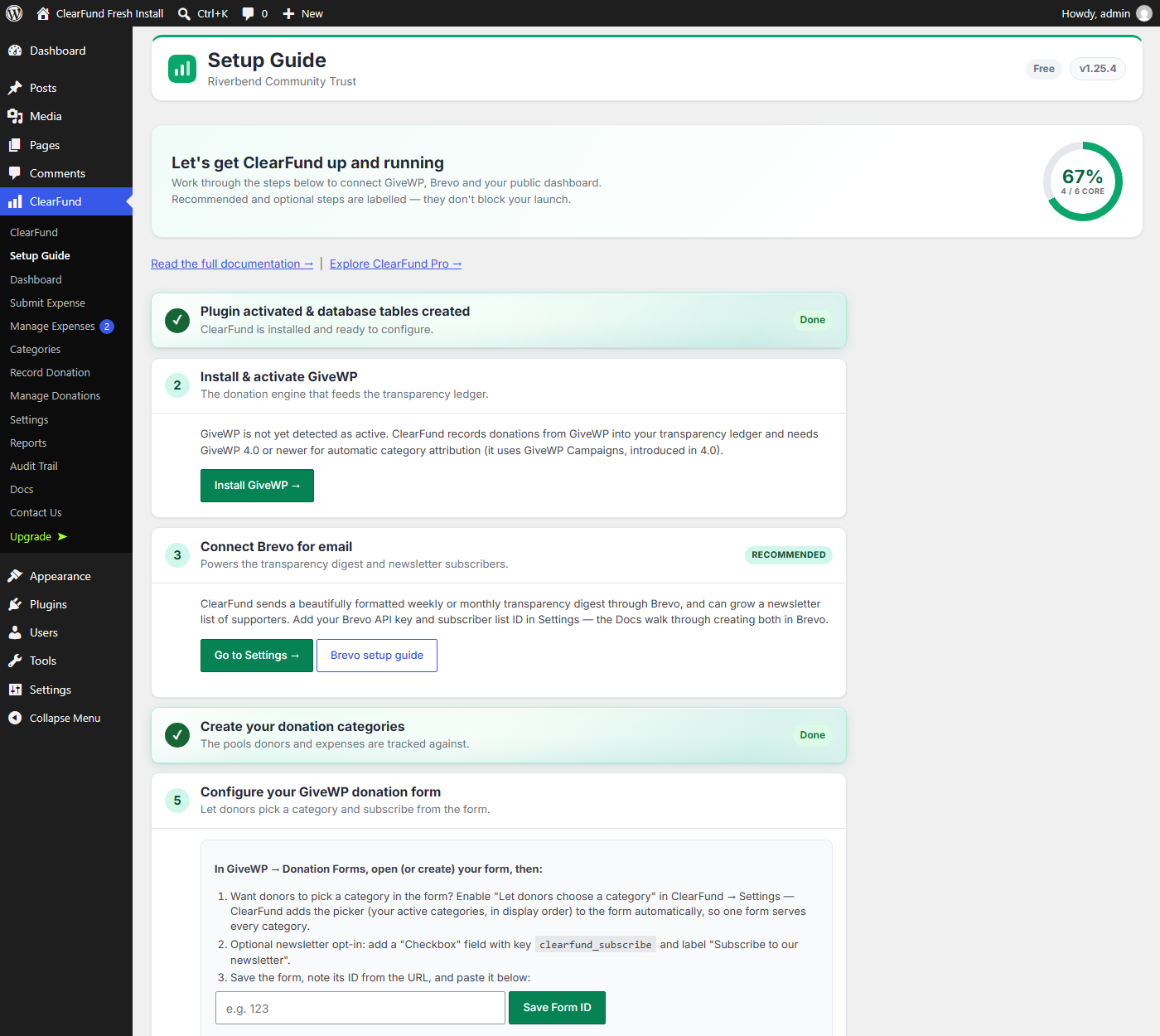
The Setup Guide — a short, checkable path from activation to a live public dashboard.


