DadsFam AntiSpam Wordpress Plugin - Rating, Reviews, Demo & Download

Plugin Description
DadsFam AntiSpam blocks spam on contact forms, comment forms, user registrations, logins and WooCommerce checkout — without making real visitors solve puzzles, and built so that a real person is never turned away by a guess.
Everything described below works on every site. Nothing is capped, blurred, disabled or time-limited.
Built never to lose a real customer
A spam filter that blocks one real customer has cost more than all the spam it stopped. So:
- Only a message actually written to you gets the full set of checks. A sign-up, a login, an add-to-cart button or a signed-in member only meets the honeypot, your own blocklists and the public spam lists, and WooCommerce’s cart and checkout are left to WooCommerce.
- A CAPTCHA, a missing CAPTCHA token or an unusual timestamp only adds points to the score. On its own it never blocks anyone.
- The same message sent twice — to two people, or again after an error — is fine. Only the third identical copy to the same recipient counts as a repeat.
- When a check that judges how a message arrived holds one that reads like a real person wrote it, it is emailed to you straight away instead of being lost, and the visitor is told it arrived.
How it stops spam
- Honeypot trap — an invisible field is injected into your forms. Bots fill it in; real visitors never see it. The field name rotates daily so it cannot be learned, with a grace period so page caching does not break it.
- Time check — a signed timestamp is added on page load. A submission that arrives faster than a human could type is refused.
- Rate limiting — an address that submits repeatedly is throttled. Whitelisted addresses and logged-in staff are never counted, so testing your own form never locks you out.
- Unlimited blocklists — block IPs (wildcard and CIDR supported), email addresses, domains, usernames and keywords. There is no entry limit.
- Whitelist — addresses you trust are never blocked, never rate-limited, and can always log in. Always available, because it is what stops you locking yourself out.
- Content scoring — excessive links, HTML injection and spam phrasing all add to a score you control.
- Disposable email detection — throwaway addresses are rejected, and the domain is checked for a real DNS record.
- Comment protection — the same checks applied to WordPress comment forms, with optional flagging of non-Latin comments.
- Public spam lists (threat feeds) — the Spamhaus DROP and EDROP lists, StopForumSpam’s toxic networks and weekly address list, and the Tor exit list are downloaded to your server once a day and checked locally. No keys, no sign-up, and nothing about the visitor is sent anywhere. Off by default; the one-click setup recommends it.
- StopForumSpam live lookup — optionally ask the StopForumSpam database whether this exact address or email account has been caught spamming elsewhere, with a confidence figure you set the bar for. Off by default because it shares the visitor’s IP and email with StopForumSpam.
- Spam Brain — a self-learning classifier that learns from the spam the other checks confirm and from the real messages that get through, then nudges the score — up for wording that looks like your spam, down for wording that looks like your customers. It only learns from evidence about the message itself, it can only tip a message the fixed rules already find suspicious, and it stores one-way hashes of words, never the message. “This was not spam” in the log unteaches a mistake.
- Never lose a real message — some checks judge how a message arrived (no script ran, it came from a network on a public spam list, the email address is a near-copy of gmail.com). When one of those holds a message that reads like a real person, it is emailed to you with Reply-To set to the sender, the visitor is told it arrived, and one link lets them straight through next time. At most ten a day, never the same message twice. On by default.
- Autopilot — the Brain blocks attackers by itself. It reads the spam log and blocks the address, the network (256 addresses) or the whole range (65,536) a bot is working through, because a blocked bot usually just moves on to the next address along. Blocks run out on their own and come back longer if the attack does. It learns which networks your customers and staff use — logins, paid orders, approved comments — and never blocks those. It never touches logins or checkout, and your whitelist always wins. What it is blocking, and why, is on your dashboard with a one-click “Let back in”. On by default.
- AI second opinion (optional) — on WordPress 7.0 and later, a message the rules are unsure about can be read by the AI service you connect once for your whole site under Settings Connectors (for example Anthropic’s Claude, Google’s Gemini or OpenAI). It says spam or real, how sure it is, and why. A confident “spam” blocks it and teaches the Brain; a very confident “real” lets a genuine customer through. It goes through the AI Client built into WordPress, so this plugin holds no AI key of its own. Only borderline messages are sent, never the visitor’s IP address or name, and a slow or failed answer changes nothing. Off by default.
- Remote control — everything the plugin can do is published through the WordPress Abilities API (WordPress 6.9 and later), so an assistant such as Claude can answer “who is attacking the shop?”, “why was this blocked?” or “would this message get through?”, and block, unblock, whitelist, tune settings or run the Self-Test for you. Administrators only, with switches for what it may do and a log of everything it did.
- Self-repair — checks itself every day, after every update and whenever you ask, and fixes what is safe to fix by itself: damaged settings, missing tables, two CAPTCHAs on one form, whitelist and blocklist clashes, a server locked out of its own site, an untrained Brain and public spam lists that stopped updating. It tells you what it fixed, and never switches a protection off to make a problem go away.
- Optional CAPTCHA — Cloudflare Turnstile, hCaptcha or Google reCAPTCHA (v2 checkbox, v2 invisible or v3 scoring), on whichever forms you choose. Its answer is weighed with everything else: on a message it adds to the score, and on a checkout, a sign-up or a form plugin only an address that fails it five times in fifteen minutes is held back.
- Full spam log — every block recorded with the reason in plain words, the address, form and time, searchable and filterable, with a one-click “this was not spam” that whitelists the sender and lifts any lockout.
Works with
Contact Form 7, WPForms, Ninja Forms, Gravity Forms, Fluent Forms, Pagelayer, WooCommerce, WordPress comments, and WordPress login, registration and lost-password forms. Custom and theme contact forms that have no dedicated integration are protected on the server by the generic form guard, including reCAPTCHA v3 verification.
Declared compatible with WooCommerce High-Performance Order Storage and Cart & Checkout Blocks.
Visitor IP detection
The visitor’s address is taken from the network connection, which cannot be forged. If your site sits behind Cloudflare, a load balancer or a reverse proxy, switch on “This site is behind a proxy” in Settings and choose which forwarded header to trust.
Cloudflare is recognised automatically. When a request arrives from one of Cloudflare’s published addresses, the real visitor address is read from the header Cloudflare adds — even with the proxy setting off — so a site behind Cloudflare can never mistake every visitor for Cloudflare itself.
This matters: a plugin that trusts a forwarded header by default can be defeated by anyone who sends a made-up one, which would let a blocked address straight through and reset its rate-limit allowance on every request.
Privacy
Out of the box no data is sent anywhere: there are no external calls, no tracking and no accounts. The spam log lives in your own database, and if you would rather not store email addresses, names or page URLs at all, switch off “Store submission details” and only the reason and timestamp are kept. The Spam Brain stores one-way hashes of words, never the message itself. The Autopilot keeps the address ranges of the attackers it blocks, and only one-way hashes of the networks your real visitors use — never a customer’s address. It makes no outside connections.
When “Never lose a real message” holds a message that reads like a real person, a copy is emailed to your site’s own admin address through your site’s normal email — the same way your contact form would have sent it.
Some optional features, each off by default, make outbound connections. They are described in full under External services below. In short: the threat feeds download public lists to your server on a schedule and send nothing about visitors; the StopForumSpam live lookup sends the visitor’s IP address and email address to StopForumSpam; the optional CAPTCHA (Cloudflare Turnstile, hCaptcha or Google reCAPTCHA — whichever you choose) loads that provider’s script in the visitor’s browser and sends the resulting token, your secret key and the visitor’s IP address to the same provider; and the AI second opinion sends only borderline messages — the message and its subject, the kind of form, the sender’s email domain and your site’s name, tagline and web address, never the visitor’s IP address or name — through WordPress’s AI Client to the AI service you connected under Settings Connectors.
A word about PRO
Right, let me be straight with you, because I hate being sold to as much as you do.
Everything above is free and it stays free. The honeypot, the time check, the blocklists, the public spam lists, the Spam Brain, the Autopilot, the AI second opinion, never losing a real message, the spam log, the self-repair and the remote control — none of those are premium features. Those are the things a spam plugin should just do, and if I put them behind a paywall I would be taking the mickey.
There is a PRO add-on. It exists because I am a dad in Cape Town, and this is one of the things that puts food on the table at my house. That is the honest reason. Not “unlock your potential”, not “supercharge your workflow”. Just: if this plugin kept the junk out of your inbox and you can spare it, PRO helps me keep building.
What PRO adds is for people who run more than one site or want a bit more reach: DadsFam Shield, where spam caught on one of your PRO sites is blocked on all of them and their Brains share what they learn, DNSBL reputation checks, country blocking for your forms, and a digest email of what was stopped. That is extra reach and convenience. It is not the plugin working properly, because the plugin already works properly.
So if the free one does everything you need, brilliant. Genuinely. Use it, and I hope your spam log stays boring. If you get to the point where your sites helping each other would save you time, PRO is at plugins.dadsfam.co.za.
Either way, thanks for using something I built. — Zak, DadsFam
External services
Out of the box this plugin connects to nothing. Each service below is optional, switched off by default, and used only after you switch it on in Anti-Spam Settings.
Public spam lists — FireHOL’s blocklist mirror on GitHub
What it is: a blocklist service, the way Akismet is an anti-spam service. Spamhaus, StopForumSpam and other volunteer projects publish the internet addresses that are sending spam and running attacks right now. The lists change several times a day, so they cannot be shipped inside the plugin; the FireHOL project collects them and keeps them current on GitHub. Your server downloads the lists and checks visitors against its own copy.
Setting: Anti-Spam Settings Threat intelligence Public spam lists, “Check visitors against the lists below”.
Server: raw.githubusercontent.com (GitHub). Each list is one file under https://raw.githubusercontent.com/firehol/blocklist-ipsets/master/ — spamhaus_drop.netset and spamhaus_edrop.netset (Spamhaus DROP and EDROP), stopforumspam_toxic.netset and stopforumspam_7d.ipset (StopForumSpam), tor_exits.ipset (Tor exit nodes) and, only if you tick them, botscout_30d.ipset, firehol_webclient.netset, firehol_abusers_1d.netset and firehol_level1.netset.
Account: none — no sign-up and no key.
When: once a day, once about 20 seconds after you switch it on, when you press “Update now”, and when the daily self-check finds the lists more than three days old. Never while a visitor waits.
What is sent: a plain download request whose User-Agent names this plugin and its version. Nothing about your visitors, your site or your settings. Visitors are checked against the downloaded copy, on your own server.
Terms: GitHub Terms of Service https://docs.github.com/site-policy/github-terms/github-terms-of-service — GitHub Privacy Statement https://docs.github.com/site-policy/privacy-policies/github-general-privacy-statement — FireHOL https://iplists.firehol.org/ — Spamhaus DROP https://www.spamhaus.org/drop/ — StopForumSpam https://www.stopforumspam.com/ — BotScout https://botscout.com/
Throwaway email domains — the disposable-email-domains list on GitHub
What it is: the open disposable-email-domains project’s list of thousands of temporary and ten-minute email services. New ones appear every week, so the list is fetched rather than shipped; it extends the short list built into the plugin.
Setting: “Throwaway email domains”, one of the public spam lists above.
Server: raw.githubusercontent.com (GitHub) — https://raw.githubusercontent.com/disposable-email-domains/disposable-email-domains/main/disposable_email_blocklist.conf
Account: none.
When: together with the public spam lists above.
What is sent: the same plain download request, nothing else. Email addresses typed into your forms are checked against the downloaded list on your own server and are never sent anywhere.
Terms: the project and its licence https://github.com/disposable-email-domains/disposable-email-domains — GitHub Terms of Service and Privacy Statement as above.
StopForumSpam live lookup
What it is: StopForumSpam’s database of addresses and email accounts reported for spamming, fed by thousands of sites.
Setting: Threat intelligence “Look visitors up on StopForumSpam”.
Server: https://api.stopforumspam.org/api
Account: none.
When and what is sent: each form submission, registration or comment from a visitor who is not on your whitelist sends the visitor’s IP address and the submitted email address, and receives back whether each has been reported as a spammer and with what confidence. Answers are cached for six hours, so each visitor is looked up once. If the service is slow or unreachable the visitor is let through.
Terms and privacy: https://www.stopforumspam.com/legal
CAPTCHA — Cloudflare Turnstile, hCaptcha or Google reCAPTCHA
Setting: “Use a CAPTCHA”, then “Which service”. Only the one service you choose is used, and only on the forms you tick.
Account: a free account with that service, for the site key and secret key you paste into Settings.
When and what is sent: the visitor’s browser loads that service’s script on the forms you ticked, and your server sends …
Screenshots
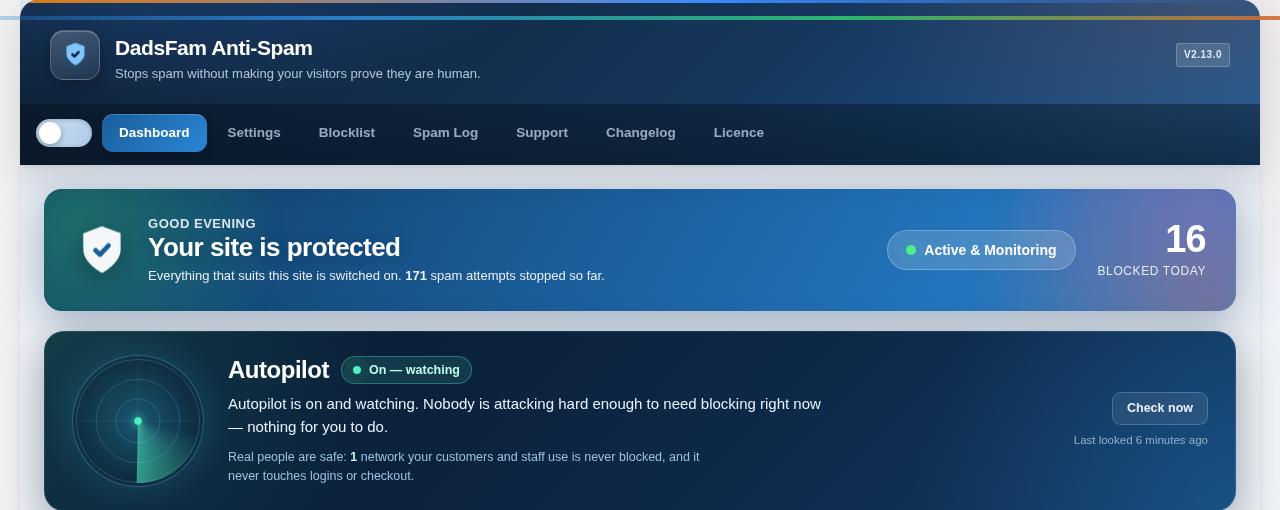
The dashboard answers the only question that matters — is my site safe? — and shows what the Autopilot is doing about attackers right now.
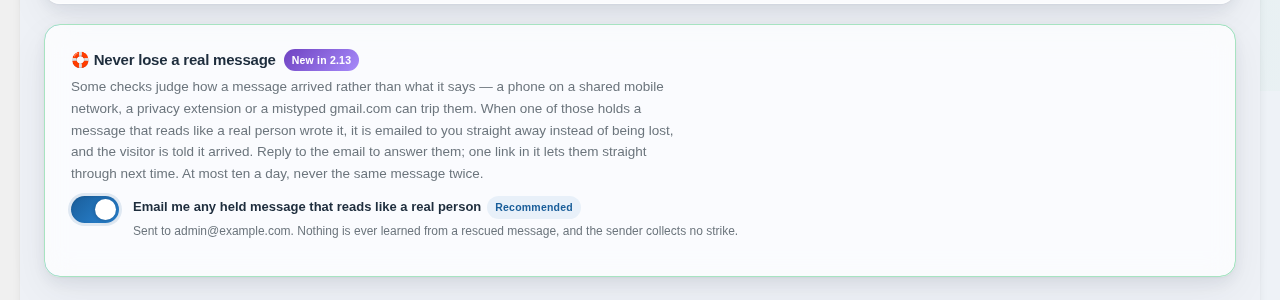
Never lose a real message: anything held that reads like a real person is emailed to you instead of being lost.
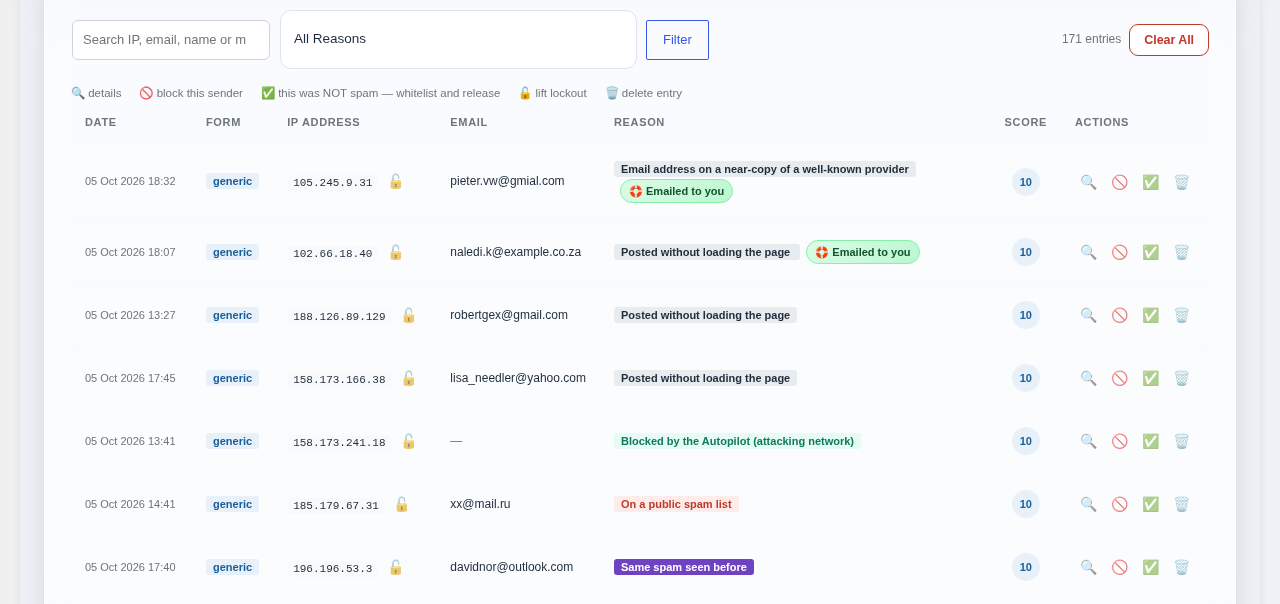
The Spam Log: every block with the reason in plain words, rescued messages marked “Emailed to you”, and a one-click “this was not spam”.
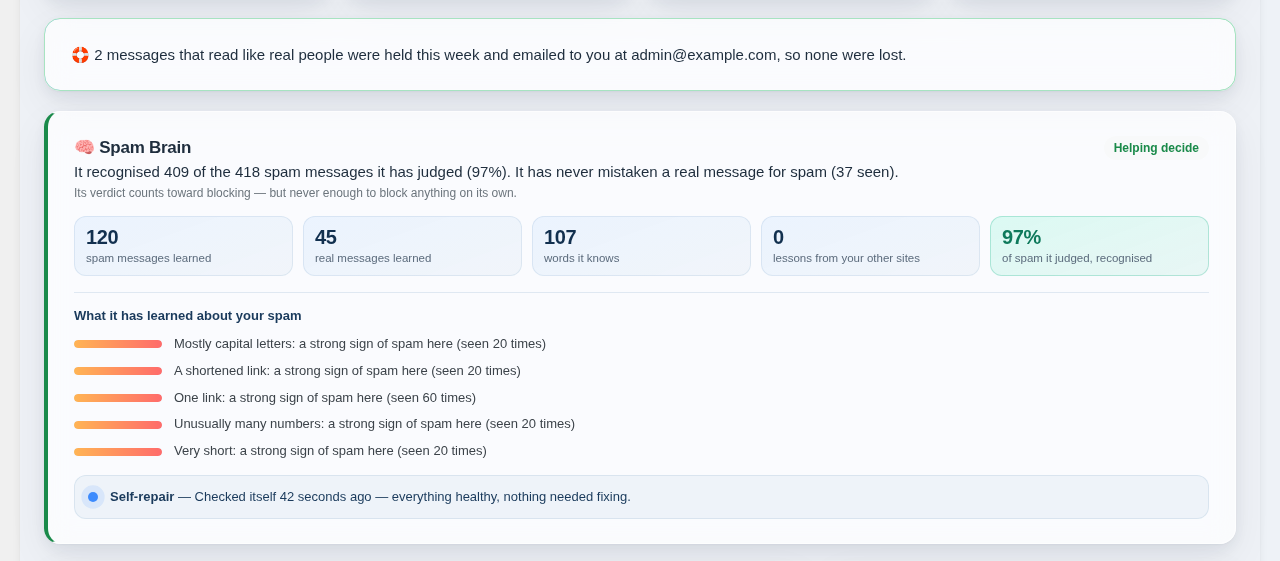
The Spam Brain’s track record in plain English, what it has learned about your spam, and the self-repair.
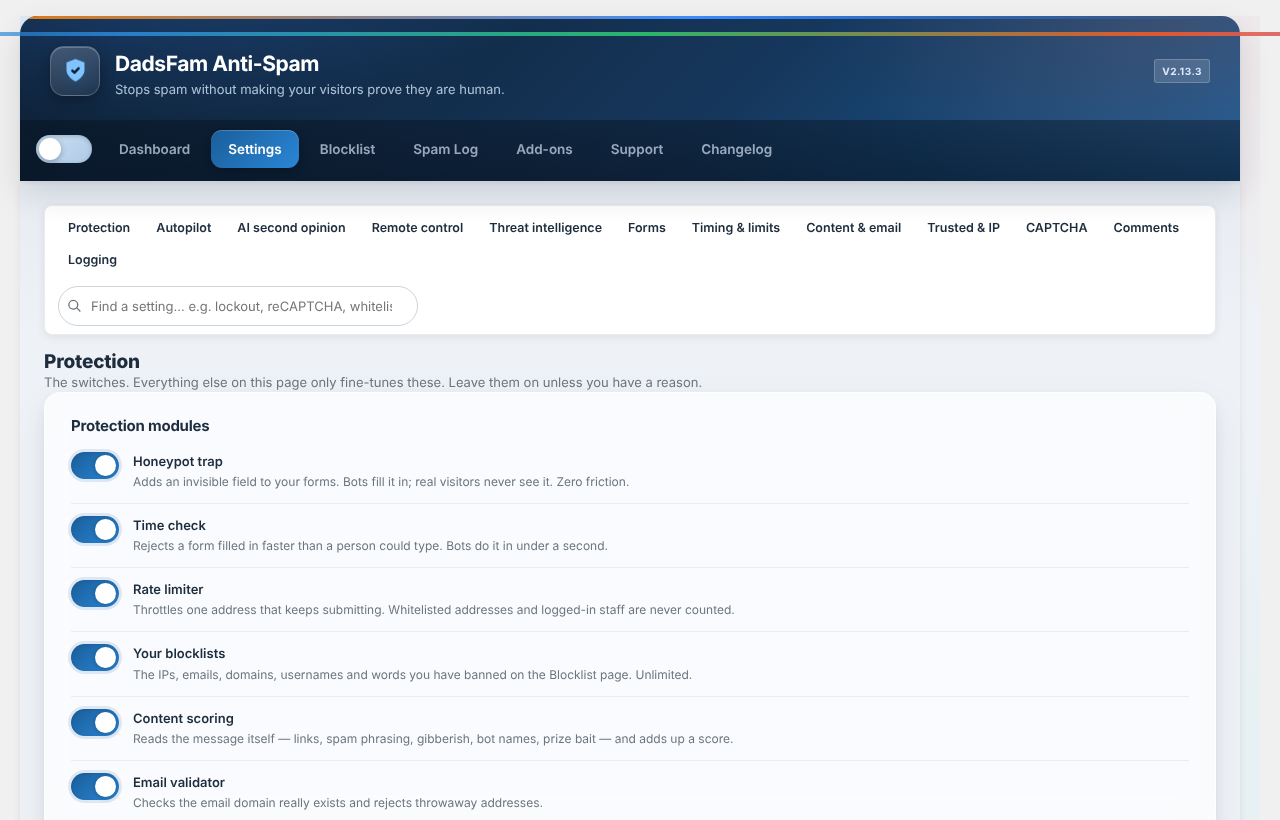
Settings, with a section finder, search and recommended values.
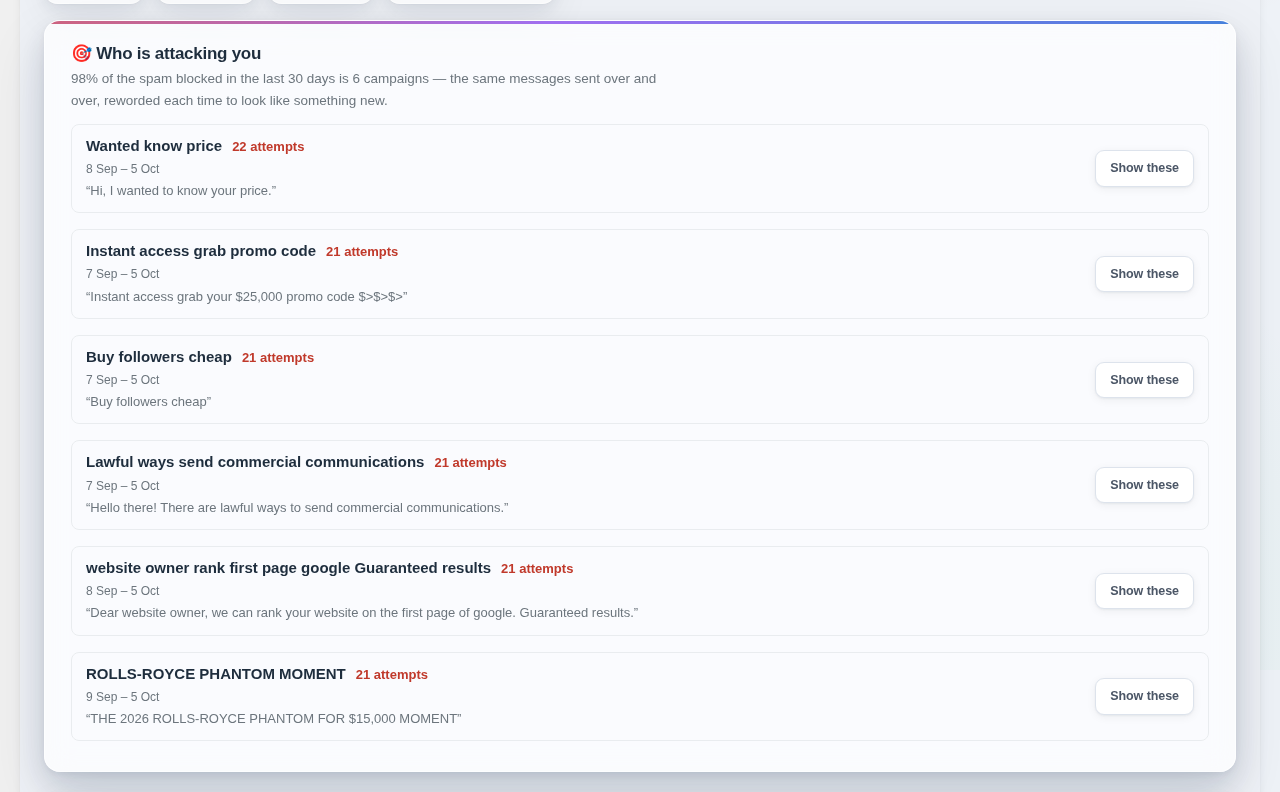
Who is attacking you: spam grouped into campaigns — one sender’s message, reworded every time.