
DadsFam Live Chat Wordpress Plugin - Rating, Reviews, Demo & Download

Plugin Description
DadsFam Live Chat puts a modern chat window on your site, gives your team a proper Inbox to answer from, and adds a help centre — with an AI assistant built in that looks after visitors whenever nobody is around.
Everything runs on your own WordPress site. There is no account to create, no cloud service, no API key and no monthly fee. Conversations are stored only in your own database, and nothing is sent to an outside service.
The built-in AI assistant
The assistant runs entirely inside your WordPress, on your own server. It does not use OpenAI, ChatGPT, Claude or any other outside service, there is no API key, and nothing about your visitors or their conversations leaves your site. It costs nothing to run.
- It reads your site. Pages, posts, products and help articles — you choose which. It keeps up by itself whenever you save a change.
- It understands questions however they are typed. Spelling mistakes are corrected against the words your own site uses, words are matched by their roots (“delivered”, “delivery”, “deliveries”; “bit” and “bitten”), and it knows everyday words that mean the same thing (courier and delivery, kids and children, Amex and American Express). Chat spelling and South African English are fine too: “hoe much 4 a big dog per nite”, “can I fetch my dogs on Sunday?”.
- It works things out instead of just matching words. “If I cancel 10 days before, do I get my money back?” finds your rule for 7 to 14 days. “We’ll only get there at 11pm” finds what you say about arriving after 20:00. “My clutch is slipping. How long will you need the car?” finds the clutch row of a long price table and answers with just that row. “What’s your cheapest room?” compares the prices in your table.
- It answers with the exact sentences that matter, not a whole page, and adds a link to read more. Ask two things at once (“What time is check-in? Is breakfast included?”) and it answers both.
- It never guesses. When it is not sure, it says so, offers a person, or takes the visitor’s email for your team. You choose how sure it must be.
- WooCommerce aware. It answers “do you have…” and “anything under R500?” with product cards showing live prices and stock, and checks order status safely: the order number and the email address it was placed with must both match.
- It knows the basics — your opening hours (including “are you open on Saturday?”), phone, email and address, even if they are only written on your pages — and hands over to a person whenever a visitor asks, or seems unhappy.
- It learns. Questions it could not answer are collected for you to answer once. Answers your team gives in chats are picked up for your approval (or straight away once two chats get the same answer). Visitors’ 👍 and 👎 push good answers up and poor ones down, and it works out new word links by itself from what visitors found helpful.
- It shows its working. The AI Assistant screen has a test chat that shows how it understood a question, what it found and how sure it was.
How it works, for the curious: questions are broken into word roots, corrected, and expanded with related words; every passage of your site is ranked the way search engines rank pages, with extra weight where the words asked appear together and where amounts, times and dates fit; and the best-matching sentences are picked out to form the answer. It is not a large language model, so it cannot make things up — every answer comes from your own site or from what you taught it.
You decide when it talks: only when your team is away (the default), first on every chat with people on request, or never — just suggesting replies to your team.
Live chat your visitors will like
- A clean chat window that matches your brand colour, in light or dark, on desktop and phone.
- Home, Messages and Help tabs: a greeting, who is online, instant answers from your help articles and the conversation itself.
- Quick-reply buttons, “Seen” receipts, typing indicators, emoji, ratings, transcripts by email and a leave-a-message form when nobody is around.
- Chats carry on across pages and tabs, and survive a dropped connection.
- It costs nothing until it is used: the chat bubble loads without a single request to your server.
- Draws itself in its own sealed-off area, so your theme’s styles cannot break it — and it cannot break your theme.
An Inbox your team will actually enjoy
- Waiting, My chats, All live chats, With your AI, Messages and History.
- Reply suggestions from your saved answers, your site and your saved replies, right above the reply box.
- Type / for saved replies. Private notes inside the conversation. Transfers, tags and keyboard shortcuts.
- The visitor’s details beside the chat: the page they are on, the pages they visited, their device, their earlier chats and their WooCommerce orders.
- Take over from the AI assistant at any time, and teach it with one click from any reply you send.
- Sound and desktop alerts, dark mode, and it works properly on a phone.
- A “Chat Agent” role for staff who should answer chats without being able to edit your site.
A help centre
- A help centre at an address you choose (yourdomain.com/help/ by default): a search box that answers as people type, your topics, the most helpful articles and every article, laid out to suit your theme.
- Put the same help centre on any page with the “Help Centre” block or the
[dadsfam_help_center]shortcode. - “Was this helpful?” on every article, related articles, and the same articles inside the chat window.
- A “Chat Button” block and
[dadsfam_chat_button]shortcode. Any link to#chatopens the chat too.
It looks after itself
- An hourly check repairs missing database tables, sets forgotten “online” team members to away, tidies stuck chats and keeps the assistant’s knowledge fresh.
- If a security plugin or your host blocks the WordPress REST API, the chat switches to a backup connection by itself.
- The Health screen checks everything in plain English and fixes most problems with one click.
Safe and private
- Bots are stopped with signed tickets, a hidden trap field and rate limits. Blocklists understand IP ranges (IPv4 and IPv6), email domains and words, and throwaway email addresses can be refused.
- Visitors’ IP addresses cannot be faked to get around a block, and you can shorten or not store IP addresses at all.
- Finished chats can be deleted automatically after the number of days you choose.
- Works with WordPress’s own Export and Erase Personal Data tools and suggests privacy-policy wording.
- Works alongside DadsFam AntiSpam when it is installed, so its blocklists and checks apply to chats too.
For developers
- AI tools connected to WordPress through the Abilities API (WordPress 6.9 and later) can read and answer chats, check health and teach the assistant.
- Open the chat from your own code with
DadsFamLiveChat.open(). - Filter where the widget shows with
dadsfam_live_chat_show_widget.
A word about PRO
Right, let me be straight with you, because I hate being sold to as much as you do.
There is no PRO version of Live Chat. Everything above is free and it stays free. The AI assistant, the Inbox, the help centre, the WooCommerce product answers and order checks, saved replies, transcripts and the rest are not premium features, and if I put them behind a paywall I would be taking the mickey. No trial, no locked buttons, no “upgrade to unlock” anywhere.
I am a dad in Cape Town, and I built this because my own shops needed a chat that did not cost a fortune every month or send my customers’ conversations to somebody else’s server. That is the honest reason. Not “unlock your potential”, not “supercharge your workflow”.
So if it does everything you need, brilliant. Genuinely. Use it, and I hope it saves you a few late-night messages. The rest of what I build is at plugins.dadsfam.co.za.
Either way, thanks for using something I built. — Zak, DadsFam
External services
This plugin does not connect to any service of its own. It has no home-phoning, no analytics and no licence checks. The AI assistant, the chat and the help centre all run on your own WordPress site, and conversations are stored only in your own database.
Two things are worth knowing:
- The Health screen checks that chat can connect by making one request from your site to its own REST API address (a “loopback” request). It is sent to your own domain and nothing is sent anywhere else.
- Team members’ pictures in the Inbox come from WordPress’s own avatar setting, which uses Gravatar by default. You can change or switch this off under Settings Discussion. The plugin itself sends nothing to Gravatar.
Screenshots
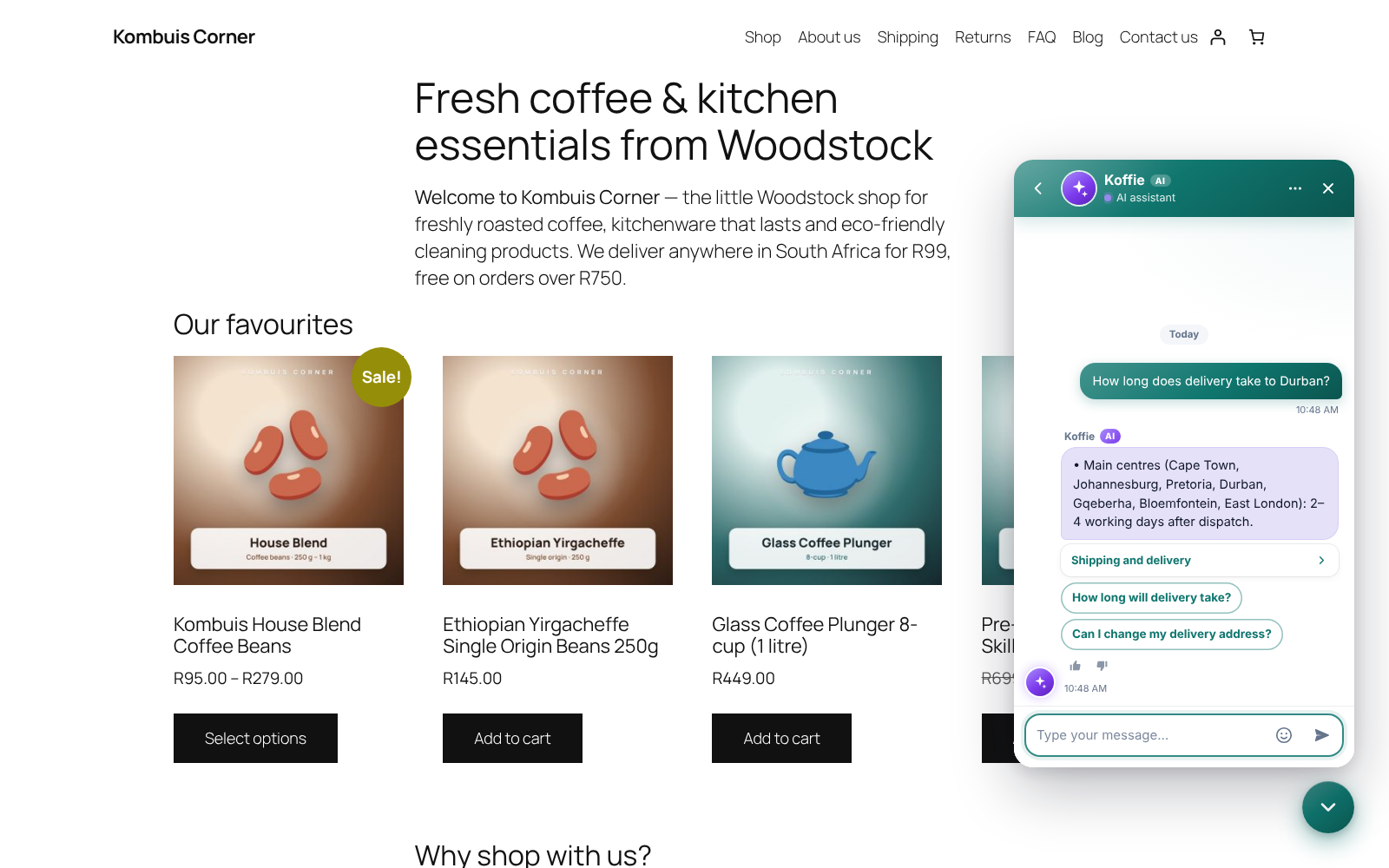
The chat window on your site, with the AI assistant answering from your own pages.
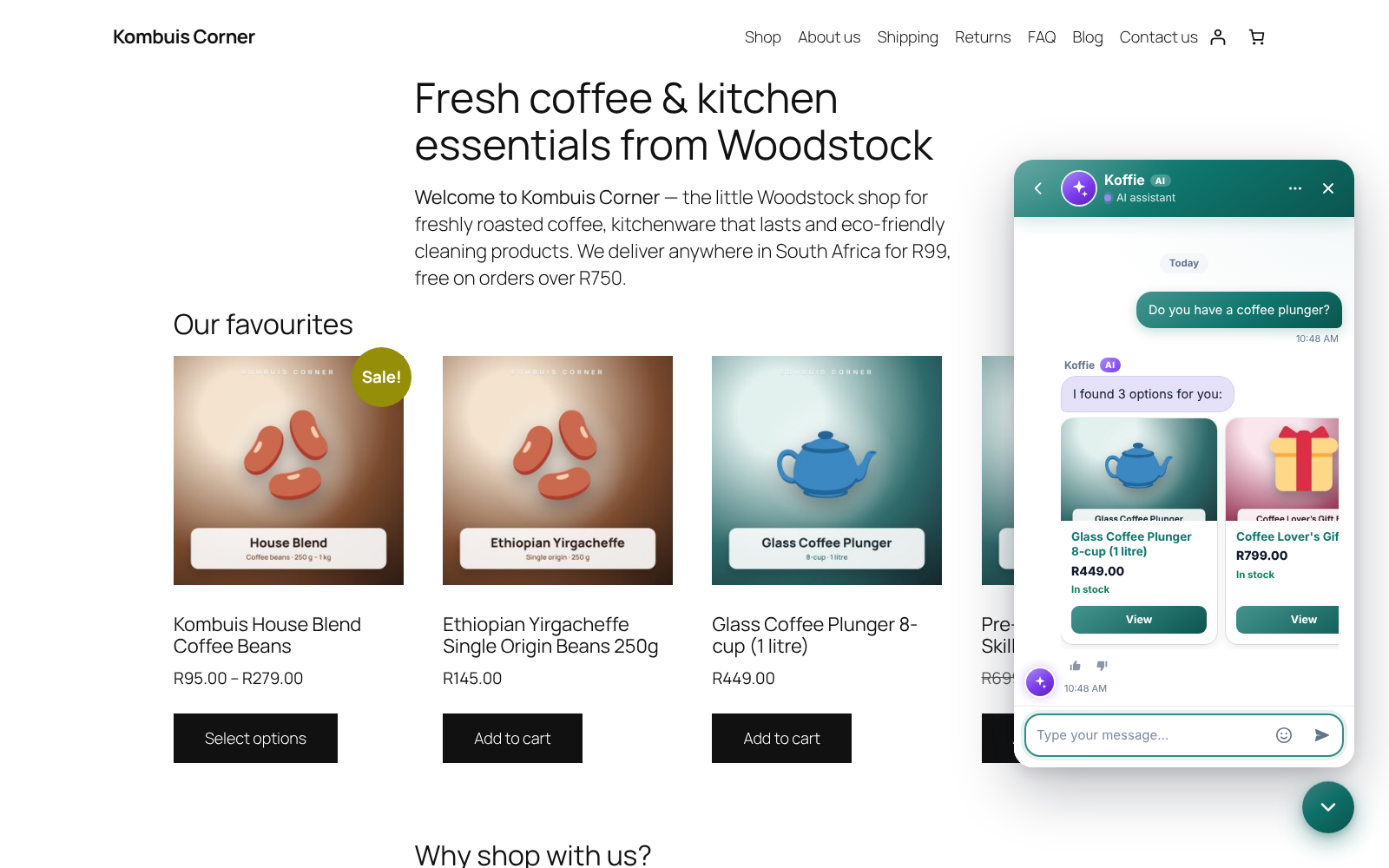
Product questions answered with live prices and stock.
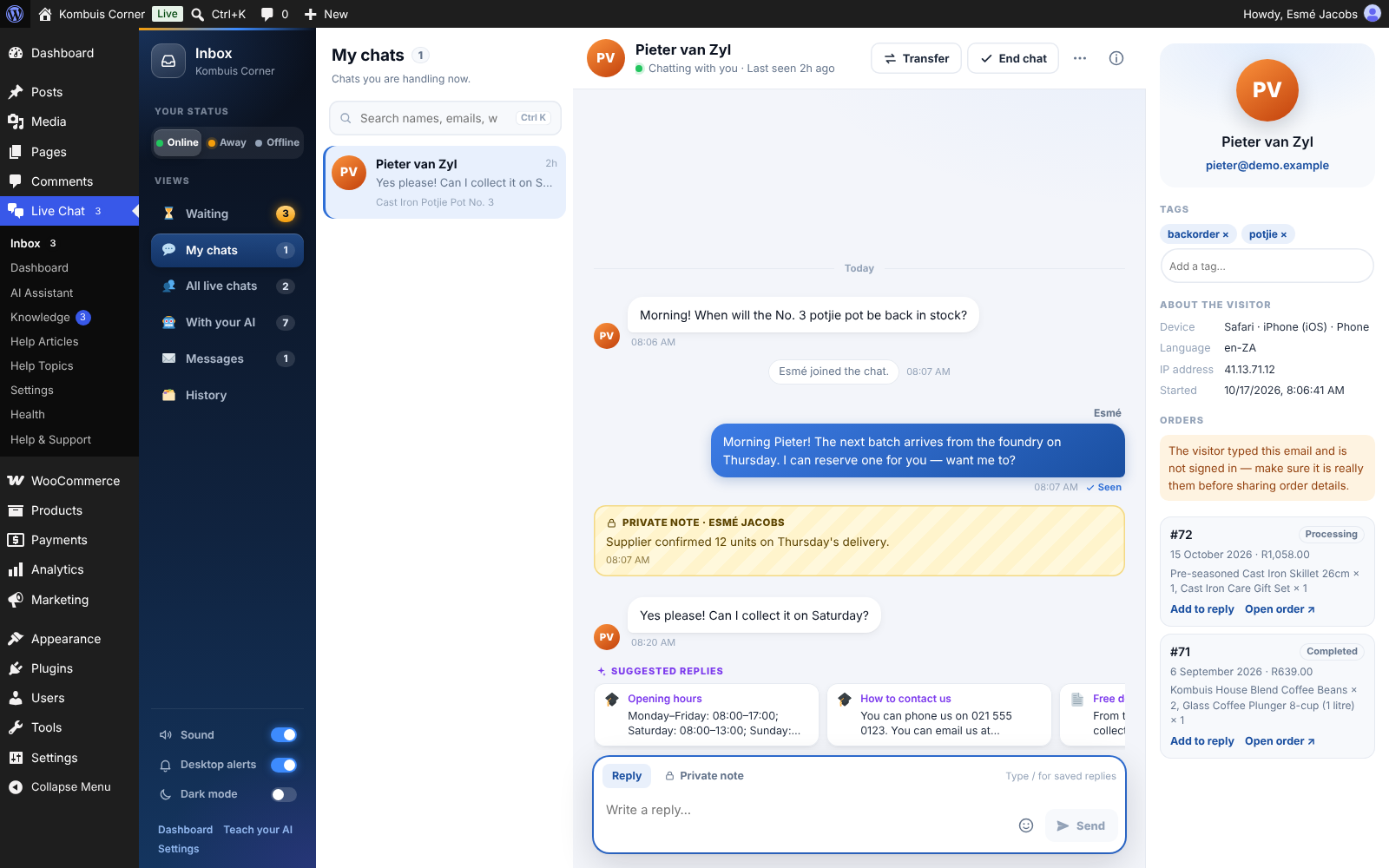
The team Inbox: the conversation, reply suggestions and the visitor’s details and orders.
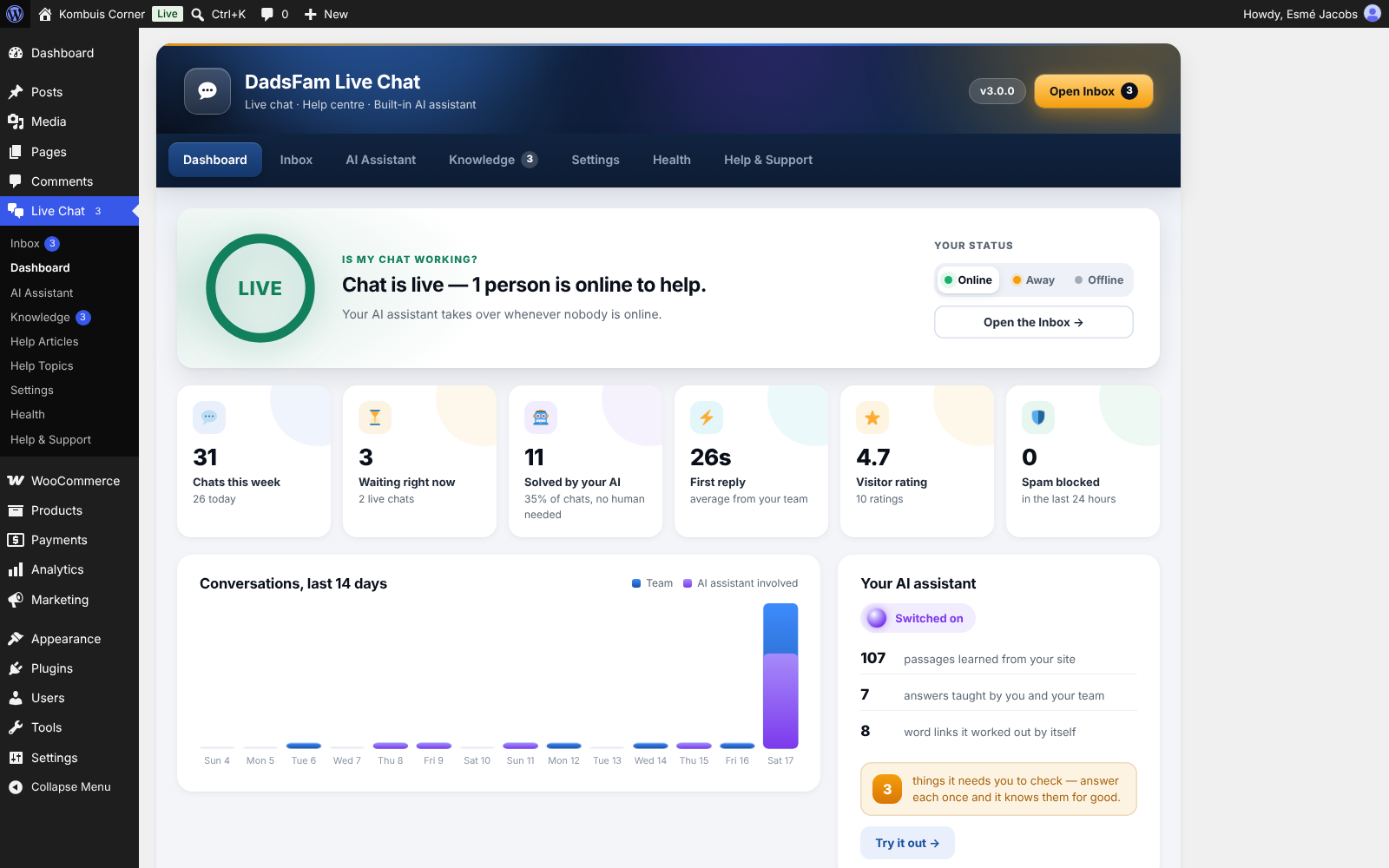
The Dashboard answers “is my chat working?” at a glance.
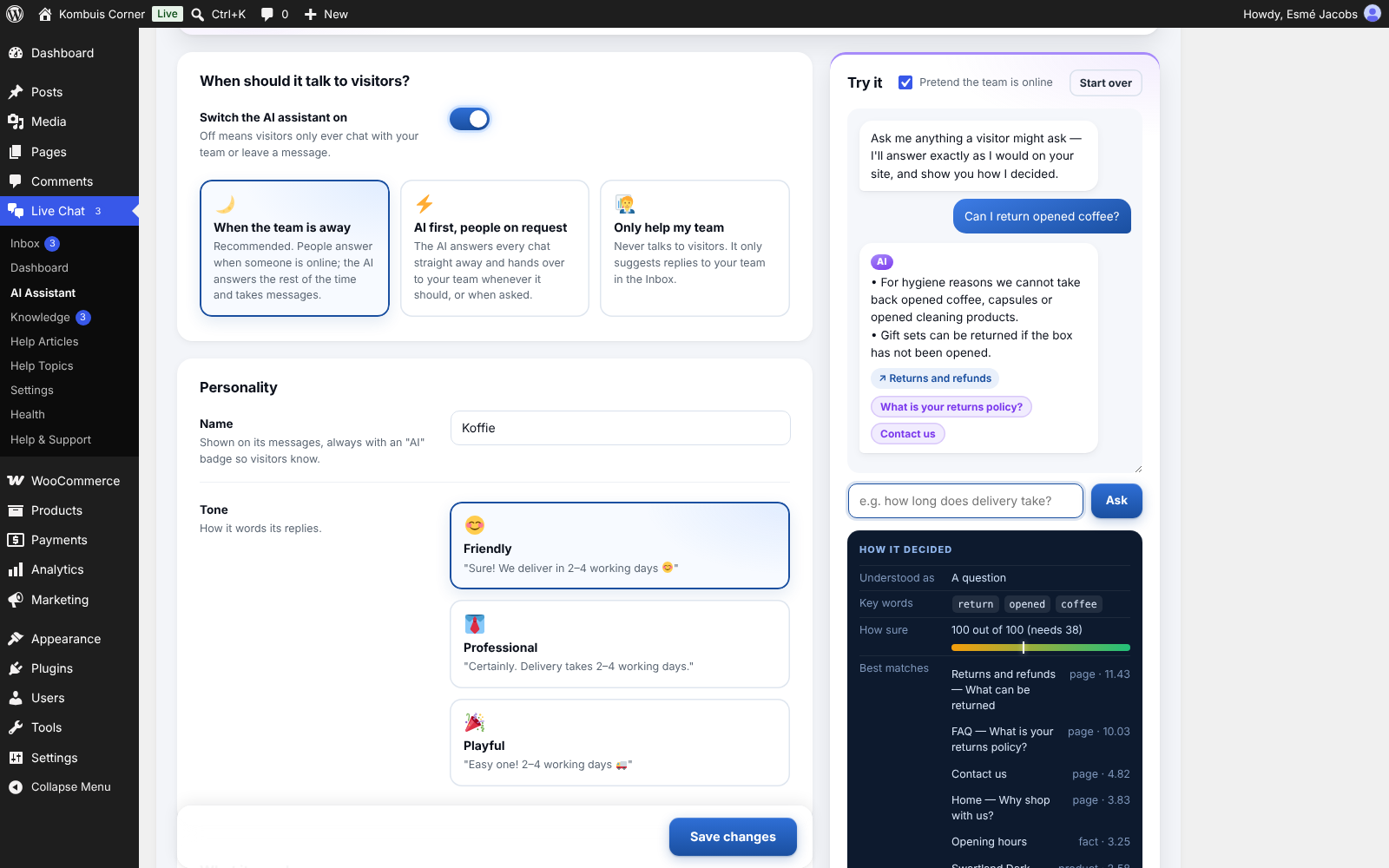
AI Assistant: when it talks, its personality, and a test chat that shows how it decided.
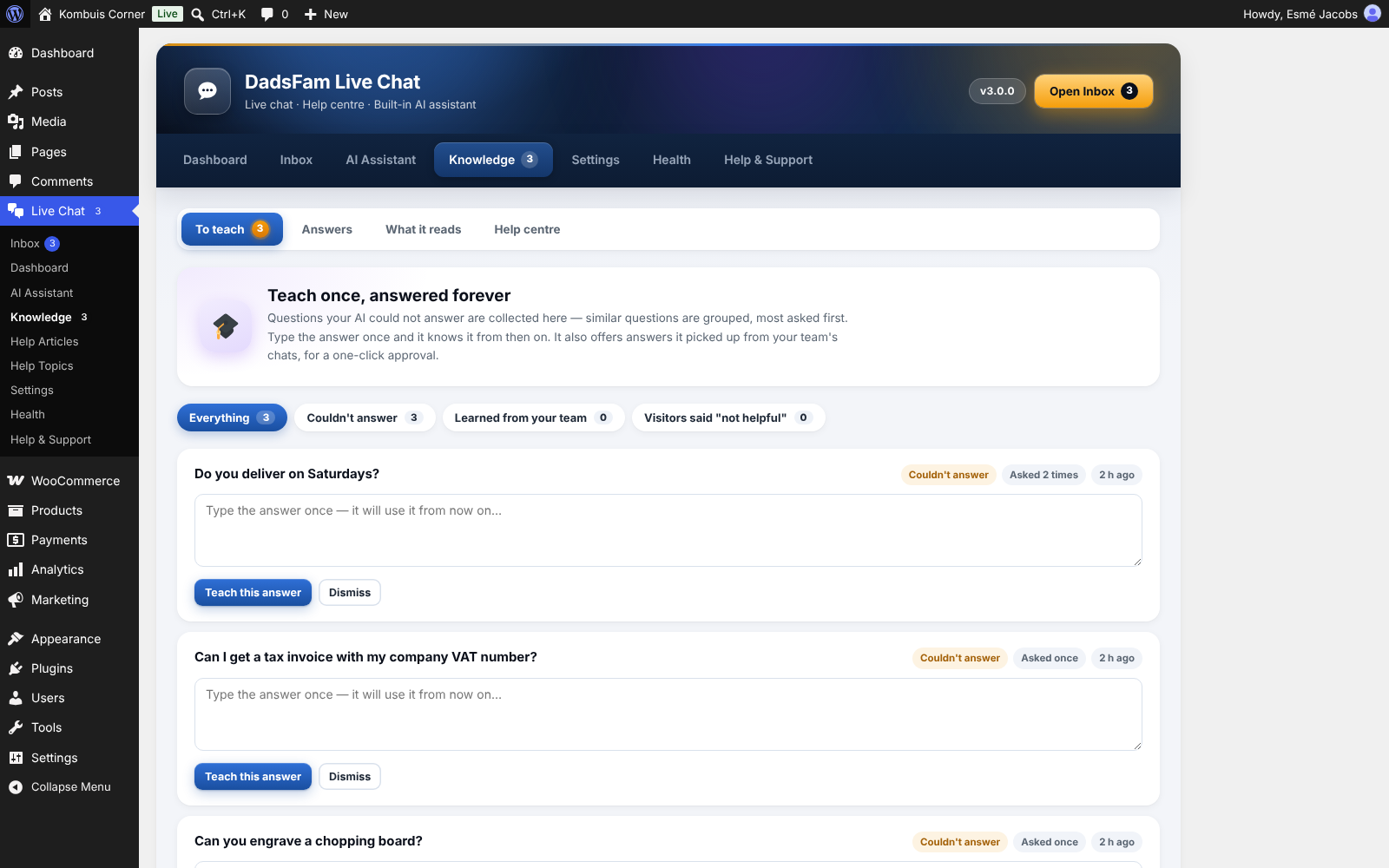
Knowledge: questions the assistant could not answer, ready to teach once.
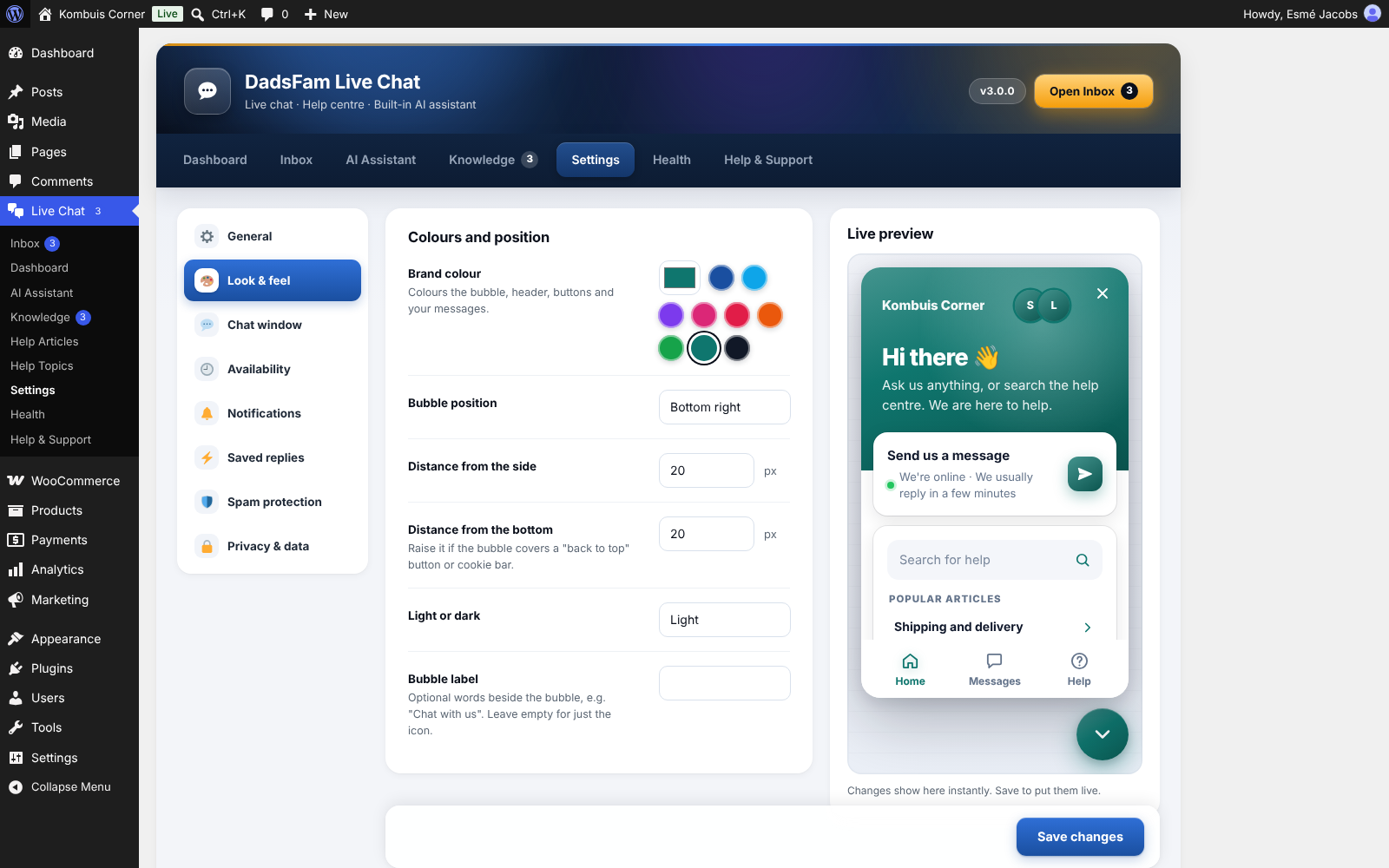
Settings, with a live preview of the chat window.
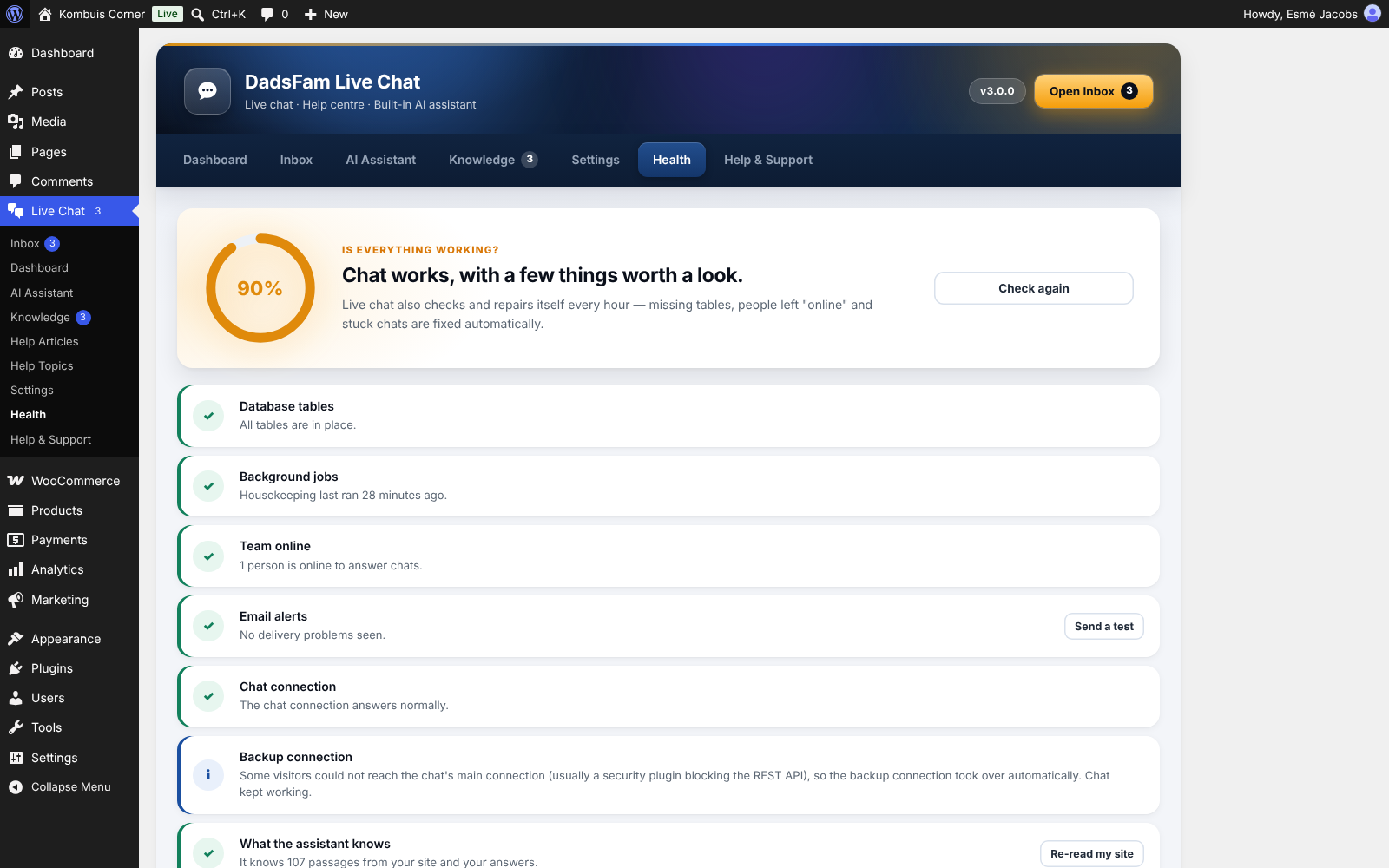
Health: every check in plain English, with one-click fixes.
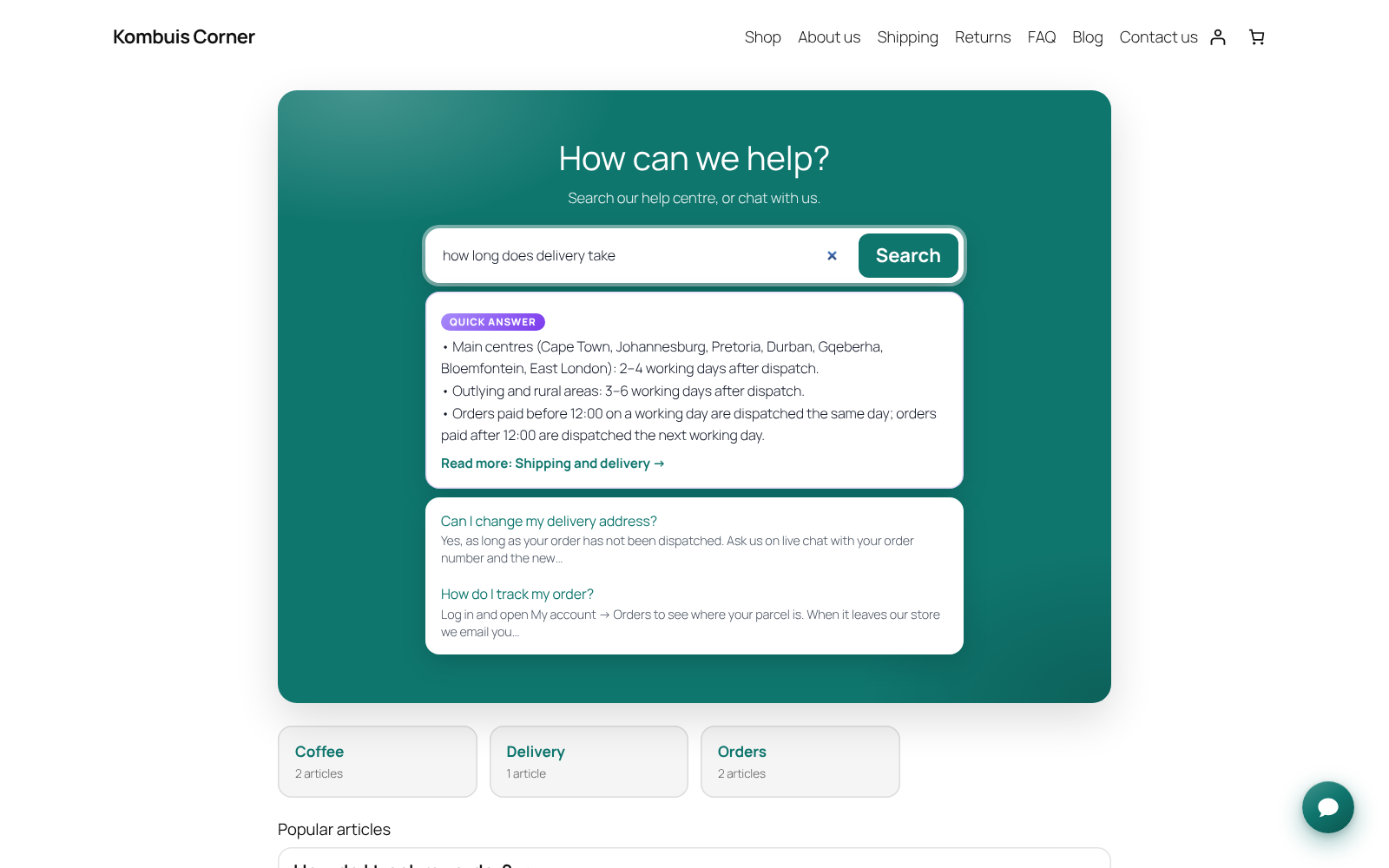
The help centre on your site, with instant answers as people type.


