Designed2Use Events Wordpress Plugin - Rating, Reviews, Demo & Download

Plugin Description
Designed2Use Events is a self-contained events calendar for WordPress. Events
and venues are custom post types — not products — so the calendar works fully
on its own. When WooCommerce is active, an opt-in ticketing module turns
events into purchasable tickets with attendee capture, capacity tracking,
sale windows and refund-aware capacity release.
Calendar without WooCommerce
- Events and venues as custom post types, with categories and tags
- Frontend Pages for the calendar (
/events/) and the venues archive
(/venues/) — created on activation and rendered through your active
theme, no template takeover - Month + List calendar views with venue / category / featured filters,
prev / next month navigation, and a shareable URL for every state - Server-rendered first paint plus a vanilla-JS REST-driven view swap —
no JS framework, no build step - Single-event pages with schedule, venue, address and an embedded
OpenStreetMap (Leaflet) map - Single-venue pages with address, map and upcoming events
- Multi-day events span every day they cover in the month view, with a
“Through {date}” hint in the list view - JSON-LD
Eventschema in the document<head>for Rich Results - Per-event
.icsdownload and a subscribable iCal feed
(/event/{slug}/feed/ics/) - Theme overrides — copy any template part to
your-theme/designed2use-events/{name}.php - Five free shortcodes (
[d2uevents_calendar],[d2uevents_list],
[d2uevents_event],[d2uevents_venues]) and matching server-rendered blocks
under an “Events shortcodes” inserter category - REST endpoint
/wp-json/d2uevents/v1/occurrencesfor headless use
Optional WooCommerce ticketing
When WooCommerce is active, the Tickets meta box on the event editor
appears and the rest of the integration switches on:
- Create a ticket product directly from the event, or link an existing
product - Inline editor on the event admin for name / description / price /
per-ticket capacity / sale window — no round-trip to the product
editor for the common fields - Single-cap cascade: per-ticket event venue settings (first
set value wins) so an admin can choose where to track capacity - Sale window with event-end fallback — the form is replaced with a
“Tickets go on sale on X” or “Ticket sales have ended” notice as
appropriate - Atomic capacity decrement at order completion — concurrent oversells
collapse to exactly one winner; the rejected order is recorded as an
order note and a debug-log entry - Refund-aware capacity release — the same counter the booking
incremented is released - Per-ticket attendee capture (name + email) on the event page — block
cart / block checkout / classic cart all show the data, no React
build step required - Cart-aware quantity input — the visitor cannot purchase more tickets
than remain - Block cart / mini-cart quantity is locked at the Store API schema
level so attendee mappings cannot be quietly broken from the cart - HPOS (High-Performance Order Storage) compatible
- Per-event Attendees admin screen with a CSV export of every booking
- WooCommerce privacy-export and erasure integration — attendee
personal data flows through the standard “export / erase personal
data” tools - My-account view-order page lets the customer edit attendee details
until a configurable cutoff before the event
Developer friendly
- Public
d2uevents_action / filter API — a documented contract for
third-party developers, not just the free Pro boundary
(docs/hooks.md) - Five shortcodes that mirror every server-rendered block
(docs/shortcodes.md) - Filterable template loader — every part is overridable from the
active theme (docs/templates.md) - PSR-4 autoloader, namespaced
D2UEvents - WooCommerce ticketing module is fully isolated — nothing outside it
references a WooCommerce symbol, so the plugin works without
WooCommerce installed at all
Designed2Use Events Pro
Pro adds recurring events (RRULE), multi-tier ticket builder with
per-occurrence inventory, registration form builder with custom fields,
QR-code check-in, organizer CPT, week / day / map views, site-wide
and per-venue iCal feeds, and a Modern Events Calendar / The Events
Calendar importer. Pro hooks into exactly
the same public d2uevents_ API a third-party add-on would — no
privileged access, no patching of free internals. See
designed2use.co.uk/plugins/designed2use-events/.
External services
This plugin relies on two OpenStreetMap services to provide venue geocoding and
maps. Both are optional to how you use the plugin and can be disabled or replaced
(see below).
1. OpenStreetMap Nominatim (address geocoding)
When you create or edit a venue and enter an address but leave the latitude and
longitude blank, the plugin sends that address to the OpenStreetMap Nominatim
service to look up its coordinates. The request includes the address you entered
and a User-Agent identifying this plugin and your site’s URL (required by
Nominatim’s usage policy). This happens only in the admin when a venue is saved,
is throttled to one request per second, and results are cached for seven days. No
request is sent if you fill in the latitude/longitude yourself, or if you replace
the provider via the d2uevents_geocode_provider filter.
- Service: OpenStreetMap Nominatim — https://nominatim.org/
- Usage policy: https://operations.osmfoundation.org/policies/nominatim/
- Privacy policy: https://wiki.osmfoundation.org/wiki/Privacy_Policy
2. OpenStreetMap map tiles (Leaflet maps)
Single venue pages, the venues archive and the venue map display an interactive map
rendered with the bundled Leaflet library. The map image tiles are loaded in the
visitor’s browser from the OpenStreetMap tile servers, which receive the visitor’s
IP address and the map area being viewed. The tile source is configurable under
Events Settings (the “Map tile URL”), so you may point it at your own or a
third-party tile provider, and maps are only shown on pages that display one.
- Service: OpenStreetMap tile servers — https://www.openstreetmap.org/
- Tile usage policy: https://operations.osmfoundation.org/policies/tiles/
- Privacy policy: https://wiki.osmfoundation.org/wiki/Privacy_Policy
Screenshots
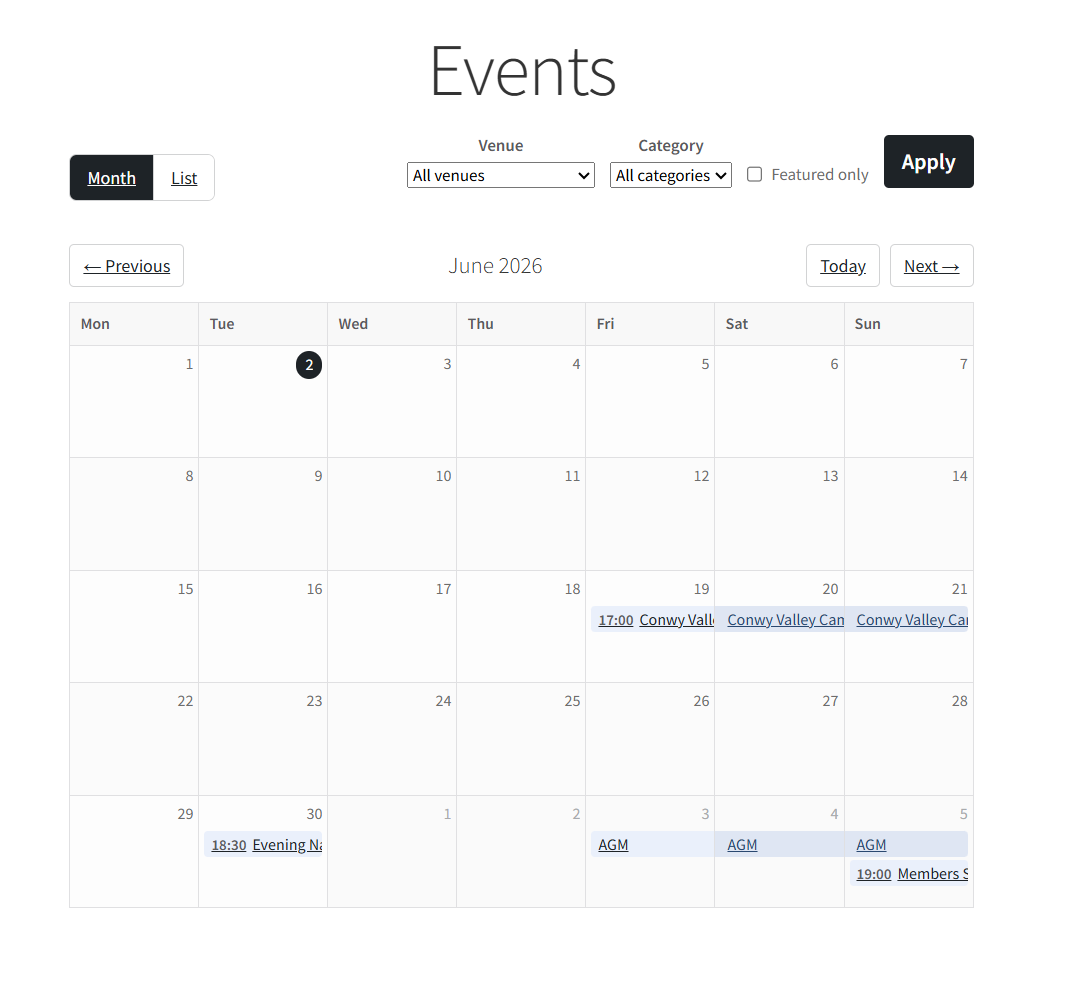
Month view of the calendar archive Page with filters
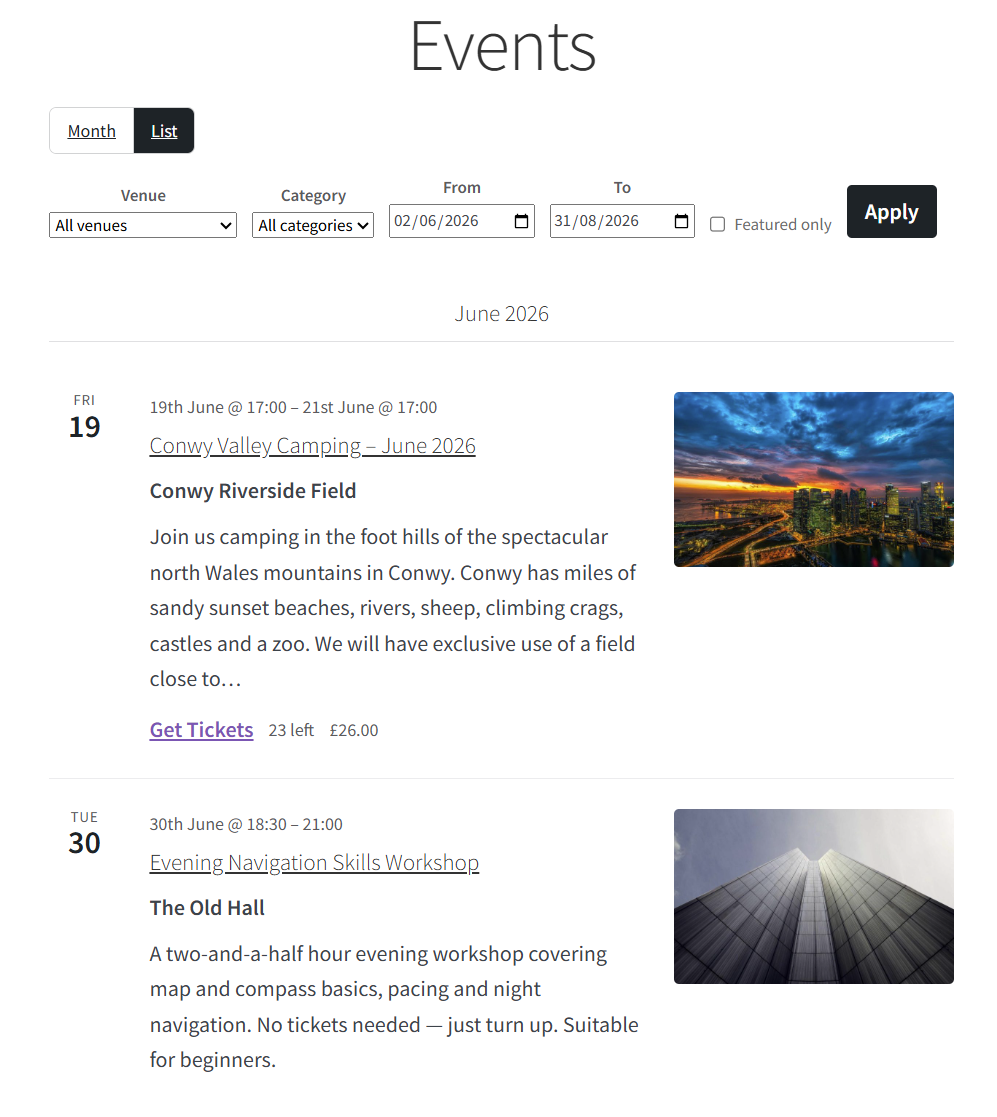
List view of the calendar archive Page
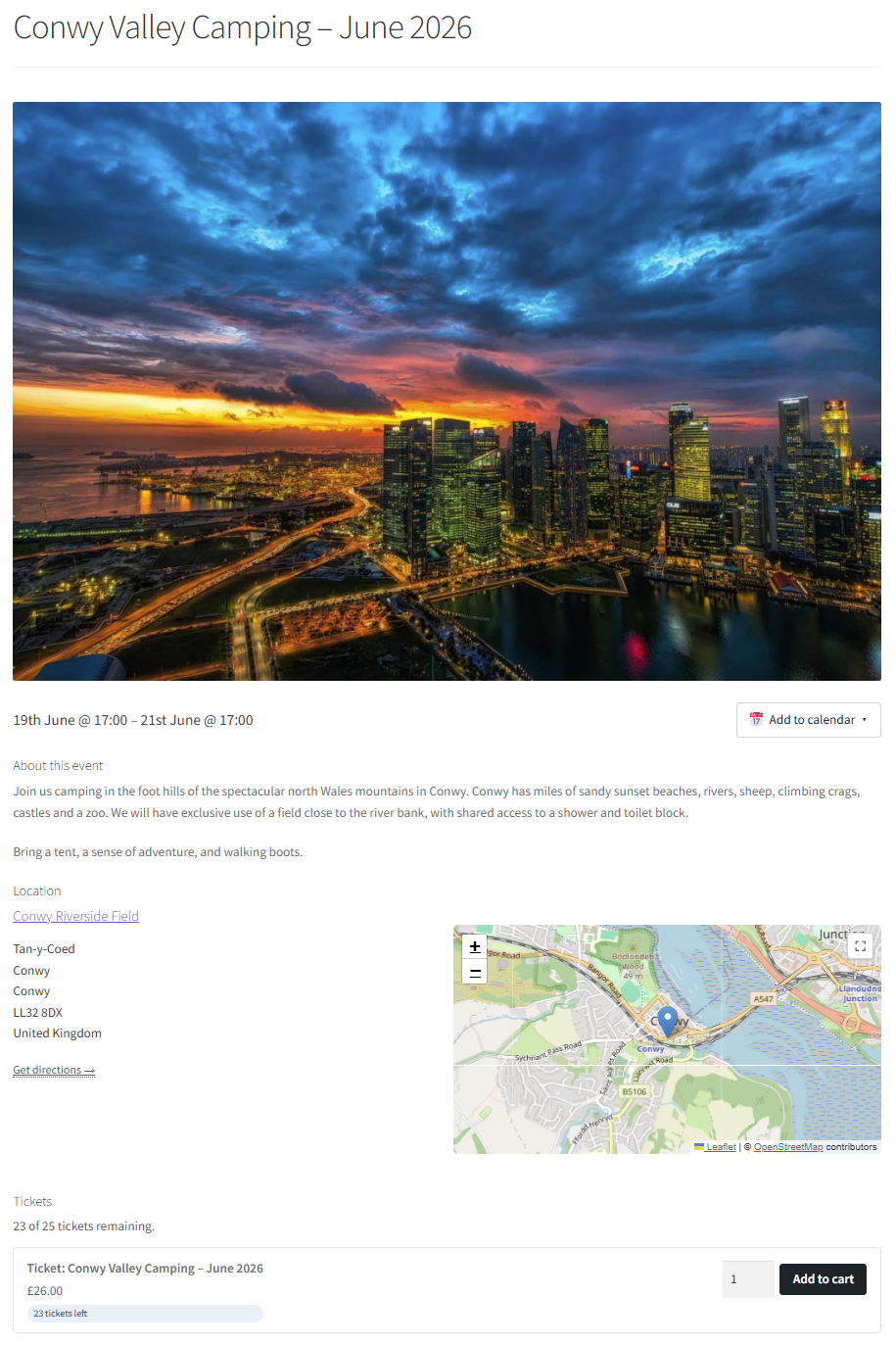
Single event page with venue map and ticket purchase form
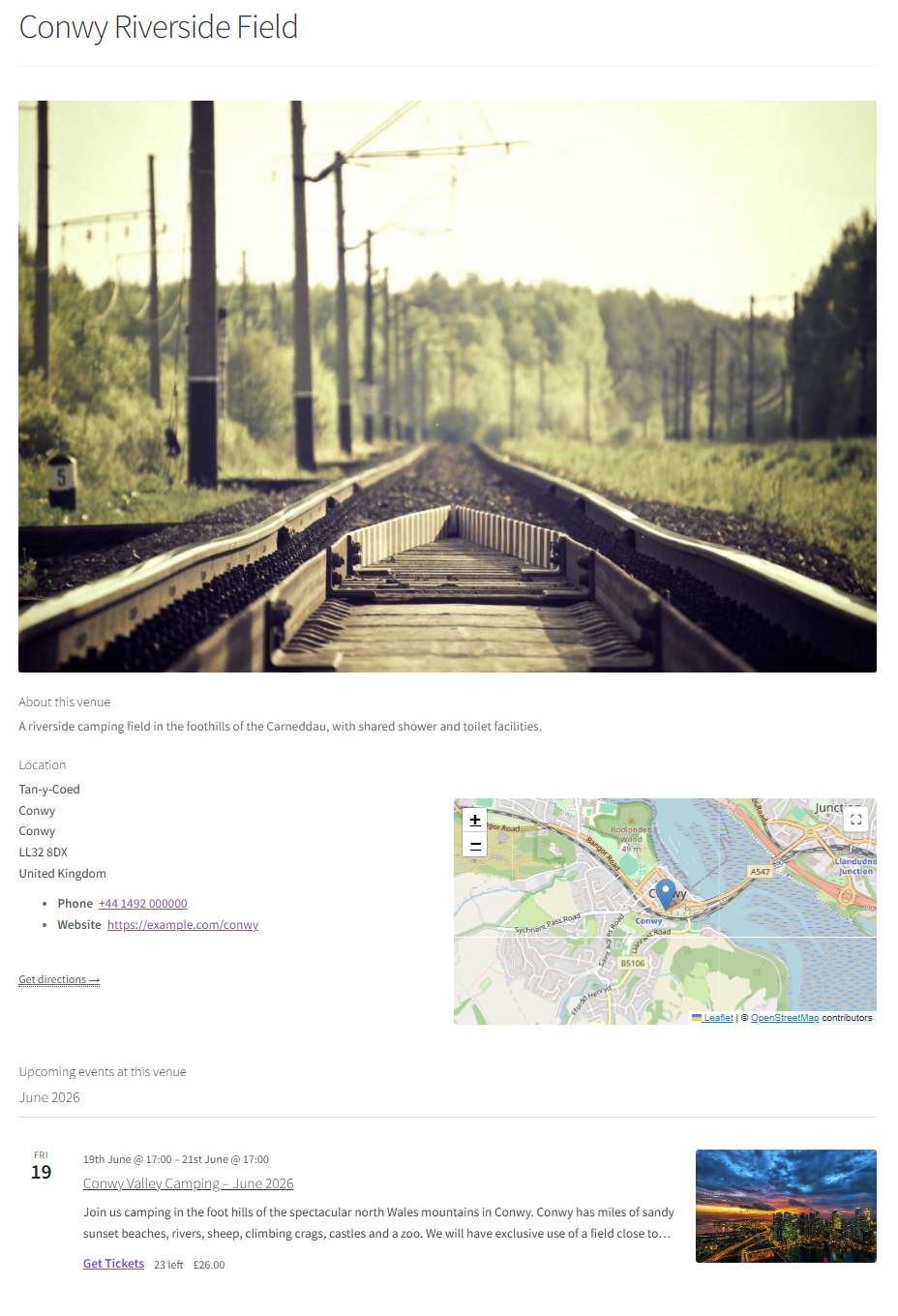
Single venue page with upcoming events
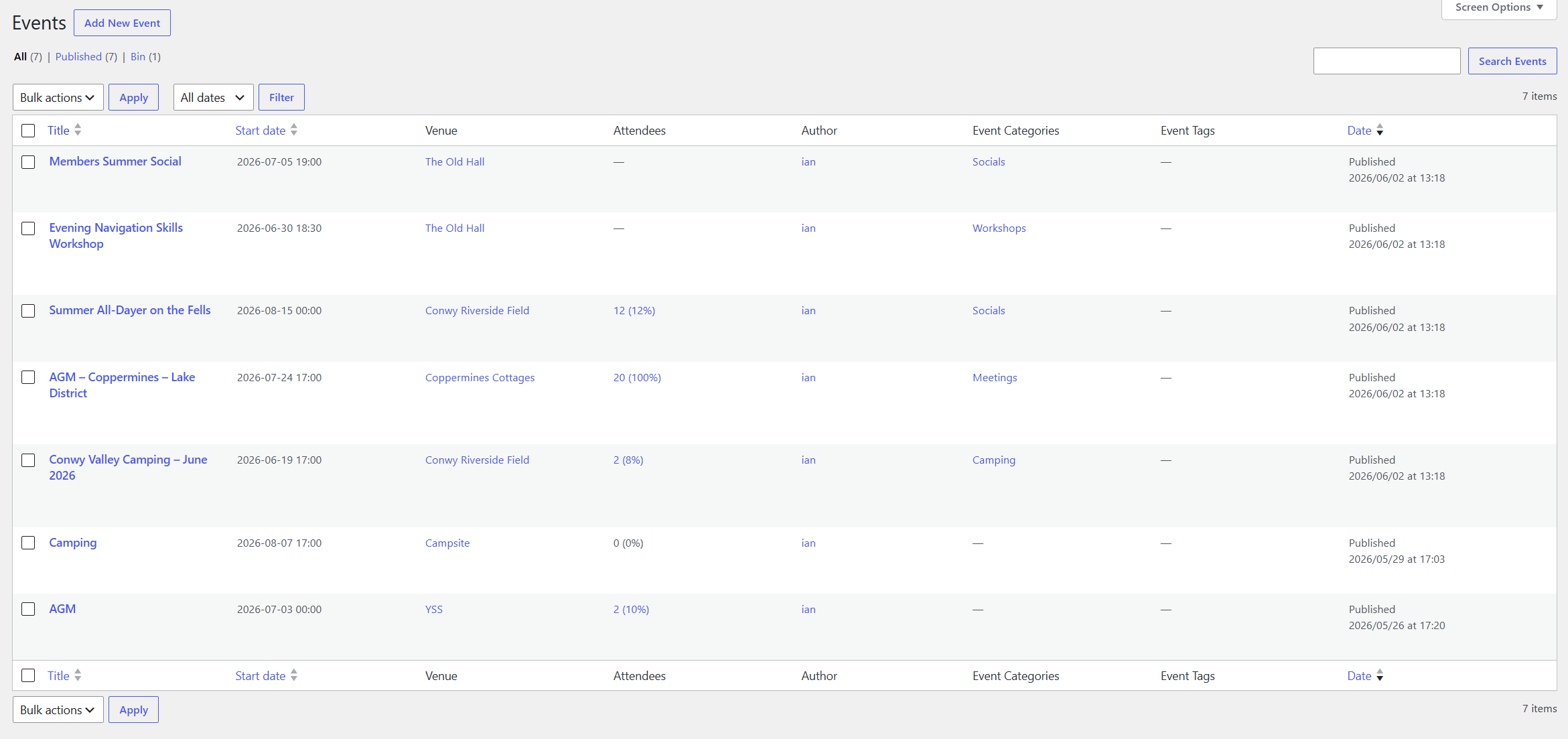
Events admin list with start date and venue columns