
DigitalPulse Family Archive Wordpress Plugin - Rating, Reviews, Demo & Download

Plugin Description
DigitalPulse Family Archive is a free, open-source WordPress plugin that turns ordinary posts into an interactive family archive. An oak-inspired tree, leaf-shaped portraits and personal stories help visitors explore relationships across generations.
Add a Family Tree block or the [wp_my_family_tree] shortcode to a page. Choose a full-window layout or embed the tree in your theme. People remain WordPress posts, and compatible records from the older WP Family Tree plugin can be reused.
Free and open source
All included plugin features are available free of charge, with no paid plugin license or subscription required. The plugin is released under GPL-3.0-or-later and includes readable source code for modification and redistribution under that license.
hCaptcha and Polylang are optional integrations. Their requirements and external-service terms are described below.
Explore the family
- Drag or swipe the tree, pinch to zoom, find a person and follow family branches.
- Open biographies, dates, places, contact details and optional social profile links.
- Swipe through person photographs; use arrows, gallery dots or the keyboard.
- Open authorized person editing in a new tab.
- Expand only the tree area to fullscreen, with an in-page fallback and an exit control.
- Save or print a tree-only image without the page header or administrator contact footer.
- Use a responsive people directory, a compact email/contact footer and optional home-screen installation help.
Manage relationships and access
- Record parents and multiple partners, including current and former relationships.
- Keep both recorded parents in a child’s view without inventing step-parent links.
- Choose the person-first editor or enable WordPress’s block editor for biographies.
- Require a family viewing password, retain access for up to 30 days and revoke remembered sessions.
- Optionally encrypt family media and deliver protected files through access checks.
- Accept private contact messages with one optional photo through WordPress mail.
New private installations remain locked until an administrator configures a password. The shared family password grants viewing access, not WordPress editing permission. The plugin must remain active for its access controls to apply.
Languages
English is the default for new installations. Complete frontend dictionaries are included for English, Spanish, Polish, French, German, Latvian, Lithuanian, Estonian, Danish, Swedish, Norwegian Bokmål, Norwegian Nynorsk, Finnish and Icelandic.
Enable presets, add any number of custom languages, edit label dictionaries and configure translated titles in the Languages settings. Missing labels fall back to English. Administrator translation coverage varies: common controls are translated in the presets, with English fallback for remaining labels and editable administrator overrides.
Polylang is optional. When configured, its translated page URLs and person posts provide content translations. Without it, the plugin language menu changes interface labels. No automatic translation service is used.
Performance and cleanup
The server-side relationship index supports automatic storage selection, WordPress transients and an existing persistent WordPress object cache. Redis or Memcached must be supplied by the host or a separate compatible cache plugin; this plugin does not install or replace an object-cache drop-in.
Administrators can clear only the Family Tree index from settings or the WordPress toolbar. The toolbar icon rotates while clearing. Password sessions, anti-spam limits, encrypted media and other plugins’ caches are retained.
Production JavaScript and CSS are supplied minified with readable sources. Optional settings compact standalone HTML, remove emoji fallback assets and unnecessary head tags, disable public comments on ordinary posts/pages/media, or omit theme styles from full-window tree pages. Private family pages and API responses retain no-store behavior.
Optional demo
An administrator can import eight fictional members of the Morgan family, realistic public-domain archival demo photographs and two English pages. Names, dates, biographies and relationships are invented. The photographs are illustrative and do not depict the named fictional people. The import succeeds only when all eight archival source photographs can be downloaded and validated; it never silently substitutes placeholder portraits.
Importing requires confirmation and preserves existing records, pages, media and settings. Repeating the import preserves edits to marked demo records. It does not create an account or enable public demo access.
On an isolated single-site installation with no real family records, a separately confirmed shared demo mode creates the username demo with password Demo@demo123Editor and front-end password demo. No such account exists by default. An existing demo username is not modified.
The custom Family Tree Demo Editor can add, edit and remove demo persons and pages through a constrained dashboard using the regular person editor’s visual layout. Personal details, contact fields, WhatsApp numbers, photo stories and dates are editable. A read-only Settings overview explains the tree page, appearance, languages, access, contact and performance options. The account cannot manage real content, site settings, users, plugins or uploads. Contact sending and the administrator WhatsApp link are disabled during shared demo mode. Demo edits are public.
On an empty first installation the Demo tab is available during setup. After setup, enable Show the Demo tab for sample content and demo sharing in General settings whenever you need these optional tools. Hiding the tab does not disable active sharing or daily reset; General always provides a control to manage or stop active sharing.
Removal requires confirmation. The starting person and tree landing page remain available, and up to 50 visitor-created records are allowed per reset cycle. Persons and Demo pages provide clear Add, Edit, Remove and View actions.
Real family records, including drafts and trashed records, block shared demo mode. If isolation later fails, demo access is locked and shared sessions are revoked. Disabling the mode revokes the shared account and sessions, retains sample content, and restores normal privacy behavior. The normal family password hash is not overwritten.
Daily demo reset
While shared demo mode is active, the plugin restores original demo titles, stories, publication status, personal details, contact fields, WhatsApp numbers, photo stories and dates to a retained starting copy every 24 hours. Removed original samples return, and records created through the shared demo editor are deleted. The reset checks demo ownership before changing a record and preserves real family records, relationships, media and normal settings. No backup plugin is required.
The task uses WordPress cron, with an overdue check before the next demo access or edit. On a site with no requests, execution can be later than the scheduled time. Demo settings show the next reset and offer a confirmed Reset demo now control. Old editor forms must be reloaded after a reset. The saved starting copy survives disabling and re-enabling demo mode. Active older demos without a saved copy use the original bundled sample fields.
To replace the saved starting copy deliberately, disable sharing, edit the samples as an administrator, and confirm Save current demo as reset baseline before enabling sharing again.
Privacy and external services
The plugin has no analytics, telemetry, author-operated service or external update system. Core tree code, styles and icons are included in the package. Social links, website links and the optional author credit are ordinary links followed only by a visitor’s action; the author credit is off by default.
hCaptcha is an optional external anti-spam service and is disabled by default. An administrator must obtain an hCaptcha account, enter a site key and secret, and enable the relevant form before it is used.
On enabled challenge forms, the browser loads https://js.hcaptcha.com/1/api.js and contacts hCaptcha and its challenge/asset hosts. hCaptcha receives browser/network information and challenge interactions as described in its privacy policy. The site’s server sends the site key, secret, challenge response token and visitor IP address to https://api.hcaptcha.com/siteverify to verify the response. The secret is not exposed to the browser.
- Service: https://www.hcaptcha.com/
- Terms: https://www.hcaptcha.com/terms
- Privacy: https://www.hcaptcha.com/privacy
The optional administrator-triggered demo import can download a fixed set of public-domain archival photographs from Wikimedia Commons. This request happens only when an administrator imports or refreshes demo content; no family records, passwords, contact details or visitor identifiers are sent by the plugin. If any photograph cannot be downloaded and validated, the import/refresh reports that file and does not report a successful media refresh. The sample names, dates, biographies and relationships remain fictional and the photographs do not depict the named sample people.
- Service: https://commons.wikimedia.org/
- Terms: https://foundation.wikimedia.org/wiki/Policy:Terms_of_Use
- Privacy: https://foundation.wikimedia.org/wiki/Policy:Privacy_policy
- Media credits and licence notes: docs/THIRD-PARTY.md
Contact messages use wp_mail() and the site’s configured mail transport. An optional photograph is attached to the email, not published or added to the Media Library. Temporary upload files are removed after processing. Your mail provider or other mail-logging plugins may retain their own copies.
Normal family viewing uses a server-validated cookie. Demo sharing uses a separate cookie and session namespace. No service worker or offline family-data cache is registered.
Development and support
Readable PHP, JavaScript and CSS are included. Minified assets are built with esbuild 0.25.5; package.json, package-lock.json and scripts/build-assets.mjs are supplied. Developers can run npm ci followed by npm run build with Node 18 or newer. Node and npm are not needed on the WordPress server.
Source and ordinary bug reports:
https://digitalpulse.click/
See readme.md for the complete administration, privacy, backup and troubleshooting guide. See SECURITY.md before reporting a security issue. Do not include real family records, photographs, passwords, keys or private logs in public issues.
Screenshots
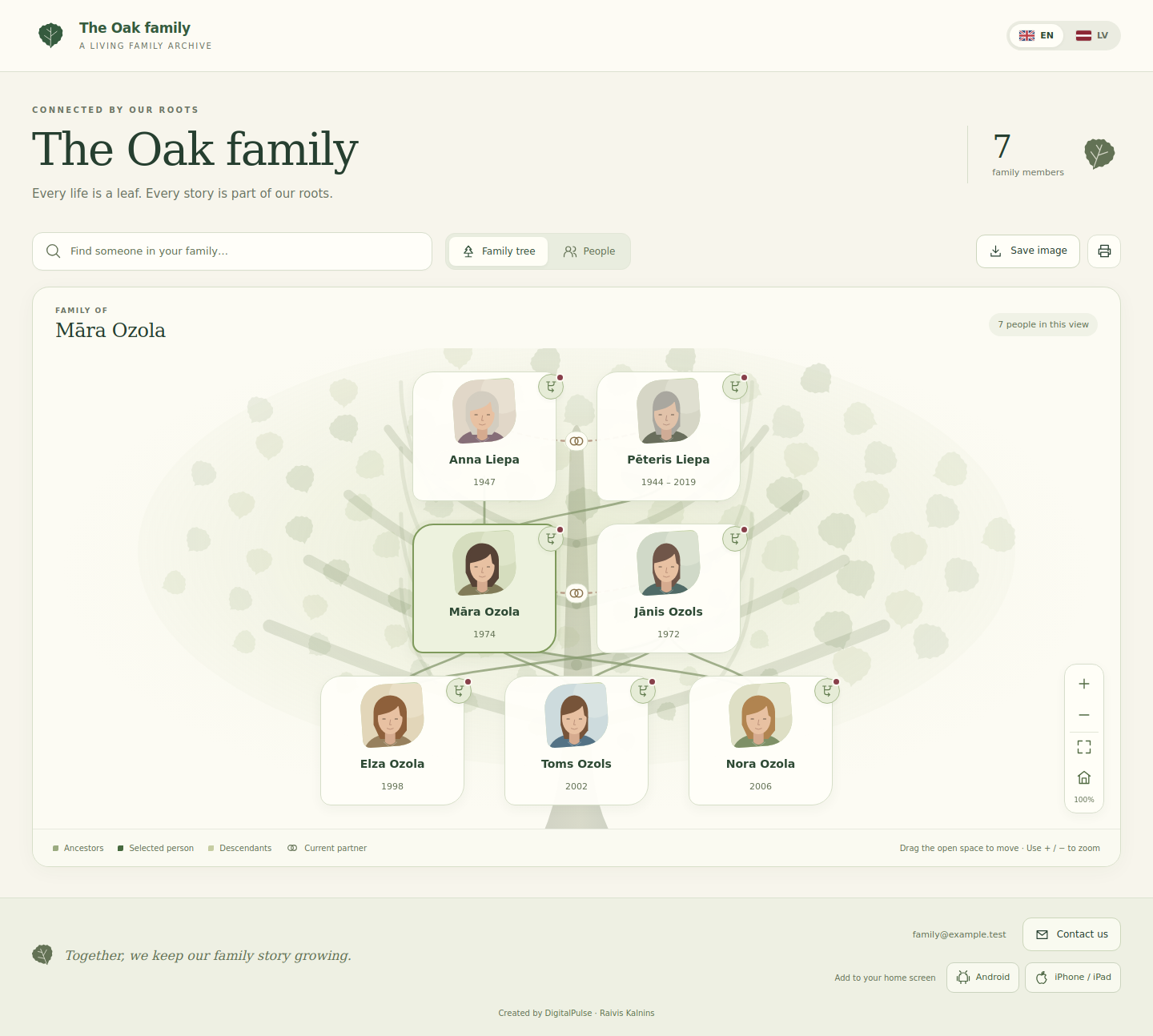
Fictional family records with realistic public-domain archival demonstration photographs in the interactive oak-inspired tree.


