FormLedger – Entries For Contact Form 7 Wordpress Plugin - Rating, Reviews, Demo & Download

Plugin Description
FormLedger saves every successful Contact Form 7 submission to your site’s own database, so a submission is never lost when an email fails to arrive. Entries are managed from a native WordPress admin screen under Contact CF7 Entries.
The plugin works entirely inside your WordPress site. It does not send submission data to any external service, it contains no tracking or telemetry, and there are no limits on the number of forms or entries.
This is an independent plugin. It is not affiliated with or endorsed by the Contact Form 7 project.
Features
- Automatic storage of successful Contact Form 7 submissions, including when mail sending fails
- Unlimited forms and unlimited entries
- Supports text, email, tel, textarea, number, URL, date, select, checkbox, radio, acceptance, hidden, quiz and file fields
- Clean entries list (entry, form, submitted date, view and delete buttons) with pagination, sorting and screen options
- Search across entry ID, form title, field names and field values
- Filter by form (including deleted forms) and by date: today, yesterday, last 7 days, last 30 days, this month, last month or a custom range
- Read/unread status with bulk mark as read or unread
- Detailed entry screen showing every submitted field
- Individual and bulk delete
- CSV export of all, filtered or selected entries (with Form ID, Form Name, page URL and full file download links), UTF-8 encoded, with protection against spreadsheet formula injection
- Uploaded files are copied to a protected folder and can be downloaded securely by authorized users
- Privacy controls: IP address storage (off, anonymized or full), user agent storage, automatic data retention
- Integrates with the WordPress personal data exporter and eraser
- Multisite compatible: each site keeps its own entries
- Translation ready
Privacy
This plugin stores Contact Form 7 submission data in your site’s database. Depending on your forms and settings, this may include names, email addresses, phone numbers, messages, uploaded files, IP addresses and browser user agents.
- IP address storage is off by default. You can choose to store an anonymized or full IP address.
- User agent storage is off by default.
- Automatic retention can delete entries older than 7, 30, 90, 180 or 365 days.
- The plugin registers a personal data exporter and eraser (Tools Export Personal Data / Erase Personal Data). Entries are matched when they were submitted by the requesting user’s account or contain a field whose value equals the requested email address.
- Suggested privacy policy text is added to Settings Privacy.
- No data is sent to external services.
Using this plugin does not by itself make your website compliant with GDPR or any other law. You remain responsible for your own legal and privacy obligations, including your privacy policy and how long you keep data.
Data Storage
Entries are stored in three custom database tables that use your site’s table prefix: cf7em_entries, cf7em_entry_fields and cf7em_entry_attachments.
Uploaded files are copied from Contact Form 7’s temporary folder into wp-content/uploads/cf7em-uploads/ with random, unguessable names. The folder contains an .htaccess file that blocks direct access on Apache. On Nginx, add a rule such as:
location ^~ /wp-content/uploads/cf7em-uploads/ { deny all; }
Files are only delivered through an authenticated admin download link.
Deactivating the plugin keeps all data. Deleting the plugin also keeps all data unless you enable Delete all entries, uploaded files and settings when the plugin is deleted under Contact Entry Settings.
Screenshots

Entries list with form, date and status filters.
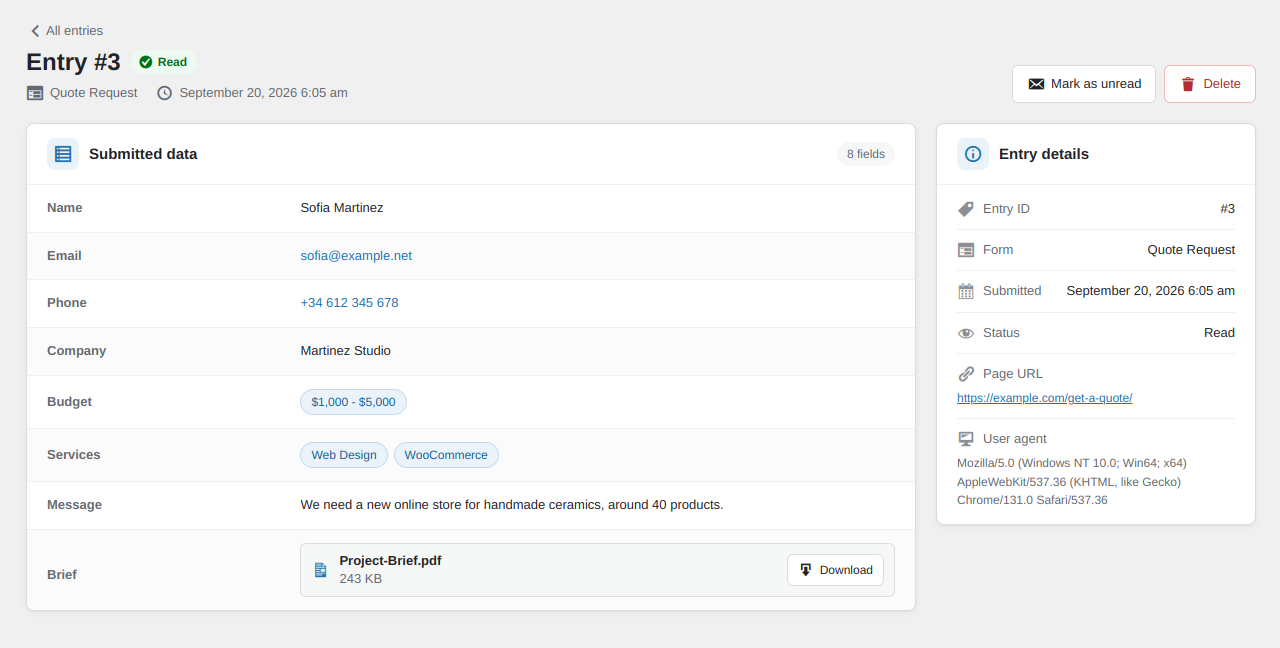
Single entry screen with all submitted fields and attachments.

Privacy and retention settings.