FW Tools For Elementor Forms Wordpress Plugin - Rating, Reviews, Demo & Download
Plugin Description
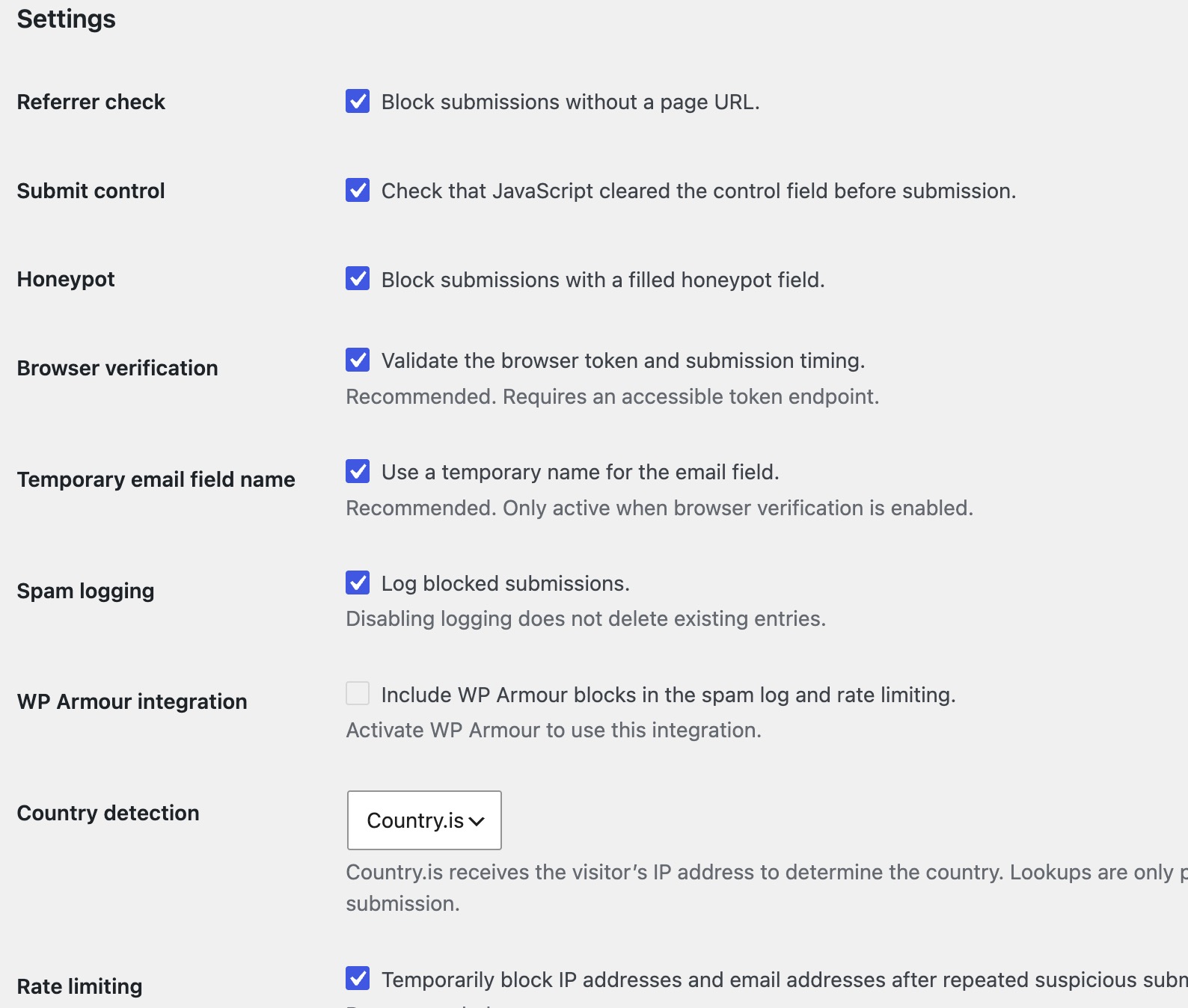
Keep building your forms in Elementor and manage their protection from one settings page. The plugin checks submissions in the background without asking visitors to solve a CAPTCHA. You can enable or disable individual checks to suit your site.
When a submission is rejected, the spam log helps you understand why. Use it to investigate repeated attempts or troubleshoot problems reported by visitors.
The optional confirmation step serves two purposes: visitors can review their details before sending, and the additional interaction creates another hurdle for automated submissions. The form’s configured actions, such as sending an email, run only after confirmation. You choose which forms use this step.
The plugin requires Elementor and Elementor Pro with the Form widget. It is not a standalone form builder.
Features
- Browser verification without an additional CAPTCHA challenge.
- Checks for missing page information, missing or invalid tokens, and submissions made too quickly.
- Honeypot and JavaScript submit controls.
- Temporary email field names when browser verification is active.
- Settings to enable or disable individual protection checks.
- IP and email rate limiting after repeated suspicious submissions.
- Optional integration with WP Armour for spam logging and rate limiting.
- An optional confirmation step with a configurable title for each form.
- A local spam log with recent entries in the WordPress admin and a downloadable JSON Lines file.
- Optional country detection using Country.is.
- An option to remove plugin settings and stored data when deleting the plugin.
Spam log
Logging is enabled by default and can be switched off independently of rate limiting. Disabling logging does not delete existing entries.
Entries can contain the submission time, form name, name, email address, IP address, country code, a message excerpt, and the rejection reason. The message excerpt is limited to 125 characters, with whitespace and line breaks combined for easier reading.
The log keeps the latest 500 entries by default. Older entries are removed when the limit is exceeded; entries do not expire based on their age. Developers can change the maximum number of entries with the fw_tfe_spam_log_limit filter.
The log is stored as a JSON Lines file in the fw-tfe-logs directory inside the WordPress uploads directory. Spam log entries are not stored in the WordPress database.
IP and email rate limiting
Rate limiting can be enabled or disabled in the plugin settings. Save your chosen setting before using it. When enabled, it uses a separate table in the existing WordPress database.
The table stores separate counters for IP addresses and hashes of normalized email addresses, together with the start of each counting period and the end of any block. Email addresses are not stored as plain text in this table. Names and messages are not stored in it.
Three suspicious attempts from the same IP address, or five using the same email address, within five minutes trigger a block lasting one hour. Further attempts during that block do not extend it. Ordinary field validation errors and expired verification tokens do not count towards the limit.
Expired records are removed in batches during subsequent form requests. Cleanup does not rely on WP-Cron. Disabling rate limiting stops enforcement but leaves the table in place.
Confirmation before sending
Enable “Require confirmation before sending” in an Elementor form’s options to let visitors review their details before the configured form actions run. You can customize the confirmation title for each form. This feature is off by default.
This is an on-page review step, not email address verification. Forms with upload fields skip this step and continue through the normal Elementor submission flow.
Pending submissions are stored temporarily in a separate database table, including form field data, form and page identifiers, and form metadata. A confirmation is valid for 15 minutes and can be used only once. Confirmed records remain stored until cleanup; cancelling an unclaimed confirmation deletes its pending record.
Expired records are removed by an hourly WP-Cron task. Actual deletion can occur later, depending on when WordPress runs scheduled tasks. Temporary confirmation storage is independent of spam logging.
WP Armour integration
When WP Armour is active and the integration is enabled, its Elementor form rejections can be included in this plugin’s spam log and rate limiting. Logging and rate limiting must each be enabled for their respective functions to apply.
WP Armour is optional and is not bundled with this plugin. Disabling the integration does not disable WP Armour’s own protection.
External services
Country.is
Country.is is an optional IP geolocation service used to retrieve a country code for a spam log entry. It is disabled by default and is used only after a site administrator selects Country.is in the country detection setting.
When logging a rejected submission with a valid IP address, the plugin sends that address in an HTTPS request to https://api.country.is/{ip}. Submitted names, email addresses, and message contents are not included in this lookup. As with other server-side HTTP requests, the service also receives the connection from your web server.
Country.is does not require an API key. According to the Country.is website, the API is free for commercial use, its data comes from MaxMind GeoLite2 and Cloudflare geolocation, and API requests are not logged by the service.
Country.is does not currently publish separate Terms of Service or Privacy Policy pages. Therefore, no direct links to such pages can be provided. The service information, usage conditions and privacy-related information published by Country.is are available on its website:
Privacy and data storage
When logging is enabled, the plugin stores the personal information listed in the Spam log section on your server. When rate limiting is enabled, IP addresses, hashes of normalized email addresses, and temporary rate limit state are stored in a dedicated database table.
When the confirmation step is used, submitted form fields and metadata are stored temporarily in a separate database table, along with a hash of the confirmation token, an expiry time, and whether the confirmation has been used. This storage is not limited to the short message excerpt kept in the spam log.
Only optional country detection sends a visitor’s IP address to Country.is. Include your use of these features in your site’s privacy information as appropriate.
The spam log has an entry limit rather than an age limit. Rate limit records become eligible for deletion after their counting period and any block have expired; physical deletion takes place during later form requests. Confirmation records expire after 15 minutes and are removed by the scheduled cleanup described above.