
GateNoxa Gateway & Shipping Status For WooCommerce Wordpress Plugin - Rating, Reviews, Demo & Download
Plugin Description
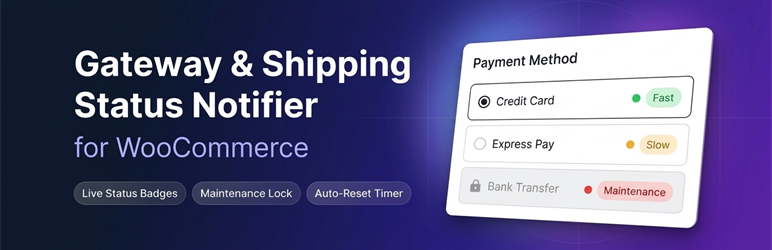
GateNoxa Gateway & Shipping Status for WooCommerce lets store admins show real-time status badges and inline notices next to payment gateways and shipping methods on the WooCommerce Checkout page—without disabling the method completely.
Features
- Auto-Detect Active Methods: Automatically lists all enabled WooCommerce payment gateways and shipping methods (Shipping Zones and global methods).
- 4 types of Status Modes + Custom Notices:
- Operational / Fast (Green): Highlight smooth checkout or fast delivery.
- Slow or Degraded (Yellow): Display an inline warning notice (e.g., delayed OTP or delivery).
- Maintenance (Red): Keep the method visible while locking selection, auto-switching to an available option, and blocking checkout submission server-side.
- Recommended or Promo (Blue): Highlight a preferred payment or shipping option.
- Auto Reset Timers: Automatically restore any method back to Normal after 1, 2, 4, 6, 12, or 24 hours.
- Admin dashboard Bar Quick Switcher: Toggle gateway and shipping statuses in one click from the top WordPress Admin Bar.
- Lightweight and HPOS Compatible: Loads assets conditionally only on Checkout and the plugin settings page, declares WooCommerce HPOS compatibility, and cleans up options on uninstall.
Installation Guideline
- Ensure WooCommerce is installed and active.
- Upload & activate GateNoxa Gateway & Shipping Status for WooCommerce via Plugins > Add New.
- Go to WooCommerce Gateway Status to set status badges, inline messages, and auto-reset timers.
- Use the Gateway Status menu in the WordPress Admin Bar for quick 1-click updates.
Screenshots

WooCommerce Checkout page showing selected live status badges, inline alert notice, and a maintenance-locked gateway.

WooCommerce > Gateway Status settings table with live previews and auto-reset timers.

1-Click Gateway Status quick switcher in the WordPress Admin Bar.
Similar Plugins:
 Rating Widget: Post Rating, 5 Star Rating, Reviews, Thumbs Up & Down, Reaction
 Shipping Method For WooCommerce – Use For Conditional Shipping + Extra Shipping + Flat Rate Shipping Method + Table Rate Shipping For WooCommerce
 Custom Shipping Methods For WooCommerce – Create Weight Based Shipping, Conditional Shipping, Table Rate Shipping And Much More