
GreenPNG Wordpress Plugin - Rating, Reviews, Demo & Download
Plugin Description
GreenPNG is a free, self-contained operations suite for independent WordPress site owners. It covers five areas in one local loop:
- Traffic security — a firewall that analyzes each request (country, network and company, hosting provider, crawler verification, and the browser and device its headers describe) against built-in and custom rules that allow, challenge, block, or temporarily ban; allow and block lists; a full analysis of any IP address; automatic bans for repeat offenders; and a lightweight client probe. Only high-confidence rules act out of the box (spoofed crawlers, HTTP tools on the login page); every other built-in rule starts in monitor mode, and verified search engine crawlers are never blocked.
- Marketing attribution — UTM and click-id capture, a 30-day signed visitor identity, first and last touch, and five attribution models computed locally.
- Funnels and A/B testing — funnel state machines, A/B exposure and conversion events with significance testing, and cart-abandonment capture with recovery links.
- CRM scoring — contact records with hashed emails, lead scoring, RFM segments, and tags. Security conclusions enter the CRM only as labels, never as raw signals.
- Local analytics — dashboards read daily aggregate tables rather than raw event tables, so reports stay fast as data grows.
Why another plugin?
- No telemetry, nothing outbound by default. The plugin never contacts a GreenPNG-operated server: no heartbeat, no version check, no statistics, no key validation. The only outbound requests are the optional integrations you configure yourself, each listed under External services and off by default.
- Privacy by default. Marketing data (attribution, behavior, CRM) stores anonymized IPs and identifiable collection is gated on visitor consent via the WordPress Consent API. Security logs keep full client IPs on a legitimate-interest basis, are masked when displayed, and can be switched to truncated storage (IPv4 /24, IPv6 /48) at any time.
- MySQL / MariaDB only. Schema discipline with dbDelta, atomic upserts for high-frequency writes, and no promises about other database engines.
External services
This plugin makes no outbound requests by default and never contacts a server operated by GreenPNG: there is no telemetry, no update check, and no license check. Every service below is optional, off until you enable it, and documented with what it is, which servers are called, what data is sent and when, and whether an account is needed.
Conversion forwarding to Google Analytics 4, Meta, TikTok, and Matomo only happens for visitors who granted marketing consent through the WordPress Consent API, and only for sessions the bot filter did not flag. It covers paid WooCommerce orders, form leads (TikTok and Matomo only), and any custom event rules you create yourself on the Plugin Ecosystem page (GA4, Meta, and TikTok only; actions taken inside wp-admin are never forwarded).
Google Analytics 4 (Measurement Protocol)
- What it is: Google’s server-side API for sending events to a GA4 property. Used to record conversions in your own GA4 property.
- Servers: https://www.google-analytics.com/mp/collect for events, and https://www.google-analytics.com/debug/mp/collect only when you click “Test connection” in settings.
- Data sent: your measurement id and API secret, the event name, the client id read from the visitor’s own
_gacookie (at checkout it is saved with the order, so a payment the gateway confirms later still carries it; erased with the customer’s other order data), the value, currency, and transaction id of the order, and for custom event rules the line items (product id, product name, quantity, price). No event is sent for a visitor without a_gacookie. No email address, IP address, or user agent is sent. - When: on paid orders and on custom event rules, under the consent and bot-filter conditions above. The test button sends one validation request with a placeholder client id; Google’s debug endpoint validates it without storing it.
- Account: yes, your own Google Analytics 4 property with a measurement id and a Measurement Protocol API secret.
- Terms of service: https://marketingplatform.google.com/about/analytics/terms/us/
- Privacy policy: https://policies.google.com/privacy
Meta Conversions API
- What it is: Meta’s server-side API for reporting ad conversions to a Meta pixel.
- Servers: https://graph.facebook.com/{API version}/{your pixel id}/events
- Data sent: your access token, the event name, event time, and event id, the SHA-256 hash of the billing email when there is one, the order value and currency, and for custom event rules the line items (product id, quantity, price); custom-rule events without an email are not sent. No raw email, IP address, user agent, or page URL is sent.
- When: on paid orders and on custom event rules, under the consent and bot-filter conditions above. The thank-you page exposes the same event id as
window.GreenPNGPurchaseEventId, so a browser pixel you already run can deduplicate. - Account: yes, your own Meta pixel id and a Conversions API access token.
- Terms of service: https://www.facebook.com/legal/terms/businesstools
- Privacy policy: https://www.facebook.com/privacy/policy
TikTok Events API
- What it is: TikTok’s server-side API for reporting ad conversions to a TikTok pixel.
- Servers: https://business-api.tiktok.com/open_api/{API version}/event/track/
- Data sent: your access token (as a request header) and pixel id, the event name, event time, and event id, the SHA-256 hash of the email address when there is one, the plugin’s own pseudonymous visitor id as
external_id, the order value and currency, and for custom event rules the line items (product id, product name, quantity, price). No raw email, IP address, or user agent is sent. - When: on purchase and lead events and on custom event rules, under the consent and bot-filter conditions above.
- Account: yes, your own TikTok Ads pixel id and an Events API access token. This needs a TikTok Ads Manager account; in many regions TikTok requires business details or a business license to open one. Off by default.
- Terms of service: https://ads.tiktok.com/i18n/official/policy/terms
- Privacy policy: https://www.tiktok.com/legal/page/global/privacy-policy/en
Matomo Tracking (your own instance)
- What it is: the tracking API of a Matomo analytics instance that you host or rent yourself.
- Servers: only the
matomo.phpendpoint of the instance URL you enter in settings. Nothing is sent to any server run by Matomo or by us. - Data sent: your site id and auth token, the event name, order value and currency, and a 16-character visitor id derived by hashing the plugin’s own visitor id (Matomo’s cookies are never read).
- When: on purchase and lead events, under the consent and bot-filter conditions above.
- Account: your own Matomo instance and an auth token for it.
- Terms and privacy: governed by whoever hosts your instance; Matomo’s own policy is at https://matomo.org/privacy-policy/
Cloudflare Turnstile
- What it is: Cloudflare’s challenge widget that tells people and bots apart.
- Servers: the visitor’s browser loads https://challenges.cloudflare.com/turnstile/v0/api.js; your server verifies the result at https://challenges.cloudflare.com/turnstile/v0/siteverify
- Data sent: the browser sends the visitor’s IP address and your site key to Cloudflare while showing the widget. On submit, your server sends your secret key, the one-time widget token, and the visitor’s IP address. The token is never stored.
- When: only with the feature enabled and both keys set: on the login and registration pages after the same address has already failed twice, and on the firewall challenge page if you pick the CAPTCHA challenge method.
- Account: yes, a Cloudflare account with a Turnstile site key and secret key.
- Terms of service: https://www.cloudflare.com/terms/
- Privacy policy: https://www.cloudflare.com/privacypolicy/
hCaptcha
- What it is: an alternative challenge widget to Turnstile; enabling one switches the other off.
- Servers: the visitor’s browser loads https://js.hcaptcha.com/1/api.js; your server verifies the result at https://api.hcaptcha.com/siteverify
- Data sent: the browser sends the visitor’s IP address and your site key to hCaptcha while showing the widget. On submit, your server sends your secret key, the one-time widget token, and the visitor’s IP address. The token is never stored.
- When: only with the feature enabled and both keys set: on the login and registration pages after the same address has already failed twice, and on the firewall challenge page if you pick the CAPTCHA challenge method.
- Account: yes, an hCaptcha account with a site key and secret key.
- Terms of service: https://www.hcaptcha.com/terms
- Privacy policy: https://www.hcaptcha.com/privacy
AbuseIPDB
- What it is: a public IP reputation database, used here as background information on addresses that keep failing logins or form posts.
- Servers: https://api.abuseipdb.com/api/v2/check
- Data sent: your API key and the IP address being checked. Nothing else.
- When: only with the feature enabled and a key set, at most one lookup per address per 24 hours, and only after that address has failed repeatedly. Lookups stop on their own when the provider’s daily quota runs out. The result is advisory and never blocks anyone by itself.
- Account: yes, an AbuseIPDB account and API key (a free tier exists).
- Terms of service: https://www.abuseipdb.com/legal
- Privacy policy: https://www.abuseipdb.com/privacy
DB-IP Lite country database
- What it is: a free IP-to-country database. A copy ships with the plugin; this service only refreshes it.
- Servers: https://download.db-ip.com/free/dbip-country-lite-YYYY-MM.csv.gz (the current month’s file)
- Data sent: a plain download request. No visitor data and no site data.
- When: only when you click the update button in settings.
- Account: none, the file is a free public download.
- Terms and attribution: https://db-ip.com/
- Privacy policy: https://db-ip.com/privacy.php
MaxMind GeoLite2 Country
- What it is: MaxMind’s free IP-to-country database, an optional replacement for the bundled DB-IP data. The plugin never bundles it because its license forbids redistribution.
- Servers: https://download.maxmind.com/app/geoip_download
- Data sent: your MaxMind license key and the name of the requested edition (GeoLite2-Country). No visitor data.
- When: only when you click the download button on the IP Intelligence page.
- Account: yes, a free MaxMind account and license key.
- License (EULA): https://www.maxmind.com/en/geolite/eula
- Privacy policy: https://www.maxmind.com/en/privacy-policy
IP lists (hosting networks and crawlers)
- What it is: public lists of hosting and cloud network ranges, official crawler address lists, and AI crawler names. They label hosting traffic, confirm genuine crawlers, and drive the crawler actions you choose on the IP Lists page. A copy ships with the plugin; this service only refreshes it, and every lookup runs locally.
- Servers, one per source you leave enabled on the IP Lists page:
- Cloud and CDN providers: https://ip-ranges.amazonaws.com/ip-ranges.json, https://www.gstatic.com/ipranges/cloud.json, https://www.microsoft.com/en-us/download/details.aspx?id=56519 (which links to the current Azure Service Tags file on https://download.microsoft.com/), https://docs.oracle.com/en-us/iaas/tools/public_ip_ranges.json, https://digitalocean.com/geo/google.csv, https://geoip.linode.com/, https://www.cloudflare.com/ips-v4 and ips-v6, https://api.fastly.com/public-ip-list
- Hosting networks by network number (ASN): https://raw.githubusercontent.com/X4BNet/lists_vpn/main/input/datacenter/ASN.txt, https://raw.githubusercontent.com/brianhama/bad-asn-list/master/bad-asn-list.csv, https://iptoasn.com/data/ip2asn-combined.tsv.gz (about 9 MB, downloaded once per update and also used for the networks crawler operators run themselves and, if you turn it on, the optional full network database that names the network of every address)
- Crawlers: the JSON lists under https://developers.google.com/static/search/apis/ipranges/, https://www.bing.com/toolbox/bingbot.json, https://search.developer.apple.com/applebot.json, https://duckduckgo.com/duckduckbot.json and duckassistbot.json, https://openai.com/gptbot.json, searchbot.json and chatgpt-user.json, https://www.perplexity.ai/perplexitybot.json and perplexity-user.json, https://claude.com/crawling/bots.json, https://raw.githubusercontent.com/rezmoss/cloud-provider-ip-addresses/main/amazonbot/ (Amazonbot), https://index.commoncrawl.org/ccbot.json, https://api.ahrefs.com/v3/public/crawler-ip-ranges, https://uptimerobot.com/inc/files/ips/, https://my.pingdom.com/probes/ipv4 and ipv6, https://app.statuscake.com/Workfloor/Locations.php?format=txt
- AI crawler names: https://raw.githubusercontent.com/ai-robots-txt/ai.robots.txt/main/robots.json
- Data sent: plain download requests. No visitor data and no site data.
- When: only when you click “Update lists now”, or weekly if you turn on the optional schedule (off by default).
- Account: none, these are free public lists. The IP Lists page links each publisher’s page; each publisher’s own terms and privacy policy apply.
Outbound webhooks (your own endpoints)
- What it is: notifications to systems you choose (your own server, or a Feishu, WeCom, DingTalk, or Slack incoming webhook).
- Servers: only the https URLs you add on the Webhooks page. We do not choose or operate any of them.
- Data sent: the event name and its parameters in the receiver’s format, signed with an HMAC-SHA256 header. People appear only as the plugin’s hashed identifiers, never an email address. Security alerts carry the IP address masked to its network (for example 203.0.113.*).
- When: only for endpoints you added and activated, and only for the event names you subscribed them to. Failed deliveries retry twice (after 60 and 300 seconds) and then stop, with the failure shown on the status page.
- Account: none with us. Any account is the one you have with the receiving service.
SMTP delivery (your own mail server)
- What it is: sends this site’s email through an SMTP server you configure, instead of the host’s mail function.
- Servers: only the SMTP host and port you enter in settings.
- Data sent: your SMTP username and password, plus the email being sent. This covers the plugin’s own notifications (which show masked addresses and masked IPs only) and, while enabled, all other email the site sends through
wp_mail, such as WooCommerce order mail and password resets. The password is stored encrypted (AES-256-GCM) and never shown again. - When: only with the feature enabled and a host set. The “Send test email” button sends one message to the address you type.
- Account: yes, a mailbox on the SMTP server you choose.
Reverse DNS for crawler verification
To confirm that a visitor claiming to be a search crawler really is one, the plugin looks up its address through your server’s normal DNS resolver. No third-party API is called and no credentials are used. Only the verdict and the resolved hostname are stored.
Attribution
This plugin bundles a country-level IP geolocation database from DB-IP (https://db-ip.com/), used under CC BY 4.0. The exact data date is stated in the NOTICE file inside the plugin package.
The scanner user-agent detection rules bundled in assets/data/ are seeded from JayBizzle/Crawler-Detect (https://github.com/JayBizzle/Crawler-Detect), used under the MIT license, and maintained locally from that seed. The NOTICE file inside the plugin package states the license, source, and data date.
The bundled IP lists combine the address lists that providers and crawler operators publish themselves with network-number data from X4BNet lists_vpn (https://github.com/X4BNet/lists_vpn, MIT) and bad-asn-list (https://github.com/brianhama/bad-asn-list, MIT), the iptoasn.com database (https://iptoasn.com/, PDDL 1.0), Amazonbot ranges from cloud-provider-ip-addresses by rezmoss (https://github.com/rezmoss/cloud-provider-ip-addresses, CC0 1.0), and AI crawler names from ai.robots.txt (https://github.com/ai-robots-txt/ai.robots.txt, MIT). The NOTICE file inside the plugin package states the sources, licenses, and data date.
The dashboard charts use uPlot 1.6.19 by Leon Sorokin (https://github.com/leeoniya/uPlot), used under the MIT license. The unminified script ships beside the minified copy in assets/js/vendor/, and the stylesheet assets/css/uplot.min.css is built from dist/uPlot.min.css in that repository.
Screenshots
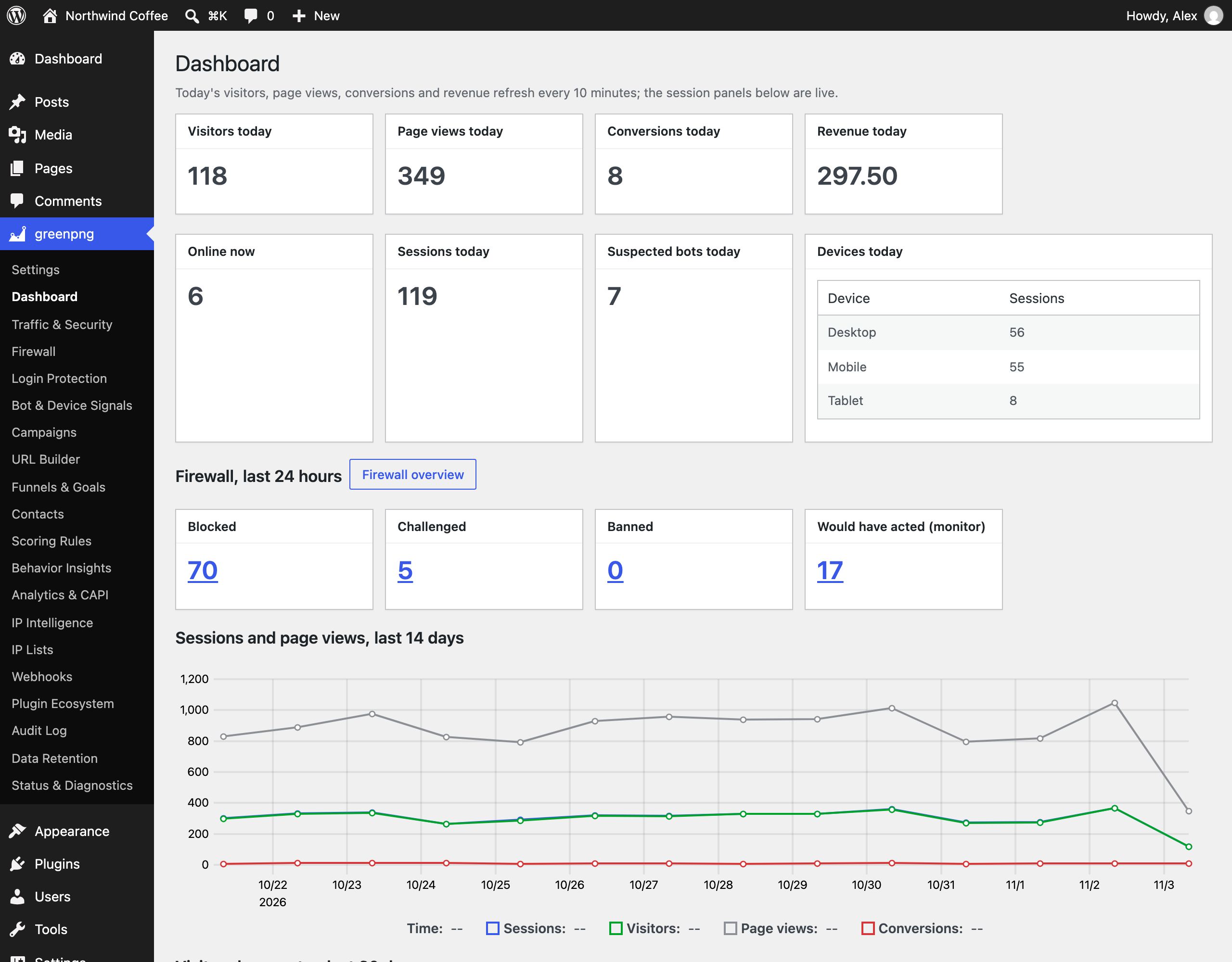
Dashboard — today’s visitors, page views, conversions, and revenue, the firewall’s last 24 hours, and the 14-day trend, all computed on your site.
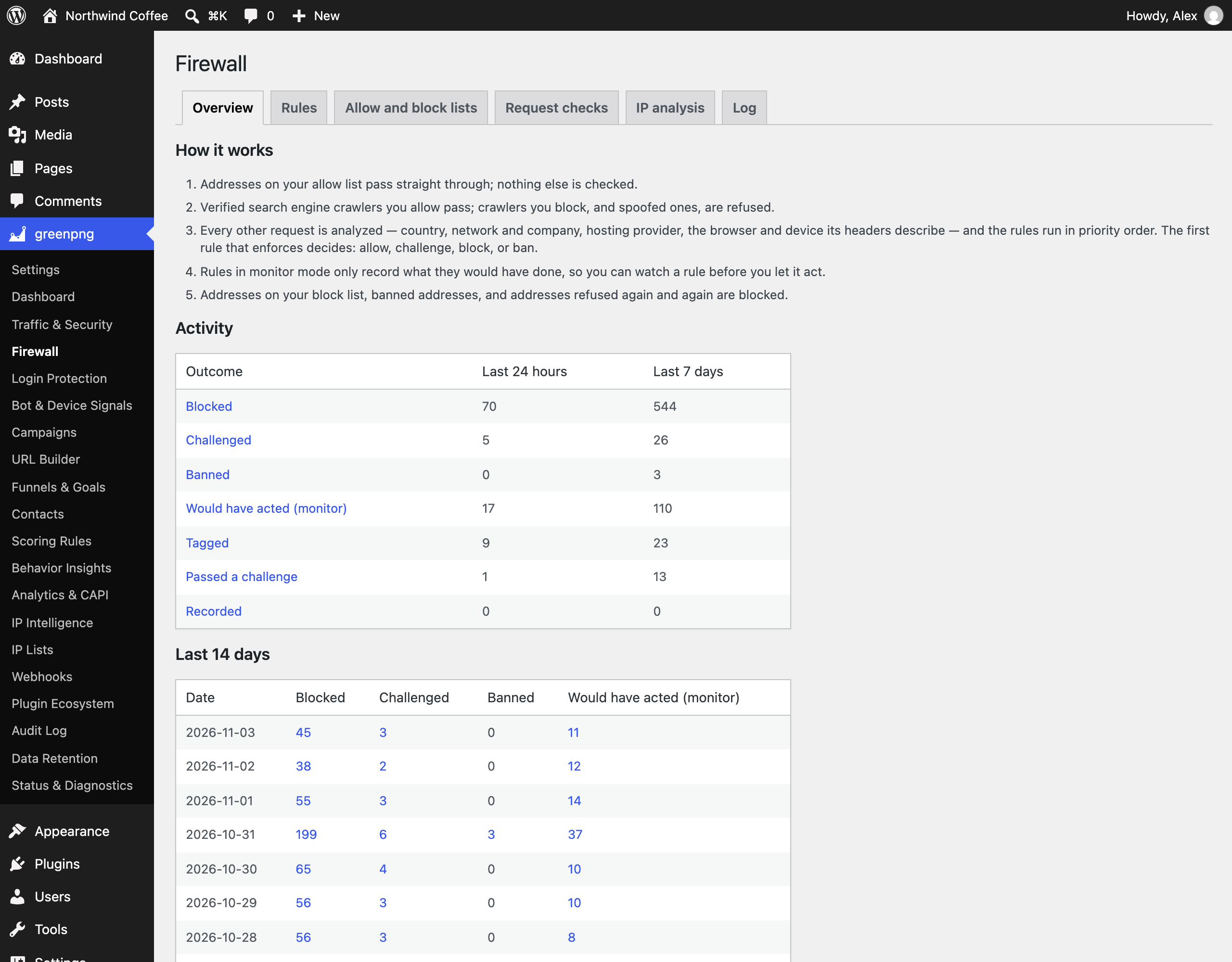
Firewall overview — what the firewall blocked, challenged, banned, or only watched in monitor mode, per day.

Firewall rules — built-in and custom rules in priority order, each with its action, monitor or enforce mode, and recent matches.
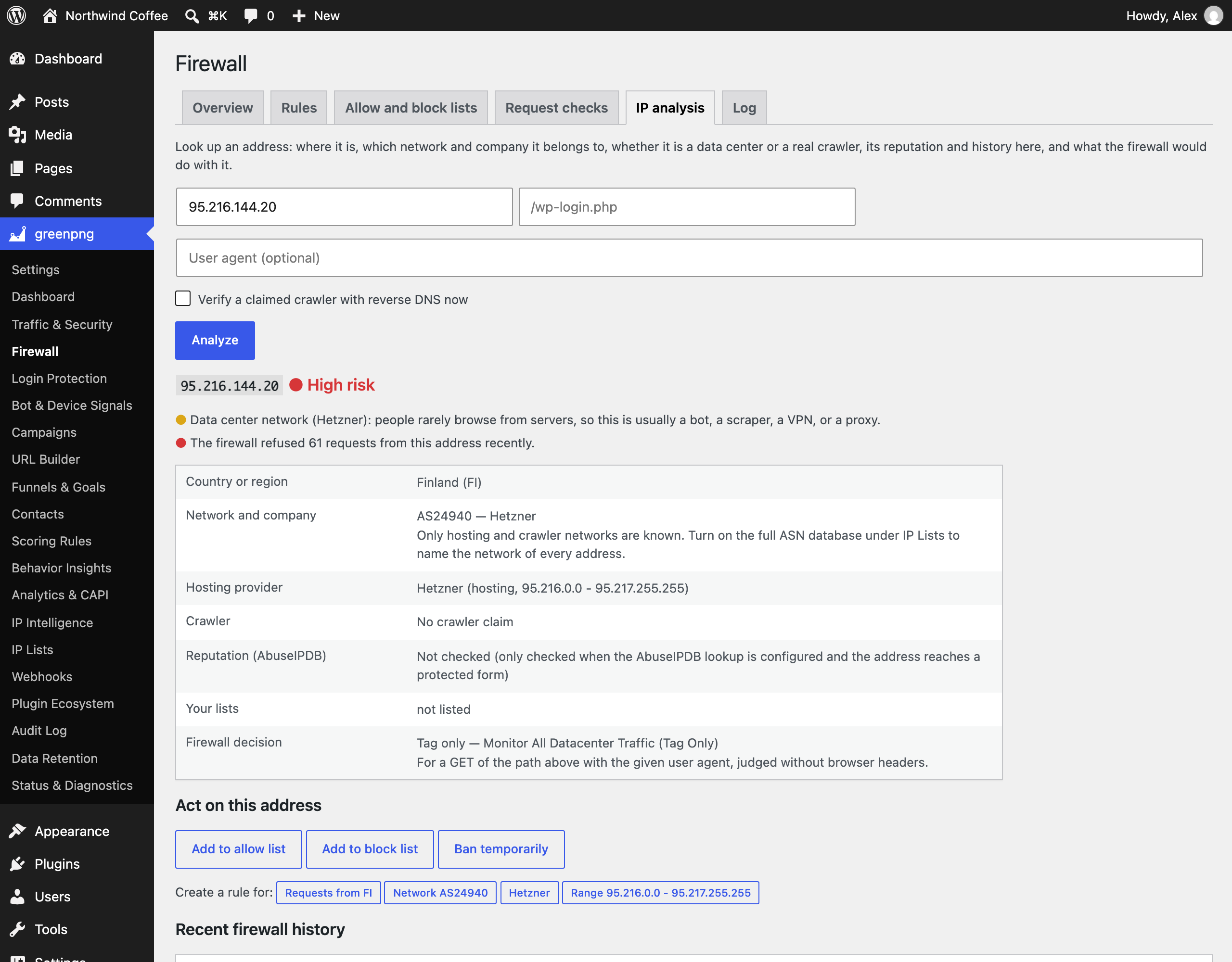
IP analysis — country, network and company, hosting provider, crawler verdict, the rule that would apply, and one-click actions for any address.
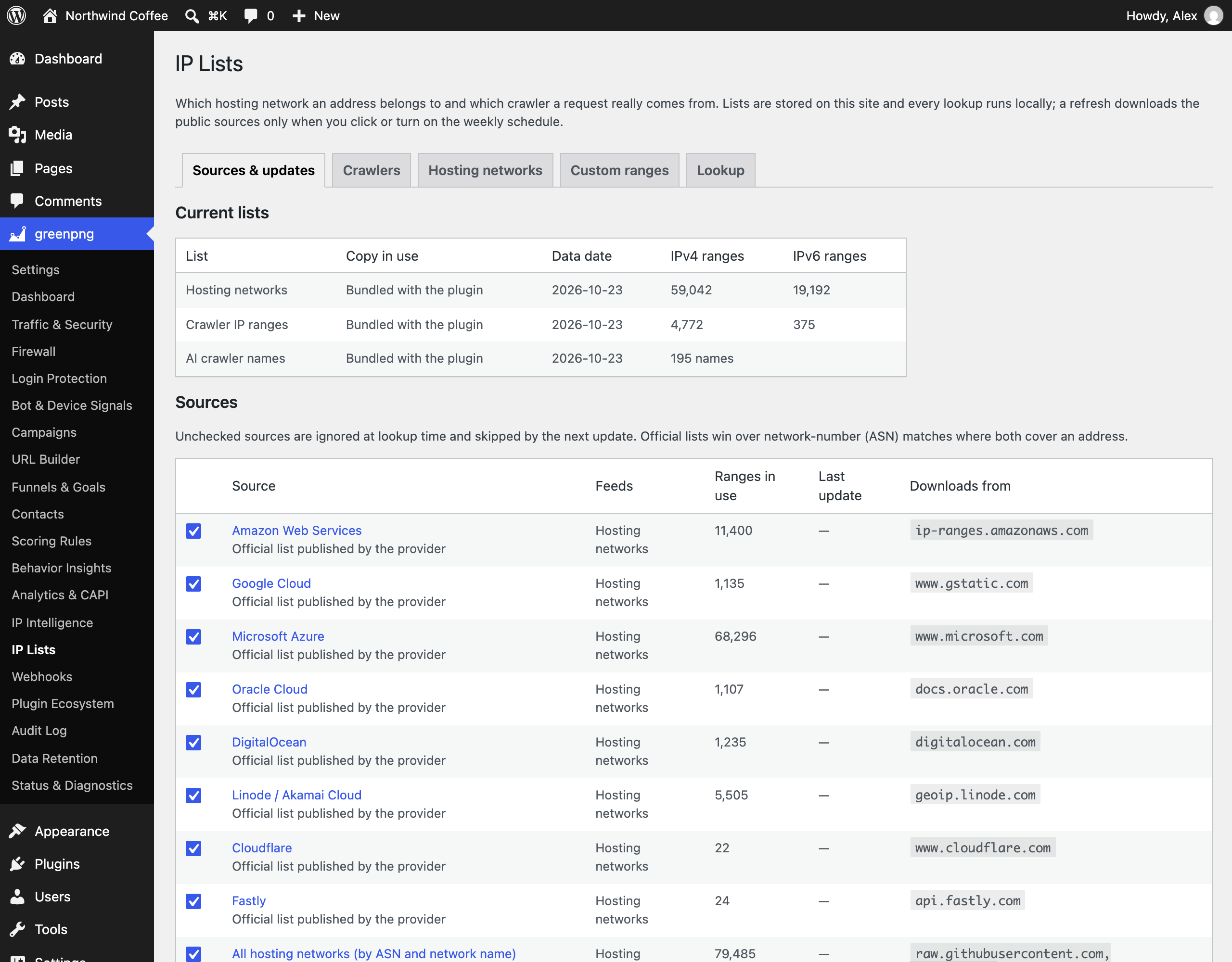
IP Lists — the hosting-network and crawler lists in use, where each comes from, and when it was last updated.

Attribution models — revenue credit per campaign under first touch, last touch, linear, position-based, and time-decay.
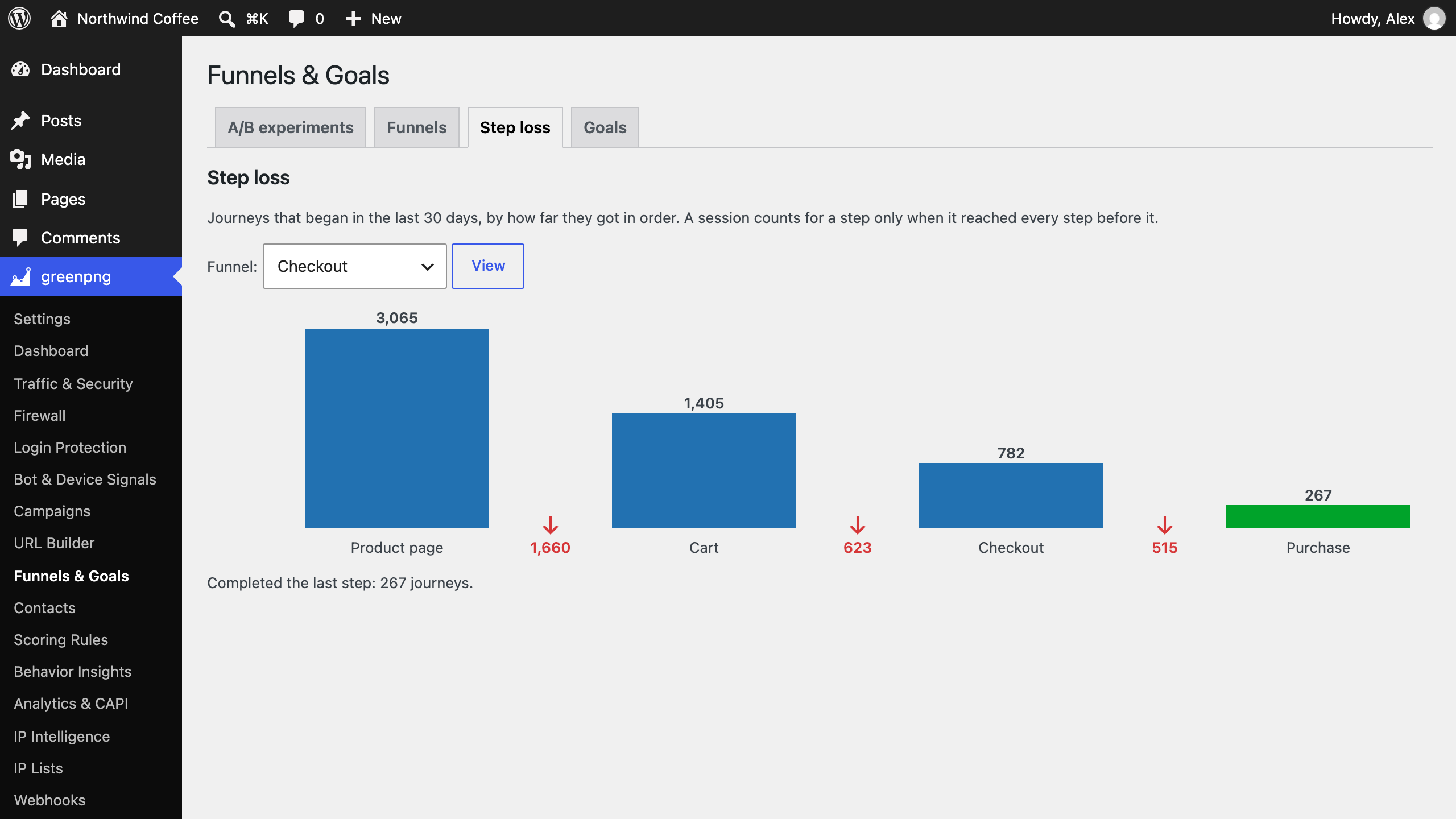
Funnel step loss — how far journeys got through a checkout funnel, and how many dropped at each step.

A/B experiments — variant split, conversion rates, and the significance test verdict.
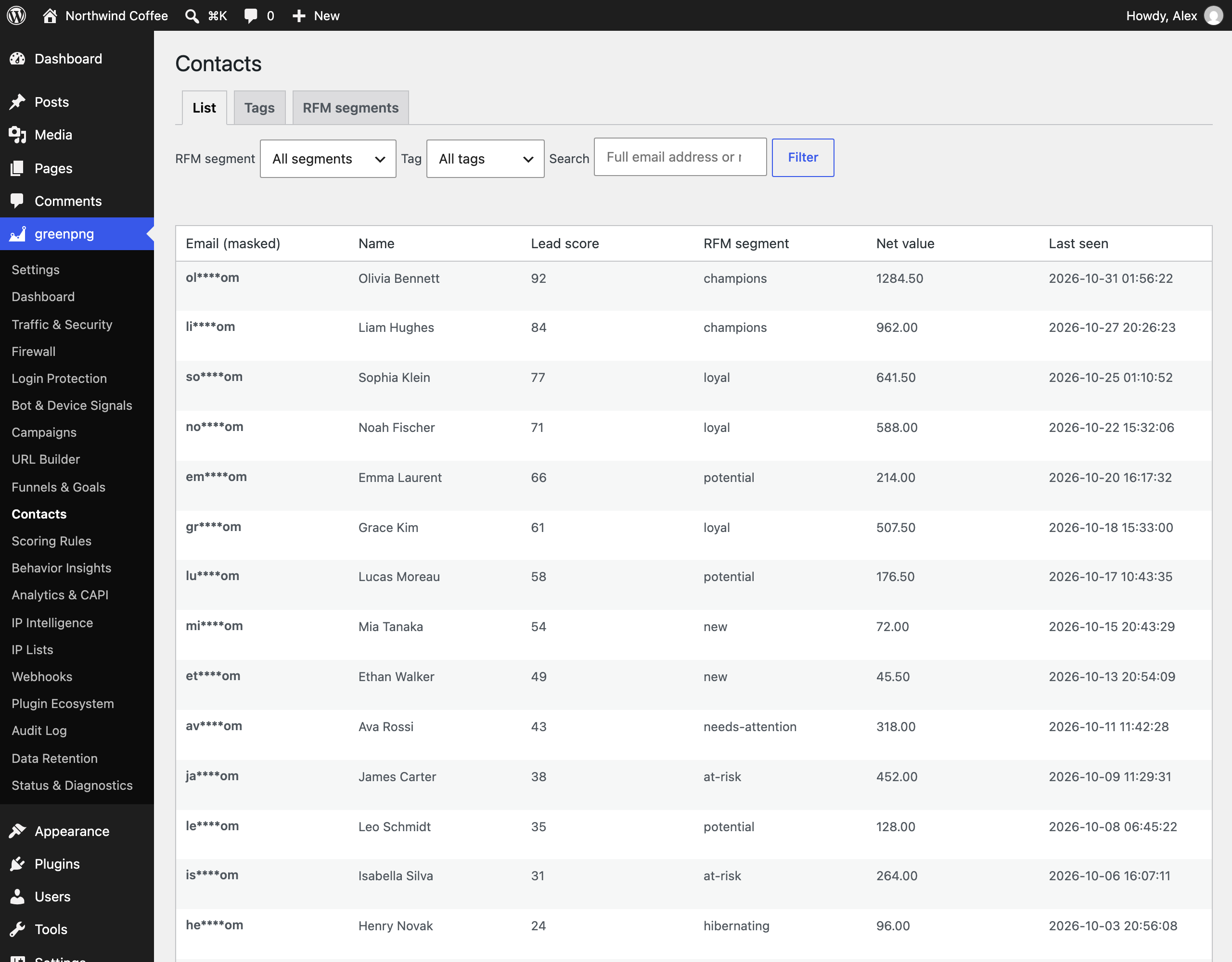
Contacts — leads with masked emails, lead scores, RFM segments, and net value.
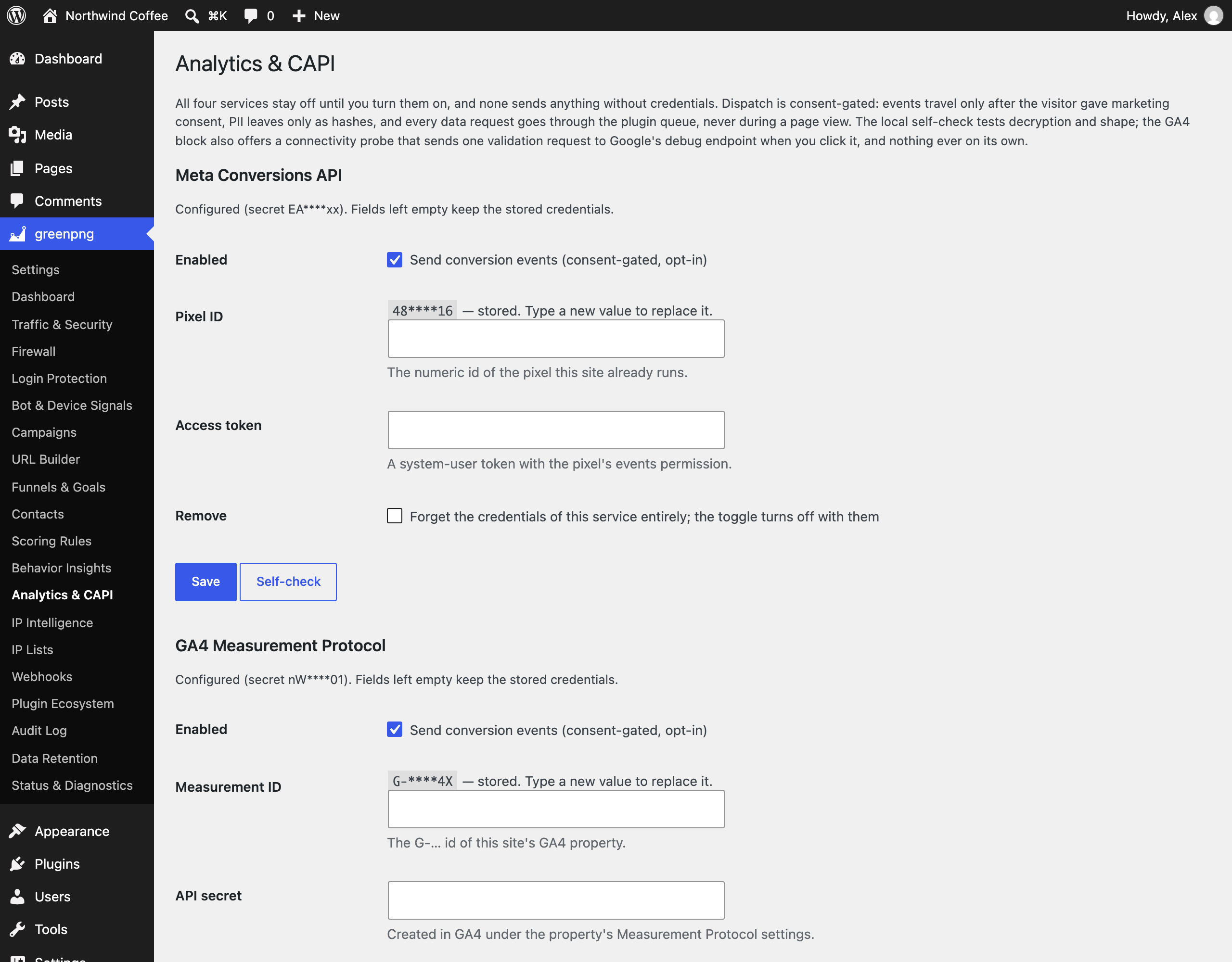
Analytics & CAPI — Meta, GA4, Matomo, and TikTok connections, off until you enable them; stored credentials are shown masked.


