
Gregius Optimizer Wordpress Plugin - Rating, Reviews, Demo & Download
Plugin Description
Gregius Optimizer gives content editors and site administrators a unified control panel for search, social, and AI metadata — without leaving the block editor.
Panels
- Sitemap — Toggle post types, taxonomies, and authors in your XML sitemap. Exclude individual posts from search engines with a single click.
- Robots.txt — Edit your robots.txt file from a modal textarea with dynamic row sizing. Reset to WordPress defaults at any time.
- Schema — Full schema.org type map with 176 subtypes across 9 categories (Article, WebPage, CreativeWork, Event, Organization, Person, Place, Product, Review). Assign global defaults per post type, override per post, and preview JSON-LD with clipboard copy. Organization JSON-LD includes sameAs and logo.
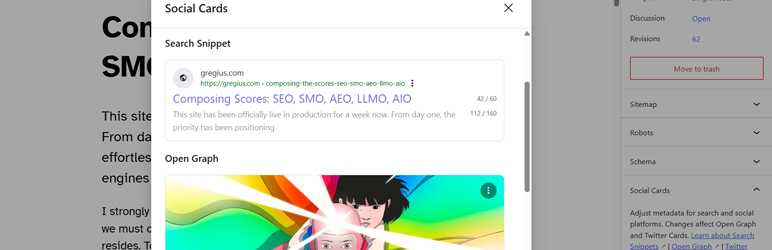
- Social Cards — Per-platform title, description, and image overrides for Google Search Snippets, Open Graph (Facebook, LinkedIn), and Twitter/X Cards. Inline live previews with character counters (Google 60/160, OG 55/65, Twitter 70/200). Global fallback image with kebab menu.
- LLMs — Auto-generate
/llms.txtfrom site content for AI agent discoverability. Custom context editing with live preview. Per-post include toggle with custom descriptions.
All panels are accessible from PluginDocumentSettingPanel in the Gutenberg sidebar, listed in order: Sitemap Robots Schema Social Cards LLMs.
Key Features
- Meta description and canonical URL output via
wp_head pre_get_document_titlefilter for Google-specific title override- Open Graph (
og:*) and Twitter Card meta tags with per-platform fallback chains gg_optimizer_ogimage size (1200×630, cropped) registered onafter_setup_theme- JSON-LD structured data: Organization (configurable subtype), WebSite, BreadcrumbList, article/page (176 subtypes)
@graphwrapper for multiple JSON-LD nodes- Custom DB table (
gg_optimizer_settings) shared across all features - REST endpoints for all settings: sitemap, robots, schema, social cards preview, llms override and preview
- Filter-based architecture — every output group can be disabled via filters
- All meta fields support revisions
Contributors & Developers
Gregius Optimizer is open source software. The following people have contributed to this plugin.
- Hector Jarquin — Lead developer and maintainer
- Gregius — Product owner and sponsor
Visit the contributor profiles on WordPress.org:
* https://profiles.wordpress.org/hectorjarquin/
* https://profiles.wordpress.org/gregiusteam/
Repository
Source code and build instructions:
https://github.com/gregius/gregius-optimizer
This plugin uses npm and @wordpress/scripts for asset compilation. Source JavaScript lives in assets/src/ and compiles to assets/build/. All PHP source is human-readable.
External Services
Gregius Optimizer does not send data to any external service. The following URLs are referenced as documentation or standards only:
- Google Robots — https://developers.google.com/search/docs/crawling-indexing/robots/intro — robots.txt and meta robots documentation
- Schema.org — https://schema.org/ — structured data vocabulary reference
- Google Structured Data Gallery — https://developers.google.com/search/docs/appearance/structured-data/search-gallery — structured data feature reference
- Open Graph Protocol — https://ogp.me/ — Open Graph meta tag specification
- Twitter/X Cards — https://docs.x.com/overview — Twitter Card meta tag documentation
- llms.txt — https://llmstxt.org/ — llms.txt proposal specification
Screenshots

Sitemap settings via the editor

Robots settings via the editor

Schema settings via the editor

Social cards settings via the editor

LLMs settings via the editor


