
Harvify Cookie Consent Wordpress Plugin - Rating, Reviews, Demo & Download

Plugin Description
Harvify Cookie Consent adds a cookie consent banner to your WordPress site: it
asks visitors which cookies they allow, holds back known tracking scripts until
they answer, and keeps a record of each answer. Unlike SaaS alternatives, your
visitors’ consent records are kept in your own WordPress database and are not sent
to any outside service, and there is no monthly fee. The plugin’s only outbound
connection is to Freemius, and only if you opt in or activate a Pro licence — see
External services below.
Free features:
- 8 professional banner templates, all 4 positions (bottom, top, center, corner)
- Full banner customization (colors, logo, text)
- Three-button flow: Accept All / Reject All / Settings
- Cookie categories: Necessary, Analytics, Marketing, Preferences
- Consent logging to your database (GDPR audit trail, SHA-256 IP hashing)
- Geo-targeting (EU, UK, EEA, California, Canada, Brazil): ask for consent only
in the regions you choose. (California asks every visitor from the US: a state
cannot be told from the country.) It needs your host or CDN to pass the visitor’s
country (Cloudflare does this), or a MaxMind GeoLite2 database; when the
country cannot be told, the visitor is asked. - Google Consent Mode v2 (GTM / GA4 / Ads signals)
- Script/tag blocking by category: GA4, Google Ads, the Meta (Facebook) Pixel,
Hotjar, LinkedIn Insight, TikTok, HubSpot and Microsoft Clarity are held until
the visitor allows their category — including the inline tags most of them
install with - Cookie scanner — detect cookies and auto-categorise them against a
known-cookie database - Deep scan across your pages — the scanner crawls the front page, your menu
and the WooCommerce pages rather than checking one page, and reports which
page each cookie was seen on. - Consent statistics — accept/partial/reject rates and per-category opt-in
rates - Cookie declaration table shortcode: [harvify_cookie_declaration]
- Cookie-policy page generator — one click creates a draft cookie-policy
page from your declared cookies, with the declaration table embedded live. It
is a starting template to review and adapt, not legal advice. - Policy version + force re-consent, import/export, preferences modal
- Multi-language via WPML / Polylang
- Vanilla JavaScript — no jQuery dependency, works with any theme
Pro features (included in Harvify Pro Bundle):
- Scheduled automatic cookie re-scans — get emailed when new, undeclared
cookies appear - Advanced consent analytics — historical opt-in/opt-out trends, segmented
by category and region, with CSV export - Consent-record audit export — filterable CSV of individual consent records
(UUID, hashed IP, categories, policy version, timestamps) for compliance /
DSAR proof - White-label — remove the Harvify credit from the admin footer of the
plugin’s own screens - Policy auto-update + versioning — a material data change bumps the policy
version, which re-prompts consent, and rebuilds an unedited page. - Optional weekly consent-summary email
- Multi-language policy generation — generate the cookie-policy page in any
language your site has translations installed for - Custom CSS for the banner
Harvify Pro Bundle:
One subscription unlocks Pro features across all Harvify plugins. The
current price and what it covers are shown on the plugin’s own Plan screen.
Install only the tools your site needs.
Setting up the banner
- Go to Harvify Cookie Consent. The Banner tab opens.
- Choose a template and a position, and adjust the wording if you want to.
- On the Compliance tab, check that Script blocking and Google Consent
Mode v2 are on (they are for a new install), and pick Geo-targeting
regions if you only want to ask visitors from certain places. - On the Cookies tab, click Scan my site (up to 8 pages), then Add all
observed to declaration, so the declaration table lists your cookies. - Click Save changes on each tab you change.
Visit your site in a private window to see the banner. Accept, reject or choose
settings, and the answer appears on the Insights tab.
External services
This plugin connects to Freemius, the licensing and update service Harvify uses to
sell and deliver the Pro tier of its plugins.
Nothing is sent to Freemius unless you choose to send it. On activation you are shown
Freemius’s standard opt-in screen. Until you answer it a fresh install makes no
outbound request at all, and if you choose Skip the free tier stays fully usable
and still sends nothing. Data is transmitted only when you take one of these
actions:
- You click “Allow & Continue” on the Freemius opt-in screen. This sends your
site address, your administrator email address, and your WordPress, PHP and active
plugin/theme details, so Harvify can provide support and know which environments to
test against. Skipping that screen sends nothing and leaves the plugin working
normally. - You enter a Pro Bundle licence key. This sends the key together with your site
address so the licence can be activated for that site. While a licence is active the
site also re-checks periodically that it is still valid and whether a Pro update is
available.
Service provided by Freemius, Inc. – https://freemius.com/
Terms of service: https://freemius.com/terms/
Privacy policy: https://freemius.com/privacy/
Cookie scanner
The deep scan requests pages on your own site over a loopback connection and reads the
cookies those responses set. It is restricted to your own host and contacts no third
party. The third-party names it reports – analytics, pixels, embeds and similar – are
recognised from markup already present on your pages, not looked up anywhere: the scanner
looks in your pages’ HTML for the addresses those services load from (for example
google-analytics.com, googletagmanager.com, connect.facebook.net, js.stripe.com or
maps.googleapis.com). Those addresses are text it searches for. The plugin never requests
them, and sends nothing to those services.
Script blocking
When a visitor has not consented to a category, the plugin holds back the scripts your
site already loads from services in that category (the same addresses as above), and
releases them in the visitor’s browser only after they consent. The plugin itself loads
no script from any of these services.
Screenshots

The consent dashboard: banner state, categories and the record of every
answer, on your own database.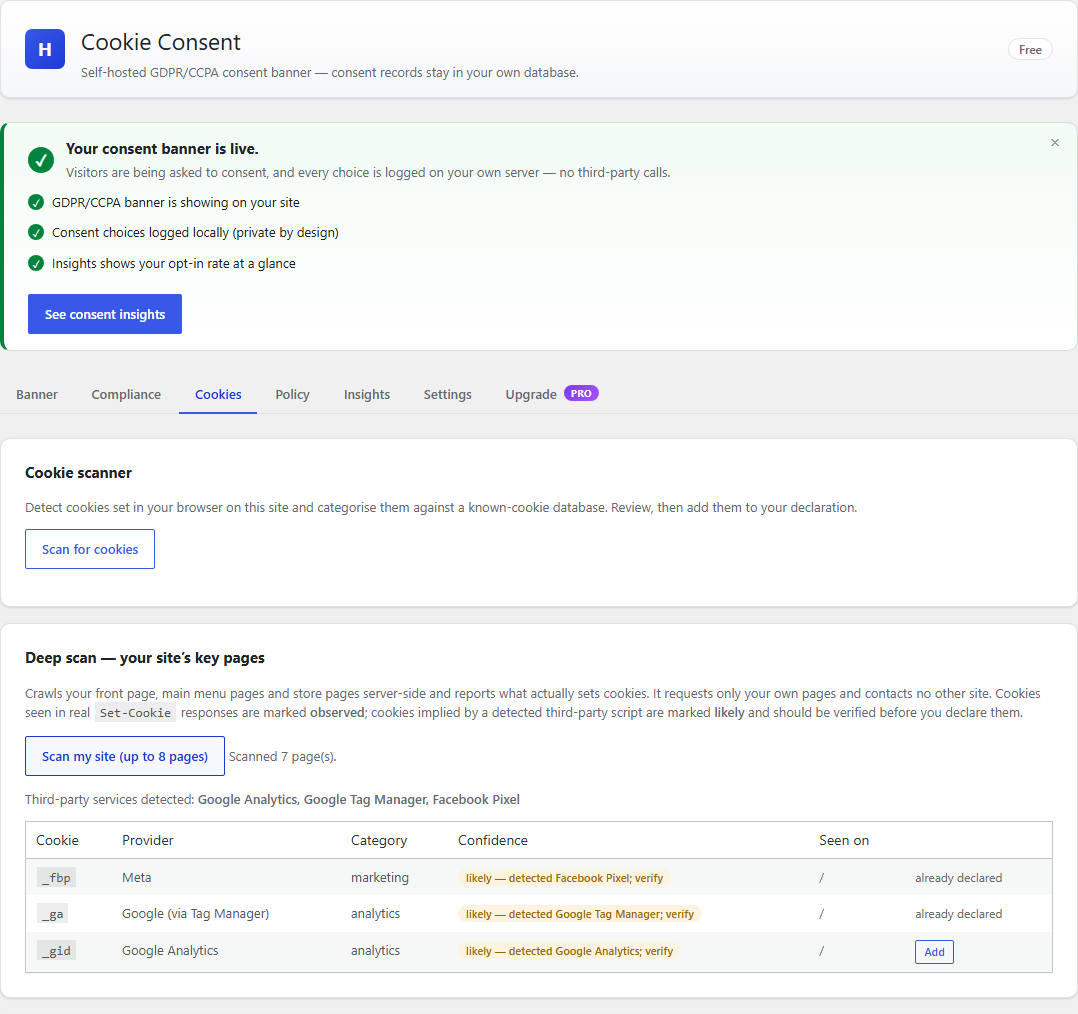
The cookie scanner finds what your site actually sets and categorises it
against a known-cookie database.
Free and Pro side by side, generated from the features that are actually
implemented.
The consent banner as your visitors see it, with Accept, Reject and Settings
given equal weight.
The cookie declaration table, generated from the cookies your site actually
sets.
Similar Plugins:
 Cookie Consent, Consent Log, Cookie Scanner, Script Blocker (for GDPR, CCPA & EPrivacy) : WP Cookie Consent
 AdSimple Cookie Consent Manager (DSGVO/GDPR), Cookie Banner, Cookie Consent, Cookie Notice
 Consentmanager Cookie Banner For Cookie Consent (Google Consent Mode And GDPR Compliant Cookie Notice)