
HelpCenter.io – Smart Widget & FAQ Sections Wordpress Plugin - Rating, Reviews, Demo & Download

Plugin Description
HelpCenter.io hosts your help center. This plugin brings it to your WordPress site:
- The smart widget. A help button on your pages that opens your help center in place: visitors search, read articles and ask AI without leaving the page.
- FAQ sections. Write the answers once in HelpCenter.io and show them on any page with a block or a shortcode. Edit a question in HelpCenter.io and every page that shows it changes with it.
Set up in a minute
Paste an API key and the plugin:
- installs the widget on every page, with no code to copy;
- adds your site to the help center’s allowed websites, so the widget is not refused (the most common reason a widget does not appear);
- shows a checklist of what is left to set up, each item with its fix;
- lists your FAQ sections in the block editor, so you pick one instead of copying its code.
Widget options
- Show it on every page, only on some, or on every page except some (
/pricing,/docs/*). - Bottom right or bottom left.
- Follow the page’s language. With WPML, Polylang or another translation plugin, each page opens the help center in its own language.
- Hide the help button and open the widget from your own menu links: link a menu item to
#helpcenter. - Turn proactive messages on or off.
- Respect visitors’ cookie choices with any consent plugin that supports the WP Consent API.
FAQ sections
- The FAQ Section block: pick a section, see its questions in the editor, and fix “not shown on this site” in one click.
- The
[helpcenter_faq id="…"]shortcode, for the classic editor, widgets and page builders. - FAQ structured data (schema.org
FAQPage) for the questions on each page, so search engines and AI assistants can read them.
Sign WordPress users in
Already have members on WordPress? With HelpCenter.io single sign-on, signed-in users read your private articles in the widget, and on the help center itself, without a second account. Choose which roles are signed in. HelpCenter.io makes each one a reader, never a member of your team.
The widget, FAQ sections and single sign-on are part of HelpCenter.io plans that include them. See pricing.
External services
This plugin connects your site to HelpCenter.io, a hosted help center service run by HelpCenter.io. It is what the plugin is for: without it, nothing shows.
- The widget script,
https://helpcenter.io/js/init.js, loads in your visitors’ browsers on the pages the widget or a FAQ section shows on. The browser then talks to HelpCenter.io to draw the widget and FAQ sections, to search and read your help center, and to answer AI questions. It sends the page’s address, the visitor’s language, what they search for or ask, and, unless a consent plugin says the visitor declined statistics cookies, usage statistics. - The HelpCenter.io API,
https://api.helpcenter.io, is called from your server with your API key when you connect, when the plugin’s screen checks your setup, when the block editor lists your FAQ sections, and when you click Allow. It sends your site’s host name, to add it to your help center’s allowed websites and to FAQ sections’ Display on URLs. - FAQ sections,
https://embed.helpcenter.io, are read from your server for the block’s preview and for the FAQ structured data on your pages. It sends the section’s key and the page’s language. - Single sign-on, when you switch it on, sends a signed-in user’s email address, display name, language, avatar address (often a Gravatar address) and an ID made of your site’s host name and their user ID to HelpCenter.io, in a token signed with your shared secret, when they use the widget or sign in to your help center.
HelpCenter.io terms of service and privacy policy.
Screenshots

The smart widget on a page: visitors search your help center and read its answers without leaving your site.
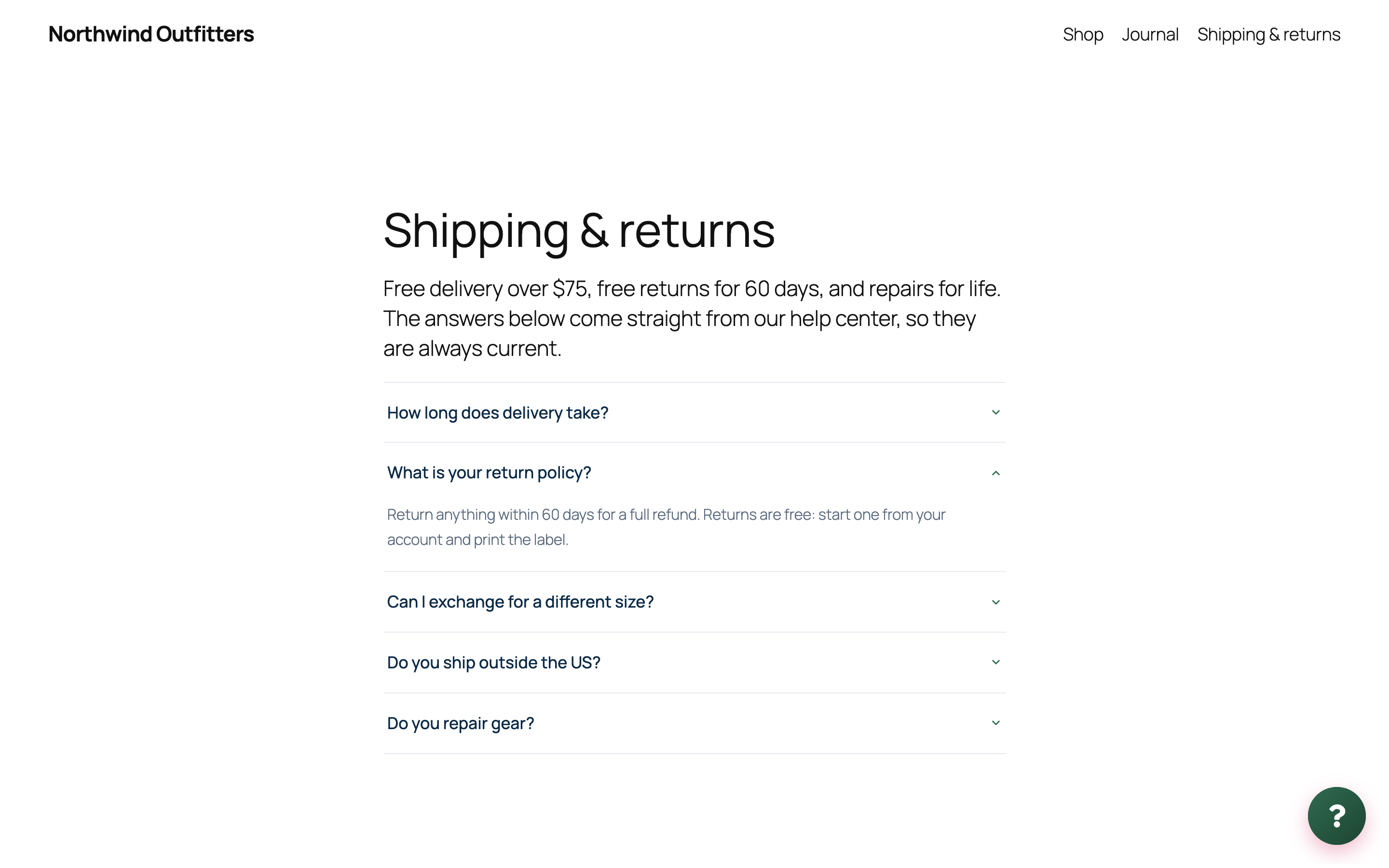
A FAQ section on a page. Its questions come from your help center, so editing an answer there updates every page that shows it.

The FAQ Section block: pick a section and see its questions in the editor.

Connect with an API key.

The Setup checklist names what is left to do, each item with a one-click fix.

Widget settings: where it shows, its position and its language.
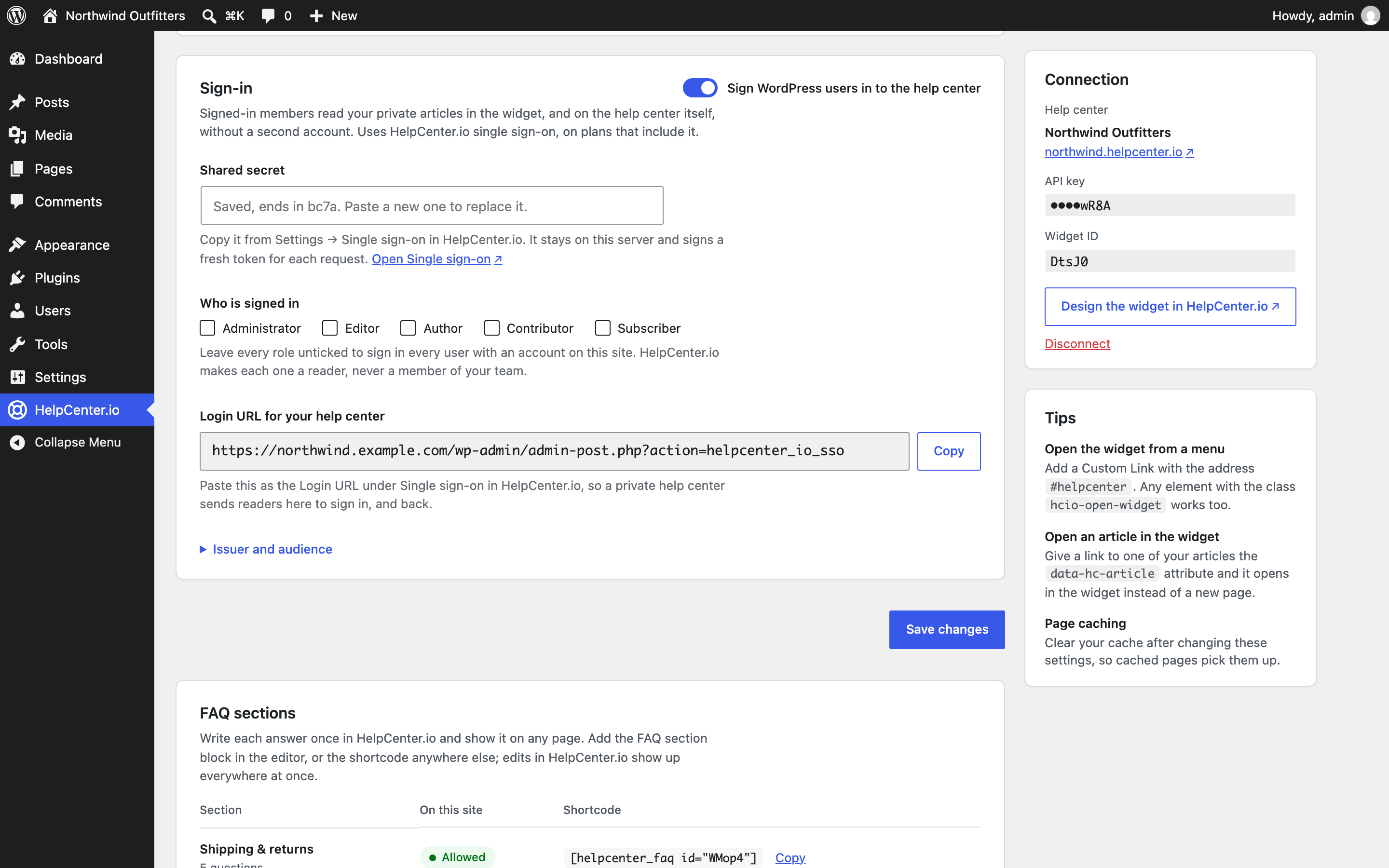
Single sign-on: WordPress users read your private articles without a second account.

Your FAQ sections, each with its shortcode, and a one-click Allow for this site.


