Honest Site Text Updater Wordpress Plugin - Rating, Reviews, Demo & Download
Plugin Description
Moved to a new web address? Renamed your business? Changed a phone number? Honest Site Text Updater finds every place the old text appears and shows you each one before anything changes.
- Type what to find and what to replace it with, and click Find matches.
- Check the list. Each place shows the text before and after, with a link to edit it. Untick anything you want to keep.
- Click Replace. Your site keeps a copy of everything it changes, so you can undo it later.
What makes it different
- You see every change first. Nothing changes until you have looked at the list and pressed Replace. There is no “dry run” setting to remember.
- Undo is free. The last 10 changes can be undone with one click. Undo only puts back what this plugin wrote: if you edited a page afterwards, your edit is kept.
- It finds web addresses in every form. Page builders such as Elementor store addresses as
https://example.com, and some forms store them ashttps%3A%2F%2Fexample.com. When your text contains a / or :, these forms are found and replaced too. - Widgets and settings stay safe. WordPress stores settings in a format that breaks if text changes length. This plugin rewrites that format correctly, including settings stored inside settings. Anything in a format it cannot read safely is listed and left alone.
- It works on cheap hosting. The work is done in short steps while the screen is open, so it does not time out on large sites.
- Pages edited in the meantime are skipped. If someone edits a page between your search and your Replace, that page is left alone and named in the result.
Where it looks
Posts, pages, menus and other content; custom fields; widgets and settings; comments; categories and tags.
It never changes:
- user accounts, emails or passwords;
- your site address settings (changing those signs everyone out; use Settings > General);
- WordPress’s own internal settings, such as scheduled tasks and the list of active plugins;
- old revisions.
What it does not do
- It does not send anything to an outside service.
- It has no settings page and no account.
- It does not slow your visitors down. It only runs while you have its screen open.
Screenshots
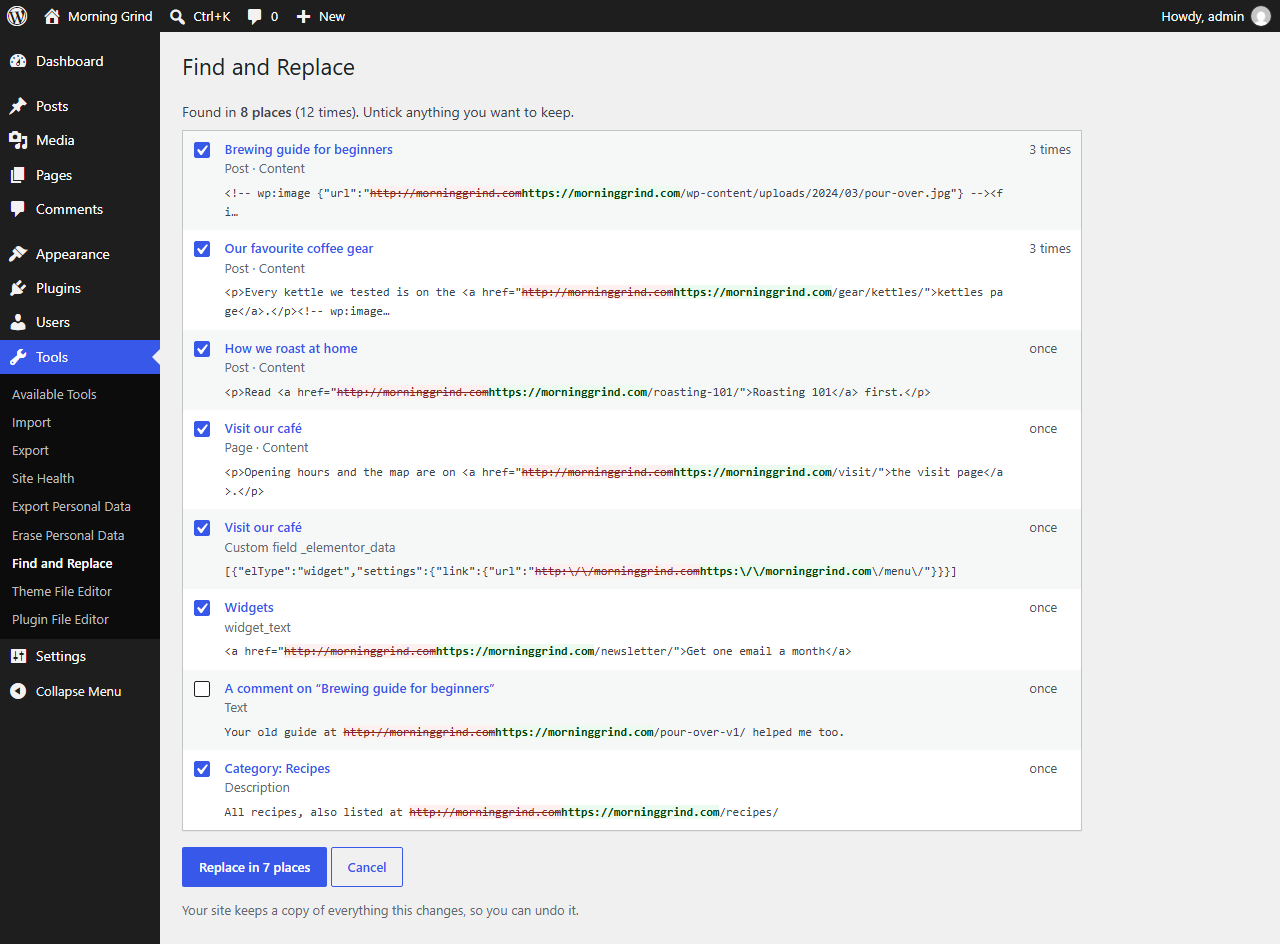
Every match, with the text before and after. Untick anything you want to keep.

The result, with Undo.

The search form and recent changes.