
Import Export Posts And Pages Wordpress Plugin - Rating, Reviews, Demo & Download
Plugin Description
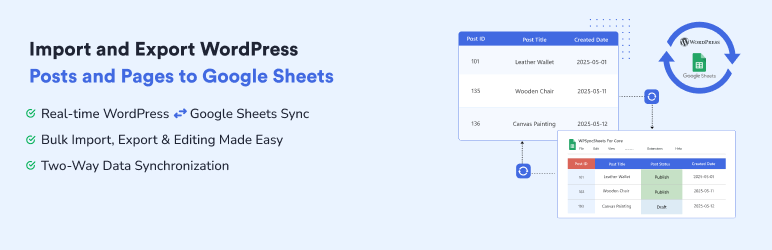
WPSyncSheets Lite For Core – Enables importing and exporting WordPress posts and pages to and from Google Sheets, allowing users to bulk edit content in the spreadsheet and sync changes back to WordPress.
🚀 Key Features
🔄 Real-time export of posts and pages to Google Sheets
✅ Automated syncing – no manual exports needed
📄 Automatically create Google Spreadsheets and manage sheets directly from plugin settings
📌 Option to freeze the header row in Google Sheets
📥 View, clear, or export Google Sheet data from the plugin dashboard
⚙️ Tested with WordPress 6.9 and PHP 8.3
💡 Why Use This Plugin?
Real-time sync: No more manual exports — your sheets update automatically
Collaboration ready: Easily share sheets with team members or stakeholders
Data backup: Keep a live copy of your WordPress data
📂 Download Sample Sheets
How to Export Posts?
How to Export Pages?
🔒 Upgrade to Pro
The Pro version unlocks powerful features:
✅ All the features in the free plugin (data export, bulk export, etc)
✅ Import Users from Google Sheets to WordPress
✅ Enable, disable, or custom-create sheet headers
✅ Schedule automatic imports of data from Google Sheets
✅ Schedule automatic export from WordPress to Google Sheets
✅ Export data from WordPress to Google Sheets within a date range
📘 Documentation & Support
- Check these help docs
- Reach out to our support team
📣 Trusted by Over 10,000+ Customers
Trusted by businesses, developers, and marketing teams to automate WordPress data syncing.
🔔 Stay Updated
Subscribe to the WPSyncSheets Newsletter and get tips, updates, and exclusive discounts delivered straight to your inbox!
Relevant Import-Export Google Sheets Plugins
Other useful plugins from WPSyncSheets to import and export data from WordPress websites to Google Sheets.
WPSyncSheets For WooCommerce: Import Export for WooCommerce orders, products, customers, coupons, and events.
WPSyncSheets For Elementor: Migrates Elementor form entries to Google Sheets, maps form fields to the spreadsheet columns, and automatically updates sheets when form entries are submitted.
WPSyncSheets For Gravity Forms: Sync Gravity Forms entries to Google Sheets allowing form data transfer to specified spreadsheet columns in real-time.
WPSyncSheets For Document Library Pro: Sync Document Library Pro entries with Google Sheets allowing for two-way updates between the plugin entries and spreadsheet data.
WPSyncSheets For Contact Form 7: Transfers Contact Form 7 entries to Google Sheets, maps form fields to spreadsheet columns, and updates sheets upon form submission.
WPSyncSheets For Ninja Forms: Migrates Ninja Forms entries to Google Sheets, maps form fields to spreadsheet columns, and updates sheets in real-time.
WPSyncSheets For Fluent Forms: Sync Fluent Forms entries to Google Sheets, and automatically transfer form data to designated spreadsheet columns upon submission.
WPSyncSheets For Formidable Forms: Adds Formidable Forms entities to Google Sheets maps form fields to spreadsheet columns and automatically updates sheets when forms are submitted.
About WPSyncSheets
WPSyncSheets is a leading plugin suite built to connect WordPress and WooCommerce platforms with Google Sheets. Our mission is to help businesses automate data transfer, simplify operations, and reduce repetitive tasks through real-time, two-way data synchronization.
With over 9+ purpose-built plugins, WPSyncSheets enables:
- Smooth export/import of WooCommerce and WordPress data
- Bulk content updates through spreadsheets
- Live syncing of form submissions across popular form plugins
- Easy spreadsheet-based product management
Whether you’re running an eCommerce store, collecting leads, or managing blog content, WPSyncSheets lets you automate your workflow—no code required.
👉 Learn more on our Official Website
📈 Upgrade to WPSyncSheets Pro for the full automation suite
💬 Have questions? Contact Our Support Team
External Services
This plugin connects to the following external services to provide its core functionality:
1. Google APIs (Sheets, Drive & OAuth 2.0)
This plugin uses the Google Sheets API and Google Drive API to read and write data between your WordPress site and Google Spreadsheets. It also uses Google OAuth 2.0 to authenticate the user’s Google account.
What data is sent: The Google OAuth 2.0 credentials (Client ID, Client Secret, and authorization code) are sent to Google’s servers to obtain an access token. The plugin then reads and writes post/page data (e.g., post title, content, status, date) to the user’s designated Google Spreadsheet.
When it is sent: Data is sent when: (a) the user connects their Google account via OAuth, (b) new or updated posts/pages are exported to Google Sheets, or (c) content is imported from Google Sheets to WordPress.
- Google APIs Terms of Service: https://developers.google.com/terms
- Google Privacy Policy: https://policies.google.com/privacy
2. WPSyncSheets Feedback Service
When a user deactivates the plugin, an optional feedback form is shown. If the user chooses to submit feedback, the plugin sends the following data to our feedback server at https://feedback.wpsyncsheets.com:
What data is sent: Plugin name, plugin version, deactivation reason (selected from a list), optional free-text message, the site’s admin email address, and the site URL.
When it is sent: Only when the user explicitly clicks “Submit and Deactivate”. No data is sent when the user clicks “Skip and Deactivate” or dismisses the popup.
- WPSyncSheets Privacy Policy: https://www.wpsyncsheets.com/privacy-policy/
- WPSyncSheets Terms of Service: https://www.wpsyncsheets.com/terms-and-conditions/
Source Code
The plugin ships with readable JavaScript and CSS source in:
assets/js/assets/css/
No separate build step is required for the distributed files. If you regenerate these assets, keep the human-readable source in the same directories so it remains easy to review.
Screenshots

Google API Integration Settings

General Settings

Sheet Headers

Google Spreadsheet Entries



