Inactive Students For LearnDash Wordpress Plugin - Rating, Reviews, Demo & Download
Plugin Description
Most LearnDash sites have inactive students nobody knows about. Inactive Students for LearnDash finds every learner who started a course and stopped, shows the exact step they stopped on, and tells you which lesson loses the most people.
LearnDash reporting tells you what your completion rate is. It does not tell you where people give up. That is the number you can actually act on — because a single badly-written lesson can quietly cost you a third of your completions, and nothing in the admin will point at it.
Course creators, training companies, membership sites and schools all have the same problem: learners buy or enrol, make a start, and drift away. By the time anyone notices, the student has forgotten the course exists. This plugin gives you a list of exactly who has gone quiet and where, so you can reach out while they still remember why they signed up — and fix the lesson that is losing them.
Find inactive LearnDash students
The Stalled Learners report lists every student who started a course, has not finished it, and has had no recorded activity for a number of days you choose. For each one you get:
- Their name and email address
- The course they are stuck in
- How far they got, as a percentage and as steps completed
- The exact step they stopped on — the lesson, topic or quiz that is still sitting incomplete
- When they were last active, and how many days ago that was
Sort by days inactive, filter by course, search by name or email.
See where students drop off
The Course Drop-off report turns one course into a funnel. Every step in order, how many learners reached it, how many got past it, and what percentage were lost there. The worst step is highlighted.
That single highlighted row is the point of this plugin. It tells you which lesson to rewrite, which quiz is too hard, or which topic is in the wrong place.
Export and re-engage
- Export either report to CSV — the file matches what is on screen, filters and all
- Copy every inactive student’s email address to your clipboard in one click
This plugin deliberately does not send email to your students. Sending brings deliverability, consent and GDPR problems you do not want bolted onto a reporting plugin. You get the list; your existing mail tool does the sending, with your existing unsubscribe handling intact.
Settings that match how your courses run
- Inactivity threshold — 14 days by default, or whatever suits your courses. A two-week bootcamp and a twelve-month certification need very different numbers.
- Expired access — leave out students whose course access ran out, or include them flagged as “access expired”.
- Staff accounts — administrators and group leaders are left out of the report by default.
- Skip courses — exclude evergreen or reference courses nobody is expected to finish.
- Schedule and chunk size — choose how often the scan runs and how many learners it processes at a time.
Built to survive a real site
The heavy work — every learner, against every course, against every step — never runs when you open the page. It runs in the background on a schedule, in chunks, and writes to its own tables. The admin screens only ever read that cache, so they open instantly whether you have fifty students or fifty thousand. There is a Recalculate now button when you want fresh figures immediately.
If Action Scheduler is present on your site (WooCommerce and many other plugins ship it) the plugin uses it. Otherwise it falls back to WP-Cron. Nothing extra to install either way.
Read-only
This plugin never changes a student’s progress, enrolment or account. It reads, counts and reports.
Who it is for
- Course creators who want to know why completion rates are low and which lesson to fix first.
- Training companies and corporate academies that need to chase learners who have not finished mandatory training.
- Membership sites where a learner who stops learning is a member about to cancel.
- Schools and coaches running cohorts who want to spot students falling behind early.
Also from the same developer
Structure Audit for LearnDash — finds orphaned lessons, empty courses, quizzes with no questions and broken course links, in one screen.
Documentation and support
Documentation, setup guides and support are available on the developer’s website: rajaamanullah.com. Read the full documentation, visit the plugin page, or use the wordpress.org support forum.
Disclaimer
This is an independent plugin. It is not affiliated with, endorsed by or sponsored by LearnDash. “LearnDash” is used here only to describe the plugin this one works with.
Screenshots
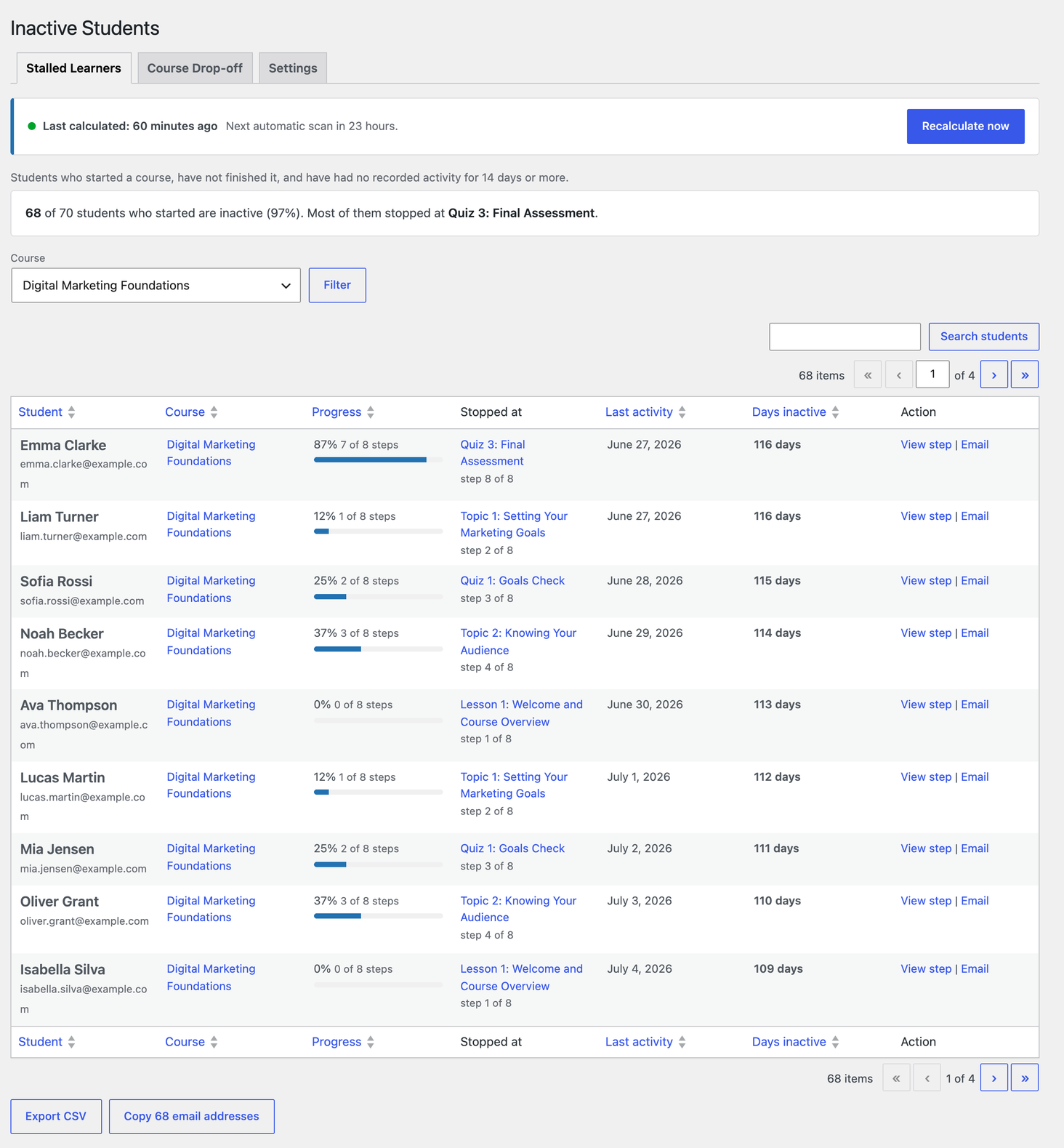
Stalled Learners — who has gone quiet, and the exact step each of them stopped on.
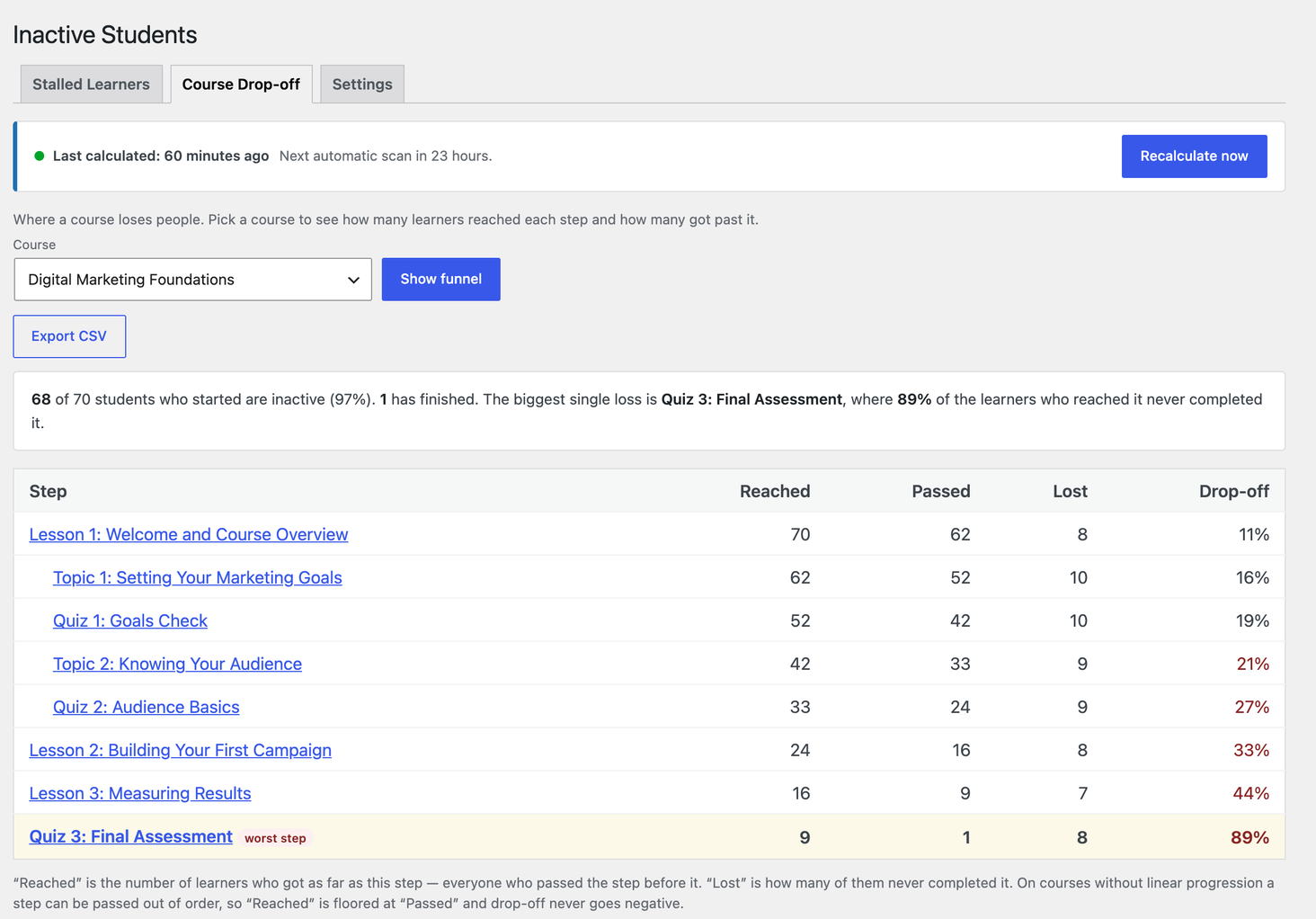
Course Drop-off — the whole course as a funnel, with the worst step highlighted.
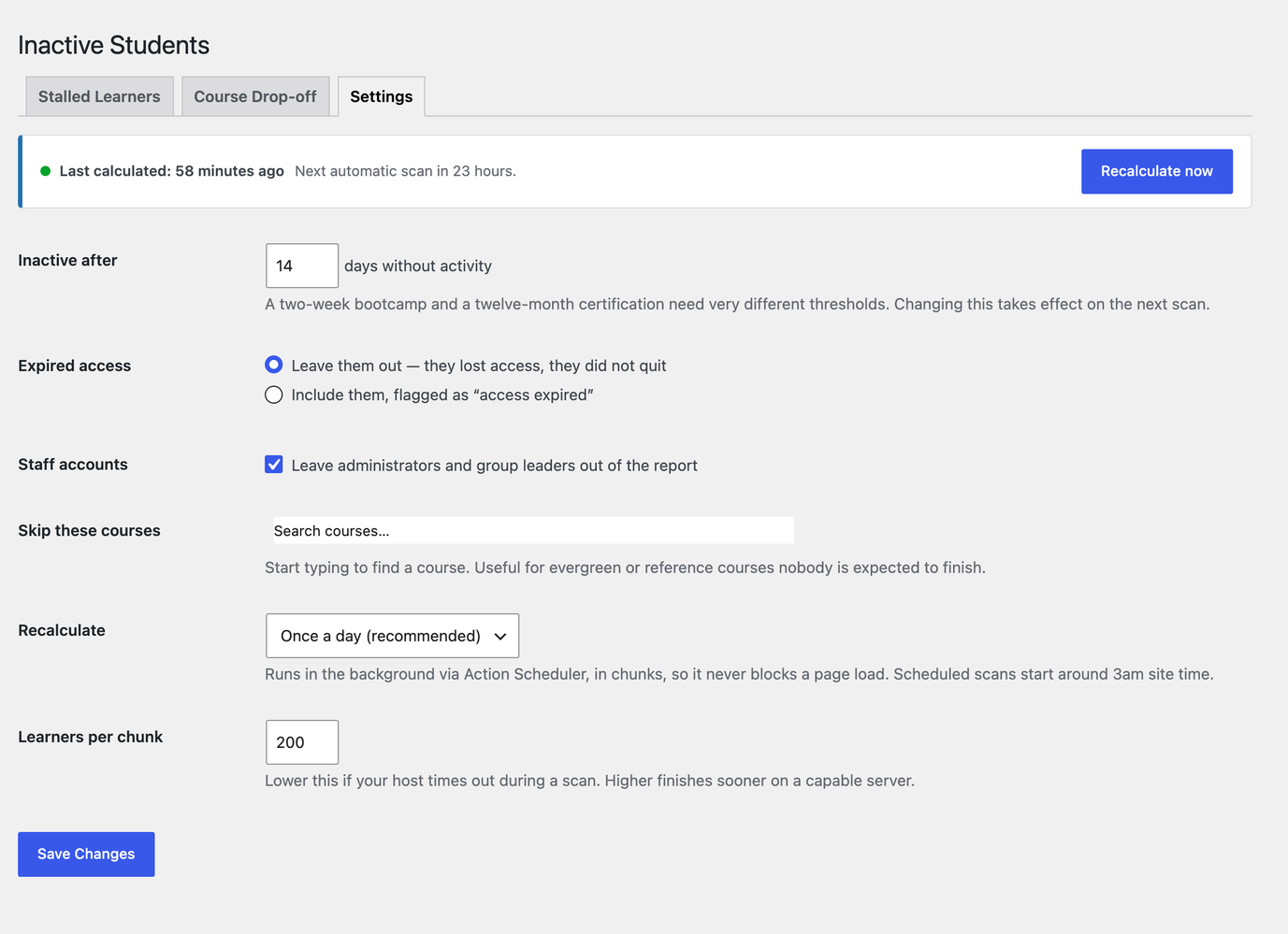
Settings — inactivity threshold, expired-access handling, staff accounts, course exclusions and schedule.