
IPS Cart&Checkout For WooCommerce Wordpress Plugin - Rating, Reviews, Demo & Download
Plugin Description
IPS Cart&Checkout for WooCommerce is a WooCommerce side cart and checkout plugin for shops that want a clearer path from adding a product to placing an order. It combines a slide-out cart, a responsive cart page, a modern checkout and a thank-you page.
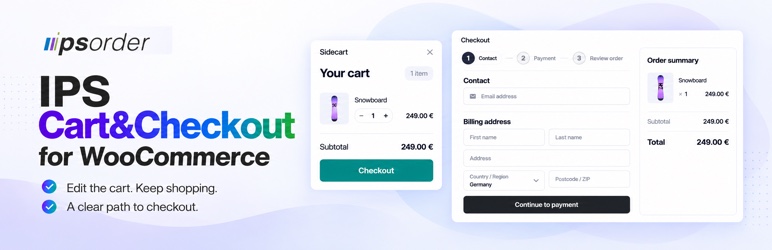
Customers should be able to check their cart without losing their place in your shop. The sidecart lets them change quantities, remove items and continue shopping on the same page. The checkout organizes contact details, delivery choices, payment and order review in a clean layout for desktop and mobile.
The free plugin includes the complete cart and checkout flow, local pickup and basic cart rules. Enable the modules your shop needs. WooCommerce continues to manage products, cart totals, shipping, payments and orders.
Network activation is supported. Each site keeps its own settings, pickup locations and plugin tables. New sites are initialized when the plugin is network-active. Uninstall retains data unless deletion was explicitly enabled on that individual site.
Documentation
Read the documentation for setup, everyday use, troubleshooting and clearly marked Free and Pro guidance.
What you can do with the free plugin
- Let customers review and edit their cart in a slide-out sidecart without opening a separate cart page.
- Guide shoppers through a responsive checkout with contact details, payment and order review.
- Offer dedicated cart and thank-you pages that fit the same shopping flow.
- Provide supported payment methods and eligible express wallets through compatible WooCommerce payment plugins.
- Manage local pickup locations and let customers select an available pickup option.
- Apply basic cart rules to all products, selected products or product categories, without an edition-based rule limit.
- Enable cart and checkout modules individually, and use the built-in diagnostics to investigate checkout issues.
Optional Pro features
IPS Cart&Checkout Pro for WooCommerce adds Order Bumps, Checkout Gate, advanced cart conditions and optional Cart Recovery. It is a separate, standalone package that includes the free functionality. Learn about Pro.
Privacy and external services
Cart contents, checkout addresses, shipping choices and orders are handled by WooCommerce and stored in the shop database. The Sidecart shares the WooCommerce cart session and its cookies; it does not create a separate customer cart service. Pickup selections and instructions can be stored with the order.
Optional checkout tracing is disabled by default. When enabled, technical events (time, step, status, gateway/provider identifiers and sanitized context) are stored locally. Known address, contact, payment and authentication fields are redacted. The default buffer retains the latest 150 events; older entries are pruned as new events arrive. This is a count limit, not a timed deletion policy. Managers can clear the buffer under Diagnostics. IPS does not receive these traces automatically. WooCommerce controls retention of customer/order data independently.
Payment services require the corresponding WooCommerce payment plugin and a configured provider account. When an enabled, eligible payment method or express slot is rendered, its provider SDK may be loaded before a customer clicks the payment button. Loading remote scripts sends connection data such as the browser IP address and user agent to the provider. During payment or wallet shipping calculations, the integration may also send the amount, currency, order references, contact and address information, and payment tokens needed to complete the transaction. Hosted card fields transmit card details through the payment provider’s SDK. Availability depends on the installed payment plugin, merchant settings, currency, country and cart.
- Stripe: loads Stripe.js from js.stripe.com for supported card, redirect and express flows. Terms, Privacy.
- WooPayments: uses the configured WooPayments/Stripe services and Stripe.js for supported payment and wallet flows. WooPayments policies, Privacy.
- Mollie: loads Mollie.js from js.mollie.com for hosted card fields; other supported methods use the Mollie plugin’s payment or wallet handoff. Terms, Privacy.
- PayPal: supported PayPal plugins and Mollie PayPal Express load the configured PayPal SDK or redirect to PayPal for approval and payment. Terms, Privacy.
- Amazon Pay: the configured Amazon Pay plugin supplies the regional SDK and checkout session used for wallet approval. Agreements, Privacy.
Apple Pay and Google Pay availability follows the selected payment provider and the customer’s browser/device. Other WooCommerce gateways may redirect to their own service; their plugin documentation describes the applicable data handling. If a manager uses an externally hosted image or icon, the browser also contacts that image host. Review the services actually enabled in your shop when preparing your shop’s privacy information.
This WordPress.org package contains no IPS update checks or license service integration. Plugin updates are provided through WordPress.org.
Find Us
https://ipsorder.com
Source and Build Tools
Readable source, locked npm dependencies and build configuration are included in this ZIP. No private repository or paid plugin is needed to inspect or rebuild the free features.
- Frontend JavaScript and CSS in
ips-react/build/assets/are built fromips-react/src/usingips-react/vite.config.ts. The entry issrc/entries/core.tsx. This includesAppSideCart.tsx,AppCartPage.tsx,AppThankyou.tsx,frontend/checkout-portal/components/form/CheckoutActionButton.tsxandfrontend/shared/portalStyle.tsunder that source directory. - Admin JavaScript and CSS in
ips-admin-react/build/assets/are built fromips-admin-react/src/usingips-admin-react/vite.config.ts. The entries aresrc/modules/cart/entries/core.tsxandsrc/modules/system-status/entry.tsx; the shared API client issrc/wp-adapter/api/wpClient.ts. - JavaScript and CSS in
dist/frontend/are built with the rootwebpack.config.jsfromassets/js/andassets/css/. In particular,ips-compatibility-js.min.*.jscomes fromassets/js/compatibility/ips-front-compatibility-script.js. The Bootstrap JavaScript entry comes from the lockedbootstrapnpm package; its bundled Popper dependency is covered inTHIRD-PARTY-NOTICES.txt. - Readable originals for the supplied minified Bootstrap styles are in
assets/css/bootstrap/. Project-owned icon font files are infonts/andassets/css/fonts/and use the plugin’s GPL-2.0-or-later license.
Build in a separate working copy of the extracted plugin, using Node.js 22.14.0 and npm 10.9.2 (Node.js 22.12 or newer is required). From the plugin root run:
npm ci --legacy-peer-depsnpm ci --prefix ips-react --legacy-peer-depsnpm ci --prefix ips-admin-react --legacy-peer-depsnpm run build
The root build runs webpack for dist/frontend/ and Vite for both React build directories. The respective package-lock.json files pin the tools and dependencies. npm downloads these build dependencies from the npm registry; node_modules is not distributed in the plugin ZIP. Vite, webpack, Babel, TypeScript and the CSS/minification plugins are development tools, not additional WordPress plugins.
Production releases build Core and Pro entries together and retain only the Core asset graph for this package. The included source builds Core alone, so generated chunk boundaries, filenames and hashes can differ from the distributed multi-entry build. The .vite/manifest.json files map the React outputs; dist/frontend/manifest.json maps the webpack outputs. package-manifest.json records the original distributed file checksums; a local rebuild does not update that release inventory.
Third-party component versions, upstream source links, copyright notices and complete license texts are in THIRD-PARTY-NOTICES.txt. The file distinguishes shared components from components shipped only in the IPS or Pro packages. React and ReactDOM are supplied by WordPress through script dependencies. Payment SDK loading is described under Privacy and external services above.
Package
Complete free sidecart, portal checkout, payments, local pickup and basic Cart Gate conditions. No edition-based rule quota.
Screenshots

Sidecart with quantity controls, cart totals and direct access to checkout.

Checkout with contact details, billing address and order summary on desktop.

Responsive checkout on a mobile screen.

Module overview for the free plugin, with individual controls for cart, checkout and local pickup.


