Kashida Branch Locator Wordpress Plugin - Rating, Reviews, Demo & Download

Plugin Description
Kashida Branch Locator provides a simple way to manage company branches, offices, stores, service centers, or other locations and display them on WordPress pages using shortcodes.
The plugin is designed to remain lightweight and does not require a page builder or a separate settings framework.
Features
- Branch management from the WordPress dashboard.
- Optional groups with custom colors and a configurable default color for newly created groups.
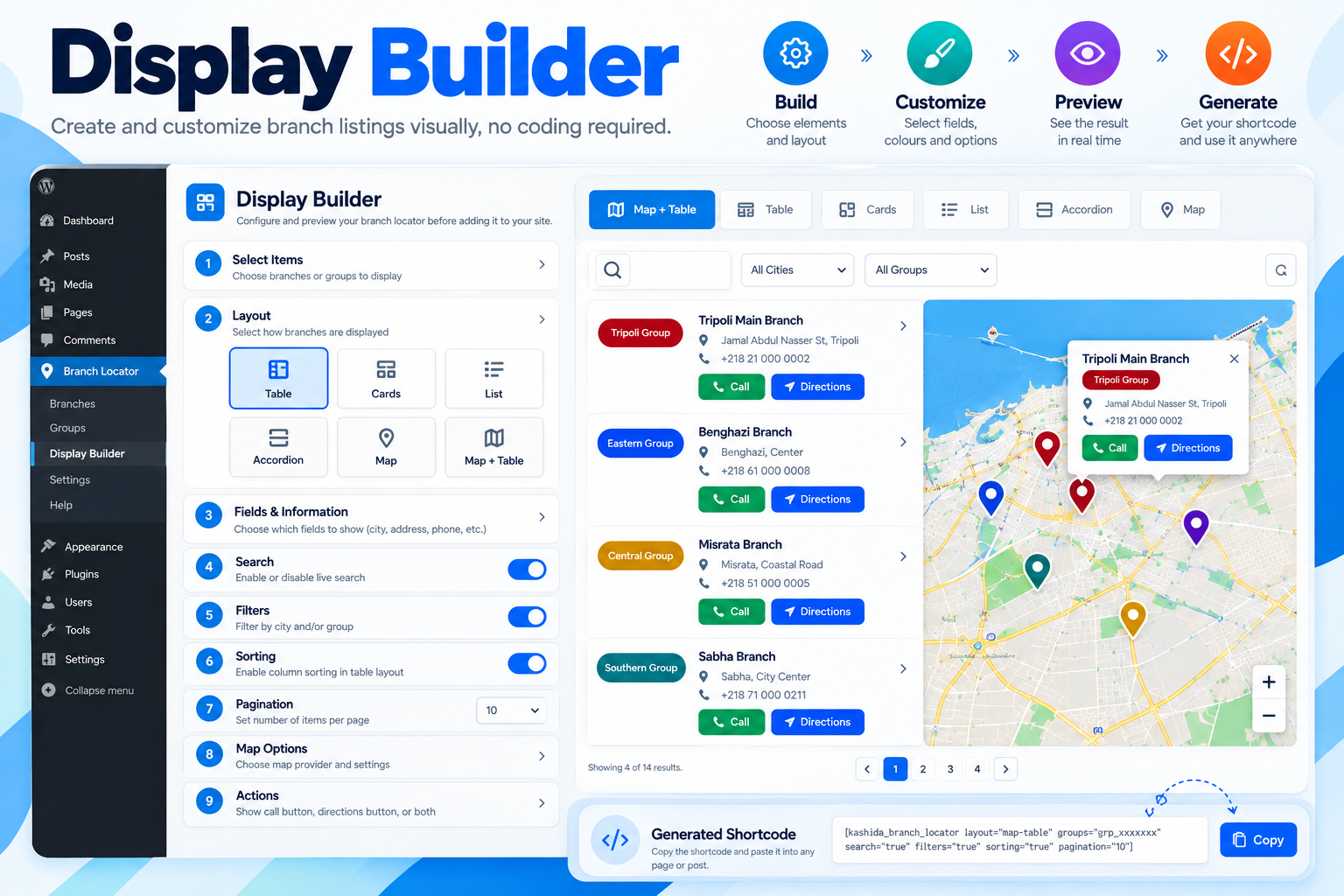
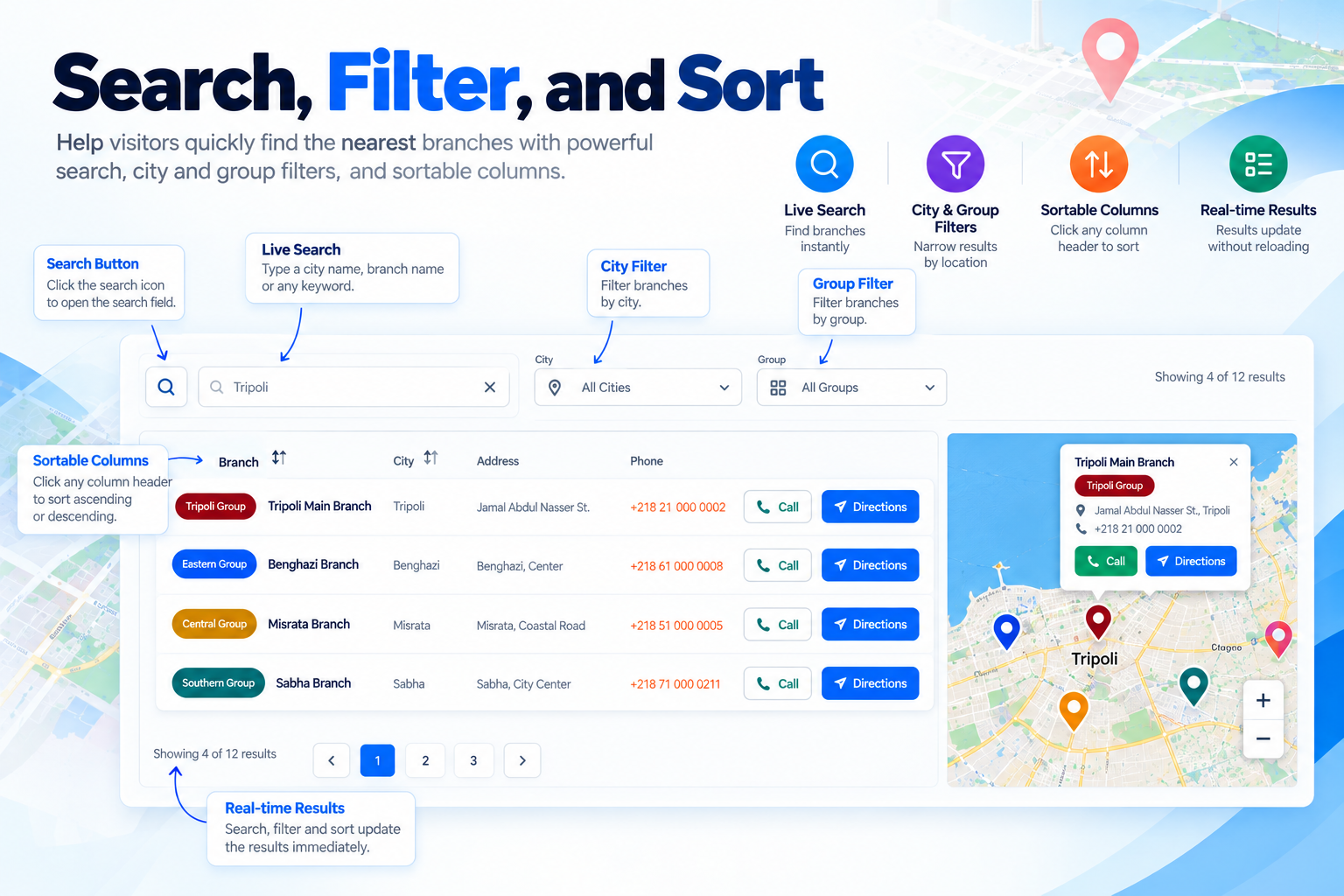
- Live search, city and group filters, sortable columns, result counts, reset controls, pagination, and configurable infinite-scroll loading.
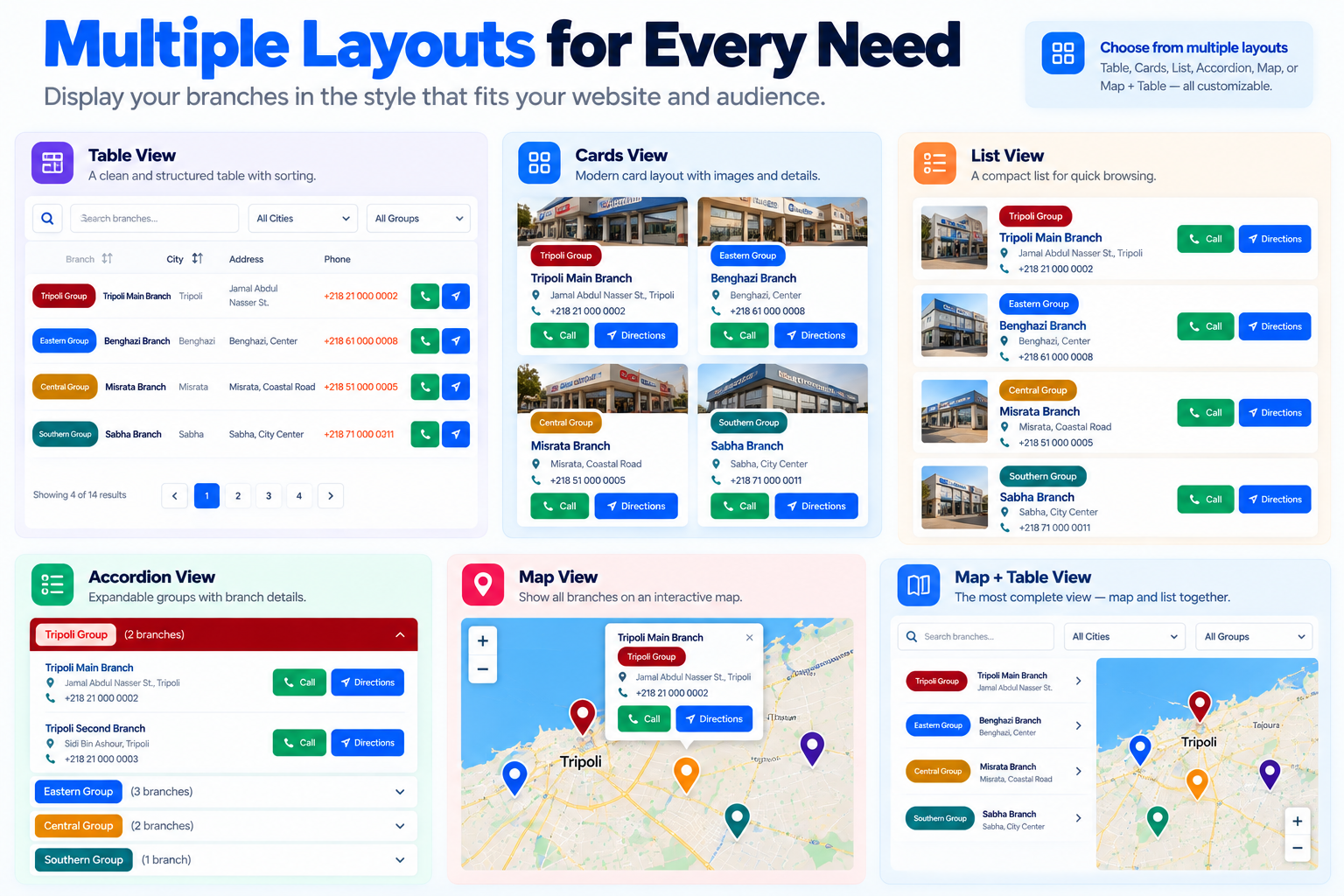
- Table, cards, list, accordion, map, and map-table layouts.
- CSV and XLSX import with preview and optional update of existing branches.
- Responsive frontend output with language-aware RTL/LTR direction and English left-to-right alignment.
- Frontend typography and direction inherited from the active theme.
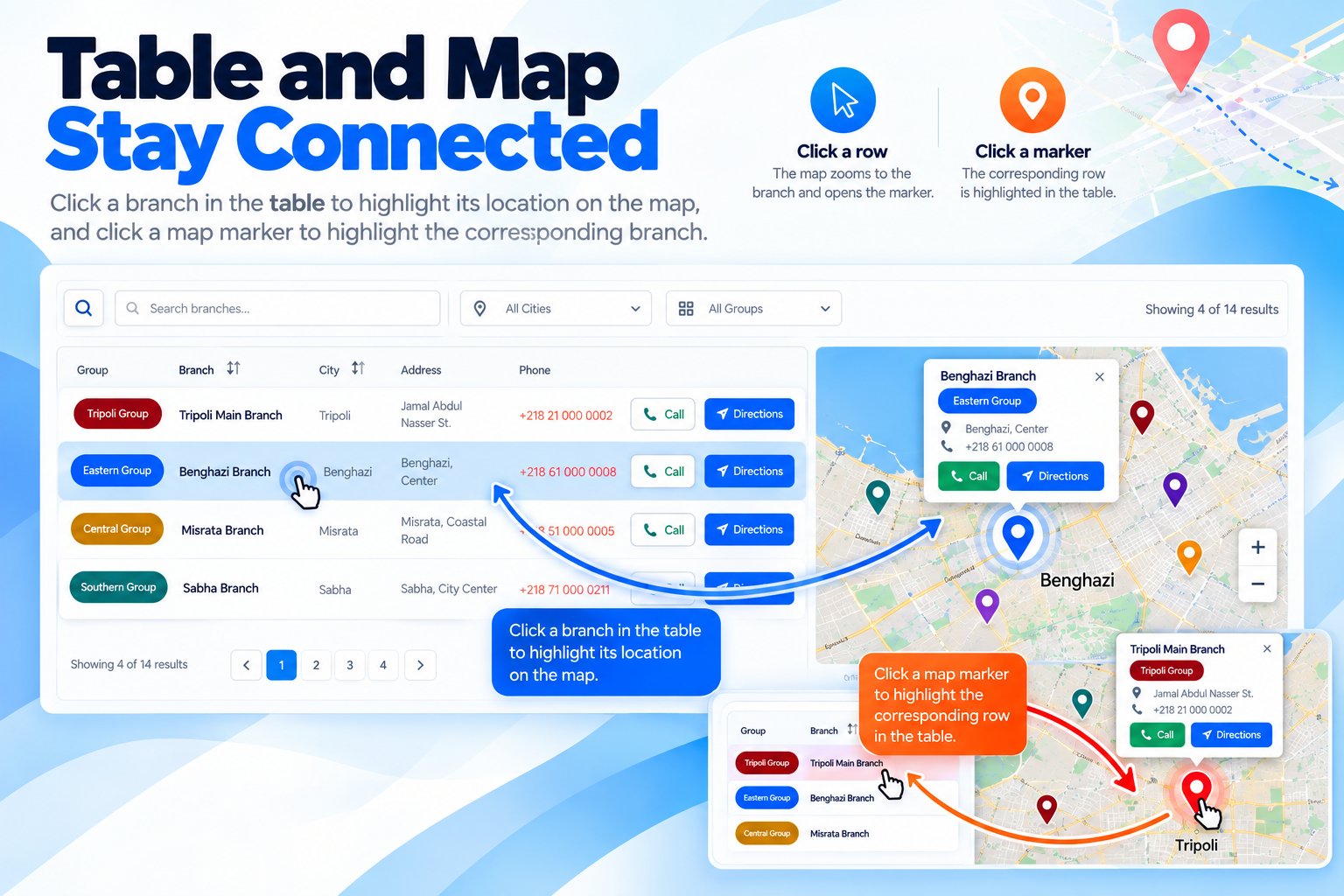
- Interactive maps using OpenStreetMap tiles without loading third-party JavaScript or CSS libraries. Filtered map markers stay synchronized with table results, and selecting a marker highlights its matching branch.
- Separate clickable links for multiple phone numbers, with the Call button using the primary phone number.
- Google Maps directions link for each branch.
- RTL support and mobile-friendly table cards.
- Multi-select branches and groups, preserving selected items across admin pages; branches can be selected across all matching search/filter results.
- Nonce and capability checks for administrative AJAX actions.
- Coordinate and group validation.
Shortcodes
[kashida_branch_locator]

[kashida_branch_locator layout="table"]

[kashida_branch_locator layout="cards"]

[kashida_branch_locator layout="accordion"]

[kashida_branch_locator layout="list"]

[kashida_branch_locator layout="map"]

[kashida_branch_locator layout="map-table" search="true" pagination="true"]

[kashida_branch_locator group="grp_xxxxxxxx"]

[kashida_branch_locator city="Tripoli"]

[kashida_branch_locator branch="br_xxxxxxxx"]

[kashida_branch_locator groups="grp_xxxxxxxx,grp_yyyyyyyy" layout="cards"]

[kashida_branch_locator branches="br_xxxxxxxx,br_yyyyyyyy" layout="map-table"]

[kashida_branch_locator layout="map" group="grp_xxxxxxxx" zoom="6" height="600"]

[kashida_branch_group_map group="grp_xxxxxxxx" zoom="6" height="600"]<h3>Import</h3>
CSV and XLSX files are supported directly.
Required columns:
- Name
- City
- Address
- Phone
- Lat
- Lng
- Group
Latitude and longitude may be provided as separate Lat and Lng columns. The legacy Location value in latitude,longitude format is also supported.
Legacy .xls files require PhpSpreadsheet to be available on the server. CSV or XLSX is recommended.
The maximum upload size accepted by the plugin is 10 MB.
JavaScript Source Code
Readable JavaScript and CSS source files are included in assets/src/ for review and modification:
assets/src/js/frontend.jsis the readable source corresponding toassets/js/frontend.js.assets/src/js/admin.jsis the readable source corresponding toassets/js/admin.js.assets/src/js/import.jsis the readable source corresponding toassets/js/import.js.assets/src/css/admin.cssis the readable source corresponding toassets/css/admin.css.assets/src/css/frontend.cssis the readable source corresponding toassets/css/frontend.css.
The files in assets/js/ and assets/css/ are the production files loaded by the plugin. The files in assets/src/ are included for transparency and developer review; WordPress does not load them separately. No build step is required to install or use the plugin. When changing JavaScript or CSS, keep the corresponding source and production files synchronized, and run syntax and functional tests before release.
External Services
This plugin uses the following external services only when the related frontend functionality is used:
OpenStreetMap
Map tiles are loaded from OpenStreetMap’s tile service to display the interactive map. A visitor’s browser connects to the OpenStreetMap tile server and therefore the visitor’s IP address and normal HTTP request information may be processed by that service.
Service: https://www.openstreetmap.org/
Tile service: https://tile.openstreetmap.org/
Copyright and tile usage information: https://www.openstreetmap.org/copyright
Privacy information: https://osmfoundation.org/wiki/Privacy_Policy
Google Maps
The plugin provides a user-initiated Directions link that opens Google Maps in a new browser tab. The plugin does not send branch data to Google automatically; the browser opens the Google Maps URL only after the visitor selects the link.
Service: https://www.google.com/maps/
Google privacy policy: https://policies.google.com/privacy
Google Maps terms: https://www.google.com/help/terms_maps/
Privacy
Kashida Branch Locator does not include analytics, advertising, telemetry, licensing checks, or automatic tracking. It does not contact the developer’s servers for plugin operation.
When maps are displayed, the visitor’s browser requests map tiles from OpenStreetMap. When a visitor chooses Directions, the browser opens Google Maps. Site owners should review the privacy policies and terms of those services for their own sites.
2.5.16
- Strengthened plugin-specific namespaces and WordPress identifiers to reduce naming collisions.
- Added migration support for existing branch and group tables and database version option.
- Replaced the legacy unprefixed
[branch_group_map]shortcode with[kashida_branch_group_map]to reduce naming collisions. Update existing pages that use the legacy shortcode. - Updated contributor metadata and prepared translation assets for WordPress.org translation management.
2.2.1
- Added a unified Kashida Media Services footer to all plugin admin pages with the Kashida logo and creator links.
2.2.0
- Added live Display Builder preview.
- Improved import validation, row-level warnings, and downloadable error reports.
- Added privacy-policy guidance for stored branch data and documented external map services.
- Improved map accessibility and handling of branches without valid coordinates.
- Added troubleshooting documentation and refined admin UX.
2.0.8
- Updated the import template to contain column instructions only; no sample locations.
2.5.4
- Compact table row spacing and safer action-column sizing in RTL/LTR.
- Fixed table content overflow and action buttons clipping.
- Tightened list layout spacing and alignment.
Credits
Kashida Branch Locator is designed and developed by Kashida Media Services.
https://kashida.ly/