
Kauthar AI Wordpress Plugin - Rating, Reviews, Demo & Download

Plugin Description
Kauthar AI is an AI assistant that answers your customers around the clock. This plugin connects your WordPress site to your Kauthar AI account:
- Chat bubble on your site — Kauthar’s chat appears on every page, or only on the pages you choose, on the side you choose. No code to copy.
- Answers from your real WooCommerce catalog — names, prices, stock and options, with product cards that link to the product page.
- “Where is my order?” — Kauthar gives the status, date and tracking only after the customer provides the order number together with the phone or email on the order. It never reveals addresses.
- No keys to copy — “Connect WooCommerce” opens WooCommerce’s own approval screen; the access keys are sent by WooCommerce straight to Kauthar.
- Fresh products — when you edit a product, Kauthar is told to sync again within about a minute, and re-checks the whole catalog daily.
- Orders from the chat (optional) — switch it on in Kauthar and Kauthar can create cash-on-delivery orders priced by WooCommerce.
- Every channel — the same assistant also answers on your chat link, QR code, WhatsApp, Messenger and Instagram (set up in Kauthar).
-
Multilingual — Kauthar replies in the language each customer writes in (Arabic, English, French and more).
-
Kauthar SEO (on by default, switch off any time) — with the Kauthar Visibility service, Kauthar fixes technical SEO on your site: titles and meta descriptions, canonical URLs and robots tags, structured data (JSON-LD), image alt text, redirects for broken URLs, an llms.txt file and an IndexNow key, and it publishes the posts written for you in Kauthar. The Connect screen says so before you press Connect: every kind of change is then allowed and Kauthar acts as an Editor of your site (by default the oldest Editor — never an administrator). Kauthar changes content and SEO data only: it cannot install, activate or update plugins or themes, manage users or change your site settings. In Settings Kauthar AI Kauthar SEO you can untick any kind of change, choose another Editor, pause everything, and see the last 50 changes; every change can be undone from Kauthar. If you use Yoast SEO, Rank Math, SEOPress or All in One SEO, Kauthar writes into that plugin’s fields.
Without WooCommerce, the plugin adds the chat bubble and Kauthar answers from the files and website pages you give it in your Kauthar dashboard.
The plugin is free. Kauthar AI is a subscription service with a free trial for new businesses — see plans and prices.
How it works
- Install and activate the plugin.
- Go to Settings Kauthar AI and press Connect to Kauthar (or paste a connection code from your Kauthar dashboard).
- Using WooCommerce? Press Connect WooCommerce and approve.
External services
This plugin connects to Kauthar AI (https://kautharai.com), the service that provides the AI assistant. It does not work without a Kauthar AI account. Nothing is sent before you press “Connect to Kauthar” or submit a connection code.
What is sent, when, and why:
- When you connect (button or code): the connection code, this site’s address (home URL) and title, and the plugin, WordPress and WooCommerce version numbers — to link the site to your Kauthar account. Kauthar returns a site token stored in your WordPress options.
- When the Kauthar AI settings page is opened or “Refresh status” is pressed: the site token and the same version numbers — to show your account, assistant and store status.
- When you press “Connect WooCommerce”: the site token and the address of this settings page. WooCommerce then shows its own approval screen and, if you approve, WooCommerce itself sends a read/write REST API key to
https://kautharai.com/api/wp/v1/woo/keys. Kauthar uses it to read products and order status and, only if you switch it on in Kauthar, to create orders from the chat. - When a product is created, edited, deleted or its stock changes (WooCommerce connected only): a notice with the site token, at most once a minute, so Kauthar syncs again. No product data is sent; Kauthar reads products from your store’s public Store API.
- When a post or page is created, edited, trashed or deleted: a notice with the site token and the post ids only, at most once a minute, so Kauthar Visibility knows what to look at again. No content is sent in the notice.
- When you press “Disconnect” or delete the plugin: the site token, so Kauthar revokes it.
- Kauthar SEO (the write channel): when you connect, and whenever the settings page or “Refresh status” is used, the plugin also sends a second secret it generated itself, the address of its own REST namespace (
/wp-json/kauthar-ai/v1), which SEO plugin is active, which kinds of changes you allowed, and a count of visits by known AI crawlers (user-agent name and count only — no IP addresses, no pages). Kauthar then signs every request it makes to your site with that secret; the plugin refuses unsigned, expired or replayed requests, anything you did not tick (each field of a request is checked against its own kind of change), and anything the acting Editor may not do. What is allowed by default: the Connect screen states it before you press Connect — every kind of change listed in “What Kauthar can change” below, acting as the oldest Editor of the site. Administrators can never be the acting user; if the site has no Editor, nothing is written until you create one (Users Add New User Role: Editor) and choose it. Writes only happen while the site is connected to a Kauthar account with the Kauthar Visibility service. To turn it off: Settings Kauthar AI Kauthar SEO untick the kinds of changes you do not want (or tick “Stop all Kauthar writes on this site”, or choose “— nobody —”) Save. Settings you saved yourself are never reset by an update or a new connection. - On your public pages (while the chat bubble is enabled): visitors’ browsers load the chat script from
https://kautharai.com/widget.jsand the chat window from kautharai.com. The service receives the usual technical data of a web request (IP address, browser, the page address) and the messages the visitor types, to answer them. The chat window may set a cookie and use browser storage on kautharai.com to keep the conversation.
Kauthar AI writes replies with a cloud AI model from Google (Gemini) on Kauthar’s own account; data is stored on Kauthar’s servers in Frankfurt, Germany.
- Terms of service: https://kautharai.com/en/terms
- Privacy policy: https://kautharai.com/en/privacy
- Security: https://kautharai.com/en/security
The plugin does not track you or your visitors, shows no ads, and sends no analytics.
What Kauthar can change
Kauthar never administers your site. Remote requests run as the Editor you chose — a user who can edit content but holds no administrative capability such as manage_options, activate_plugins, install_plugins, edit_users or edit_theme_options; a request is refused if that user ever gains one. No route installs, activates or updates plugins or themes, manages users, changes WordPress options, or writes files on the server. Every route below needs a valid signature (a secret created by this plugin, a timestamp within 5 minutes and a single-use nonce).
All routes are under /wp-json/kauthar-ai/v1:
GET /ping— status (plugin and WordPress versions, which kinds of change are allowed, counts). Read only.GET /items,GET /items/{id}— published posts, pages and products (and drafts Kauthar created). Read only.POST /items/{id}/meta— SEO title and description (kind: titles and meta descriptions) or canonical URL and noindex / nofollow (kind: canonical and robots). Needsedit_poston that item.POST /items/{id}/alt— alt text of that item’s images (kind: image alt text). Needsedit_poston the item and on each image.POST /items/{id}/schema— the item’s JSON-LD, stored in the plugin’s own post meta (kind: structured data). Needsedit_post.POST /posts— create a post or page (kind: create and publish posts). Needscreate_posts, pluspublish_poststo publish andupload_filesfor a featured image. Optional SEO fields in the same request are each checked against their own kind (titles, robots, structured data, alt text) and skipped, with a per-field result, when that kind is off.POST /posts/{id}— update a post or page: same checks, plusedit_post.DELETE /posts/{id}— move to the trash, only posts Kauthar created (kind: create and publish posts). Needsdelete_post.GET /redirects,POST /redirects,DELETE /redirects/{id}— the plugin’s own redirects table, applied only to addresses that would otherwise be a 404 (kind: redirects). Needsedit_others_posts.POST /llms-txt,POST /indexnow-key— the text the plugin serves at /llms.txt and the IndexNow key file it serves itself, kept in the plugin’s own options; nothing is written to disk (kind: llms.txt and IndexNow). Needsedit_others_posts.POST /sitemap/ping— asks Yoast SEO / Rank Math to rebuild their sitemap cache (kind: llms.txt and IndexNow). Needsedit_others_posts.
Screenshots

Settings → Kauthar AI: connect your Kauthar account with one button.
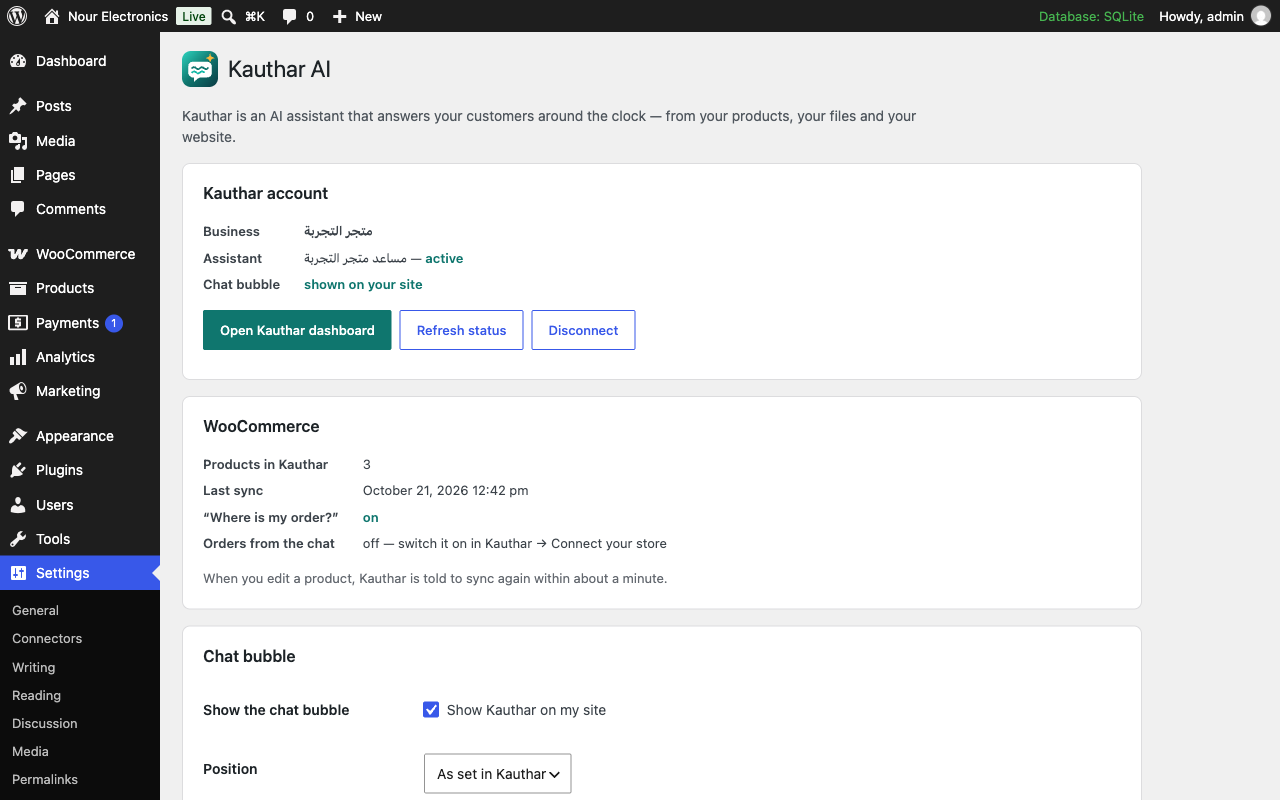
Connected: account, assistant and WooCommerce status, and where the chat bubble appears.

The Kauthar chat bubble on your website.

Your store in the Kauthar dashboard — products synced from WooCommerce.
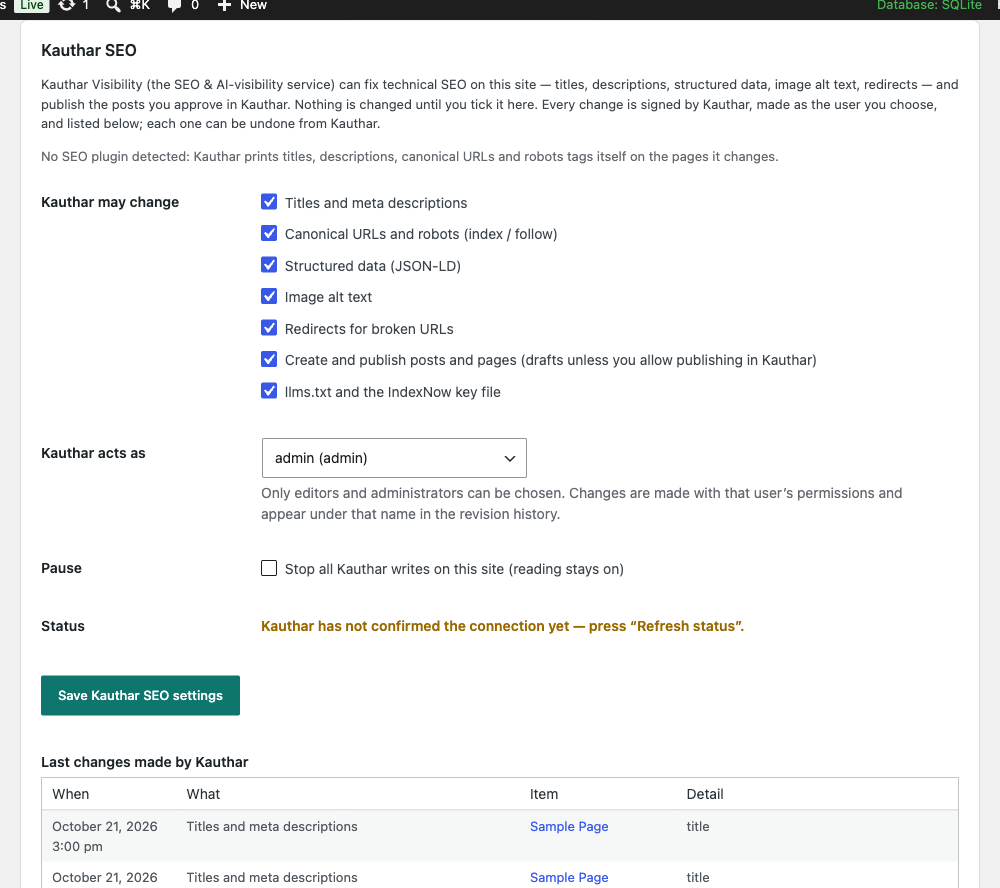
Kauthar SEO: what Kauthar may change (everything by default — untick to stop), the acting Editor, the last changes.


