Leadovation Aerodrome METAR TAF Wordpress Plugin - Rating, Reviews, Demo & Download
Plugin Description
A student opens the club’s website on Saturday morning to see whether the lesson holds. The instructor opens the same page to see what the TAF says for the afternoon slot. The webmaster who built that page has never read a METAR in his life, and should not have to.
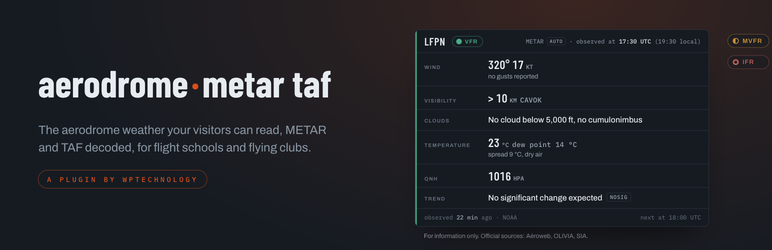
Aerodrome METAR TAF puts the field’s weather on the club’s own site, readable by all three. The METAR and the TAF come from the NOAA Aviation Weather Center, are decoded into plain words, and are shown with the flight category first, in cards that follow the site’s theme. The raw message stays one click away for the pilots who read the code.
It is written for a flying club or a flight school. One main aerodrome served by default, the club’s own runways for the crosswind, a legal notice that points to the official sources, and a settings screen a volunteer webmaster gets through in five minutes.
Free, and genuinely usable
The free version runs a whole club on its own. There is no cap on the number of aerodromes, no cap on the number of displays, and no screen that switches off.
- The raw message. The METAR or the TAF exactly as received, in a monospaced block, for the pilots who read the code.
- A compact bar. One line, ICAO, category, wind, visibility, ceiling, QNH, at the top or the bottom of a page without crowding it.
- A badge. The category alone, colour and shape, with the observation time. Fits in a title, a menu, a sidebar.
- A decoded card, METAR and TAF. Wind, visibility, clouds, temperature, QNH, in words. A TAF is read as a TAF: the base forecast with its validity, then one line per change period (BECMG, TEMPO, FM, PROB) with its own time window. The badge is the category of the period in progress and says so (“now”, “from 18:00 UTC”); the worst case over the whole validity, TEMPO and PROB included, is written underneath instead of colouring the head. An expired TAF is greyed and says it.
- A compact card. The same decoded card made dense for a column or a footer: one header line, then a grid of pairs. The
flatskin removes its background and border so it melts into a column the theme already styles. - A tabbed panel. METAR and TAF in one frame, two tabs, one footer each, so the category under the TAF tab is the TAF’s.
- Station details. Elevation, runways, frequencies. The figures come from OurAirports, with the date of the extract shown; the club can correct any field from the back office, and a corrected field reads “verified against the VAC chart”.
- A visitor selector. An ICAO field, a button, the result below. The visitor picks the aerodrome.
- A multi-aerodrome table. One line per aerodrome, category, wind, visibility, ceiling, observation time. No limit on the number of aerodromes.
- Wind on the club’s runway. Total wind, gust and crosswind component on the runway the club actually uses, on every card that shows wind.
- A single field. One value to drop into a sentence: “QNH 1016 hPa” right where your page needs it.
- A disclaimer with the official links. The legal text, with Aéroweb, OLIVIA and SIA, under each card, once per page, or never, as the setting says. One display can opt out on its own.
- A webcam. The image of the club’s own webcam, refreshed, time-stamped.
- Settings that fit on one screen. Your main aerodrome, wind unit (knots, km/h, m/s), the category profile with a plain explanation of what NOAA and metric mean and why neither is a regulation, UTC and local time or one of the two, and the disclaimer text and position.
- An Integration tab that shows before you copy. Pick a display, set its options (METAR or TAF, size, theme, skin, disclaimer, field), watch the real preview change, then copy the shortcode or the block. Same options, same names, whichever way you integrate.
- Gutenberg blocks, complete. One “Aerodrome METAR TAF” block in the Aero category carries every display and every option the shortcodes accept. Pages built with the six blocks of the 1.x still render.
- Categories in colour and in shape. VFR, MVFR, IFR and LIFR each have a colour and a distinct dot shape, and the text is always next to the dot: colour alone never carries the information.
- Two ages, never confused. “Observed at 17:30 UTC (19:30 local time)” on every card, next to “fetched 2 min ago”. Freshness is judged on the time of the observation, and a message more than two hours old is greyed and says so.
- A source that says when it falls. The dashboard shows the health of the NOAA source in green only when the last request succeeded, and “unreachable since 17:52” in red otherwise, with the last known message kept and marked as such.
- METAR AUTO read to the end.
BKN008///,VV///,12///,Q////, runway visual range and directional visibility no longer stop the decoder halfway. SPECI, AMD and COR are decoded and tagged.
Aerodrome METAR TAF Pro, a separate plugin
Aerodrome METAR TAF Pro is a separate download from the publisher, which replaces this plugin and keeps its settings, for the club that wants its own rules on the page. The free plugin is complete on its own: nothing described below is part of it, and nothing in it waits for anything. Pro adds.
- Conditions of the day, against the Club thresholds. A green, orange or red light per profile, period by period, on the TAF of the day. Three profiles (student, pilot, instructor), two thresholds per criterion (a warning figure, then a stop figure) for wind, gust, crosswind, ceiling and visibility, plus the phenomena each profile rules out (fog, thunderstorm, freezing…). The club writes what it allows; the plugin compares and never says whether the day is good to fly. A compact light for a single profile fits in a sidebar.
- A TAF timeline. The forecast hour by hour, so the best slot can be chosen on the page.
- A wind rose on the runways. The wind drawn against the runway headings, the active runway at a glance.
- A club-house screen. Fills the whole screen and rotates on its own, for the television by the coffee machine.
- A scrolling banner. The conditions scroll like a news feed and take no vertical space.
- Student mode. Every part of the METAR and the TAF explained token by token, to learn to read the weather during training.
- Avada elements. The displays as native Fusion Builder elements, under “WPTechnology”, with the same options as the shortcodes.
- In the colours of the club. An Appearance card in the settings: the club’s accent colour and logo in the card headers, the NWS palette for the categories (blue MVFR, magenta LIFR) as an alternative to the Aero one, the fonts of the theme instead of the range’s, square or rounded corners, a dark default or the visitor’s own setting, and a box of additional CSS scoped to the displays. A live preview shows the real cards while you choose. The 3 px stripe and the dot shapes never change: they carry the information.
See what Pro adds and what it costs.
Part of the Aero range
Aerodrome METAR TAF is one of the WPTechnology plugins written for flight schools and flying clubs. They share the same look and the same idea: one job each, done properly, and they talk to each other when installed side by side.
- Aero Courses: theory course scheduling and booking, the semester built once and published on the school’s site.
- Aero Users: the school’s roster (students, pilots, instructors, examiners) shared by the whole range.
Translations
The plugin is written in English.
What this plugin does not claim
The data is provided for information only. It is not an approved source for flight preparation: for that, the pilot goes to the national weather service and the aeronautical information service (in France, Aéroweb, OLIVIA and the SIA), and the plugin’s own disclaimer says so with the links. The decision to fly, and how, remains the pilot in command’s.
The VFR, MVFR, IFR and LIFR categories are a display convention, NOAA’s or an indicative metric transposition of it, and have no regulatory value: they are not EASA or SERA minima. The Club thresholds of the Pro version are the club’s own figures, entered by the club, and the plugin claims nothing about them beyond comparing a forecast to them.
Third-party services
The plugin fetches the METAR, the TAF and, as a fallback for station details, aerodrome metadata from the public API of the NOAA Aviation Weather Center. What is sent is the ICAO code of the aerodrome asked for (LFPN, say), when a display is rendered, when the dashboard is opened, or when the cache is refreshed. No personal data is sent, and no API key is needed. Terms and notices: weather.gov/disclaimer.
Station details (elevation, runways) come first from OurAirports, whose airports.csv and runways.csv are published as public domain data (CC0, no attribution required). A filtered extract of those two files is bundled with the plugin, in data/aerodromes.json, and read from disk: no network call is ever made to OurAirports, nothing about your site leaves it, and the date of the extract is shown on every station card. OurAirports terms.
The plugin bundles the Freemius SDK, the shop through which Pro is sold, and which also offers anonymous usage statistics if you agree to them on activation. You are asked, you may decline, and declining changes nothing about how the plugin works. Freemius is contacted to read the current price of the Pro plan shown on the dashboard (a public request that carries nothing about your site) and, with your consent, to send those statistics. Service: Freemius · terms · privacy.
The dashboard shows the other plugins of the Aero range. That list is read from wptechnology.com, the publisher’s own site, at most once a day and only when an administrator opens the dashboard: a plain GET on a public address, with nothing about your site in it. If the site does not answer, the last list received is shown, or the one bundled with the plugin. Whether a plugin is installed here is read locally and never sent. Legal notice · privacy.
The webcam image is an address the club enters in the settings; the plugin neither chooses it nor calls it. It is loaded by the visitor’s browser, from wherever the club pointed it.
Screenshots

The dashboard: the club’s aerodromes with their last METAR, the category, “observed at” and “fetched” side by side, and the health of the NOAA source.

The Integration tab: a display picked on the left, its options set, the real preview updating, and the shortcode or the block ready to copy.

The decoded card, METAR and TAF, in light and dark: category first, the TAF as base forecast then periods, the worst case written underneath.

The tabbed panel on a page: METAR and TAF in two tabs, each with its own footer, the category of the open tab in the header.

Station details from OurAirports, with the date of the extract, and the multi-aerodrome table: category, wind, visibility and ceiling at a glance.