Limited Admin Menu Access By URLs Wordpress Plugin - Rating, Reviews, Demo & Download
Plugin Description
Limited Admin Menu Access by URLs is built for site owners and administrators who need to give support agents, clients, or junior staff a tightly controlled window into the WordPress admin — without handing over full access.
The typical use case: you have a support agent who needs to handle WooCommerce orders, or a client who should only see their own content settings, or a developer you want to restrict to specific tools. Instead of creating a custom role from scratch, you simply select the user and click the pages they are allowed to visit. The plugin hides everything else from their sidebar and blocks any attempt to navigate to restricted pages directly by URL.
Key Features
- User Targeting — Select one or more users from a searchable, filterable list. Filter by role (Administrator, Editor, Author, Subscriber) with live AJAX search by name or email.
- Visual Link Picker — Hold
CTRL(orCMDon Mac) to activate an interactive overlay on the admin sidebar. Click any link to instantly add it to the allowlist. Added links are highlighted green; click again to remove. - URL + Title Tags — Allowed URLs are stored with their menu title for a human-readable allowlist display and a friendlier Access Denied page.
- Menu Hiding — All admin sidebar menu items not in the allowlist are automatically hidden for targeted users.
- Hard URL Blocking — Direct navigation to a blocked URL is intercepted at
admin_initand returns a styled 403 Access Denied page — even if the user tries to type the URL directly into the address bar. - Access Denied Page — A professional full-page block screen lists all pages the user is allowed to visit, with titles and URLs as clickable links.
- Empty Dashboard Option — A single checkbox removes all dashboard widgets for restricted users, leaving a clean empty dashboard while keeping the page itself accessible.
- Plugin Self-Protection — When a restricted user is granted access to the Plugins page, the Deactivate and Settings action links for this plugin are automatically removed from their view. A server-side guard additionally intercepts and blocks any direct deactivation request, even if crafted manually, ensuring the plugin cannot be disabled by a restricted user.
- Backwards Compatible — Existing plain-text URL lists from earlier versions are automatically migrated to the new JSON format on first save.
- Clean Uninstall — All plugin data is removed from the database when the plugin is deleted.
Primary Use Case: Granting Limited Admin Access to Support Agents
When a support agent needs to help with order management, content issues, or plugin configuration, giving them full admin access is a security and compliance risk. This plugin solves that problem cleanly:
- Create a WordPress account for the support agent (any role).
- Open Limited Admin Access in your sidebar.
- Check the agent’s name in the Target Users list.
- Hold
CTRLand click the exact sidebar pages they need — Orders, a specific settings tab, the media library, whatever the job requires. - Click Apply Restrictions.
The agent now sees only those pages in their sidebar, and any attempt to navigate elsewhere returns a branded Access Denied screen listing exactly where they are allowed to go. No custom roles, no code, no guesswork.
Other Use Cases
- Give a client access to only their WooCommerce orders page and nothing else.
- Restrict a content author to only the post editor and media library.
- Limit a junior developer to only the tools relevant to their current task.
- Prevent non-technical staff from accidentally accessing sensitive settings.
- Provide a contractor with a scoped admin view for the duration of a project.
How It Works
- Go to Limited Admin Access in the WordPress admin sidebar.
- Select one or more users to restrict using the Target Users panel.
- Hold
CTRLand click sidebar links to add them to the allowlist — or type URLs manually. - Optionally check Hide All Dashboard Widgets to give restricted users a blank dashboard.
- Click Apply Restrictions.
From that point on, restricted users will only see the allowed menu items and can only navigate to allowed pages. Attempting to visit any other admin URL returns a 403 page with links to permitted pages.
Security
- All inputs are sanitized using WordPress-native functions (
sanitize_text_field,esc_url_raw,absint,wp_unslash). - URL scheme validation rejects
javascript:,data:, and other non-HTTP schemes from the allowlist. - AJAX endpoints are protected with nonces and
current_user_can('manage_options')checks. - URL matching uses exact path + query-string comparison — substring matching is not used, preventing crafted URL bypass attacks.
- The plugin page render callback has an explicit capability gate independent of the menu registration.
- Restricted users who are granted access to the Plugins page cannot deactivate this plugin — the Deactivate and Settings action links are stripped from the plugin row for those users, and a server-side
admin_initguard verifies WordPress’s own deactivation nonce before intercepting and blocking any direct deactivation request. - All data is removed on plugin deletion via
uninstall.php.
Screenshots

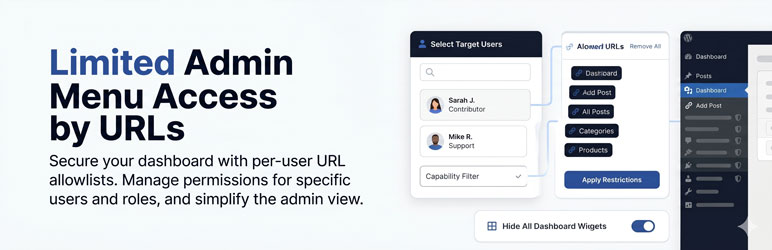
Visual Overview Our clean, modern interface designed to demonstrate how Limited Admin Menu Access by URLs gives you precise control over the WordPress dashboard experience.

Main Settings Page — The admin panel showing the Target Users list, capability filter, and URL allowlist with tag chips.

CTRL Link Picker Active — The sidebar in picker mode with blue overlay masks on each link, a green highlight on already-added links, and the active-mode banner at the top.

Allowed URLs Tag Chips — The allowlist panel showing URL+title chips in dark tag style with remove buttons.

Access Denied Page — The 403 block screen showing the plugin branding, a list of permitted pages with titles, and a link back to the dashboard.