
LiveEdit AI Agent Wordpress Plugin - Rating, Reviews, Demo & Download

Plugin Description
This plugin is a client for an external paid service and does nothing on its own.
The agent runs on our servers, which call Anthropic’s Claude models. You need an account
at vlaszubenko.com to use it. New sites get a small allowance of credits to try the
service without a card; after that the service is paid by subscription. Nothing in the
plugin code is locked, obfuscated or reserved for a premium build — all of it is here,
and all of it talks to the same service. See “External services” below for exactly what
is sent and when.
Ask in plain words — the agent finds the right files, reads the code and does the work
itself. It builds new sections in your theme’s own style, edits templates, creates
editable fields in wp-admin, fills the catalogue and writes articles.
What makes it different from a text generator:
- It works on the site, not in a chat window. Pages, blocks, products, posts — it reads your theme to match it.
- It reads your theme before writing, so a new block looks native — same tokens,
spacing and classes. - Every change is reversible. Backups are taken before each file write, and the
History screen undoes anything with one click. - It says what it did not do. No “done!” when nothing was saved.
Safety
Before writing a PHP file the plugin checks syntax, boots WordPress in a separate
process and requests the page over HTTP. If the site breaks, the file is restored
automatically. Secrets — wp-config.php, .htaccess, .env — are never readable.
Content that comes back from tools (pages, files, comments) is treated as data, not
as instructions: an attempt to command the agent through your site’s own content is
reported to you instead of being carried out.
What this version does not do
This is the free version. It reads your theme — templates, styles, spacing tokens — so that a new
block matches the site, but it does not modify theme files. Writing to theme files, creating
admin fields and installing plugins are not part of this build; that code is not here at all.
Those live in the full version, which is a separate download from our site.
Credits
Work is paid in credits from a subscription. A text edit costs about 5–15 credits,
a full new block with markup usually 150–600. The balance and what each
step cost are visible in the chat.
External services
This plugin is a client for an external service. It does not work on its own: the
thinking happens on our server, which in turn calls Anthropic’s Claude models.
LiveEdit AI Agent backend (api.web-hub.online)
What it is used for: every request you make in the agent chat is sent there, answered,
and billed against your subscription. The plugin also asks it for the list of plans and
your credit balance.
When data is sent: only when you press a button — send a message in the chat, generate
text in the post editor, connect the site, or open the settings screen (balance and plans).
What is sent: your instruction text, the parts of your site the agent needs to answer
(theme files it reads, post content, product data), any files or screenshots you attach,
the site address and the site token. No passwords or database credentials are ever read
or sent — wp-config.php, .htaccess and .env are blocked at the code level.
Page screenshots: to check how a change looks, the agent can ask our server to open a
public page of this site in a headless browser and return a screenshot. Only pages of
this same site are opened, only when the agent is working on your request, and the
screenshot is used for that task only — it is not stored in the saved conversation.
Terms of use: https://vlaszubenko.com/livedit-ai-agent/terms
Privacy policy: https://vlaszubenko.com/livedit-ai-agent/privacy
Anthropic
Our backend passes your request to Anthropic’s API to produce the answer. We do not use
your data to train models, and Anthropic does not train on API traffic.
Terms: https://www.anthropic.com/legal/commercial-terms
Privacy policy: https://www.anthropic.com/legal/privacy
Stock photo libraries (only when you ask for a picture)
When the agent needs an illustration it can import one into your media library. The image is
downloaded from one of five hosts only — images.unsplash.com, plus.unsplash.com, images.pexels.com,
cdn.pixabay.com and pixabay.com — over https, and it is rejected unless the file really is an image
under 8 MB. Nothing is downloaded unless you asked for an image, and no executable code is ever
fetched. No account is needed and nothing about you is sent to them.
Unsplash: https://unsplash.com/terms , https://unsplash.com/privacy
Pexels: https://www.pexels.com/terms-of-service/ , https://www.pexels.com/privacy-policy/
Pixabay: https://pixabay.com/service/terms/ , https://pixabay.com/service/privacy/
Google Maps (only in a map block)
If you ask the agent for a map section, the block it builds embeds a Google Maps iframe pointing at
the address you gave. The map loads in your visitors’ browsers, from Google, when that page is
opened — so Google sees your visitors’ requests as it would on any site with an embedded map. No
map is embedded unless you ask for one, and you can remove the block from the History screen.
Terms: https://policies.google.com/terms
Privacy policy: https://policies.google.com/privacy
Error reports (optional, off by default)
If you turn on “Send reports” in the settings, the plugin sends the error text, file and
line, the plugin and WordPress versions and the site address to api.web-hub.online when
something breaks. Nothing is sent while the setting is off.
Screenshots
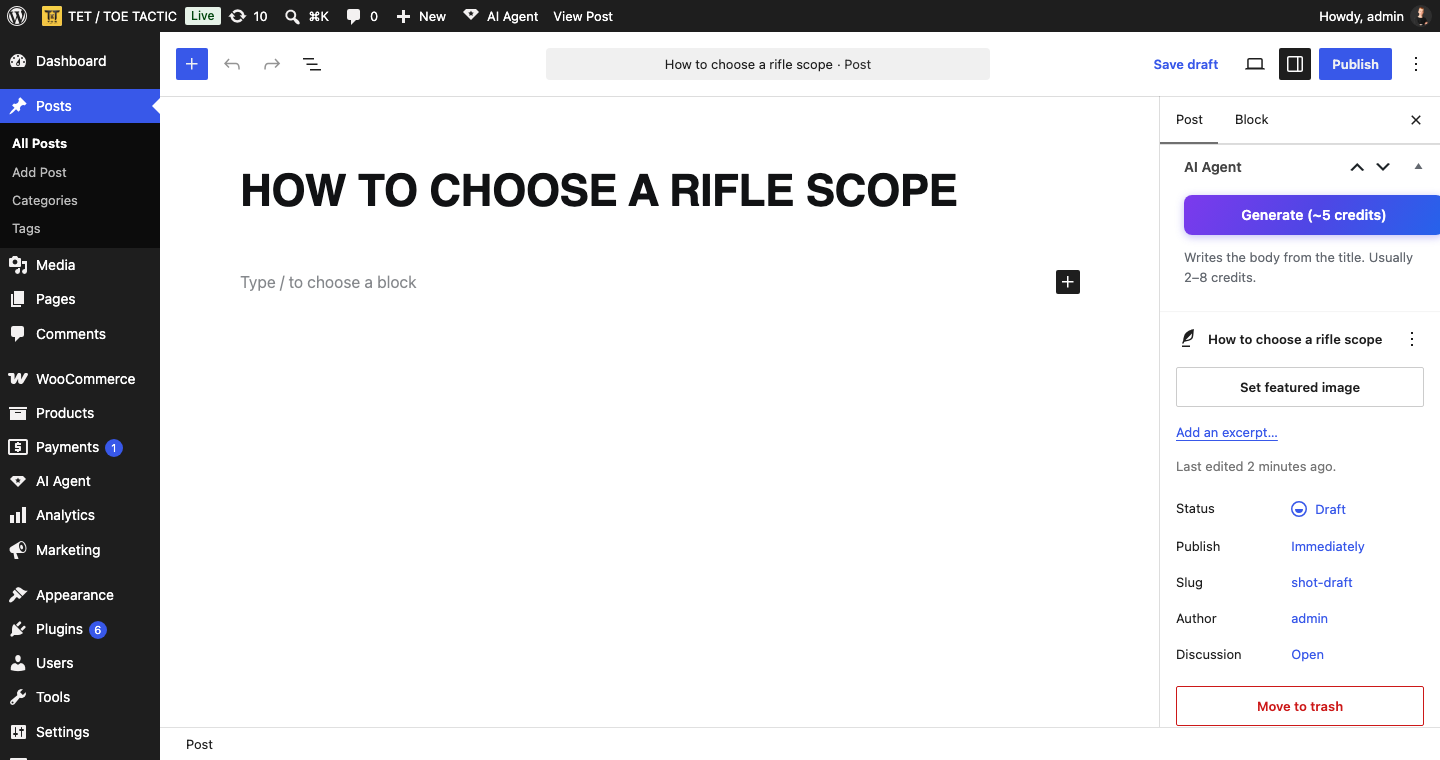
Generate in the post editor. Writes the body from the title, with the cost shown on the button before you press it.


