
Luminarix Payment Gateway For WooCommerce Wordpress Plugin - Rating, Reviews, Demo & Download
Plugin Description
Luminarix is a payment gateway provider that helps merchants accept, process and manage payments securely. This plugin connects your WooCommerce store to the Luminarix payment API.
About Luminarix
Luminarix Sdn. Bhd. provides payment gateway services including FPX, cards, e-wallets (such as Touch ‘n Go, GrabPay, Boost, ShopeePay and MAE) and DuitNow QR. Learn more at lmnrx.com.
What the plugin does
The plugin creates payment orders, redirects customers to the Luminarix hosted checkout, receives signed status callbacks and keeps WooCommerce order status in sync.
An active Luminarix merchant account and API credentials are required. Credentials are provided by Luminarix when you apply at lmnrx.com and are not included with the plugin.
Features
- Separate sandbox and production URLs and credentials
- Environment-specific settings display
- HMAC-SHA256 Base64 request checksums
- Signed callback verification with timestamp and replay protection
- Hosted checkout redirects and channel-specific payment instructions
- Automatic and manual transaction-status synchronization
- Scheduled polling for pending payments
- Full and partial WooCommerce refunds
- Refund callback tracking isolated from the original payment transaction
- HPOS and Cart/Checkout Blocks compatibility
- Optional masked WooCommerce debug logs
- Admin order transaction details and gateway diagnostics
- Multiple payment methods (for example FPX and Touch n Go) from a drag-and-drop repeater; each has its own checkout name, Payment System Code, Merchant ID, Sub-Merchant ID and Client Secret (sandbox and live)
- Configurable payment system, channel, currency, phone country code, timeout, and order prefix
External services
This plugin connects to the Luminarix payment API only after a store administrator enables and configures the gateway and a customer selects it, or when an administrator/automated status task manages an existing Luminarix transaction.
Data sent can include merchant credentials, order reference, amount, currency, return and callback URLs, payment system/channel, and optional customer billing name, email, phone, and address. Refund and transaction-status requests send the corresponding transaction identifiers and amounts. This data is required to provide the payment service and is sent to the sandbox or production API base URL entered by the store administrator.
Service provider: Luminarix Sdn. Bhd. (lmnrx.com). Privacy Policy: https://www.lmnrx.com/agreements/Privacy%20Policy.pdf. The Terms of Service and Merchant Agreement are available from the Luminarix website and onboarding. Store owners should provide their customers with Luminarix’s applicable terms and privacy policy.
Privacy
The plugin stores Luminarix transaction identifiers, references, statuses, environment, synchronization timestamps, callback fingerprints, payment instructions, and refund records as WooCommerce order metadata. Optional debug logs are stored through the WooCommerce logger and mask sensitive fields. Uninstalling the plugin removes gateway settings and its last-callback diagnostic; order transaction metadata remains as part of the store’s financial records.
Suggested privacy-policy text is registered with WordPress under Settings > Privacy > Policy Guide.
Screenshots
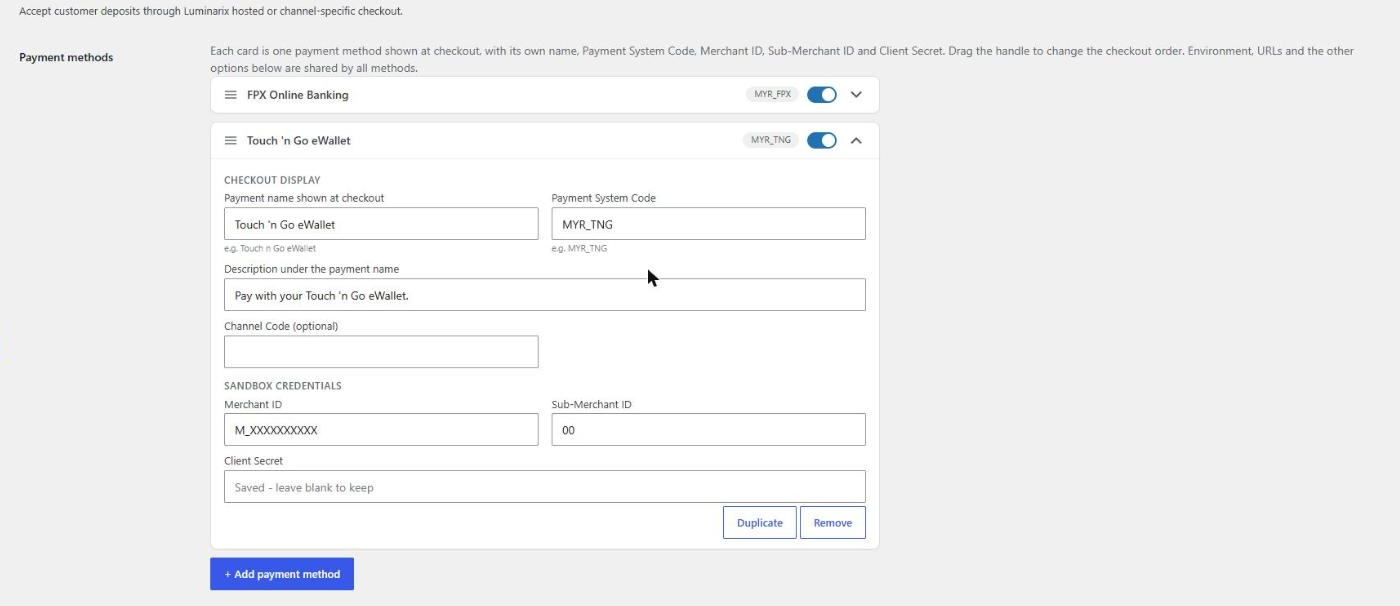
Payment methods under WooCommerce > Settings > Payments > Luminarix Payment: add as many methods as you need, each with its own name, Payment System Code and credentials; drag to reorder.
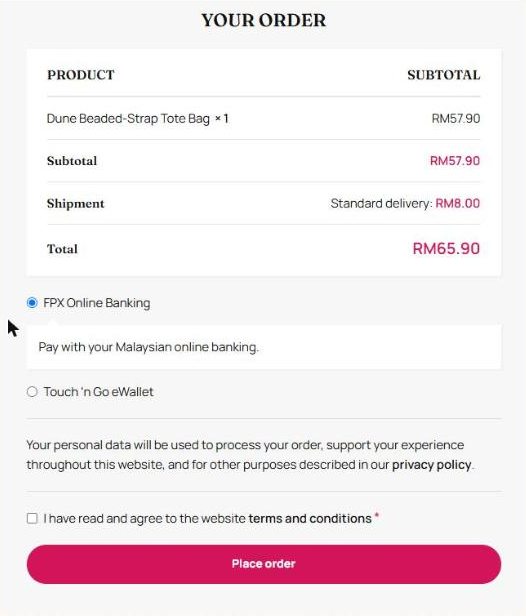
Checkout showing the Luminarix payment methods side by side.


