Maintained.log – Maintenance Reports For Agencies & Clients Wordpress Plugin - Rating, Reviews, Demo & Download

Plugin Description
Website maintenance is silent work: when it is done well, nothing happens, and clients never see it. Maintained.log keeps a trustworthy record of everything done on the site and turns it into a clear report your clients will actually read.
Automatic update log
- Records every core, plugin and theme change with the old and new version, the date and who did it: a user in the dashboard, an auto-update or WP-CLI.
- Also catches changes made outside WordPress (FTP, hosting panel, deployment tools) by comparing snapshots of the installed software twice a day.
Proof that the site works
- After every update, Maintained.log requests the pages you choose (home, contact, checkout…) and records the HTTP status, the response time and whether a text you expect is on the page.
- Detects PHP errors on the page and emails you immediately when a check fails.
- Clients only see the final result in their report, without technical details.
Security updates explained (optional)
- With a free Wordfence Intelligence API key, Maintained.log downloads the vulnerability database once a day and works out which of your updates fixed a known vulnerability — including past updates already in the log.
- The client report explains each one in plain language: what the flaw could allow, how severe it was and whether an attacker needed an account, without technical jargon.
- You are alerted when installed software has a known vulnerability, and especially when there is no fix yet.
- The database is processed in small slices in the background, so it works on shared hosting.
Speed ratings for clients (optional)
- Measures your key pages with Google PageSpeed Insights on mobile and desktop, weekly or monthly.
- Clients see a rating (Excellent, Good or Could be improved) instead of a raw number, its trend compared with the previous period, and a short plain-language list of what could make the site faster.
- The rating uses the median of the period’s measurements, and the report explains why Google’s score varies between runs.
- Alerts you when a page drops to a lower rating.
Manual tasks with time tracking
- Log tests, backups, security reviews, incidents or content changes with a category, notes for the client and the minutes spent: ideal for retainer hours.
One-click rollback
- Before a plugin or theme is updated, its current files are archived. If the update breaks something, restore the previous version from the log with one click.
- Works for premium plugins too, even when the old version cannot be downloaded again.
Backups you can show
- Most backups are made by the hosting provider, where WordPress cannot see them. Describe your backup policy once and it appears in every client report.
- A periodic reminder asks you to check the backups in your hosting panel; confirming takes one click and is recorded with its date. Restore tests can be recorded too.
A log you can trust
- Entries are never edited or deleted. Corrections are new entries linked to the original.
- Every entry is chained with a SHA-256 hash, so you can verify that nobody altered the log directly in the database.
Visible to the client every day
- A “Website maintenance” box at the top of the WordPress dashboard shows who maintains the site, when it was last reviewed, whether everything works and this month’s activity.
- Optional secret link to each report: the client can open it in a browser, browse previous reports and save it as PDF.
Technical status
- Watches the HTTPS certificate expiry, PHP security support, the WordPress version and WordPress Site Health, and alerts you before something becomes a problem.
- The report explains it in plain sentences; anything pending is shown as “under review”.
Client reports
- Weekly, monthly, every two months, quarterly or every six months, or send one manually for any period.
- Customizable subject, introduction and closing with placeholders, plus your logo, brand color and agency name (white label).
- Choose which sections to show: updates, site checks, tasks and time.
- The site is checked again right before each scheduled report. If something fails, the report waits until it passes (up to a maximum you choose) and you get an email.
Administrator alerts
- Daily or weekly reminder of pending updates.
- Immediate alert when a site check fails.
Safe on staging
- Client emails are paused automatically on non-production environments and on copies of the site whose URL changed, so a staging clone never emails your client.
For developers
- WP-CLI:
wp maintained-log snapshot|check|add|list|report|verify. - CSV export of the full log.
- Filters and actions such as
maintained_log_entry_added,maintained_log_report_data,maintained_log_check_targets,maintained_log_categoriesandmaintained_log_capability. - Override the email template by copying
templates/email-report.phptoyourtheme/maintained-log/email-report.php.
External services
Site checks send HTTP requests only to the URLs you configure, usually pages of your own site. No data is sent to the plugin author.
Wordfence Intelligence (optional, off by default). When you enable the vulnerability module, the plugin downloads the Wordfence Intelligence vulnerability database (https://www.wordfence.com/api/intelligence/v3/vulnerabilities/production) once a day, or when you click “Update vulnerability data now”, sending only your Wordfence API key. Nothing about your site, its software or its visitors is sent: matching happens locally. Vulnerability data is provided by Wordfence Intelligence (Defiant, Inc.) and is shown with its attribution. Terms: https://www.wordfence.com/wordfence-intelligence-terms-and-conditions/ — Privacy: https://www.wordfence.com/privacy-policy/
Google PageSpeed Insights (optional, off by default). When you enable the speed module, the plugin sends the URLs of the pages you list, together with your Google API key, to the PageSpeed Insights API (https://www.googleapis.com/pagespeedonline/v5/runPagespeed) on the schedule you choose or when you click “Measure speed now”. Google loads those pages and returns performance data. No visitor data is sent. Google API Terms of Service: https://developers.google.com/terms — Google Privacy Policy: https://policies.google.com/privacy
Screenshots

The monthly report your client receives: updates, security fixes explained in plain words, site checks, speed, tasks and time.

The maintenance log: every update, check and task, with the technical status and a form to log manual work.
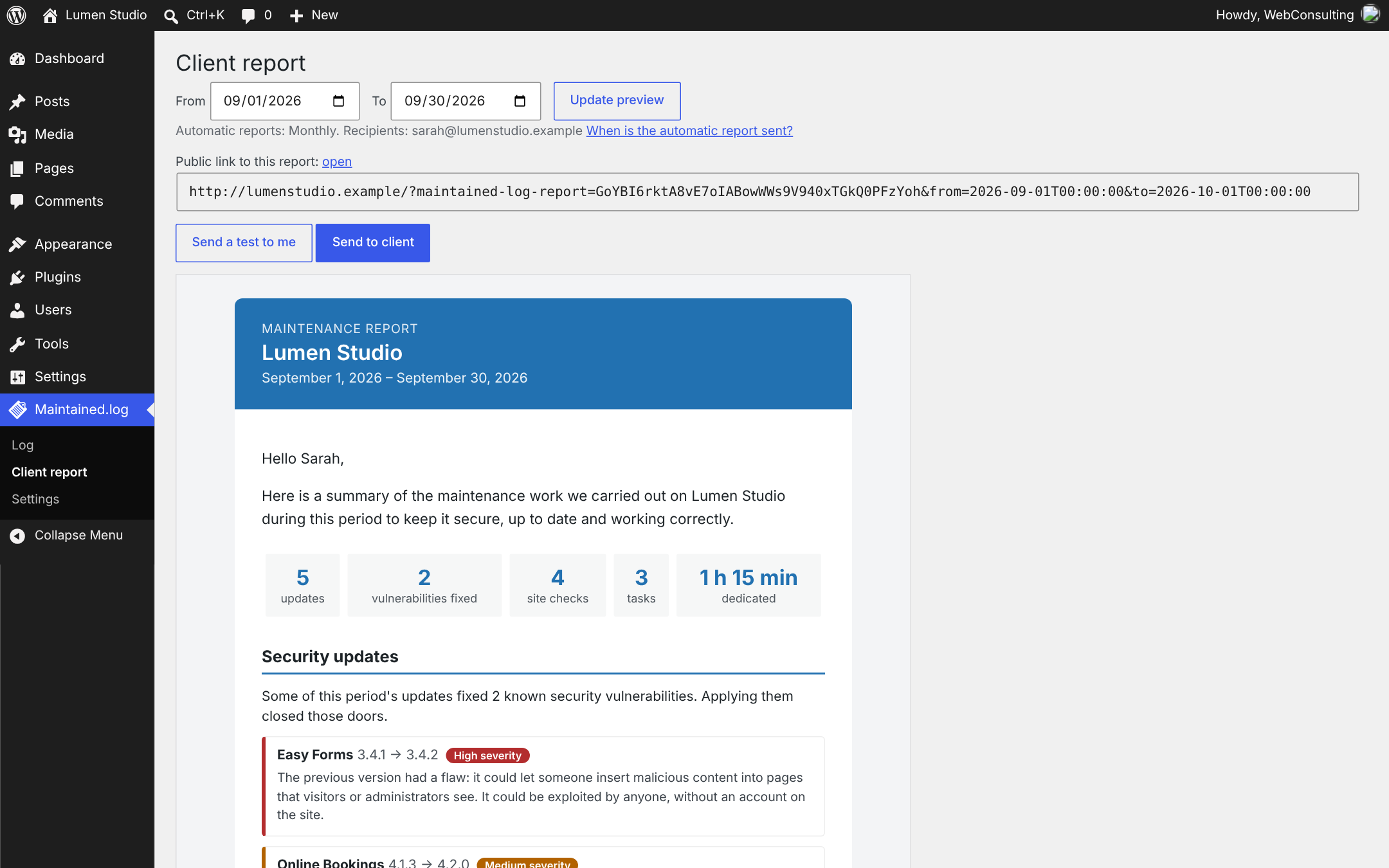
The client report screen: preview any period, send yourself a test or send it to the client.
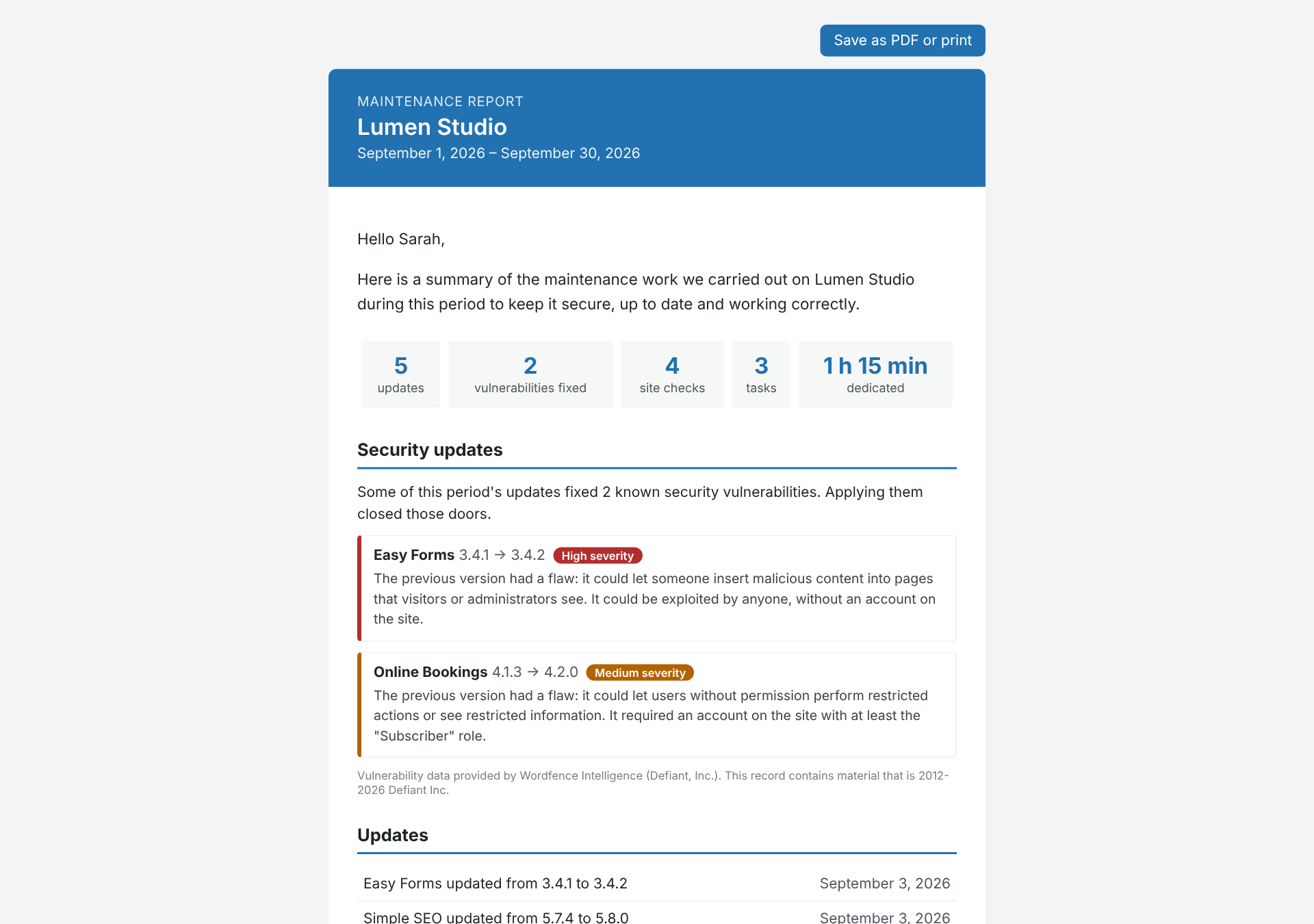
The report opened from its private link, ready to be saved as PDF.
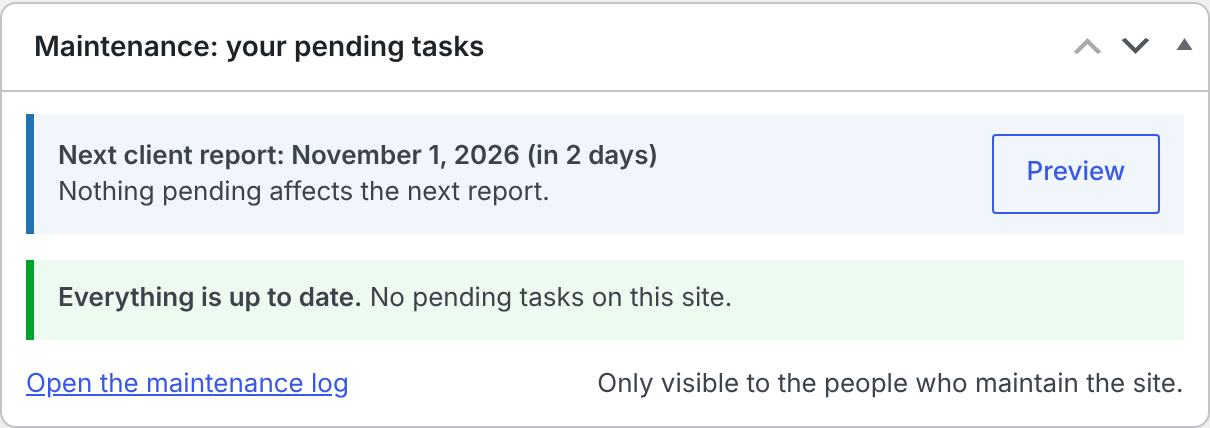
The dashboard summary for the people who maintain the site: next report and pending tasks.
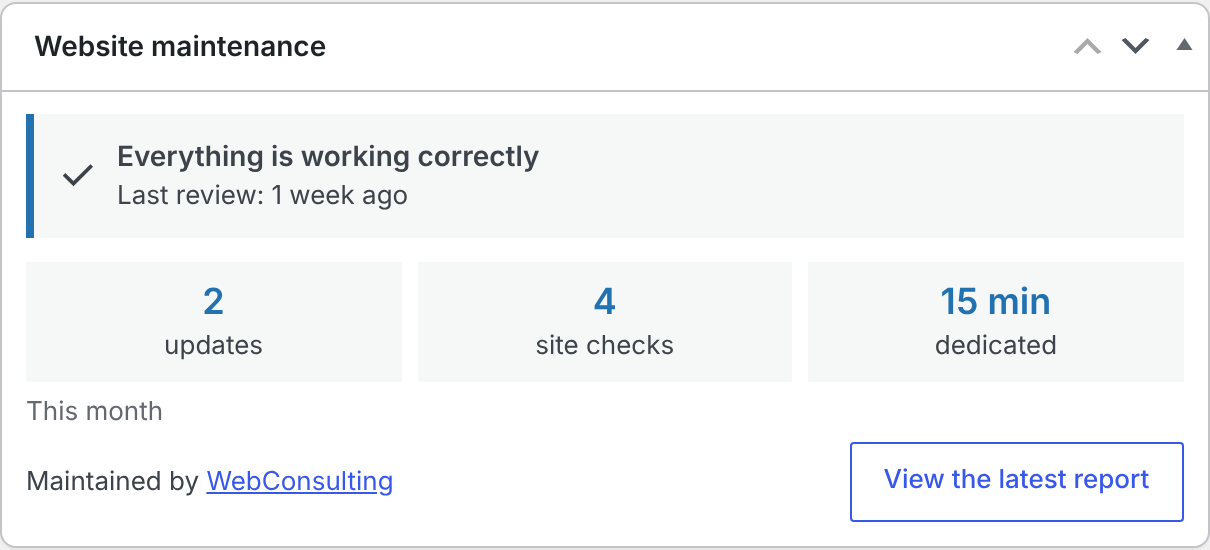
The “Website maintenance” box your client sees on their dashboard.
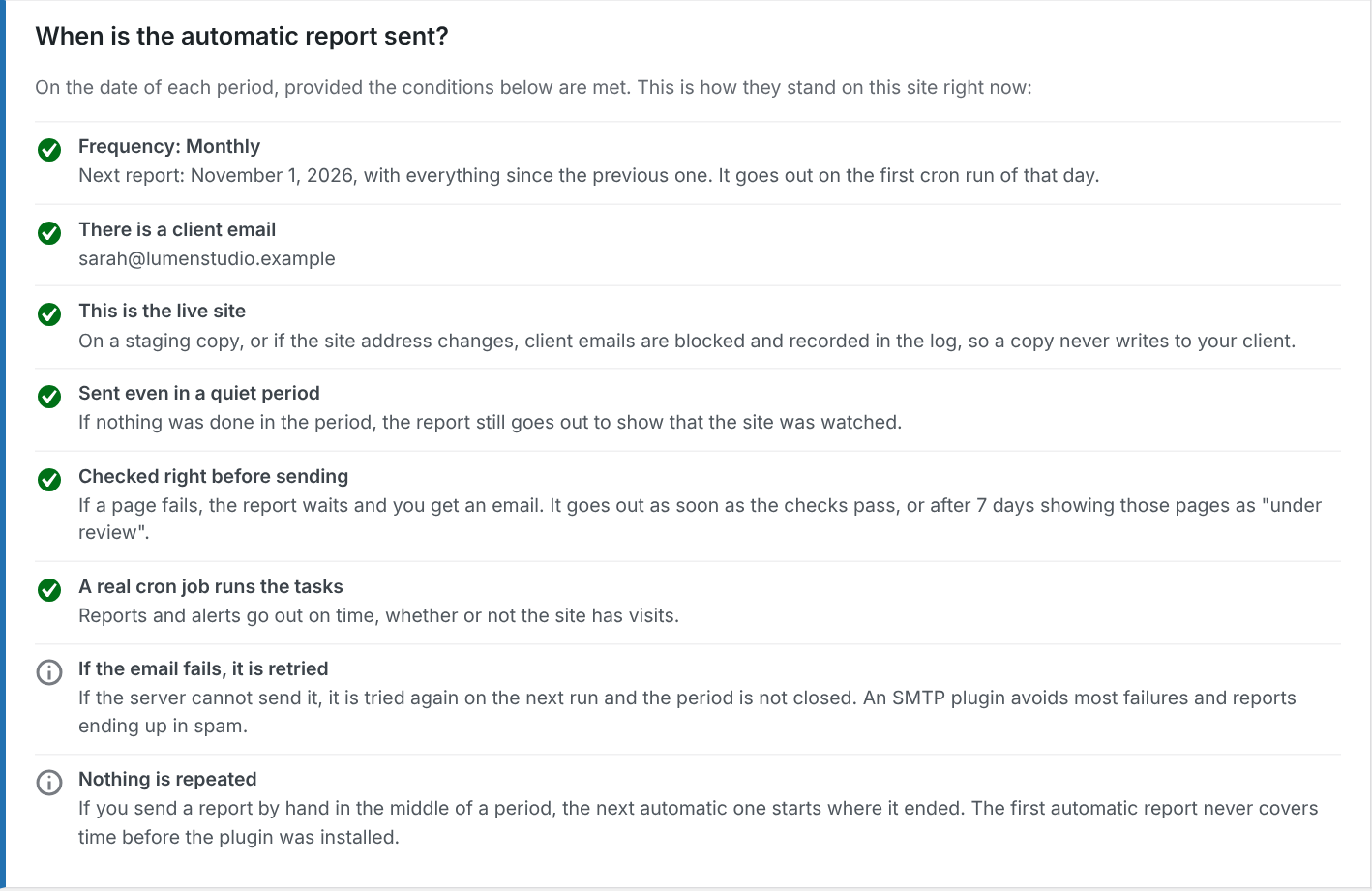
When the automatic report is sent, with the current state of every condition on the site.
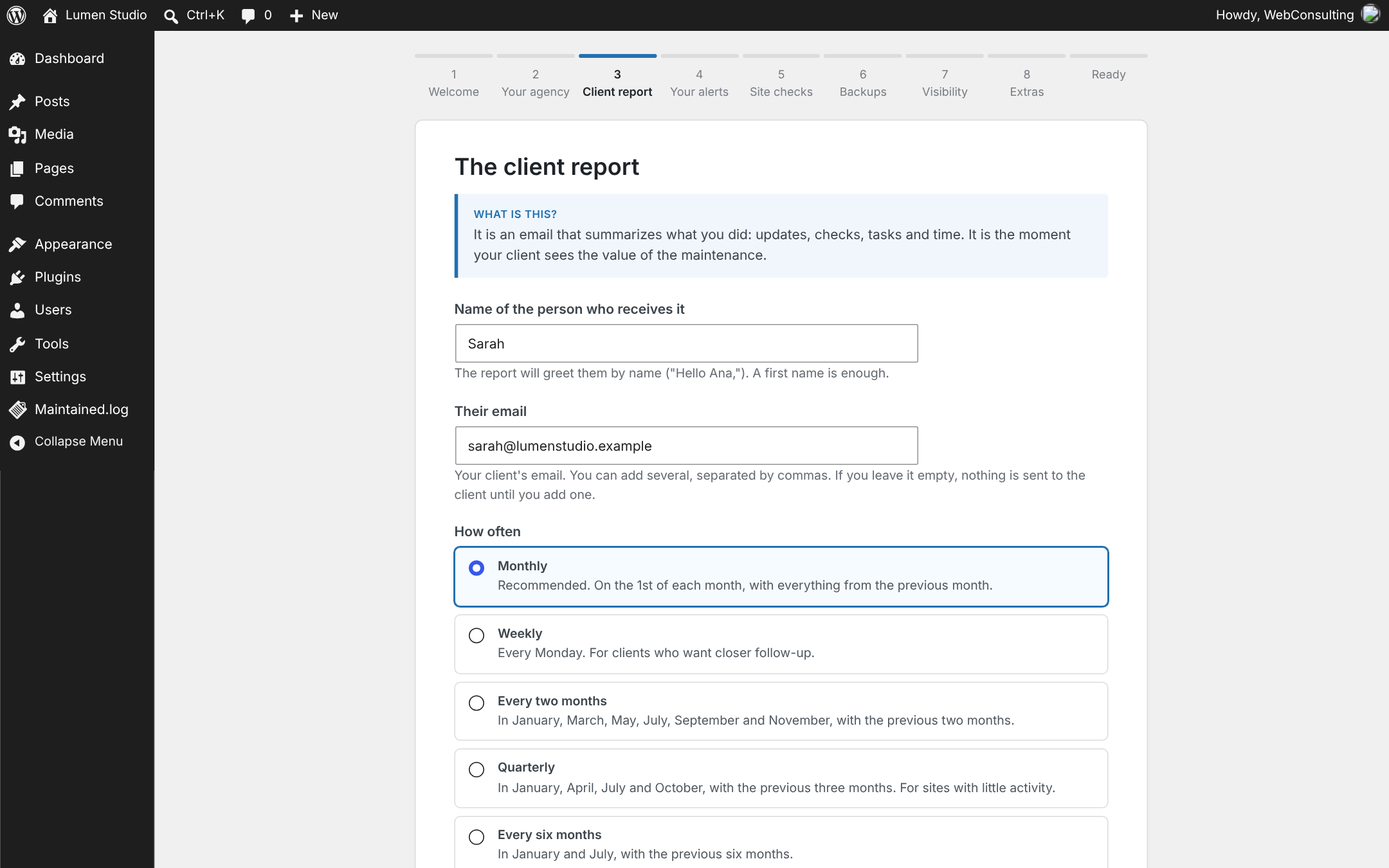
The step-by-step setup assistant.