
MarketPulse COGS & Profit For WooCommerce Wordpress Plugin - Rating, Reviews, Demo & Download
Plugin Description
🚀 Stop Treating Revenue as Profit. Discover Your True Net Take-Home Earnings.
“Revenue is vanity. Profit is sanity. Cash is king.”
Are you celebrating a $50,000 sales month, only to check your business bank account and wonder: Where did all the actual profit go?
WooCommerce by default only reports your Gross Revenue. It completely ignores the real-world expenses that silently eat away at your bottom line every single day:
1. Wholesale Product Costs (COGS): What you paid your supplier or manufacturer.
2. Payment Gateway Processing Fees: Stripe, PayPal, Square, bKash, Nagad, and COD processing fees quietly taking 2%–4% + fixed fees off every transaction.
3. Courier Shipping Deficits: Subsidizing “Free Shipping” or flat-rate delivery when courier bills (Pathao, Steadfast, RedX, FedEx, DHL, UPS) are significantly higher than what the customer paid.
4. Operating Expenses (OpEx): Meta Ad spend, Google Ads, TikTok ads, server hosting, staff salaries, software subscriptions, office rent, and packaging materials.
MarketPulse COGS & Profit for WooCommerce by NexForge AI addresses this challenge. It provides an automated Profit & Loss (P&L) tracking workflow — lightweight, with zero frontend scripts, and 100% HPOS compatible.
💎 Core Accounting & Analytics Features
MarketPulse COGS & Profit provides an end-to-end financial intelligence workflow:
- True 4-Pillar Net Profit Scope: Deducts product wholesale costs, payment gateway transaction fees, shipping deficits, and operating expenses.
- Storefront Speed Focused: Zero frontend JavaScript or CSS assets, with pure SVG administrative charts.
- Order Cost Snapshots: Line-item wholesale costs are snapshotted at time of purchase, preserving historical accounting integrity.
- Payment Gateway Rules: Built-in fee calculation rules for Stripe, PayPal, Square, Cash on Delivery, and custom merchant gateways.
- Courier Deficit Tracking: Automatically reconciles customer-paid shipping charges against actual out-of-pocket courier invoices.
- Operating Expenses Ledger: Track recurring and one-off operating overhead such as advertising, hosting, software, and salaries.
- Real-Time Margin Feedback: Calculates gross margin percentage on product edit screens with alert guidance if margins drop below 15%.
- High-Performance Order Storage (HPOS): 100% compatible with WooCommerce custom order tables and standard post-meta storage.
- Supplier Management: Track vendor information and generate inventory restocking reports.
- In-Dashboard Documentation: Built-in user guide and FAQs directly within the WordPress admin.
⚡ Key Features at a Glance
1. True 4-Pillar Net Profit Engine
Never guess your actual earnings again. The plugin calculates exact bottom-line profit by deducting:
* Wholesale Unit Cost (COGS)
* Payment Gateway Transaction Fees
* Courier Shipping Deficits
* Operational Overhead (OpEx) amortization
2. Live Margin % Preview & Smart Profit Floor Protection
When editing any Simple or Variable product, typing a Cost Price (COGS) instantly computes your live Gross Margin in both currency and percentage. If your margin dips below 15%, a high-visibility alert warns you before you publish, preventing costly pricing mistakes.
3. Zero-Config Payment Gateway Fee Auto-Detection
Stop calculating 2.9% + 30¢ manually. MarketPulse automatically detects the payment gateway used for each order (Stripe, PayPal, Square, bKash, Nagad, Rocket, SSLCommerz, Cash on Delivery) and applies exact percentage and fixed processing fee deductions. Custom rates can be configured with ease.
4. Courier Shipping Deficit Reconciliation
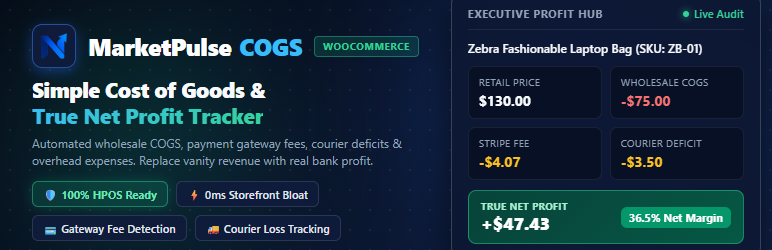
If you charge customers a flat $5.00 for delivery, but FedEx, DHL, Pathao, or Steadfast invoices you $8.50, you lost $3.50. The plugin accounts for this courier shortfall and subtracts it directly from order profit.
5. Operating Expenses (OpEx) Overhead Ledger
Factor in non-product operational costs: Meta Ad spend, Google Ads, hosting servers, salaries, packaging, and SaaS subscriptions. The plugin amortizes these overheads against your sales to reveal true business take-home cash.
6. Immutable Line-Item Cost Snapshots
When an order is placed, unit wholesale costs, gateway fees, and shipping margins are permanently locked into the order’s financial snapshot. Changing a product’s price or supplier cost six months later will never alter or invalidate your historical accounting records.
7. Pure SVG Interactive Trendlines (Zero JS Overhead)
View 7-day, 30-day, or custom-range trendlines comparing Revenue vs. COGS vs. True Net Profit. Built entirely with lightweight inline SVG, eliminating heavy third-party JavaScript libraries (Chart.js, Highcharts) for instant admin loading.
8. Order Financial Waterfall Meta Box
Every single order edit screen features a crystal-clear financial breakdown:
* Gross Sales
* Wholesale COGS
* Gateway Fee Deductions
* Courier Deficits
* True Net Profit & Profit Margin %
With instant color-coded margin health badges (🟢 Green 30%+, 🟡 Amber 15-30%, 🔴 Red <15%).
9. Native WooCommerce Product CSV Bulk Import / Export
Seamlessly import and export Cost of Goods (COGS) and Supplier data using WooCommerce’s built-in Product CSV tools. Manage pricing across thousands of SKUs in Microsoft Excel or Google Sheets.
10. Quick Edit & Bulk Edit Catalog Management
Update wholesale purchase costs directly from the standard WooCommerce Products > All Products catalog list using Quick Edit or Bulk Edit without opening individual product editors.
11. Supplier Directory & Inventory Restocking Sheets
Tag products by wholesale supplier or distributor. Compare profitability across vendors and filter low-stock inventory to produce clean supplier restocking purchase sheets.
12. Interactive In-Dashboard User Guide & Knowledgebase
A complete, beautifully structured user manual and interactive FAQ tab built right inside WooCommerce > Profit Analytics > User Guide. New store managers can onboard themselves in minutes without leaving the WordPress admin.
13. Dynamic AI Repricing Lift (MarketPulse Integration)
Identifies profit leaks and uncaptured margin opportunities across your catalog. Connects seamlessly with MarketPulse (usemarketpulse.com), the AI-powered dynamic repricer that tracks competitor prices 24/7 and automatically optimizes your retail prices for maximum profit.
🧮 5 Accounting Formulas Demystified
The plugin follows standard GAAP and IFRS e-commerce accounting standards:
- Gross Revenue =
Retail Price × Quantity Sold - Total COGS =
Wholesale Cost × Quantity Sold - Gross Profit =
Gross Revenue − Total COGS - Courier Deficit =
Actual Courier Cost − Shipping Fee Paid by Customer - True Net Profit =
Gross Profit − Payment Gateway Fee − Courier Deficit − Allocated OpEx
Net Margin % = (True Net Profit ÷ Gross Revenue) × 100%
🚀 Powered by NexForge AI & MarketPulse
Crafted with extreme attention to detail by the engineering team at NexForge AI — makers of MarketPulse, the automated 24/7 competitor price intelligence and dynamic AI repricing engine for WooCommerce merchants.
- Website: https://usemarketpulse.com
- Start 14-Day Free Starter Trial: https://usemarketpulse.com/signup?plan=cmu76n3c80005n2el6itwbile
External Services
This plugin is developed by NexForge AI and provides optional insights and integration links with the MarketPulse competitor price intelligence & dynamic repricing cloud service (https://usemarketpulse.com).
- Service Website: https://usemarketpulse.com
- Terms of Service: https://usemarketpulse.com/terms
- Privacy Policy: https://usemarketpulse.com/privacy
What data is sent to MarketPulse and why:
- 100% Local Self-Contained Execution: All Cost of Goods (COGS) tracking, profit calculations, payment gateway fee detections, courier shipping deficit accounting, and P&L financial reports are calculated and stored 100% locally on your WordPress database. The plugin does NOT transmit any customer data, order details, or financial stats to external servers during standard operation.
- Optional AI Repricing Connection: The plugin provides optional outbound administrative links to connect your store with MarketPulse Cloud for automated 24/7 competitor price monitoring. Any store pairing or integration with MarketPulse is strictly voluntary, opt-in, and requires explicit merchant authorization.
- Zero Customer Tracking: The plugin NEVER collects, tracks, or transmits shopper personal data, customer names, addresses, or payment details. 100% GDPR compliant.
About the Developer & Brand Ownership
MarketPulse (https://usemarketpulse.com) is an e-commerce intelligence brand owned and engineered by NexForge AI (https://nexforgehq.com). NexForge AI is a specialized software product lab building high-performance, lightweight tools for WooCommerce store owners.
For technical support, custom integrations, or store audits, visit https://usemarketpulse.com or contact hello@nexforgehq.com.
Screenshots

screenshot-1.png: MarketPulse Profit Analytics Executive Hub: Real-time financial KPI cards (Net Sales, COGS, Gateway Fees, Shipping Deficit, True Net Profit), 30-day interactive SVG trendline, and P&L waterfall breakdown.
screenshot-2.png: Product Edit Screen: Wholesale purchase cost input, real-time gross margin preview badge, and red low-margin alert box (<15% margin) with 1-click MarketPulse AI repricing action.
screenshot-3.png: WooCommerce Order Details (#1042): Line-item wholesale cost snapshots, payment processor deduction, courier shipping deficit reconciliation, and Financial Waterfall Meta Box.
screenshot-4.png: Operating Expenses (OpEx) Overhead Ledger: Track recurring and one-time business expenses including Meta/Google ad spend, hosting, and staff salaries.
screenshot-5.png: Zero-Config Payment Gateway Fee Auto-Detection: Built-in transaction fee rules for Stripe, PayPal, Square, bKash, Nagad, and Cash on Delivery (COD).
screenshot-6.png: Suppliers & Bulk Restocking Sheet: Wholesale vendor directory with catalog filtering, supplier margin tracking, and inventory restocking sheet.
screenshot-7.png: Catalog Profit Leak Radar & Dynamic Repricing Lift: Interactive catalog audit identifying uncaptured surge margins and undercut risks.
screenshot-8.png: In-Dashboard User Guide & Knowledgebase: Interactive manual and comprehensive accounting knowledgebase embedded directly inside WordPress admin.


