
NexlifyDesk Wordpress Plugin - Rating, Reviews, Demo & Download

Plugin Description
NexlifyDesk is a comprehensive, enterprise-grade support ticketing system for WordPress that transforms your website into a professional customer service hub. Built with scalability and efficiency in mind, it provides everything you need to deliver exceptional support experiences while maintaining complete control over your customer data.
Documentation: Full Documentation & Setup Guide
Key Features
Frontend Customer Experience
* Ticket Submission & Management: Clean, user-friendly interface for customers to submit tickets, view their history, and track progress
* Real-time Updates: AJAX-powered interface with live status updates and instant reply notifications
* File Attachments: Support for multiple file types with configurable size limits and security validation
* Responsive Design: Optimized for desktop, tablet, and mobile devices
Advanced Admin Dashboard
* Centralized Ticket Management: Comprehensive admin interface with filtering, search, and bulk actions
* Real-time Statistics: Live dashboard with ticket counts, response times, and performance metrics
* Agent Assignment: Intelligent auto-assignment or manual assignment with load balancing
* Status Management: Five ticket statuses (Open, In Progress, Pending, Resolved, Closed) with automatic workflows
Agent Roles & Permissions System
* Custom Agent Positions: Create unlimited agent roles with granular permission control
* Capability Management: Fine-tune what each agent can do (view all tickets, assign tickets, manage categories, etc.)
* Agent Performance Tracking: Monitor response times, resolution rates, and workload distribution
* Orphaned Ticket Management: Automatic reassignment when agents are removed or deactivated
Professional Communication Tools
* Internal Notes: Private agent-to-agent communication within tickets (invisible to customers)
* Email Notifications: Fully customizable templates with dynamic placeholders for all scenarios
* Notification Control: Granular settings for when and how notifications are sent
* Professional Templates: Pre-designed email templates for new tickets, replies, status changes, and SLA breaches
Intelligent Automation
* Duplicate Detection: Advanced algorithms detect similar tickets and merge conversations automatically
* Auto-Assignment: Smart distribution of tickets to available agents based on workload
* SLA Monitoring: Automatic tracking and breach notifications to maintain service standards
* Auto-Closure: Resolved tickets automatically close after 48 hours of inactivity with system notifications
Categories & Organization
* Unlimited Categories: Organize tickets with custom categories and descriptions
* Priority Levels: Four priority levels (Low, Medium, High, Urgent) with visual indicators
* Search & Filtering: Advanced search across all ticket fields with multiple filter options
* Bulk Operations: Manage multiple tickets simultaneously
WooCommerce Integration
* Order History: Built-in order lookup for WooCommerce stores
* Customer Context: Access customer order information directly from tickets
* Order-based Duplicate Detection: Automatically link tickets to existing order-related conversations
Reporting & Analytics
* Performance Metrics: Comprehensive reporting on ticket volume, response times, and agent performance
* Visual Charts: Interactive charts showing ticket trends, priority distribution, and monthly statistics
* Recent Activity: Real-time feed of all support activities across your team
Developer & Advanced Features
* Template Override System: Customize any frontend template by copying to your theme
* Shortcode System: Flexible shortcodes with customizable attributes ([nexlifydesk_ticket_form] and [nexlifydesk_ticket_list])
* Data Management: Configurable data retention with optional purge functionality
* Rate Limiting: Built-in protection against spam and abuse
* Caching System: Optimized performance with intelligent cache management
Duplicate Ticket Detection
NexlifyDesk includes a sophisticated three-layer duplicate detection system to maintain clean, organized support queues:
1. Exact Subject Matching
– Detects identical subjects from the same user within the last 30 days
– Automatically adds new messages as replies to the existing conversation
– Prevents ticket fragmentation for ongoing issues
2. Order Number Pattern Recognition
– Intelligently recognizes order/invoice numbers in subjects and messages
– Patterns include: “Order #12345”, “Invoice ID: 67890”, “#ABC123”, etc.
– Links all order-related communications to a single ticket thread
3. Content Similarity Analysis
– Advanced keyword comparison between new tickets and recent submissions from the same user
– Configurable similarity threshold (default: 80%) for fine-tuned control
– Smart filtering of common stop words for accurate matching
User Experience
When a duplicate is detected, users receive clear notification that their message has been added to an existing conversation, maintaining context while preventing scattered tickets.
Administrative Control
– Enable/disable duplicate detection from NexlifyDesk > Settings
– Adjust sensitivity threshold to match your support workflow
– View duplicate detection stats in the reports dashboard
Usage
Shortcodes
[nexlifydesk_ticket_form] – Displays the ticket submission form
* show_title="no" – Hides the default “Submit a Ticket” title
* category="5" – Pre-select a specific category ID
* priority="high" – Pre-select priority level
[nexlifydesk_ticket_list] – Displays user’s ticket history
* show_title="no" – Hides the default title
* status="open" – Filter by specific status
* limit="10" – Limit number of tickets displayed
Admin Menu Structure
NexlifyDesk (Main Menu)
* All Tickets: Complete ticket management with advanced filtering and search
* Categories: Create and organize ticket categories with descriptions
* Settings: Configure all plugin options, automation rules, and integrations
* Reports: Performance analytics, charts, and team statistics
* Agent Positions: Define custom roles and assign capabilities to team members
* Order History: WooCommerce order lookup and customer information (requires WooCommerce)
* Email Templates: Customize all automated email notifications
* Support: Contact NexlifyLabs for assistance and feature requests
Ticket Statuses
The system uses five distinct statuses for comprehensive workflow management:
- Open: New tickets awaiting initial response
- In Progress: Actively being worked on by an agent
- Pending: Waiting for customer response or external action
- Resolved: Issue solved, awaiting customer confirmation
- Closed: Completed tickets (auto-closed after 48 hours resolved, or manually closed)
Agent Capabilities
Create custom agent positions with these granular permissions:
- View All Tickets: Access to organization-wide tickets vs. only assigned ones
- Assign Tickets: Ability to assign tickets to other agents
- Manage Categories: Create, edit, and organize ticket categories
- View Reports: Access to analytics and performance reporting
Customization
NexlifyDesk offers extensive customization options for businesses of all sizes:
Settings Panel Configuration
* Email Notifications: Control when and how notifications are sent
* Default Values: Set default priority, category, and assignment rules
* File Upload Controls: Manage allowed file types, sizes, and security settings
* SLA Management: Configure response time targets and breach notifications
* Automation Rules: Set up auto-assignment, duplicate detection, and closure policies
Email Template Customization
Complete control over all automated emails with a rich set of placeholders:
* Dynamic content insertion with {ticket_id}, {user_name}, {subject}, etc.
* HTML email support with visual preview
* Separate templates for different notification types
* Multi-language support with translation files
Visual Customization
* CSS Override: Use your theme’s CSS to match your brand
* Template System: Copy plugin templates to your theme for structural changes
* Responsive Design: Built-in mobile optimization with customizable breakpoints
Advanced Integration
* WooCommerce: Automatic order context and customer history
* Multisite Support: Works seamlessly across WordPress networks
* Developer Hooks: Extensive action and filter hooks for custom functionality
* REST API Ready: Structured for future API integration
Performance & Security
Optimized Performance
* Intelligent caching system reduces database queries
* AJAX-powered interface for smooth user experience
* Optimized database schema with proper indexing
* Background processing for email notifications
Security Features
* Nonce verification for all forms and AJAX requests
* Proper data sanitization and validation
* File upload security with type and size validation
* Rate limiting to prevent spam and abuse
* Capability-based access control throughout
Data Management
* Configurable data retention policies
* Optional data purging for old tickets
* Database maintenance tools for administrators
* Full export capabilities for data portability
Support & Documentation
Getting Help
* Email Support: support@nexlifylabs.com
* Website: https://nexlifylabs.com
* Documentation: Comprehensive guides available on our website
* Community: WordPress.org support forums
Premium Support
Upgrade to NexlifyDesk Pro for priority email support, advanced features, and dedicated account management.
Feature Requests
We actively develop NexlifyDesk based on user feedback. Submit feature requests through our support channels.
Privacy & Data Protection
Data Storage
* All ticket data is stored in your WordPress database
* No information is transmitted to external servers
* Complete control over your customer data
Email Handling
* Notifications sent through your site’s configured mail system
* No third-party email services required
* Full compliance with privacy regulations
Data Portability
* Built-in export capabilities for all ticket data
* Standard WordPress data formats for easy migration
* GDPR-compliant data handling and deletion options
Security Measures
* Industry-standard encryption for sensitive data
* Regular security audits and updates
* WordPress security best practices throughout
For complete privacy policy details, visit: https://nexlifylabs.com/privacy-policy
Uninstall Process
Data Retention (Default)
By default, NexlifyDesk preserves all your valuable support data when uninstalled:
* All tickets and customer conversations
* Agent responses and internal notes
* File attachments and customer data
* Categories and configuration settings
* Performance analytics and reports
Complete Removal (Optional)
To permanently delete all plugin data during uninstall:
1. Go to NexlifyDesk > Settings
2. Uncheck “Keep all tickets and data when plugin is uninstalled”
3. Save settings before uninstalling
Warning: Complete removal permanently deletes ALL support history, customer data, and configurations. This action cannot be undone. Always backup your database before proceeding.
What Gets Removed During Complete Uninstall
* All support tickets and conversations
* Customer replies and agent responses
* File attachments and uploaded documents
* Ticket categories and custom settings
* Agent positions and permission configurations
* Email templates and notification settings
* All analytics data and performance reports
Screenshots
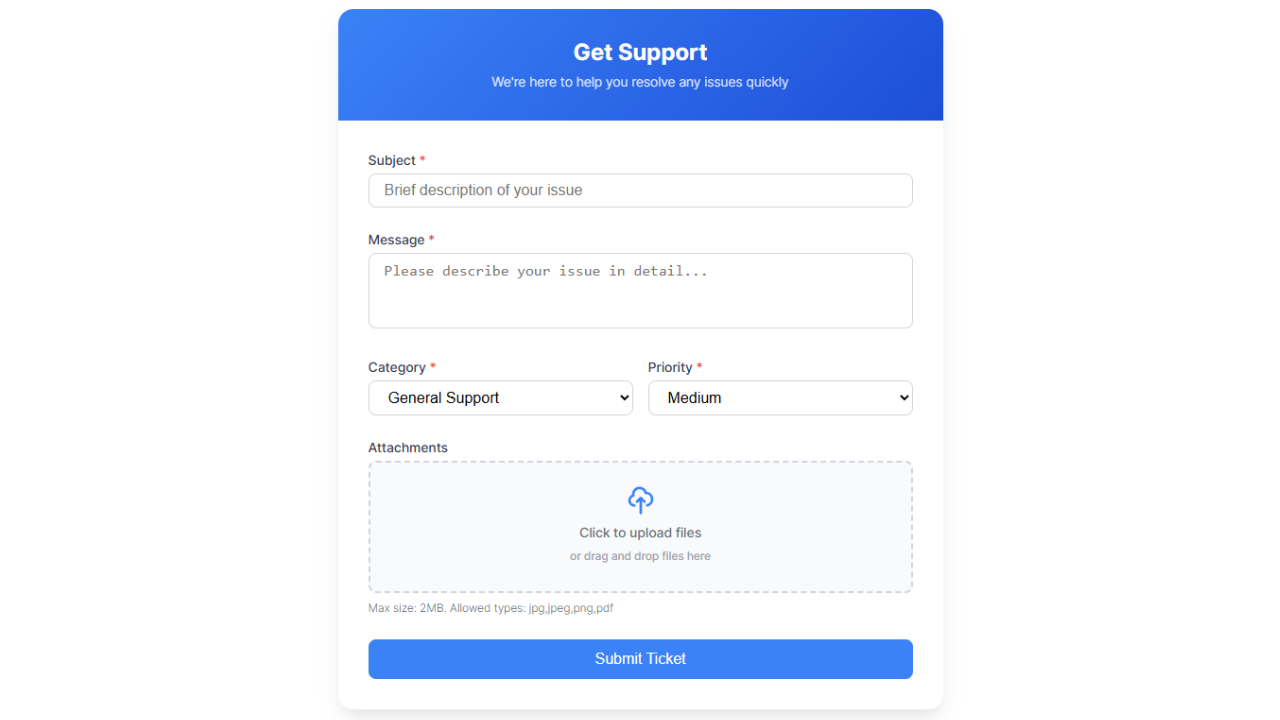
Frontend Ticket Submission Form: Clean, professional form for customers to submit support requests with file attachments and priority selection.
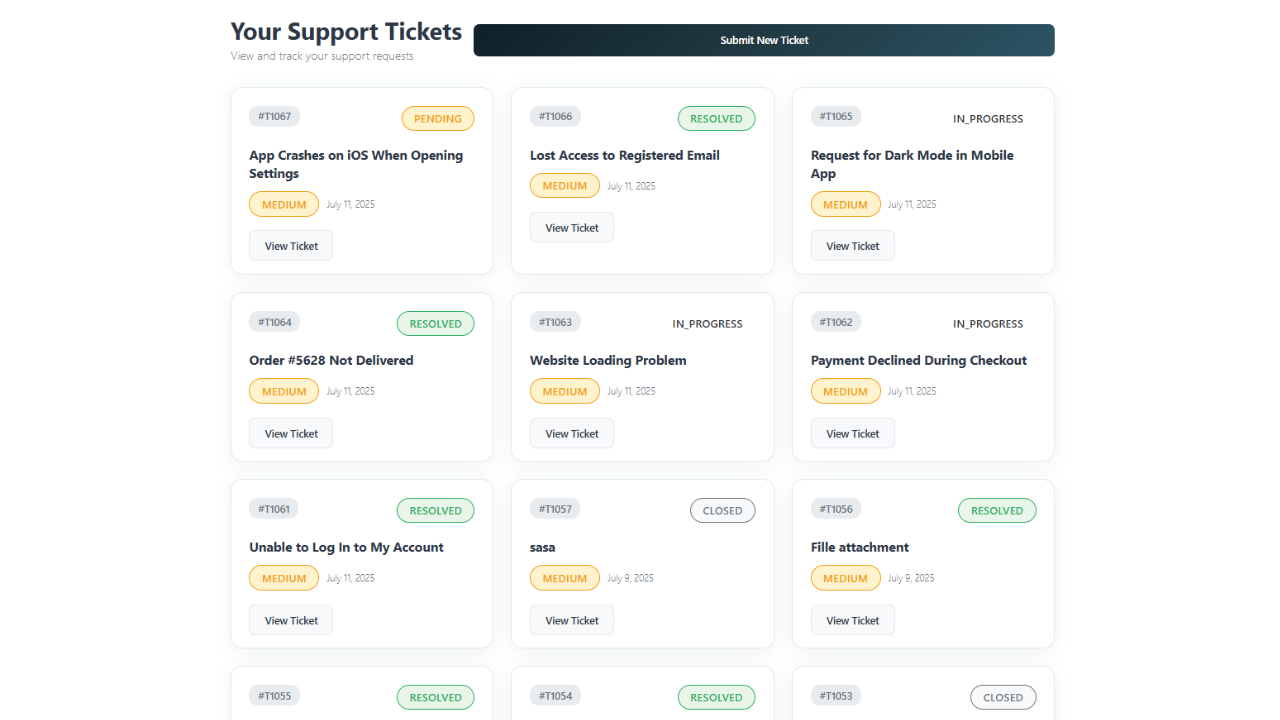
Customer Ticket Dashboard: User-friendly interface showing ticket history, status, and progress tracking.
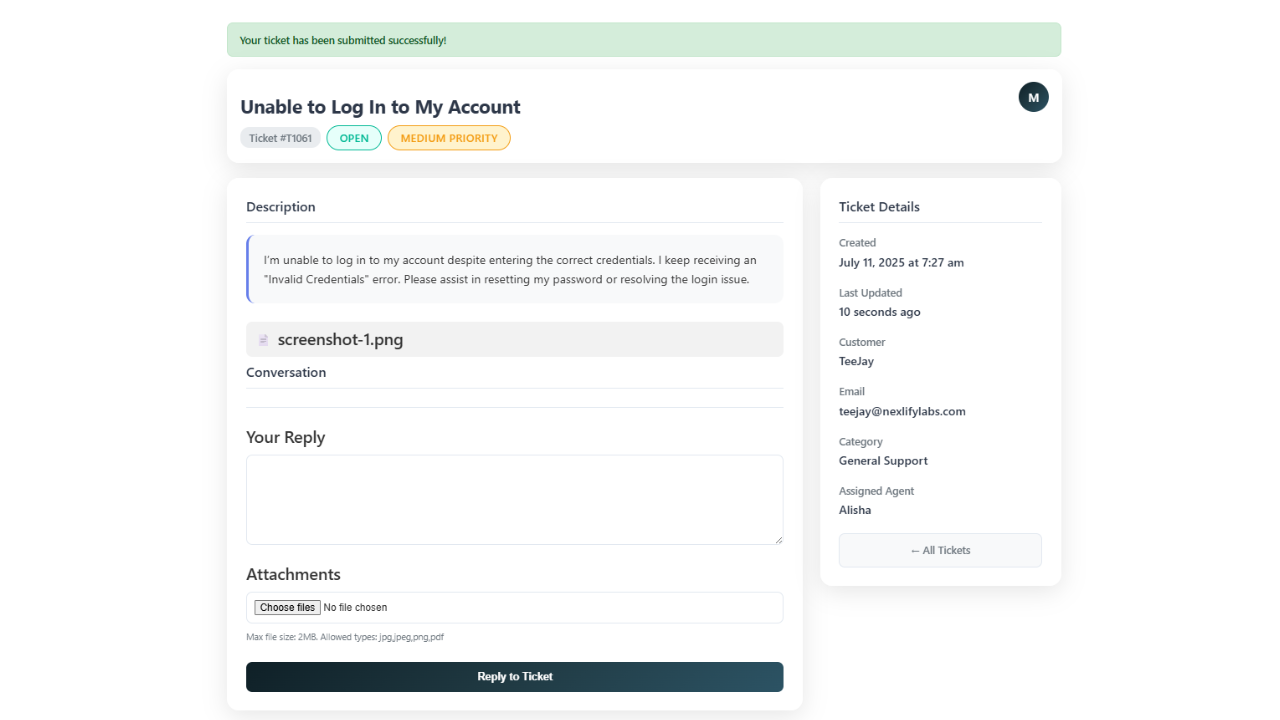
Frontend Ticket Conversation: Detailed ticket view with threaded conversation, attachments, and reply functionality.
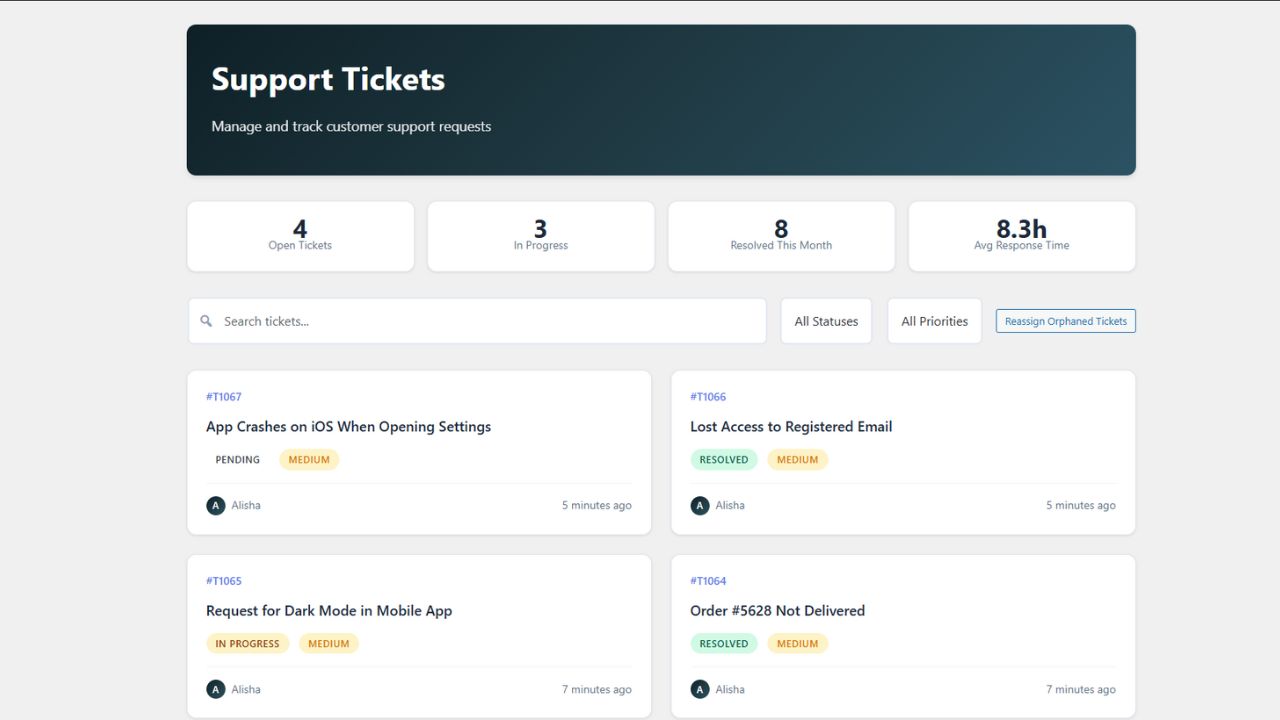
Admin Dashboard: Comprehensive ticket management interface with real-time statistics, filtering, and bulk actions.
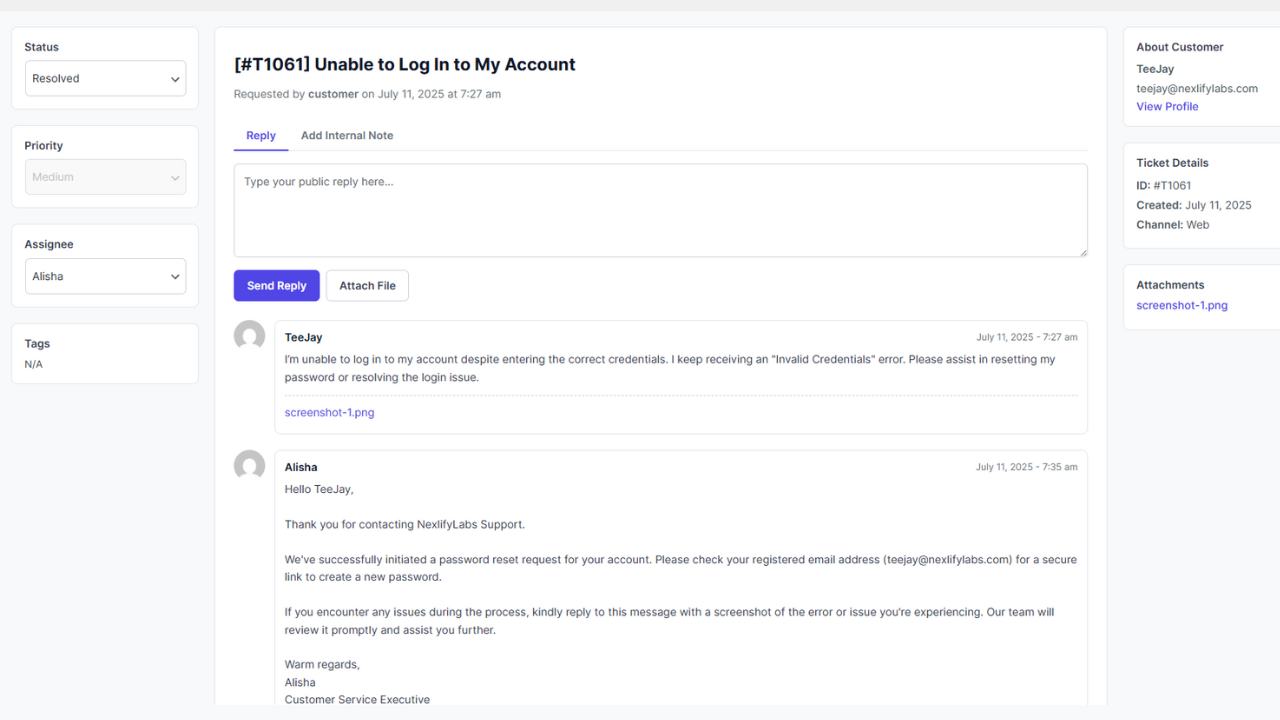
Admin Ticket Details: Professional single-ticket view with sidebar controls, internal notes, and conversation history.
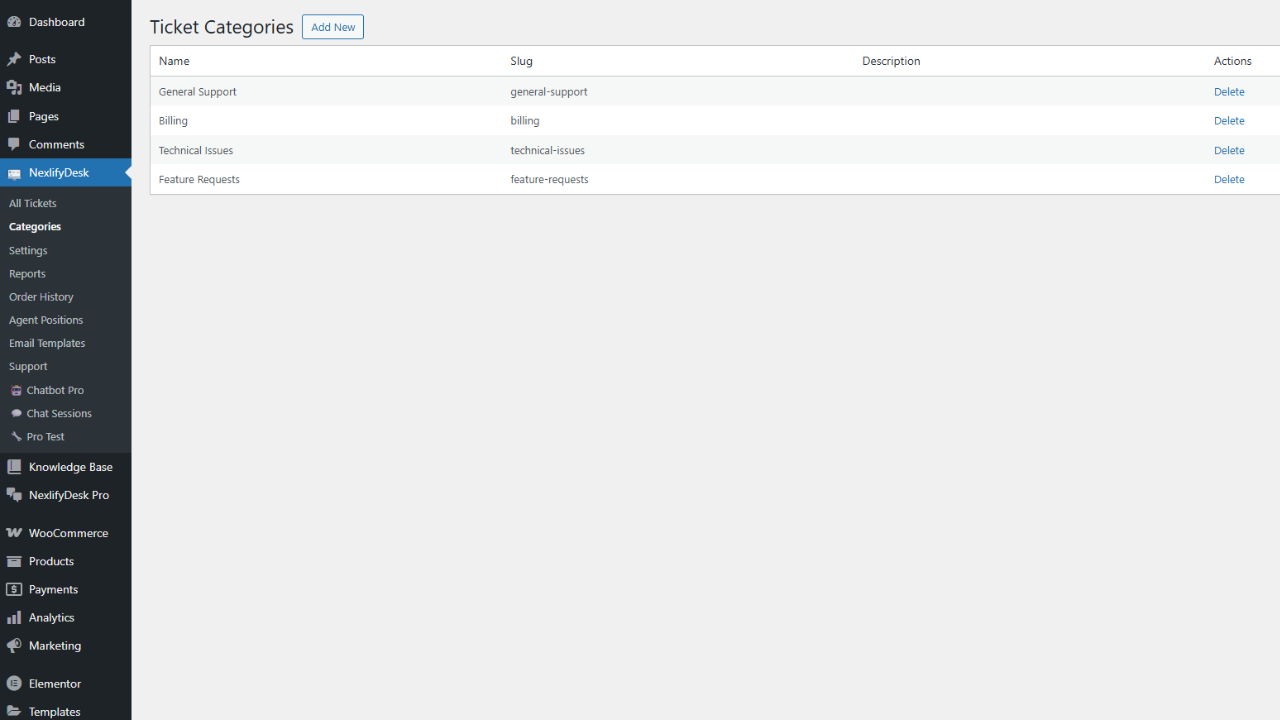
Category Management: Easy-to-use interface for organizing tickets with custom categories and descriptions.
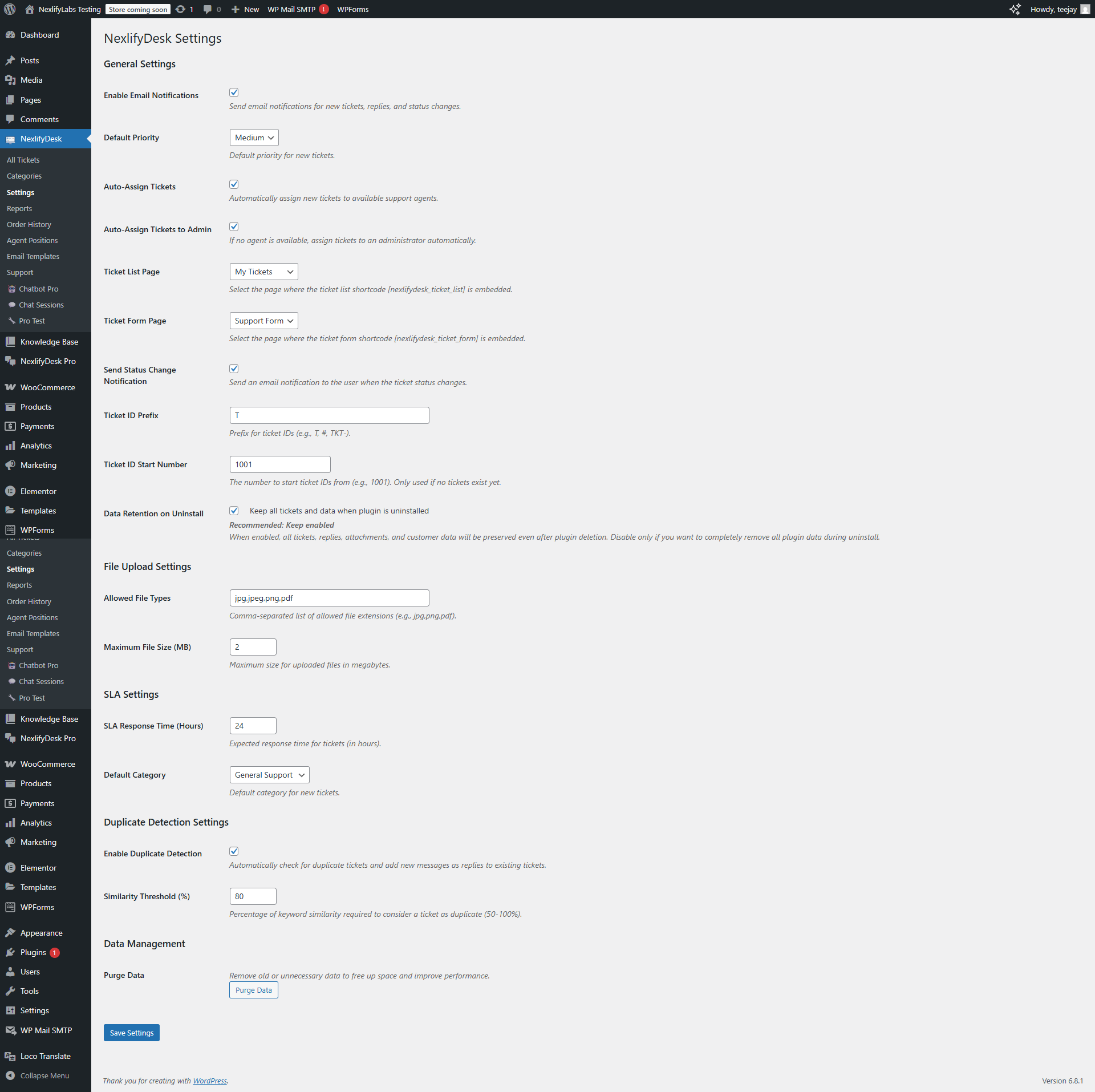
Comprehensive Settings: Extensive configuration options for email notifications, file uploads, SLA targets, and automation rules.
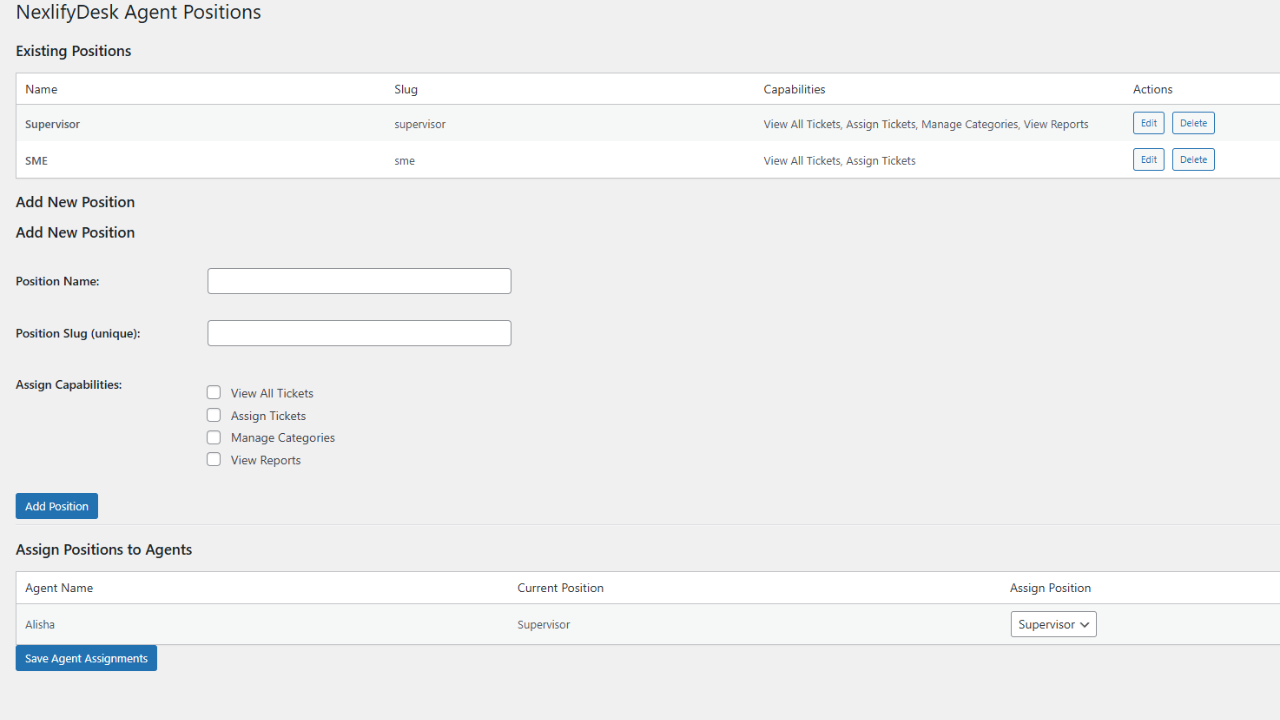
Agent Positions & Permissions: Granular control system for defining agent roles and capabilities.
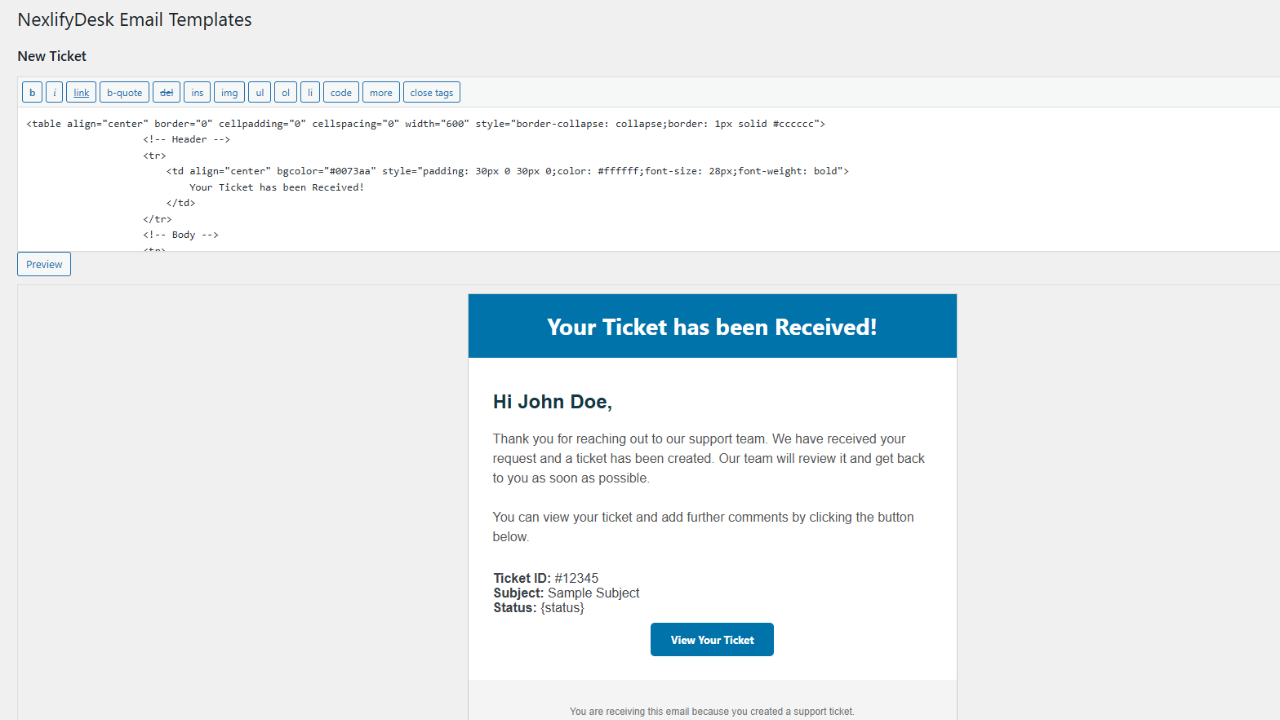
Email Template Editor: Visual editor for customizing all notification emails with dynamic placeholders.
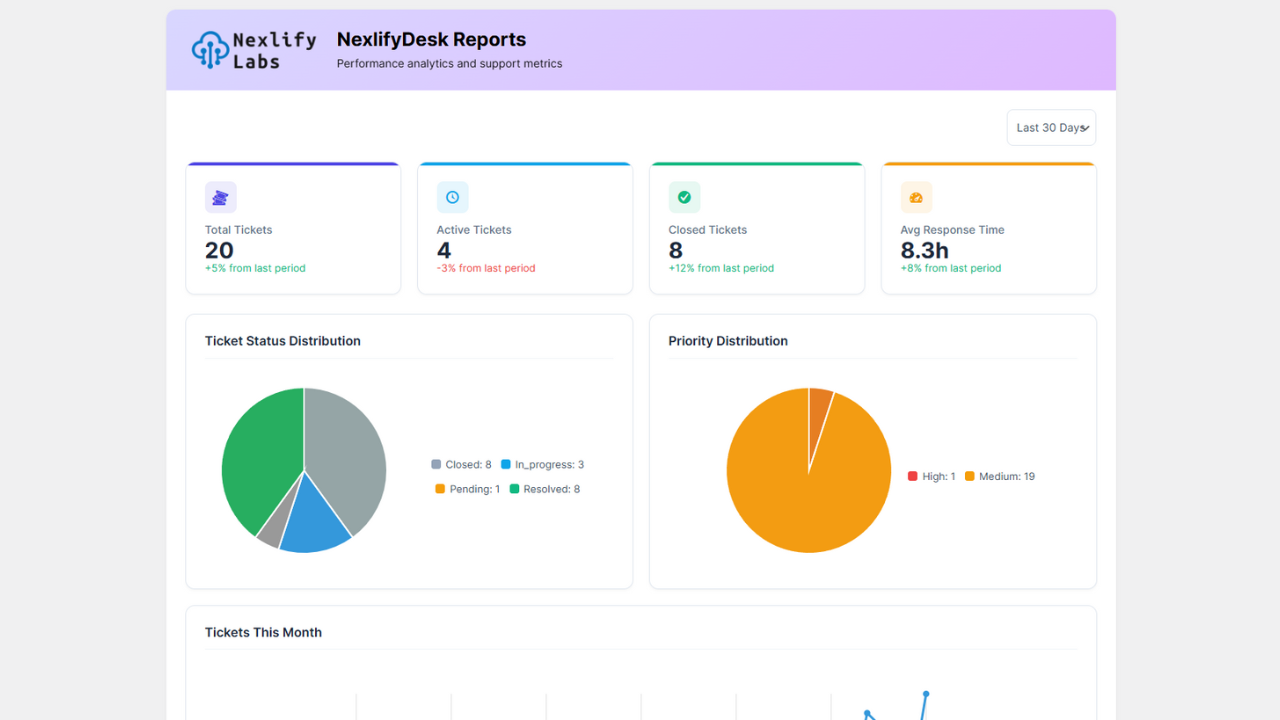
Reports & Analytics: Professional reporting dashboard with charts, metrics, and performance insights.


